Repository navigation
Solstice 1.2.0

Solstice 1.2.0 adds Vector Brush Strokes: the brush tools paint on vector layers, and every stroke stays an object that can be erased, reshaped, restyled and scaled after it is drawn.
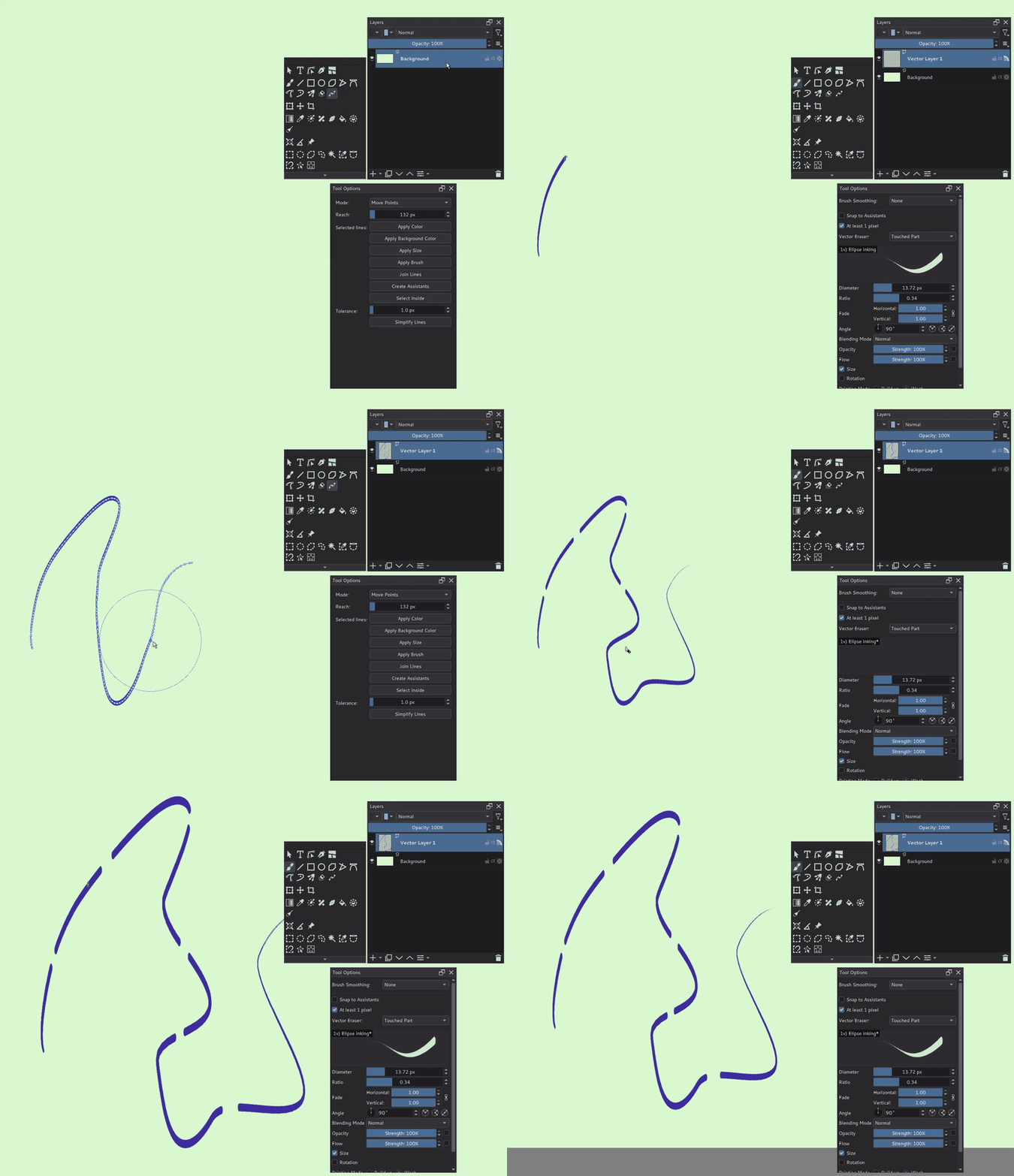
What's new since 1.1.1
- Vector Brush Strokes (#106, #107): select a vector layer and paint with the Freehand Brush, the Dynamic Brush or the Multibrush, with any brush preset. Each stroke keeps its path, pen pressure, brush and colors, and is drawn again with that brush whenever it changes. It needs no particular graphics card. Guide: Vector Brush Strokes.
- Vector eraser: in eraser mode the brush cuts lines instead of painting: Touched Part, Whole Line or Up to Intersection. With the Multibrush it erases at every copy of the brush.
- Edit Brush Strokes Tool: Move Points, Change Width, Add Width, Cut, Add Point, Delete Point, Switch Corner, Change Density, Free Transform, Redraw and Redraw Width.
- Selected lines: Apply Color, Apply Background Color, Apply Size, Apply Brush, Join Lines and Simplify Lines.
- Create Assistants makes painting assistants along selected lines and along vector shapes (a whole ellipse becomes an Ellipse assistant); Select Inside selects the area a line encloses.
- Scaling: the Select Shapes Tool, Scale Image and the Transform Tool draw the strokes again at the new size, so line art stays sharp.
- The guide has a comparison with Clip Studio Paint's vector layers (23 functions covered, 8 partly) and the current limitations: brushes that mix with the paint below find nothing to mix with, blending modes other than Normal apply inside a stroke only, and control points have no curve handles.
- Upstream Krita fixes (#104): MyPaint brushes and eraser presets are no longer marked as changed when they are selected, and an assert when the system asks for the
application/zipclipboard type is fixed. - Vector shapes: resizing a shape with the Select Shapes Tool no longer changes the size of the copy that is being painted at that moment, which could leave ink outside a brush stroke (#107).
- The Simplified Chinese interface translates the new texts.
Krita opens brush strokes on vector layers as pictures. Saving the file in Krita drops what Solstice needs to edit them.
1.2.0 includes everything in 1.1.1.
Download
Windows x64: download Solstice-1.2.0-windows-x64-f4041d71cfc1.zip, extract it and start Solstice.exe. No installer is needed.
- This is an unsigned package. Settings and resources remain in
%APPDATA%\Solstice, separate from Krita. - The
-dbg.zipcontains debug symbols for crash reports; it is not the application download. SHA256SUMS.txtcontains checksums for both ZIP files.- Explorer
.kra/.krzthumbnails can be registered withshellex\register-thumbnails.cmd(guide).
Scope and supported environment
- 1.2.0 is a regular release. Feature-specific limits remain as documented in the user guides.
- Tested locally on Windows 11, 64-bit; the downloadable package is built on GitHub's Windows runner.
- The Vulkan engine remains experimental. It is developed and tested on an RTX PRO 6000 Blackwell and starts by itself only on NVIDIA Blackwell; see the GPU Engine guide. Vector Brush Strokes do not depend on it.
- Linux and macOS are not validated. Android is not supported.
- The Simplified Chinese interface uses an AI-translated catalog; terminology and layout may still need refinement.
Please report problems in Solstice Issues. Solstice is independent of the Krita project and KDE. See the website and user guides.
Build and verification
- Commit:
f4041d71cfc1503ecc489756aff512abcb1cf23a, the merge of #108. - Build: GitHub Actions run 44678851678.
- Build details and dependencies:
BUILD-INFO.txtandwindows-dependencies.lock.json. - Local tests before the release:
KisVectorBrushStrokeTest36/36,KisBrushStrokeLayerTest43/43 andkis_shape_commands_test10/10 (Windows, offscreen).- Test control scenarios in the application:
vector-brush-stroke,vector-eraser-intersection,vector-eraser-multibrush,vector-join-lines,vector-shape-assistantsandedit-brush-strokes-tool. - Checked by hand in a local build (2026-11-20): the manual checks of the Vector Brush Strokes notes, including the fixes for canvas-mirror lines, leftover ink after a resize, the Multibrush eraser, the Apply Background Color message and assistants from vector shapes.
- These are local results, not tests of the release package. Cloud CI uses
BUILD_TESTING=OFF: it verifies compilation and packaging, not interactive behavior.
- Package checks:
- Windows compilation, installation and packaging passed, including the GPU engine, Python plugins and the bundled CPU G'MIC runtime.
- Application ZIP SHA-256:
f16f161d2827ef69d7bd4473b6e3bc50bbd92ab88cfc0d344e55208057611245. - Both ZIPs passed SHA-256 and full CRC checks (5,323 application entries and 221 debug entries). The required runtimes, translation and shell integration files are present.
- The dependency lock matches the built revision after Windows line-ending normalization.
- The packaged executables report ProductName
Solstice, version1.2.0 (git f4041d7)in their Windows version metadata. - The release package itself was not started.