Repository navigation
Releases
CIRCLES 1.0

CIRCLES turns your CHOMPI into fifteen loopers that play together, each with its own instrument and its own loop length. Play a short figure and press loop, and that looper keeps repeating it. Then play the next one, or pass the same figure on to another. Because the lengths differ, the loops drift against each other, the way the minimalists worked, and line up only now and then: the music keeps changing on its own.
There is no grid, no steps and no record button: you play by hand and decide afterwards what to keep. It is closer to conducting a small ensemble than to programming a sequencer.
Start here: the guided tutorial, https://ugrossek.github.io/CHOMPI/circles/. Six short lessons, pieces to start from and a cheat sheet. With the CHOMPI connected over USB (a computer with Chrome or Edge; phones and tablets don't work), each lesson sets up its players on the CHOMPI, lights the control to use next, and notices when a step is done. Without a CHOMPI it runs as a demo.
In 1.0
- Fifteen players, fourteen instruments on the white keys, all physical models: wood, marimba, amadinda, gangsa, mbira, kora, snare bar and muffled for rhythm; vibes, bell, hang, singing bowl, gong and glass for melodies.
- Figures: play, press loop to keep; copy a figure to another player; give each its own length as a ratio of the shared beat (1/3 to 3).
- Sound: K1 to K4 shape each player (with CHOMPI held, a second layer); the room and the volume on K6. With the switch on all, the knobs and the black keys work on everyone.
- Hold K6 to see how many voices sound and how busy the CHOMPI is.
Install: with the multi-firmware launcher v1.1 or later, pick CIRCLES in the setup tool and put it on a free key, or send the downloaded CHOMPI_CIRCLES_1.0.bin with Feed the CHOMPI. On a stock card, put it in the card root as the only .bin.
Going back: with the launcher, start another key. On a stock card, put your previous .bin back in the card root (CIRCLES writes nothing to the card or the CHOMPI's flash).
Good to know: when many long notes ring at once the CHOMPI runs out of CPU and lets the quietest go first. Feedback is welcome.
SHA-256: 7ff2badcaa52cf5f8285efd9546ca1149b569cfa4d2b1aff4c97996edd8bb605 (the same build as beta 1).
Source: firmware/chompi-meter on the meter-fw branch.
Written together with Claude, Anthropic's AI assistant. Unofficial, experimental software, provided as-is with no warranty; use it at your own risk.
CIRCLES (dev snapshot)
A working snapshot of CIRCLES: something that works, but isn't quite finished. Not a release; the file behind this link gets replaced with newer snapshots.
This snapshot: CIRCLES-75, the drift build with the click.
- Every player runs at its own speed, pulled back to its place against L0.
- Play held + wheel: detune the chosen player; play held + push: exact again.
- Loop held + wheel: a kick (on all: how strong the pull is); loop held + push: glide home.
- Loop held + play: clear (on all: everyone).
- A new length lands at the player's own loop start.
- A click on every L0 until the first figure is kept.
Tutorial, math and the mind map: https://ugrossek.github.io/CHOMPI/circles/dev/
CIRCLES (beta 1)
CIRCLES turns CHOMPI into a small ensemble: up to fifteen players, each with a mallet instrument, together in one room. You play a short figure and press loop, and that player keeps repeating it. Pass the figure on to other players, the way the musicians in Terry Riley's In C do. Give one of them another length, and its copy slides through the others, lining up with them only now and then. That slow shifting is the music.
Start here: the guided tutorial, https://ugrossek.github.io/CHOMPI/circles/. Six short lessons, pieces to start from and a cheat sheet. With the CHOMPI connected over USB (Chrome or Edge), each lesson sets up its players on the CHOMPI, lights the control to use next, and notices when a step is done. Without a CHOMPI it runs as a demo.
In beta 1
- Fifteen players, fourteen instruments on the white keys: wood, marimba, amadinda, gangsa, mbira, kora, snare bar and muffled for rhythm; vibes, bell, hang, singing bowl, gong and glass for melodies.
- Figures: play, press loop to keep; copy a figure to another player; give each its own length as a ratio of the shared beat (1/3 to 3).
- Sound: K1 to K4 shape each player (with CHOMPI held, a second layer); the room and the volume on K6. With the switch on all, the knobs and the black keys work on everyone.
- Hold K6 to see how many voices sound and how busy the CHOMPI is.
Install: with the multi-firmware launcher v1.1 or later, send CHOMPI_CIRCLES_beta_1.bin to a free key with the setup tool. On a stock card, put it in the card root as the only .bin.
Beta: expect rough edges; feedback is welcome. When many long notes ring at once the CHOMPI runs out of CPU and lets the quietest go first.
SHA-256: 7ff2badcaa52cf5f8285efd9546ca1149b569cfa4d2b1aff4c97996edd8bb605
Source: firmware/chompi-meter on the meter-fw branch.
Written together with Claude, Anthropic's AI assistant, and tested on one CHOMPI. Unofficial, experimental software, provided as-is with no warranty; use it at your own risk.
SING (beta 3)
SING turns CHOMPI into an instrument led by your voice. Press keys and sing, talk or make any sound: CHOMPI plays the keys' notes with your voice.
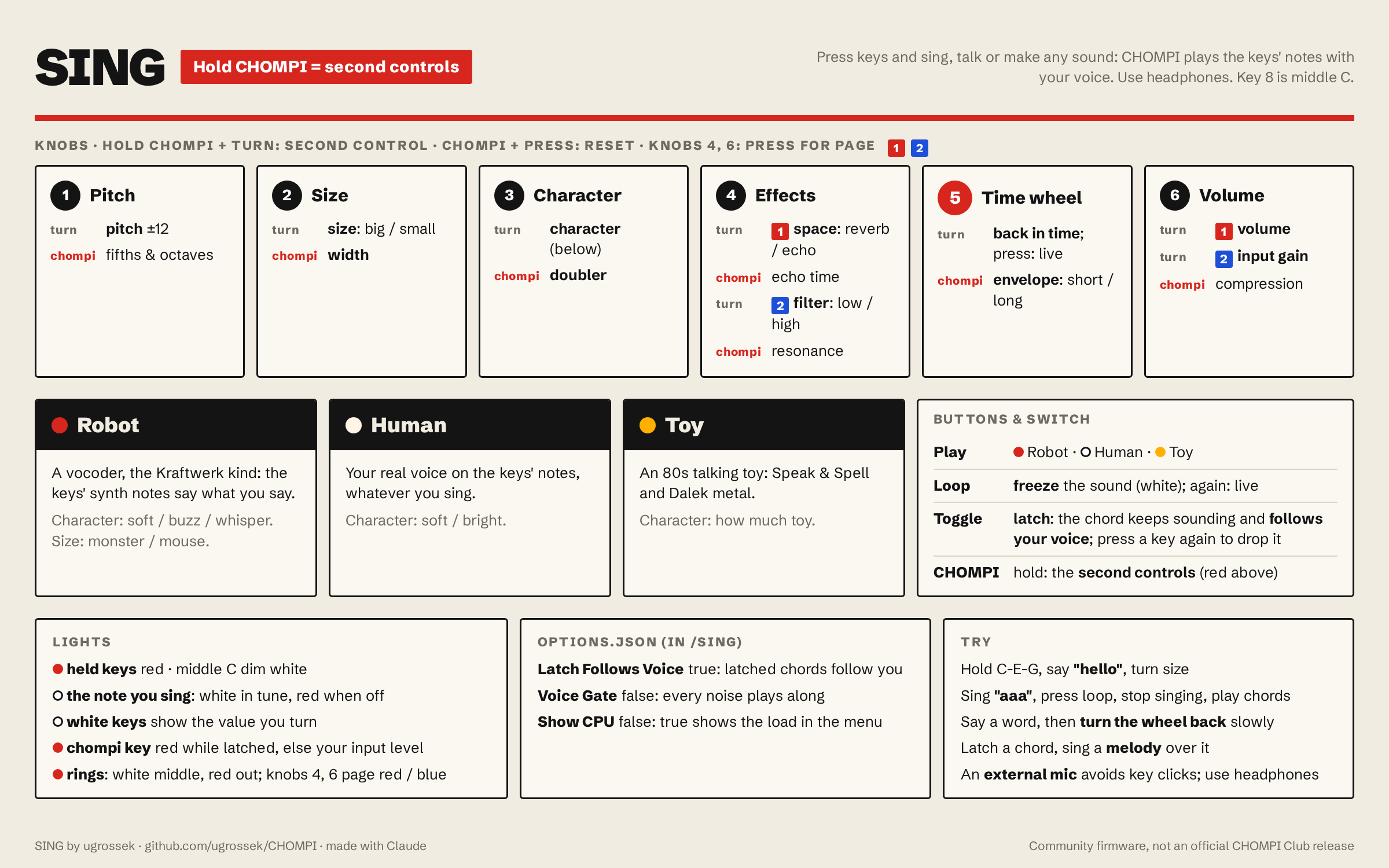
Beta 3 is a bug fix
- Line in works. With a recorder, mixer or mic preamp on the input jack, the voice was very quiet and the input gain hardly helped: SING mixed the left and right channels, and on CHOMPI they cancel each other out. SING now takes the left channel only, so stereo and mono cables both work.
Everything else is as in beta 2. Full controls: the cheat sheet above and the README.
Install: with the multi-firmware launcher v1.1 or later, send CHOMPI_SING_beta_3.bin to a free slot from https://ugrossek.github.io/CHOMPI/. On a stock card, put it in the card root as the only .bin.
Use headphones, and an external mic on the input jack if you can: the built-in mic picks up key clicks.
Beta: expect rough edges; feedback is welcome.
SHA-256: 0145b9aff91e26d594d86bd52621107503fecf83b2e92099b5036aac4e791e7c
Written together with Claude, Anthropic's AI assistant, and tested on one CHOMPI. Unofficial, experimental software, provided as-is with no warranty; use it at your own risk.
TEHP (alpha)
THEP is a silly little thing. It is CHOMPI's TAPE firmware with one change: changing pitch no longer changes speed. In TAPE every pitch change is a tape speed change; in TEHP a pitch shifter does the pitch, and everything keeps its length and tempo.
- Keys: every note keeps the sample's length, whatever key you play.
- Pitch knob: changes the pitch of the samples, not their speed.
- Looper pitch: the loop keeps its tempo, so it stays in time while you pitch it in fifths and octaves.
- Overdubbing while pitched records what you hear: the new layer stays in tune with the loop.
- Still tape: scrubbing, starting and stopping the looper, reset, wow & flutter.
Shares TAPE's files: samples, options.json and presets.json, in /TAPE like the launcher's TAPE (or the card root). Tip: "Tape Slew On": false in options.json removes the tape intro when you press play.
Details and known limits: README.
Install: with the multi-firmware launcher v1.1 or later, send TEHP.bin to a free slot from https://ugrossek.github.io/CHOMPI/. On a stock card, put it in the card root as the only .bin.
Alpha: tested on one unit; expect rough edges. Feedback is very welcome.
SHA-256: 2b4e363b9e6eddc099ac29453b475a4c286e49911c088018e5c12464ddfdd3a8
Written together with Claude, Anthropic's AI assistant. Unofficial, experimental software, provided as-is with no warranty; use it at your own risk.
SING (beta 2)
SING turns CHOMPI into an instrument led by your voice. Press keys and sing, talk or make any sound: CHOMPI plays the keys' notes with your voice. Simple enough for children: press a key, say "hello", and it sings.
New in beta 2
- Three characters on the play button. Robot (red): a vocoder, the Kraftwerk kind; the pitch you sing doesn't matter, and talking, whispering and noises all work. Human (warm white): your real voice, moved onto the keys' notes, whatever you sing. Toy (yellow): an 80s talking toy, Speak & Spell and Dalek metal.
- The keys play their own notes. Press C-E-G, hear C-E-G. Key 8 is middle C.
- Simple controls: one page per knob (two on the effects and volume knobs, as in TAPE), and every knob has a second control on chompi + turn. Pitch, size, character, space, filter, time wheel, volume; width, doubler, echo time, resonance, envelope. Effects start off.
- Only the harmonies: your own voice isn't mixed in.
- Freeze on the loop button: hold the sound you're making and keep playing chords with it.
- Time wheel on the big wheel: go back through the last 2 seconds, slowly or scratching.
- Latch follows your voice: latch a chord and sing a melody, the chord moves with you.
- A tuner on the keys: the note you sing lights up.
- Lights in red and warm white, after Kraftwerk's Die Mensch-Maschine; the play button shows the character: red, white or yellow.
- Options in
/SING/options.json: Latch Follows Voice, Voice Gate, Show CPU. - The looper is gone (its buttons and wheel went to freeze, the characters and the time wheel).
Full controls: the cheat sheet above and the README.
Install: with the multi-firmware launcher v1.1 or later, send CHOMPI_SING_beta_2.bin to a free slot from https://ugrossek.github.io/CHOMPI/. On a stock card, put it in the card root as the only .bin.
Use headphones, and an external mic on the input jack if you can: the built-in mic picks up key clicks.
Beta: expect rough edges; feedback is welcome.
SHA-256: 21d0639403314bdb587fbb4646f634a0075827c6a19635f6b54ed3f2c8ffc913
Written together with Claude, Anthropic's AI assistant, and tested on one CHOMPI. Unofficial, experimental software, provided as-is with no warranty; use it at your own risk.
SING beta — live harmonizer
SING turns CHOMPI into a live harmonizer. Sing into the mic and hold keys: each held key adds your voice, pitch-shifted by its distance from the middle C. Hold C and E and you sing a third. Or flip the toggle switch to latch: hold a chord, let go, and it keeps following your voice while your hands are free for the knobs. Up to 7 voices; looper and effects work as in TAPE.
An external mic on the input jack is strongly recommended. The built-in mic sits on the same board as the keys and picks up their clicks.
The controls follow TAPE's layout:
| Knob | Page 1 | Page 2 |
|---|---|---|
| 1 | transpose, continuous ±12 semitones | harmony volume |
| 2 | spread (voices alternate left/right) | attack |
| 3 | doubler | release |
- Toggle switch: latch. Voices keep sounding after you let go; press a key again to drop that note.
- Chompi key: the menu, as in TAPE. In the menu, knob 1 jumps transpose in fifths and octaves (a press resets it), and a press on knob 6 sends your dry voice to the headphones, all outputs, or nowhere.
- Turn a knob and the white keys briefly show its position.
- Every start begins from the defaults.
Details: firmware/chompi-sing.
Install: with the multi-firmware launcher v1.1 or later, send CHOMPI_SING_beta.bin to a free slot from https://ugrossek.github.io/CHOMPI/. On a stock card, put it in the card root as the only .bin.
Use headphones: the built-in mic and speaker feed back.
SHA-256: 18fae1e5eab49f391a5b95cc0e9b1b088d1cc55e915aea722ee3c77bf27d5dfa
Beta: expect rough edges; feedback is welcome.
Written together with Claude, Anthropic's AI assistant, and tested on one CHOMPI. Unofficial, experimental software, provided as-is with no warranty; use it at your own risk.
SING prototype v1 — live harmonizer
SING turns CHOMPI into a live harmonizer: sing into the mic and hold keys. Every held key adds a copy of your voice, pitch-shifted by its distance from the middle C — hold C and E and you sing a third. Looper and effects work as in TAPE. Built on TAPE and its pitch-shift experiment.
Source, details and how it works: firmware/chompi-tape.
Written with AI. This was written together with Claude, Anthropic's AI assistant, and tested on one CHOMPI.
Use at your own risk. Unofficial, experimental software, provided as-is with no warranty. It is loaded from the SD card like any firmware update and never touches the bootloader.
Controls
| Knob | Page 1 | Page 2 (press the knob) |
|---|---|---|
| 1 | harmony volume | spread: low notes left, high notes right |
| 2 | transpose all harmonies, −12…+12 semitones (middle = none) | attack, 2 ms…500 ms |
| 3 | doubler: chorus and slight detune | release, 20 ms…3 s |
| 4–6 | as in TAPE: effects, looper, output volume / input gain |
The toggle switch turns your dry voice on and off. Held keys light magenta; the middle C glows dim amber. Use headphones — the built-in mic and speaker feed back.
Install
- With the multi-firmware launcher v1.1 or later: open https://ugrossek.github.io/CHOMPI/ in Chrome or Edge, choose
CHOMPI_SING_prototype_v1.binand send it to a free slot. - On a stock card: keep a copy of your current firmware
.bin, then putCHOMPI_SING_prototype_v1.binin the card root as the only.binand power-cycle. To go back, swap the original.binin again.
Known limits
- About 30–45 ms of latency on voices shifted up; voices on the middle C have none.
- The built-in mic hears the key clicks; SING dips the mic briefly on every key change, which reduces them. A mic on the input jack avoids them.
- The keys don't play samples in SING.
- A prototype, tested on one unit.
Verify
Built from commit e0554b4 with GNU Arm Embedded 10.3-2021.10.
sha256 c0c6ef25fdfddafc34de20dac34c244c14b61fdad47422973949325ec6693220 CHOMPI_SING_prototype_v1.bin
TAPE pitch-shift experiment v1
Experimental TAPE 2.0 firmware where changing a voice's pitch no longer changes its playback speed. Source and details: firmware/chompi-tape.
Use at your own risk. Unofficial software, provided as-is, with no warranty, tested on one unit only. It is loaded from the SD card like any firmware update and never touches the bootloader.
Install
- Keep a copy of your original firmware (the
.binon your card), so you can go back. - Put
CHOMPI_TAPE_pitchshift.binin the root of the SD card. It must be the only.binthere: the bootloader flashes the first one it finds. - Power-cycle the CHOMPI. To go back, swap in the original
.bin.
If a unit ever won't boot, USB DFU mode lives in the processor's ROM and can't be overwritten: https://flash.daisy.audio.
Known limits
- About 30–45 ms of onset latency when shifting up.
- With many notes at high ratios, later voices get rougher splices.
- The looper's pitch is unchanged (still varispeed).
- The first boot after flashing hung once on the author's unit and worked on retry; cause unknown.
Verify
Built from commit 12d249e with GNU Arm Embedded 10.3-2021.10.
sha256 e766df1214ff1c108c94d4cc6bc09f690aebfa2e8b2d05df075af8e9a9ade5e6 CHOMPI_TAPE_pitchshift.bin