Repository navigation
Releases
CursorFects 1.1.0.2 - Straight Typography

CursorFects v1.1.0.2 — Straight typography, now actually visible
If v1.1.0.1 still looked curvy, you were seeing the old copy that was still running in the tray. Launching the new build handed control back to that old window, so the font change never appeared. This release keeps the straight typography and fixes that trap.
Typography
- Bahnschrift everywhere — Windows' built-in DIN-style face with straight, squared letterforms instead of the rounded Segoe UI fallback.
- Lighter, more even title/card/shortcut weights.
- Tighter title and status letter spacing; better helper-text contrast.
- Plain uppercase section labels: EFFECT, ACTIVATION, SOUND, TIME STOP, LOOK, WARP DASH, SYSTEM.
- Version number at the bottom of the window is easier to read.
Launch fix
- Starting the app while the same version is running still just brings its settings window back.
- Starting a different/older version now shows a clear notice: exit the old copy from the tray, then start the new one. No more silently staring at the old UI.
Validation
- Native UI snapshot inspected after the typography change.
- 84 debug tests passed.
- 84 release tests passed.
- Release executable reports ProductVersion/FileVersion
1.1.0.2. - Public ZIP contains no audio files.
Install
- Right-click the old CursorFects tray icon and choose Exit. This step is what makes the new font show up.
- Run
CursorFects-v1.1.0.2.exe. - Keep your existing
soundsfolder beside it (or use%APPDATA%\CursorFect\sounds).
Emergency off remains Ctrl + Alt + Shift + F12. The executable is unsigned, so SmartScreen may show a warning. No Made in Heaven code, no copyrighted audio.
CursorFects 1.1.0.1 - Typography Polish
CursorFects v1.1.0.1 — Typography polish
This is the original Sandevistan + The World application with a cleaner settings interface. No effects, shortcuts, settings, sounds, input behavior, tray behavior or rendering logic were changed.
UI improvements
- Uses Bahnschrift, Windows' built-in DIN-style typeface, throughout the native Slint window.
- Straighter letterforms replace the soft/curvy generic fallback appearance.
- Reduced overly heavy title, card and shortcut weights.
- Refined title/status/card letter spacing and improved subtitle contrast.
- Replaced ornamental section icons with clear uppercase labels: EFFECT, ACTIVATION, SOUND, TIME STOP, LOOK, WARP DASH and SYSTEM.
- Displays the requested four-part version 1.1.0.1 in the UI and Windows file metadata.
Validation
- Native app-only UI snapshot inspected in both debug and release builds.
- 84 debug tests passed.
- 84 release tests passed.
cargo clippy --all-targetscompleted; existing unrelated style/dead-code warnings remain.- Release executable reports ProductVersion/FileVersion
1.1.0.1.
Install
Exit the older tray copy first, then run the new portable executable. Keep your existing sounds folder beside it (or use %APPDATA%\CursorFect\sounds). Copyrighted audio is not included.
Emergency off remains Ctrl + Alt + Shift + F12. The executable is unsigned, so SmartScreen may show a warning.
CursorFect 1.1.0: The World & Sandevistan
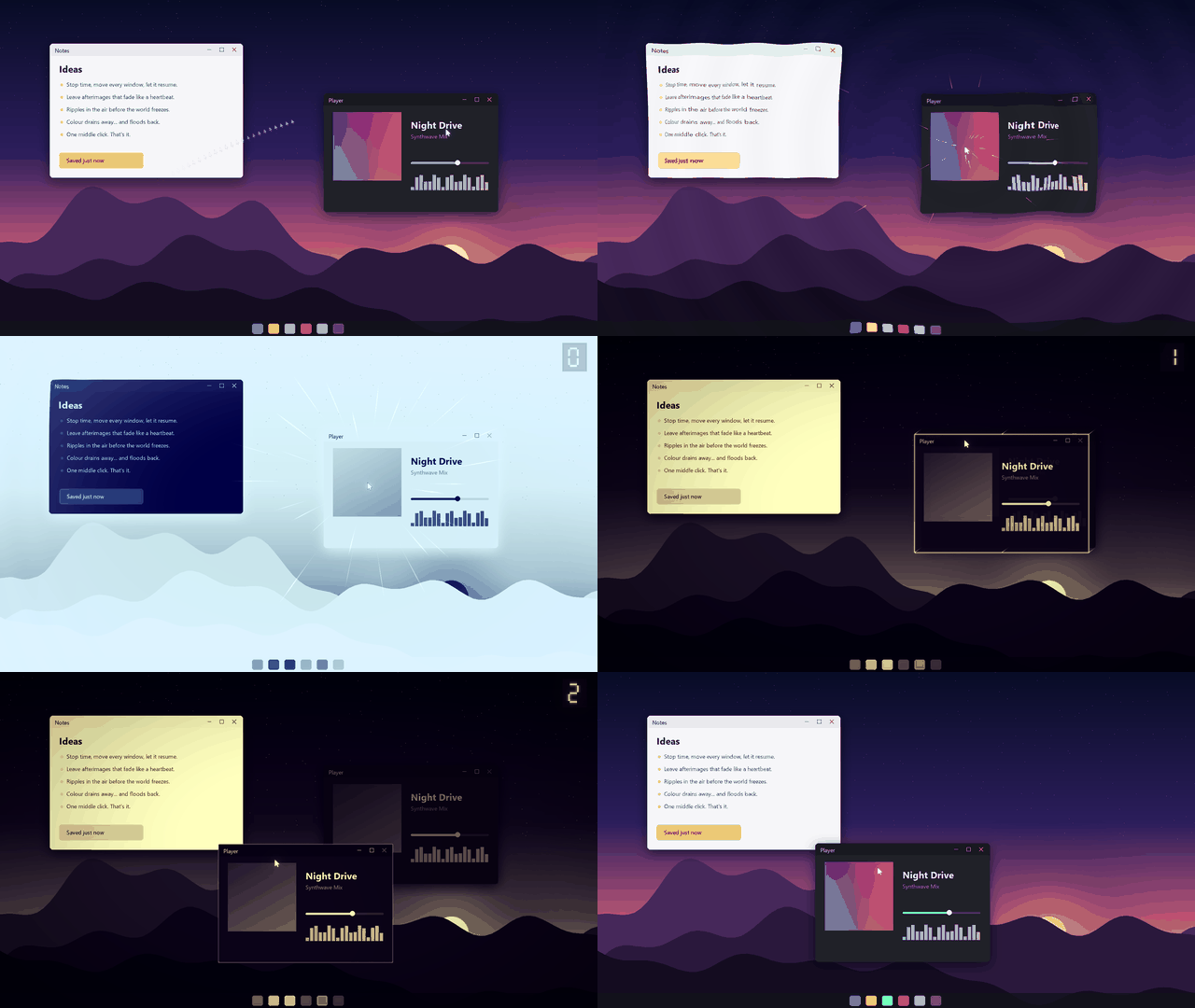
CursorFect 1.1.0: stop time. Leave afterimages.
⏱ The World
- Voice-synced time stop: the screen freezes on the SFX impact, after "ZA WARUDO!"
- Wind-up with inward energy streaks, ripples and a lens flare; a colour-inverting sphere bursts out; the world freezes in gold and violet
- Drag real windows in stopped time. They jump to their new places when time resumes
- DIO-style second counter + clock ticks, resume line, colour flooding back
- 6 voice options: DIO, Jotaro (JP / EN dub), Diego Brando, Over Heaven, SFX only
- Hold / Toggle (no limit) / Timed modes
⚡ Sandevistan
- Live black & white world, speed-based rainbow afterimages, warp dash, glitch, light rays
- One sound file is cut into start / movement loop / dash / end, and the movement layer follows your speed
Everything else
- HDR rendering (bloom, tonemapping, dithering), refresh-synced to 60–360 Hz
- Every sound and every visual can be switched off on its own
- Emergency off: Ctrl + Alt + Shift + F12. Watchdog thread, no admin rights, no network access
Install
- Download CursorFects-latest.exe below and run it. No zip needed.
- Add your own sound files to
sounds\(seesounds\README.md). No sounds are included because they're copyrighted. Without them the Sandevistan uses built-in sounds and The World runs silently. - Pick an effect, switch it On, middle click.
The exe is not code-signed, so SmartScreen may ask: More info → Run anyway.
SHA-256 CursorFects-latest.exe: 418dbdb7873b336a90ec2ba3682fb07fb877cdc6ee76aee1d82d04eb7b5af60c
Unofficial fan project, not affiliated with CD PROJEKT RED, Studio Trigger, Hirohiko Araki, Shueisha or David Production.