Repository navigation
Releases: weblab-network/weblab
Release list
Weblab v0.12.0

Weblab v0.12.0
External SSH access, browser pop-outs and PDF-based practice-lab authoring.
External access
- Optional SSH service for the same device consoles used in the browser. It
supports public-key authentication, reader/writer/admin roles, shared input
locks, revocation and session expiry. No guest IP address is required. - Internet nodes can optionally provide a non-root SSH shell with SSH/Telnet
tools and ProxyJump to reachable lab IPs. Gateway grants are separate from
console grants; shell connections are limited to the configured lab networks. - Public keys are managed in Storage → External SSH access. Grants and host
identities remain deployment-local and are excluded from topology/ZIP exports. - Internet settings use Network, Port forwards, Firewall and
SSH access tabs with a fixed Apply footer. The Inspector SSH checkbox opens
the SSH tab for review and Apply; listener changes require that gateway stopped.
See SSH setup and screenshots. Both access paths are
optional and require explicit configuration and public-key grants. They do not
start guests or enable SSH/Telnet services inside routers and switches.
Workspace and traffic monitoring
- Pop out Instructions, topology, combined or individual consoles, Agent and
Traffic monitor into separate browser windows, with fullscreen and Return to
workspace controls. The owning workspace must stay open. Browser chrome and
popup behavior remain browser-controlled. - Live console sockets, scrollback, input locks, Agent drafts and capture buffers
survive pane transfer. Pop-out notifications clear normally, compact title bars
avoid redundant headings, and shallow resize grips leave scrollbars accessible. - Layout → Arrange floating windows, also in console Actions, tiles only
visible workspace floats. Four consoles form an equal 2×2 grid when space
allows; docked panes, hidden windows and separate browser pop-outs stay put. - Traffic monitor has a 1 / 2 / 5 minute capture selector, default five
minutes. The existing 2,000-frame / 8 MiB limits still apply and may stop a
capture earlier. Display filtering does not reduce capture volume. - Set
WL_ALLOW_POPOUT=0in deployment configuration to hide/disable Weblab's
pop-out controls; the default is enabled. This is a UI preference.
Agent
- OpenAI sessions accept PDF references. The isolated companion extracts text
and renders pages offline before sending them to the model. Limits include
50 PDF pages per message, 256 KiB combined extracted/attached text, 24 MiB of
rendered pages and a conversion deadline. Uploads remain four files / 2 MiB
total. Large excerpts can consume substantial model context and allowance. WL_AGENT_HISTORY_LIMIT_MIBmakes the companion history cap configurable
(default 256 MiB). Raising it and recreating only the companion with the same
volumes preserves conversations and sign-in state.- The existing authoring-guide tool now explains exercise capabilities and
their boundaries: directional frame loss for UDLD/loop guard, carrier loss,
capture/decoding, Instructions, gateway controls, diagrams and saved state.
This is guidance, not new mutation tools. Link faults, captures and publishing
Instructions remain browser actions. Reset still preserves Instructions.
Upgrade and validation
Use matching 0.12.0 core, Agent, EXOS and optional Internet helper tags. Save
device configurations and stop the lab before recreating core. Recreate Agent
with the same dedicated volumes for PDF support. Pull/select the new helper
before starting gateways; existing containers keep their old image until restart.
Console SSH uses the optional compose.ssh.yaml source-build override described
in the setup guide; the installer does not enable it automatically.
FRR remains 10.7.1-wl1; LL2S remains 0.2.0-ovs-rstp1. No saved-topology format
change is required. SSH grants and service host keys are not portable lab state.
Validation includes backend regression, disposable Playwright workspaces,
packaged PDF conversion, real OpenSSH console and gateway/ProxyJump checks,
revocation and destination restrictions, MCP integration and verification of the
helper's exact binary/source pair. Release CI repeats packaged checks before
promoting the versioned images. This does not certify every guest image/protocol.
Weblab v0.11.1
Weblab v0.11.1
Patch release for Internet gateway error handling and publication reliability.
Fixes
- Internet port forwards now return related ICMP destination-unreachable,
fragmentation-needed, time-exceeded and parameter-problem errors when outbound
policy is Deny. Rules match the admitted connection; unrelated ICMP remains
subject to outbound policy. - Local gateway-build instructions explain selecting
weblab-internet:dev
explicitly in prebuilt deployments, including when core recreation is required. - The mobile network-cloud browser test waits for compact layout before opening
the inspector, removing a viewport-transition timing race.
Release verification
- Release jobs stage images and promote the tested digests only after all editions
pass. Existing version tags cannot be replaced with different images, and an
older release cannot replace a newerlatest. The v0.11.0 recovery input is retired. - The helper verifier checks actual image layers, executable build inputs and
retained source files against runtime inventories. Archive compression timestamps
are normalized; different rebuilds still require their own version and source pair. - Retry failed jobs to reuse original tested artifacts. Source downloads appear
as a prerelease before helper publication; stable/latest is set after verification.
Upgrade
Use matching 0.11.1 core, Agent, EXOS and optional Internet helper tags. Save
and stop the lab before recreating core. Pull the new helper and select it with
WL_INTERNET_IMAGE=ghcr.io/weblab-network/weblab-internet:0.11.1; an already running
helper keeps its old rules until that Internet node is stopped and started.
FRR remains 10.7.1-wl1; LL2S remains 0.2.0-ovs-rstp1. No saved-topology format
change is required. See installation and Internet setup.
Weblab v0.11.0
Weblab v0.11.0
Light/Dark/System workspace themes, independent console colors and complete
Internet gateway settings bring appearance and connectivity controls into this
release. Use matching 0.11.0 core, Agent, EXOS and optional Internet helper
images once release publication completes. LL2S remains 0.2.0-ovs-rstp1 and
Weblab FRR remains 10.7.1-wl1.
Appearance
Layout → Theme selects Dark, Light or System. Console theme independently
sets the terminal area; console toolbars, tabs and controls follow the workspace.
These are browser preferences, preserved between visits and synchronized across
its tabs. Theme changes preserve connections, scrollback, locks and window layout.
The stopped-lab Start button is also readable before hovering in Map workspace.
Cancelling a multi-select rectangle with Escape keeps the previous selection
when the mouse is released.
Internet gateway controls
- Up to 64 ordered outbound firewall rules match IPv4 protocol, source/destination
and TCP/UDP ports or ranges, with an unmatched Allow/Deny policy. Sources still
require the attached subnet or a configured return network. - Apply firewall changes live without restarting devices or clearing NAT/connection
state. A new deny can interrupt existing traffic. Address, return-route, uplink
and port-forward changes require only the Internet node stopped; other devices
and their consoles remain running. - Up to 32 TCP/UDP host forwards expose a reachable router, switch management IP
or PC service. Localhost is the default; explicit LAN/wildcard bindings and LAN
source restrictions are available. Routed targets need return routes. Services
keep their own authentication and see the gateway's lab address as the client.
Existing settings default to the original outbound Allow policy and no inbound
ports. The new helper's capability labels prevent silently accepting features
an older helper does not support. See Internet setup.
Agent and MCP
Dedicated gateway tools read paginated settings, preview/apply exact edits and
stop/start only the gateway. Existing topology and guest storage are retained.
Compact discovery summarizes gateway settings; every rule, route and forward
remains available through bounded pages with a consistent revision.
External writes require the separate --allow-internet-write adapter flag.
The browser Agent has a separate Internet gateway settings and stop/start
permission, initially off for existing and new sessions. Exact-action approvals,
turn expiry, session isolation, topology/runtime checks and enabled-action YOLO
behavior remain enforced. See MCP coverage.
Prebuilt Internet helper
The optional ghcr.io/weblab-network/weblab-internet:0.11.0 Linux amd64 image
removes the local-build requirement. Fresh installers can use --with-internet.
Existing deployments pull it on the Docker host and configure WL_INTERNET_IMAGE;
ordinary local development builds remain supported.
The release includes the tested binary, matching component sources, Alpine
recipes/patches, verified distfiles, package inventory, notices and checksums.
Publication verifies the image identity and anonymous registry access, recording
an immutable pull reference. See distribution details.
Save and stop the lab before recreating core/Agent, retain its volumes, then
stop/start Internet nodes to adopt the new helper.
Weblab v0.10.2
Weblab v0.10.2
New LL2S switches and the fresh-install preload use
ghcr.io/weblab-network/ll2s:0.2.0-ovs-rstp1. This image includes the OVS 3.7.1
RSTP root-selection patch. We retested the original Cisco MST / LL2S RSTP topology
and confirmed that the lower-cost uplink is selected correctly. LL2S still uses
one STP/RSTP tree; this does not add MSTP or PVST+ support.
Existing ghcr.io/weblab-network/ll2s:0.2.0 and ll2s:dev nodes retain their
selectors, configuration storage and exact saved-ZIP image checks. The old
selector appears in the catalog when used by a lab. An upgrade does not retag
images or change running switches.
To compare an existing topology with the patched image, save inside each switch,
stop it and export JSON + saved configs. Keep the original, then change the
LL2S image selectors in a copy and import into a separate workspace or with fresh
node IDs. Saved storage is separate for each node/image selector. Do not rename
images inside a saved-state ZIP or retag the original release to bypass identity
checks. See saving and restoring.
Use matching 0.10.2 core, Agent and EXOS images. The installer and examples
select the patched LL2S release. Weblab FRR remains 10.7.1-wl1.
Pull the new LL2S image on Weblab's Docker host; Weblab does not pull on Start.
Existing installations should back up and stop their lab before recreating the
Weblab service, retaining their volumes.
See the LL2S release and corresponding sources
and device guide.
Images were promoted from the successful full container CI run. All runtime and Docker build inputs match v0.10.2; the tested public commit contains only an additional test-fixture timing fix. The immutable image indexes, SBOMs and attestations are preserved, including their original edge-build metadata. Reviewed image digests.
Weblab v0.10.1
Weblab v0.10.1
This release fixes a workspace reload race and delivers the Internet gateway,
Network cloud and Diagram group features introduced in the v0.10.0 source tag.
The v0.10.0 image/release pipeline stopped at the regression check; use 0.10.1
for installations. The existing v0.10.0 tag is unchanged.
Workspace restore fix
When Instructions finished loading after Agent availability was restored, its
saved open state could replace the selected Agent tab in a split workspace.
Split layouts now retain their selected tool while Instructions loads. Standalone
Instructions windows still restore normally. A regression test deliberately
holds the Instructions response until Agent is available to cover this ordering.
Internet access and topology diagrams
- Internet provides outbound IPv4 NAT, DNS forwarding and configurable return
routes through a dedicated Docker uplink network. A locally built helper image
is required; the installer does not build or download it. - Network cloud represents an unmanaged network using diagram-only connections.
- Diagram group adds rectangles, titles and notes, with optional movement of
fully enclosed devices. JSON and ZIP preserve diagram settings.
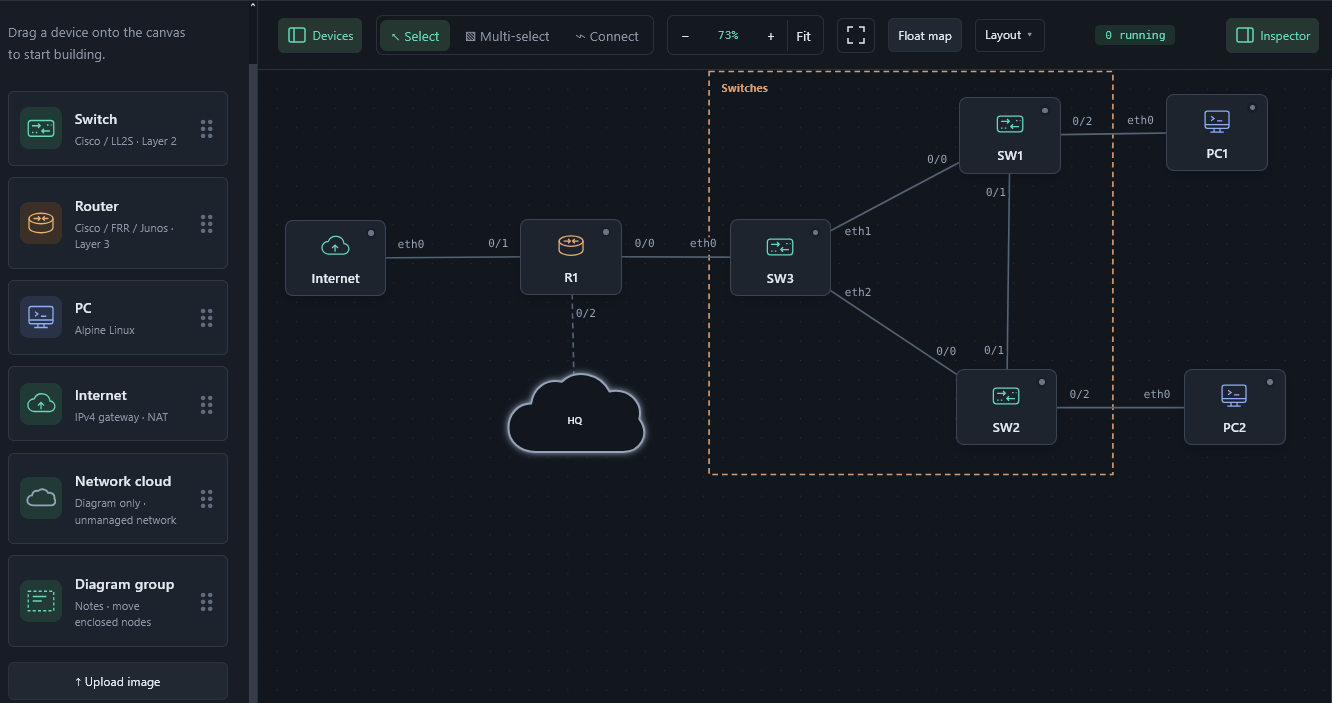
See the Internet helper build guide,
topology guide
and v0.10.0 feature notes.
Installation and upgrade
Use matching 0.10.1 core, Agent and EXOS image tags. The release includes
weblab-install.sh and SHA256SUMS for fresh installations. Existing installations
should back up and stop the lab before recreating containers, retaining their
volumes. No topology migration is required.
LL2S remains 0.2.0 and Weblab FRR 10.7.1-wl1. Their binaries and the
Internet helper are unchanged. This release does not add Agent packet-capture
or decoding tools.
See the installation guide.
Weblab v0.9.1
Weblab v0.9.1
More room for large topologies, compact traffic-monitor controls, rectangle
selection and more patient device startup on slower hosts.
Workspace improvements
- Layout → Map workspace fills the visible workspace with the topology below
one compact toolbar. Agent and Instructions stay on that toolbar; consoles
and documents float above the map. Devices and Inspector open as overlays.
The Lab menu keeps lab actions, the topology name and account controls available.
Layout changes preserve console connections, locks and Agent drafts. - Multi-select supports dragging a rectangle from empty canvas space to
select every node it touches. Shift/Ctrl/⌘ adds to the existing selection;
Escape during the drag restores the previous selection. Normal unmodified
Select mode still pans. Selection works with zoom, scrolling and floating maps. - Traffic monitor capture buttons, filters and Follow move into its title
bar. The controls scroll horizontally in narrow windows; move, information,
maximize and close remain accessible. Hover, focus or tap ⓘ for capture
limits and relay semantics. A slim line retains endpoints and capture status. - Updated documentation screenshot shows Map workspace and actual DTP decoding
with the compact monitor controls.
See workspace layouts
and traffic monitoring.
Startup and installer fixes
FRR and LL2S daemon-readiness limits increase from 30 to 120 seconds per node.
Ready nodes proceed immediately; this adds no fixed delay. Readiness still
checks each device's existing completion signal and fails if it never arrives.
The fresh-install helper now displays the server's error message when an example
startup request fails, instead of only an HTTP 400 traceback. It allows up to
30 minutes for the complete example-start request to accommodate sequential
startup. Failed requests are not automatically retried; inspect the workspace
before recovery. The previously reported slow-VM startup failure lacked its
server error body, so its exact cause remains unconfirmed.
Installation and upgrade
Use matching 0.9.1 core, Agent and EXOS image tags. The release provides
weblab-install.sh and SHA256SUMS for fresh installations; the installer is
not an upgrade tool. Back up the lab and preserve its volumes when recreating
existing containers. No configuration migration is required.
See the installation guide.
LL2S remains 0.2.0 and Weblab FRR 10.7.1-wl1; the readiness change is in
Weblab's lifecycle manager, so those device images do not need rebuilding.
Weblab v0.9.0
Weblab v0.9.0
Inspect traffic directly on a lab link, decode network protocols, and export
PCAP files. The Export dialog also gains a guarded workspace reset.
Link traffic monitor
Click a link and choose Monitor traffic. An independent floating window
shows packet time, direction, addresses, protocol, size, summary and relay outcome.
Filter by protocol or direction, follow incoming packets, and resize the divider
between the packet list and details with the mouse, touch or keyboard.
Decoded uses TShark, included in the core image. Its installed protocol
library supports switching and routing protocols such as LLDP, CDP, DTP, VTP,
STP/PVST+, LACP, ARP, OSPF and BGP, alongside IP, transport and application
protocols. Filters expand with detected protocols. Hex / ASCII shows the
captured bytes; Download PCAP includes every captured frame regardless of
those display filters.
Captures observe frames entering the link relay. Forwarded means sent to the
peer socket, not confirmed delivery to the guest. Blocked and undelivered frames
are also recorded. No guest commands or host-interface sniffing are used.
- Each capture stops after 60 seconds, 2,000 frames or 8 MiB. At most four capture
buffers exist server-wide; they expire 15 minutes after creation. - Captures are temporary: closing their window, logging out or restarting the
server discards them. Download the PCAP before closing if it should be kept. - With authentication enabled, admin and writer can capture. Each capture belongs
to its exact login session; readers and other logins cannot access it. - Decoding runs outside the forwarding path with resource/time limits. Summary
batches and selected-packet details do not reconstruct conversations across
batches or reassemble TCP/IP messages. Use Wireshark on the PCAP for that work. - Native installations need
tsharkandutil-linuxfor full decoding. Basic
summaries, raw bytes and PCAP remain available if decoding is unavailable.
See traffic monitoring.
Export and reset
In Export, select Reset lab after export, save the JSON or ZIP download,
then confirm the reset. A separate Reset without export… button offers the
same confirmation without creating a backup. All nodes must be stopped; with
authentication enabled, reset requires admin access. A competing workspace change
invalidates the reset request instead of clearing a changed lab.
Reset clears topology and device storage, including retained storage from removed
nodes. Installed images, authentication settings, activity records, Agent history
and published instructions remain. JSON is not a complete device-state backup;
choose Saved lab ZIP for the current lab's saved state. Storage retained from
previously removed nodes is not included in current-topology exports.
See backup and reset behavior.
Installation and upgrade
Use matching 0.9.0 core, Agent and EXOS image tags. Back up the lab and preserve
its volumes when recreating existing containers; no configuration migration is
required. Building from source requires a rebuild to install TShark.
The release includes weblab-install.sh and SHA256SUMS for fresh installations.
It retains the optional Agent, authentication, running example and core-only
--dns override. It is not an upgrade tool. Follow the
installation guide.
LL2S stays at 0.2.0 and Weblab FRR at 10.7.1-wl1. Their existing image and
source/binary distribution are unchanged.
Weblab v0.8.3
Weblab v0.8.3
The fresh-install helper now accepts --dns IPV4 to override DNS for the
Weblab core container. Omitting the option preserves Docker's normal DNS settings.
For a non-resolving DNS configuration, choose an address with no responding DNS
service, for example:
sudo sh weblab-install.sh --dns 127.0.0.199The flag can be combined with --with-auth, --with-agent and --start-example.
With host networking, loopback refers to the Docker host. Normal DNS lookups fail
or time out only if no resolver answers at the selected address. This is not
Internet isolation: direct IP access, hosts-file mappings and applications
using their own resolvers can still work. Agent cloud providers requiring DNS
through the core gateway may become unavailable. Host DNS, image pulls, installer
downloads and separate lab-device containers are unaffected.
The installer validates IPv4 syntax before host operations and includes the
selected override in its plan. Regression tests cover invalid inputs, dry runs,
unchanged defaults and applying the setting only to the core container.
See the installation guide
for the installer download, checksum and manual Docker equivalent.
The existing v0.8.2 tag and installer assets remain unchanged. Core, Agent and
EXOS images use matching 0.8.3 tags; LL2S 0.2.0 and Weblab FRR
10.7.1-wl1 are unchanged. No application configuration migration is required.
For an existing installation, preserve its volumes and follow the documented
container-recreation procedure; the installer remains for fresh installations.
Weblab v0.8.2
Weblab v0.8.2
A prebuilt installation helper gets a fresh Linux host from Docker to Weblab,
optionally with the Agent and a running FRR/LL2S practice lab. Building from
source with Compose remains supported.
Fresh-install helper
Download weblab-install.sh and SHA256SUMS from this release, verify the checksum,
then follow the installer guide.
Run sudo sh weblab-install.sh --with-agent --start-example to start the core,
isolated companion, and the preconfigured 12-node VLAN/OSPF/RSTP/VRRP example.
Its instructions are published in the workspace. Omit either flag when unwanted.
The helper uses plain Docker commands, checks the local rootful daemon and host
prerequisites, and refuses existing containers, saved volumes or a busy web port.
It defaults to localhost and preserves a customized alpine:latest image.
--with-auth enables admin/user/guest accounts with generated keys in a mode-600
file and listens on 0.0.0.0. This is HTTP on all IPv4 interfaces; use a trusted
network or a separately configured TLS reverse proxy. The optional Agent remains
admin-only when authentication is enabled.
Optional flags select KVM, another name/port, or downloaded exercise files.
It does not install Docker, perform upgrades, install TLS/firewall rules, or
start devices automatically after later restarts. Download size and first boot
requirements still apply; no model weights or proprietary device images are included.
Installation documentation covers both docker compose and docker-compose,
including the source-build path. The manual no-Compose recipe remains available.
Regression tests cover installer guards, option handling, companion isolation,
example selection and incomplete-installation behavior.
Existing installations
There is no application configuration migration in this release. Existing users
can follow the usual backup and container-recreation procedure with matching
0.8.2 core/Agent images; do not rerun the fresh-install helper over saved state.
The EXOS edition receives the matching release tag as well.
LL2S stays at 0.2.0, and Weblab FRR at 10.7.1-wl1. Their functionality and
image identity are unchanged. The FRR binary/source archives remain on
v0.8.0.
Weblab v0.8.1
Weblab v0.8.1
This patch release includes the Weblab FRR features introduced in
v0.8.0 and fixes offline topology validation with --image-dir.
The validator did not initialize the FRR catalog setting, causing an
AttributeError when checking installed VM/IOL image filenames. This also
blocked the v0.8.0 EXOS image and release workflow. The running server already
initialized this setting; the fault was in the standalone validation tool.
A regression test now checks the EXOS example with present and missing images.
Use v0.8.1 for the core, optional Agent and EXOS edition. Save configurations
and export backups before following the usual Compose upgrade procedure.
The existing v0.8.0 Git tag is unchanged.
Weblab FRR package
The optional node image remains
ghcr.io/weblab-network/weblab-frr:10.7.1-wl1, with the same immutable image ID
and the same tested LLDP, read-only SNMPv2c, routed VLAN and IPv4 VRRP support.
It has not been rebuilt for this validator fix.
Its binary archive, corresponding source archive, image.json and SHA256SUMS
remain attached to the v0.8.0 source release,
matching the image's provenance label and repository checksum lock. Verify with
sha256sum -c SHA256SUMS, then use docker load -i weblab-frr-linux-amd64.tar.gz
or pull the published image tag.
See the FRR setup and CLI guide for configuration,
persistence and supported scope. Existing FRR and LL2S images and saved lab data
retain their previous behavior.