Repository navigation
Releases
Zap MCP v0.2.1 (alpha): Windows and Linux

🖥️ Now on Windows and Linux
Zap MCP now runs on macOS, Windows and Linux. Every build below was packaged and then smoke-tested on its own OS in CI before being attached here: the app starts, creates its database, its MCP server rejects calls without a token, and answers all 7 tools.
| System | Download | First launch |
|---|---|---|
| macOS (Apple Silicon) | zap-mcp-0.2.1-mac-arm64.dmg (or .zip) |
Not notarized yet. If macOS blocks it: System Settings → Privacy & Security → Open Anyway, or xattr -dr com.apple.quarantine "/Applications/Zap MCP.app". |
| Windows (x64) | zap-mcp-0.2.1-windows-x64-setup.exe (or the portable -win-x64.zip) |
Not code-signed yet. On "Windows protected your PC": More info → Run anyway. |
| Linux (x64) | zap-mcp-0.2.1-linux-x86_64.AppImage or zap-mcp-0.2.1-linux-amd64.deb |
AppImage: chmod +x and run. Debian/Ubuntu: sudo apt install ./zap-mcp-0.2.1-linux-amd64.deb. On GNOME the tray icon needs the AppIndicator extension. |
Connecting Claude:
- Claude Desktop (macOS and Windows): install
zap-mcp-0.2.1.mcpbbelow. - Claude Code (all three): copy the command from Conectar ao Claude in the app.
What changed
- Tray icon in color on Windows/Linux. Left-click opens the panel on Windows. Native window frame.
- Claude Desktop extension finds the app on Windows (
%APPDATA%) as well as macOS. - Voice-note transcription (Whisper) on all three systems:
- Mac: on the GPU (Metal).
- Windows x64 and Linux x64: on the CPU, slower, so the Light model helps there.
- Each engine is built from source by this repo's workflow. Before publishing, it transcribed a sample on its own OS. The app verifies each download by SHA-256.
- "Open at login" starts hidden in the tray on Windows. Electron can't register login items on Linux, so the option is hidden there.
Warning
Not affiliated with WhatsApp or Meta. Zap MCP uses an unofficial client (Baileys), so your number can be banned. Test with a secondary number first.
Still alpha: builds aren't code-signed yet, data isn't encrypted at rest yet, and the UI is in Portuguese.
SHA-256 checksums
5d9984fbb7e419871026cfbc15946c558884f8bf01c60893f9011cc4919a9f88  zap-mcp-0.2.1-linux-amd64.deb
57c1e6cc9ecaa736103e3a92a135a25760664e3b1b643c6b5aee42e9483b1825  zap-mcp-0.2.1-linux-x86_64.AppImage
85270946f0c3e38af29065e578161c386358866012e532a0d21aae6807fb79d4  zap-mcp-0.2.1-mac-arm64.dmg
1f42110fd690efa76fbf121f84cd81da4e57a7d95e70869291e8e89b606aa037  zap-mcp-0.2.1-mac-arm64.zip
50a87de200cffba5b05e7ae5bc9ef5be73fd0a152bfefddd2949e3ea6cd505bf  zap-mcp-0.2.1-win-x64.zip
b1513c54d95f1364edaacf23e43cb7926fc984d0e0fb3e43d5ef91f503baa94a  zap-mcp-0.2.1-windows-x64-setup.exe
460c725c8423f447734decfe07579a76360b1037cf1897caecbbb0e0158f3341  zap-mcp-0.2.1.mcpb
Zap MCP v0.2.0 (alpha): voice-note transcription

🎙️ Voice notes → text, on your Mac (optional)
Voice notes are half of many WhatsApp conversations. Zap MCP can now transcribe them locally with Whisper, so Claude can read, summarize and search what people said.
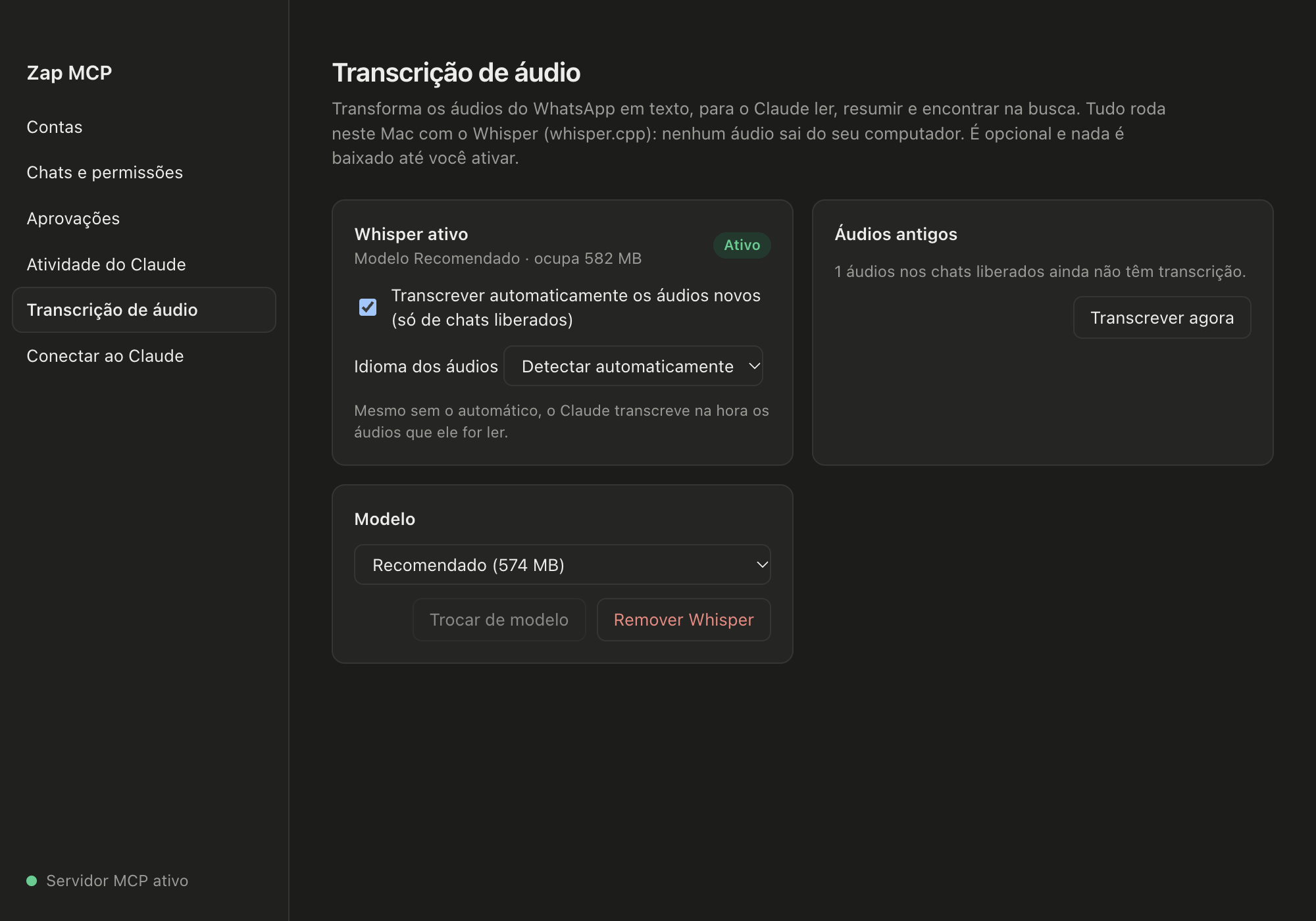
- Opt-in, one click. In the menu bar choose Transcrição de áudio, pick a model and click Baixar e ativar. Nothing is downloaded before that.
- Recommended (
large-v3-turbo, 574 MB) is much better with Portuguese and noisy audio. It transcribes a 30 s voice note in about 4–5 s on an M4. - Light (
base, 148 MB) is quicker to download and makes more mistakes.
- Recommended (
- 100% local. whisper.cpp runs with Metal acceleration. Audio never leaves your Mac. No Homebrew or ffmpeg needed.
- Everywhere Claude looks.
read_messagesreturns atranscriptfor each voice note and transcribes pending ones on the fly.get_mediareturns the transcript.search_messagesfinds spoken words.
- Automatic for new voice notes in allowed chats. Older ones: Transcrever agora.
- Verified downloads. The engine is built from source by this repo's workflow (release). The model comes from the official whisper.cpp repository on Hugging Face. Both are checked against a pinned SHA-256 before use.
- Removable. Remover Whisper frees the disk space and keeps existing transcripts.
Upgrade
- App from source:
git pull && npm install && npm run dev. Your database is migrated automatically. - Claude Desktop: download
zap-mcp-0.2.0.mcpbbelow and drag it into Settings → Extensions. This updates the tool descriptions so Claude knows voice notes come with transcripts. The 0.1.1 extension keeps working.
Warning
Not affiliated with WhatsApp or Meta. Zap MCP uses an unofficial client (Baileys), so your number can be banned. Test with a secondary number first.
Still alpha: there's no signed .app yet (run from source), data isn't encrypted at rest yet, and the UI is in Portuguese. Transcription needs Apple Silicon (M1 or newer).
SHA-256 zap-mcp-0.2.0.mcpb: 07d57f4d4f752a511cbd56dff868155c8bdf6ce8f37840d9d312d5e72019537f
Whisper engine v1.9.5 (macOS arm64, Windows x64, Linux x64)
Optional speech-to-text engine for Zap MCP: whisper-cli from whisper.cpp v1.9.5 (MIT), built by this workflow as a standalone binary with Metal. Zap MCP downloads it only when you turn on audio transcription.
Zap MCP v0.1.1 (alpha)
A small update to the first alpha.
What's new
- More reliable Claude Desktop bridge. The extension now retries the connection to the app up to 3 times, 500 ms apart, before reporting "app not running". In 0.1.0 the first call after the app started could fail once even though the app was up. A test where the app becomes reachable 700 ms late fails on 0.1.0 and passes on 0.1.1.
- App icon for the macOS bundle.
- Opening the app shows the panel. Launching from Applications or Spotlight, or reopening it while it runs, brings up the window. When it starts at login it stays quietly in the menu bar.
Upgrade
- Claude Desktop: download
zap-mcp-0.1.1.mcpbbelow and drag it into Settings → Extensions (or double-click it). Your WhatsApp session and settings live in the app, so nothing is lost. - App from source:
git pull && npm install && npm run dev.
Warning
Not affiliated with WhatsApp or Meta. Zap MCP uses an unofficial client (Baileys), so your number can be banned. Test with a secondary number first.
Still alpha: there's no signed .app yet (run from source), data isn't encrypted at rest yet, and the UI is in Portuguese.
SHA-256 zap-mcp-0.1.1.mcpb: bcda6f1693304bccb62059952f7d1bda076221bb402dadf0cba20def23da3764
Zap MCP v0.1.0 (alpha)
First public alpha of Zap MCP, a macOS menu bar app that links your WhatsApp accounts and gives Claude access to only the chats you choose, as a local MCP server.
Warning
Not affiliated with WhatsApp or Meta. Zap MCP uses an unofficial client (Baileys), so your number can be banned. Test with a secondary number first.
What's in it
- 📱 Multiple WhatsApp accounts, each linked by QR as a linked device, with history sync
- 🔒 Per-chat permissions (Blocked / Read / Read + propose / Read + send), enforced by the app; new chats start blocked
- ✅ Approval queue for outgoing messages, with editing; files always need approval
- 🔎 Accent-insensitive full-text search, plus images and media for Claude
- 🧾 Activity log and a "Pause Claude access" kill switch
- 🔌 Works with Claude Desktop (this
.mcpbextension) and Claude Code (Streamable HTTP on127.0.0.1)
Install
- Run the app from source. There is no signed
.appyet:git clone https://github.com/well-prado/zap-mcp.git && cd zap-mcp npm install && npm run dev
- Link an account (⚡ menu bar icon → Open panel… → Accounts → Generate QR code) and allow some chats.
- Claude Desktop: download
zap-mcp-0.1.0.mcpbbelow, double-click it, and confirm the install.
Claude Code: copy the command from Connect to Claude in the app.
The extension only forwards Claude's requests to the app. While the app is closed, Claude is told to ask you to open it.
Known limitations
- No signed or notarized
.appyet. Run from source. - Data (messages, media, linked-device keys) is not encrypted at rest yet.
- The UI is in Portuguese (pt-BR).
- Only Claude Desktop and Claude Code can connect. Claude on the web and on mobile can't reach a local server.
SHA-256 zap-mcp-0.1.0.mcpb: 88d411522eccbb92221cc033025915b9d62a5e5e22d58f87f282cb060d9fbce7