Repository navigation

Replies: 17 comments 30 replies

|
It's SO good to have a serious tool that is made native linux and not one that has to run behind the elite client on the game machine itself. The idea of having it run in a self contained docker container makes it so easy to deploy! Great stuff.. there are so many features that it will take me a moment to get abreast of them! what would be the effort for getting it to work on Proxmox? |

|
Hey thanks! Glad to hear the nice words about the thing... I kind of threw it out into the void, and no clue if anyone else is using the thing. (Purposefully did not include any telemetry calls or anything... it bugs me when software reports to "the mothership" and I didn't want to do it myself) Honestly on Prox you could just spin up a linux vm and load up Docker. Be easier than fiddling with lxc or anything. That being said though, running it in a Docker (or anything that's running off the game system) means you lose overlays, auto-targeting and auto-honking. Just a heads up on that. I played with using a local runner to proxy the handlers to the local system, but it introduced too much lag for the mapping overlays and the button presses... was annoying so I took it out. So if you want those, try running it locally. It's pretty lightweight. If not, I'd Docker the thing up and just let it run 24/7. 😁 |

|
I've been using it for about a week and absolutely love it. I've been trying to get ED going on Linux with the tools I use and actually basically gave up. Issues with overlays causing the mouse to not be captured by the game when on foot, one particular tool actually caused ED to crash, etc. The next day I heard about ED Outrider and have been using it since, switching to Linux full time. (The issue with overlays causing the mouse not be captured does happen with the Outrider overlays as well for me, but I don't use them. I have multiple monitors, including a touchscreen, and an android tablet that lets me get all the info without cluttering up the game screen.) I still have a couple of simple EDMC plugins running but maybe Outrider would eventually allow me to replace them entirely. I wasn't going to bother you with suggestions or feature requests, but since you asked... (I do note that this tool is intended for being "in the black" and these suggestions might be more suited to being in civilization, so this might not be the direction you want to go.)
Anyway, thanks for the app. I've tried them all, and really like what you've done. |

|
... you know, I never realized that overlays might be causing that problem. I have it myself, but since I started using EDMC at the same time I switched to linux, and then switched over to Outrider for overlay support. I honestly thought it was an annoying linux problem. Ok, I really, really need to look at that then. (I've been looking in the wrong damned place!) 🤣 That being said, I'm glad you like it! And are you actually using the Android tablet app? If so I think you might be the second person that does, myself included. It working ok for you? I can definitely take a look at #1... #2 might be a bit of feature creep with the stations though. Not currently keeping track of stations per se, they're queried from spansh/edsm when you search for selling locations, but that's about it. You can click on a system to get detail about the stars/bodies, but for stations... possibly a "Route plotter" option that queries each system to see if stations are in system and show a station icon? Let me think about that one. As for #3, that should be easy enough. And with the new Tweaks branch that I'm working on, you can pop out any "view" to another window instead of just the Now page. That might help you there. |
|
I do use the Android app, and it is working without any issues for me. If you don't feel it is worth supporting, I think most of the same can be done with a browser in fullscreen mode. I have not used the voice feature it adds. Yeah, #2 is probably asking too much. I think there are various level of sophistication and you don't need to take it as far as the EDMC plugin does with getting the station info. (I've never seen another routing tool go to that level of detail, but it sure is handy in certain situations.) Even just being able to copy the name when clicked would help. I don't think a click performs a function on the route strip currently. For #3, if the popped out window has the same window class, and title then it could also match the window rule and be unable to be focused. I don't think Outrider sets a window title that can be used to differentiate it. (I installed a separate browser just for Outrider.). I realize this is a bit of a niche case, though. I also haven't looked into all the Linux options, but I think I could write a script that would temporarily allow the window to be focused, paste the clipboard, and then prevent focus again. Just seemed like a button to set the value from the clipboard might be easy, and not too intrusive to others. To be honest, I wouldn't even raise these suggestions if I thought Outrider had a long way to go. It is already my most preferred tool. |
|
Oh heck no, I built that for me. I actually run two android tablets, one on each side. (Actually planning on making a smaller tablet layout with "Now" at the top and the bottom half being filled with command buttons) It's already set up to copy any system/planet name when you click on the name itself... Clicking elsewhere in the row opens the detail. But I'll think about 2. As for 3, that's not something I thought about, but maybe could set the window title. But putting a "click here to paste the clipboard" icon/button should be easy enough. Let me get through the tweaks update/release and I'll work on it. Probably a few days though (I'm pretty tied up right now) |
|
I think we are talking about two different things with regard to clicking on systems in the route. If you "plot a route" using Outrider, you can copy the names in the list by clicking on them. I was referring to what I thought was called the "route strip" -- the star classes in the route when you plot in game. (Can I paste an image here?) Incidentally, the tooltip when hovering for many of these systems show "not reported to Spansh". E.g. Sol shows "not reported to Spansh". Seems odd, but maybe I'm misunderstanding what this means. Don't feel obligated or rushed to implement any of these. Just throwing them out there. |

|
Here's a bit of an example when using my combat ship. I can only go about 3-4 jumps in this and then need to refuel. "Route strip" shows this: Outrider knows I can make 2 more jumps. (It tells me this in the Fuel tile.) It could draw a vertical line or some indication that I can only do two more jumps before refueling. So I can start looking at those systems to the left of the bar to see where I need to refuel. Click on the furthest one, copy name to clipboard, check Inara for suitable station. If none, then check the previous star, etc. (Two jumps isn't a very complicated situation, but you get the idea.) Same idea applies when fuel scooping. You would have an idea of how far you can get before needing to scoop. If that vertical bar happens to be in a string of non-scoopable stars, you know you need to fill up earlier. |


|
Just wanted to say that I've seen the latest changelog and tried the build, and wanted to thank you so much for considering my suggestions. Looking forward to the next release. |
|
Sure thing! I've been putting them in, but haven't been able to do any real testing yet. That being said, thank you thank you thank you for telling me about the overlays causing the mouse problem. Like I said, I think I know what's going on, and I have some ideas on how to fix it, but I';m not going to have the sit down game time to work on it till tomorrow or friday I'm afraid. But that stuff is committed... if you'd like to pull the repo and try the new features out, give it a go and let me know if it's the kind of thing you were looking for |
|
I did try the repo and ran through some of the new features.
|
|
Hey, I just pushed a potential bugfix for the mouselock problem. Try the current repo commit and see if it helps with yours as well. If not, there's now an option to disable the overlays when in DSS or "On Foot" so at worst you could at least have the overlays at other times. But I'm hopeful... it seems to work for me at least. Also adjusted the carrier landing pad overlay and put in an adjustable docking announcement delay in Settings->Voice |

|
I hope you don't mind me making another small request/suggestion on the landing pad announcement delay. I have set this quite high (trying 9s currently) to avoid talking over the ATC. When I request docking, the landing pad shows on the overlay immediately, but it does not show on the Now screen on the tablet until after the delay. It would be nice if the landing pad map showed immediately on the tablet, and only the voice was delayed. (I plan to turn the overlays off and just use my extra displays.) |
|
I didn't see your comment hiding down here! Sorry about that. I'll get that put in place after work, no problem. Also feel free to open Issues or other Discussion items for any feature requests or changes, otherwise I'm afraid I'll miss them like I did this one. 🤦♂️ |
|
Ok, went ahead and did it... should be working with the latest commit. Take a look and let me know if you would. (Can't test it now) |
|
Works great, thank you. (I thought I'd post here to keep it in the related thread, but if it didn't get noticed I would've opened a new topic.) |
|
I think the mouselock problem is resolved. It has always been a bit intermittent for me. (I think it doesn't happen until you switch out of the game at least once.) But I've been trying to break it and so far have been unsuccessful, so I think it is fixed. Awesome! (BTW, I use Fedora/KDE/Wayland. Noticed you use Gnome so thought you'd want to know it seems ok under KDE as well.) I did notice one different thing though. When you use the comp scanner to mark a bio on the Now map, if you move far enough that the marker moves out of the circle, the marker and its legend completely disappears. There is no indicator on the edge of the circle to direct you how to go back to it. However, if you handscan the same species somewhere, then the comp scan marker will appear on the edge of the circle and the legend again. And one final small thing that I thought you might want to know. On the tablet, when Now has a map, there is a pill that says "map". When using the Elite theme, this pill seems to be cyan text on a cyan background. You can see the pill, but can't read the text. |
|
Glad the mouse fix, I appreciate you letting me know about KDE working as well. I just released the bug fix release, but those problems should be fixed in the next one. 👍️ |
|
Pulled the repo. Looks good! |

|
I noticed when doing exobiology after you take a sample, if you are flying your ship to the next sample, it doesn't tell you if you have gone far enough until you land again. Any way to get an alert as you are airborne that you have gone far enough away? |

|
yes I was using a Mandalay not a nomad, I'm waiting until the nomad is available for credits before I switch. |
|
Well it should be fixed on the recent commits.. Worked fine in my Caspian, as long as you're under 5k in altitude. (which reminded me how freaking hard it is to land a Caspian on a body) 🤣 |
|
Awesome! thanks so much! |
|
Ya confirmed, it's working for me now! Thanks again! Out of curiosity are you using Claude code? or something else for vibe coding? |
|
Claude in VSCode... I like being able to review the code. Might not do anything with it, but at least I can check it. 🤣 Also, glad it worked! |

|
Hi there, just wanted to let you know that I've started using your tool as of today. I had discovered it via edcodex.info a couple (?) of weeks ago in fact. I've moved my gaming rig to Linux about 3 months ago (doing Linux though for about 15 years on all other computers in my household). Getting ED running through Steam has become trivial meanwhile, however, it is the third party tools I use for exploration (ED Discovery, EDCoPilot and Elite Observatory) that prove challenging. I've only got ED Discovery running successfully (important for screenshot conversion), so I have been looking for native Linux tools. But apart from EDMC there is not much, and even that I found lacking for exploration purposes. So far your tool has been really useful and was positively surprised about features and presentation. I will certainly do further testing over the next few days, perhaps even longer, if I decide to stay out in the Black (currently doing exploration for the CG). By the way, I'm using it on a second computer and connect to it through my browser (actually Web App now). That also has worked fine so far, I may give the Android version a try as well, I do have a 12" tablet that should be ideal for it. Regarding missing features, it is too early to tell, however, if you could manage to include a screenshot conversion like ED Discovey has (conversion from BMP to PNG with automatic save in a CMDR/SYSTEM/ folder (I have 5 commanders :-) there would be probably no need for me to run anything else (for exploration at least). But again, I like it very much already as it is. Cheers, Hiner |
|
5 commanders?! Holy crap... well, glad I put in a commander filter recently. (wow... 5...) Thanks for the nice words. The interface can be a bit "much" initially, but I think it flows pretty well once you're used to it. As for screenshot conversions, I honestly hadn't thought about that. I don't do much in the way of screenshots, but had been thinking about the ability to take screenshots and tie them to Bio/Geo samples, or to bodies/systems... but I hadn't gotten very far down that thought process yet. But as for an image conversion and storage function, shouldn't be too hard. Give me a bit and I'll have a go! |

|
Hehe, actually the fifth one I only got as a test cmdr for moving to Linux, I'm not using him much otherwise right now. The others just came along over the years, but I always play only one at a time. It's just a way of being in separate places at the same time. One is doing BGS, another one colonisation, then one perhaps exploration and one is dedicated to Powerplay. And I just pick the one for the gameplay I feel I want to do at a particular moment. But I started off as an explorer doing an expedition for about 12 months and I got to know how to use the free camera for doing screenshots (lots) and sometimes videos. So having a screenshot utility that takes the standard BMPs that ED (using F10) creates, which then converts them into PNGs (optionally deleting the original BMP, because "big") and sorting them into folders is really handy and helpful to find something later on. Everyone has of course a different system, so being able to select a pattern for a folder structure and file naming is rather crucial. If you need examples I can provide some screenshots from ED Discovery, how it does it. Re interface: True, but I like having a lot of information, so yeah it takes a while to get it mentally sorted, but personally I don't mind. At least it works for me. Cheers. |
|
Well, if you get a chance try the current commits. Should have conversions, per commander storage, small/medium extra images... haven't tested the cropping yet, but about to. Also thinking about how to integrate it with Geo/Bio discoveries... if you're within xx meters of a scanned colony/feature then it can optionally put the name of the scanned object into the filename, and it stores it in the image. Trying to think about how someone could link that to "Bacterium Alcyoneum - Lime" for example... Also I'm glad to see someone else was frustrated getting their stuff to work after switching to Linux. EDDiscovery, EDCopilot, Exploration Buddy... I loved those things. But on Linux they were just painful. They "worked", kind of... but that's generous |
|
Oh yeah... I added "Hide UI", "Screenshot" and "Hi-Res Screenshot" as options to the Android command button rail. I never really take screenshots, and it was a pain getting used to hitting Ctl-Alt-G to hide the UI. That's a bit easier. 🤣 |
|
Yeah, agree, those tools are great, but they are so embedded into the Windows eco system, that they run rather poorly (if they run at all) on Linux. There are some exceptions, e.g. Odyssey Material Helper, but they are few. Anyways, I'll give the screenshot feature a try as soon as possible. But no need to hide the UI, practically all my screenshots are taken in camera mode and then hitting F10. I guess ED Discovery (what I have been using so far) just knows from the journal that a screenshot was taken (which gets a rather generic name through ED, something like Screenhot0001.BMP), takes that file, converts it to PNG and replaces the filename according to the pattern selected (usually the system name and the date, something like HD 232819_20261025-1645.PNG). But let me check first what you have implemented, then I can give qualified feedback. There is one other (small) thing that came to my mind. For planetary bodies you show the distance from arrival and that's good. However, for moons or planets in a multi-star system it would be good to also have the relative distances to the body which is being orbited. Example: Planet B1 is 253 kls from arrival, but 15 ls from star B (which it is orbiting). Or moon B1c is 235 kls from arrival, but 23 ls from B1 (again, which it is orbiting). This is helpful to identify interesting orbits, e.g. how close a moonlet (moon of a moon) really is to the moon it is orbiting. The information is there, it is just hidden in the details of the system map. I've enclose a screenshot to show what I mean (1757ls from arrival star and 2.6ls from planet AB1, which it orbits). |
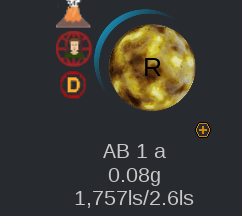
|
Ah, and one stupid question since I'm not really an avid user of GitHub (it's been a while since I've used it at all): How do I download that particular commit? |
|
Oh, you can just clone the repo at the current state and that should get all of the recent commits. However I should have the next release out in the next hour or so, just testing and doing a few bug fixes real quick. Also I like the orbiting distance suggestion. I had tried to figure out how to get distances between objects to calculate the best planning for hitting the "of interest" bodies, but couldn't come up with an orrery method for doing it... but the distance from the orbiting body I do believe is exposed with the scan... |
|
Next release is out... and I put in the orbital distances as well for you. 👍 |
|
Great, I should be able to test it tomorrow. Also I figured out how to clone and update the repo, so I'll be able to pick smaller changes as well. |
|
So I couldn't resist and had a very quick look at your changes (sitting at the megaship in HD 232819 of the current CG system). I really like the orbital distances and that's certainly all I need for that. A nice-to-have would be to add them to the graphics in the "Here" section (e.g. simply as "1,891 ls / 3.3 ls" underneath the body, the parent in this case is obvious from the graphic). Really a small detail, but your quick implementation kind of made me ask for more :-) Now the Screenshot feature really made my day. It works beautifully and l like those additional options to have smaller copies for Discord etc. And with that you just solved my major problem in that regard for Linux (no need for ED Discovery anymore for that), in fact now ED Outrider has already everything in one single application that I need for exploration. There is probably still stuff that can be improved or even added, but if you would stop right there I still would be very happy to use it for exploration as my sole companion app. |
|
That's great! Glad it covers your use case. If there's anything I missed, or other options you'd like there just let me know. Also I'm just about to push a new commit for the Schematic version of the Here pane to show the orbital distances. I live in Tree view, so I completely forgot about the graphical version. 🤦 |
|
One other thing, I can promote your tool on the Discord server where I'm member of. I know there are a few commanders running ED on Linux who might be interested in ED Outrider. Is that okay with you? |
|
Sure, that'd honestly be great. If other people use it, more ideas and more testing. 😁 There's only so many eyeballs that EDCodex can reach. One thing though, it's "Linux first" but should work fine on Windows as well for all of the functionality. Honestly I'd really love to get more Windows people using the thing so that they can test it on that side of the fence as well. (Though I know of a coupl eof people using it on Windows with no problems, at least that they've told me) |
Squadron CarrierI've been doing some colonisation today with one of my commanders, which happens to own not only a personal fleet carrier, but also leads a squadron and thus owns a squadron carrier. From what I could gather Outrider does currently "ignore" squadron carriers altogether. Since you do reference some FC information I think it is necessary to provide a second card in the top row for the SC, if present (some players also have only an SC and no FC). From the journals I found that there is an attribute called CarrierType, which either has the value of "FleetCarrier" or "SquadronCarrier" together with some other squadron-specific attributes. I also have some thoughts on the multi-commander situation, which admittedly is only relevant for a small portion of players, but you already enumerate the data anyways and I think there could be some automation in selecting a specific commander with the subsequent restart of the server. But I'll write up my thoughts on that in a separate post in the next days or so. |
|
Hmm... the cards are tight already... what about the ability to flip between FC and SC in the block? As for multi-commander functionality, let me know what you think. Since I'm not multi-account myself I don't really have much of a perspective on what would be good or not there |
|
Agreed, the cards are tight, but your idea of flipping the FC card is actually genious since it addresses all combinations. If only FC or only SC then card does not need to flip, if both then the button for "flip" (probaboly labelled "SC"/"FC" or such) makes it obvious how to show and if neither then no card I assume. The card could flip automatically perhaps based on where I am or was docked last (manual flip possible though). Otherwise I think it just holds pretty much the same information (name, location, distance, services, etc.) |
|
I just created an issue to track it... take a look and let me know what you think: #16 |


Uh oh!
There was an error while loading. Please reload this page.
I don't know how many people are using Outrider... I wouldn't think that many since it's still pretty new, but if you are please let me know what you think!
If you have any ideas, suggestions, really good recipes for brownies... you know, whatever!
All reactions