Repository navigation
Home
CronCompose is a self-hosted control plane for writing, scheduling, and managing cron-style jobs across remote Linux machines — Raspberry Pi, EC2, bare metal, or any Linux box. You write a shell script in the web UI, set a schedule (for example “every 6 hours”), pick the server it runs on, and CronCompose deploys it, runs it on time, and shows live logs and run history.
Repository: workvar/cron-compose
Current release: v0.0.3 — see Releases
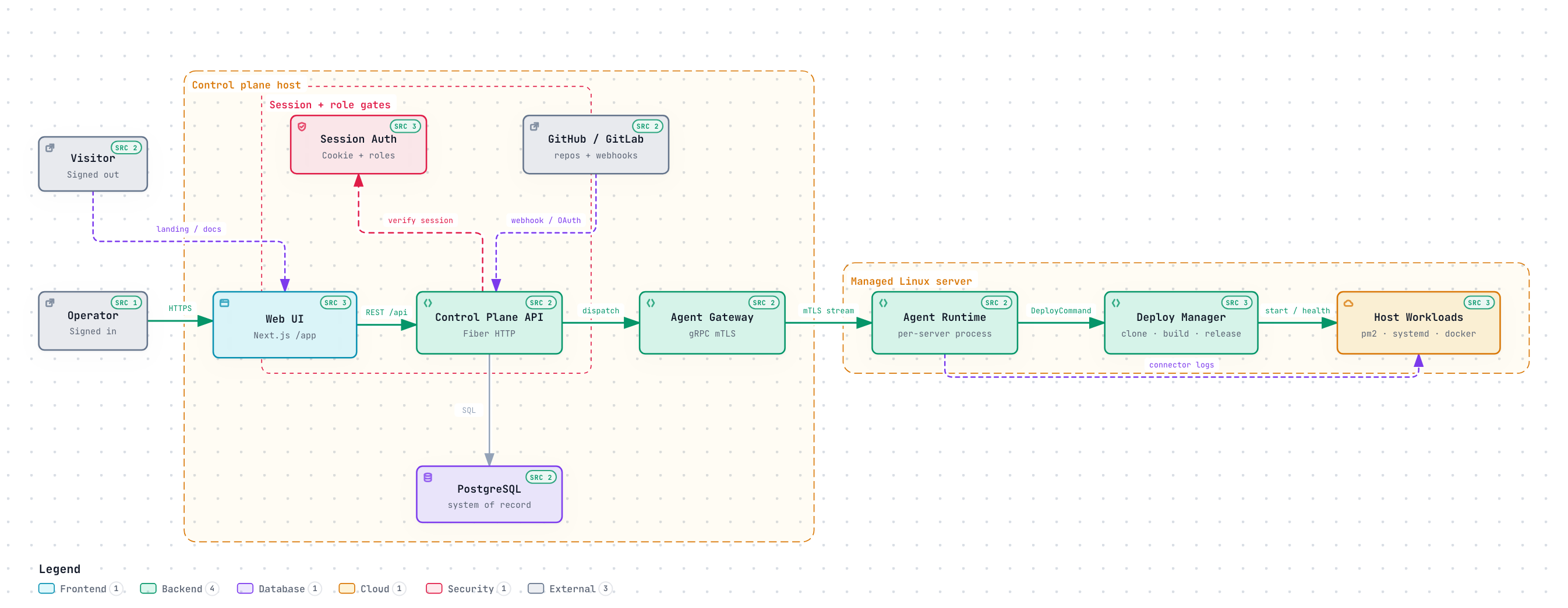
All diagrams · Architecture · Design decisions · How it works
Classic cron lives on each box: crontab -e, no history, no live logs, and no way to manage a fleet from one place. Hosted job runners assume inbound access to the worker, which fails for a Pi behind a home router. CronCompose is built for the other case:
| Need | What CronCompose does |
|---|---|
| One place to write jobs | Web UI + REST API + cc CLI |
| Servers behind NAT / firewalls | Agents dial out; no inbound ports on targets |
| Flaky links and outages | Agent-local scheduler — jobs keep firing offline |
| Visibility | Run history, exit codes, durations, live SSE logs |
| Safety | RBAC, encrypted secrets, audit log, mTLS agent identity |
| Self-hosting | One small VM (or Pi) for the control plane; agents are a single binary |
It is not a CI/CD system, a DAG orchestrator, or a SaaS. It is a single-tenant, self-hosted operations tool.
- Homelab and Raspberry Pi operators who want a real UI for jobs that used to live in crontab.
- Small teams running Linux boxes (edge, kiosks, backup hosts) that should keep working when the control plane is unreachable.
- Operators who also want to inspect nginx, systemd, Docker, and pm2 on those same hosts from one portal.
- Control plane — Next.js web UI, Go (Fiber) REST API, PostgreSQL. Define servers, write jobs, read logs.
- Agent — a small Go binary on each target. It dials out over mTLS gRPC, caches job definitions locally, runs its own cron, and streams results back.
The control plane is the source of truth for definitions. Execution does not depend on a live connection.
  Browser  ──HTTP──►  Control plane (:8080  /app + /api)
                         ▲
                         │ mTLS gRPC (:9090)
                         │  agents always dial OUT
              ┌──────────┴──────────┐
           Pi (home)    EC2      bare-metal Linux
git clone https://github.com/workvar/cron-compose.git
cd cron-compose
./install/install.sh
Open the printed URL (it redirects to /app), sign in with the admin you created, add a server, and paste the install command on the target. Details: Installation.
| Page | What’s on it |
|---|---|
| How it works | End-to-end flow: enroll, sync, schedule, run, logs |
| Architecture | Components, topology, scheduling model, transport |
| Installation | From-source installer (--advanced for OIDC), Docker Compose, agent install |
| Compatibility | OS, runtimes, architectures, connectors, limits |
| Deployment | Production topology, TLS, env, hardening |
| Security | Auth, RBAC, mTLS, secrets, threat model |
| Development | Local setup, make targets, repo layout |
| REST API | HTTP surface for the UI and external callers |
| CLI |
cc command reference |
| Agent protocol | Enrollment, gRPC messages, local scheduler |
| Connectors | nginx, systemd, Docker, pm2 from the portal |
| Web terminal | Browser PTY on enrolled servers |
| Data model | Postgres entities |
| Operations | Metrics, OIDC (--advanced / .env), agent packages, retention |
| Releases | Version history and upgrade notes |
| Roadmap | What’s shipped and what is not |
Source-of-truth design docs also live in the repo under docs/. This wiki is the public guide; those files are the detailed spec.