Repository navigation
Releases
macos-ax-mcp 0.2.0

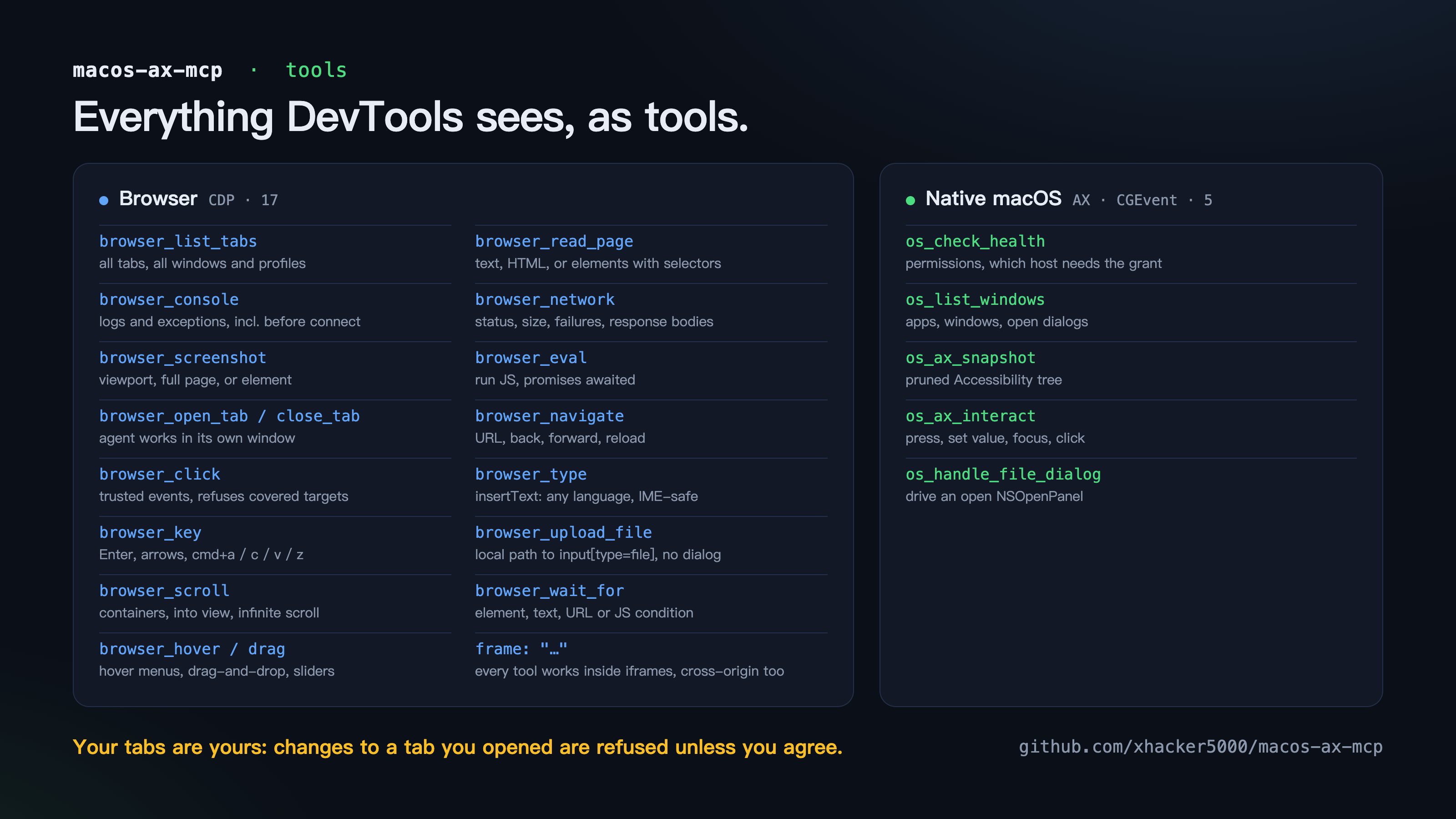
Exploring real-world pages: scroll, wait, hover, drag, and iframes (cross-origin included). 22 tools now.
New
browser_scroll: up / down / top / bottom / into view, inside any scrollable element. Infinite scroll: passtimes, it waits for lazy content after each step and stops on its own once the page stops growing.browser_wait_for: wait for an element to appear or disappear, text, a URL, or a JS condition, instead of fixed sleeps.browser_hover: real mouse move; opens hover menus and tooltips.browser_drag: HTML5 drag-and-drop (kanban boards, drop zones) and pointer dragging (sliders, sortable lists, canvas), picked automatically.- iframes:
browser_read_pagemode=frameslists them; read, eval, click, type, hover, drag, scroll, wait and upload acceptframe, cross-origin iframes included, with coordinates mapped to the page.
Tested end to end against a live Chrome: 21/21, including clicking, typing Chinese and uploading 50 MB inside a cross-origin iframe, and infinite scroll loading 110 items then stopping after 6 of 30 allowed steps.
Fixed
browser_upload_filedid not enforce the user-tab write protection described in the README. It now returnsERR_USER_TAB_PROTECTEDon tabs you opened unlessconfirm_user_tab: trueis passed. If you use 0.1.0, please upgrade.
Install / upgrade
tar -xzf macos-ax-mcp-0.2.0-macos-universal.tar.gz
cd macos-ax-mcp-0.2.0
xattr -d com.apple.quarantine macos-ax-mcp 2>/dev/null   # ad-hoc signed, not notarized
install -m 0755 macos-ax-mcp ~/.local/bin/macos-ax-mcp
Verify: shasum -a 256 -c macos-ax-mcp-0.2.0-macos-universal.tar.gz.sha256. Or build it yourself from ~4.2k lines of Swift: swift build -c release --arch arm64 --arch x86_64.
Universal arm64 + x86_64, macOS 14+, zero dependencies.
macos-ax-mcp 0.1.0
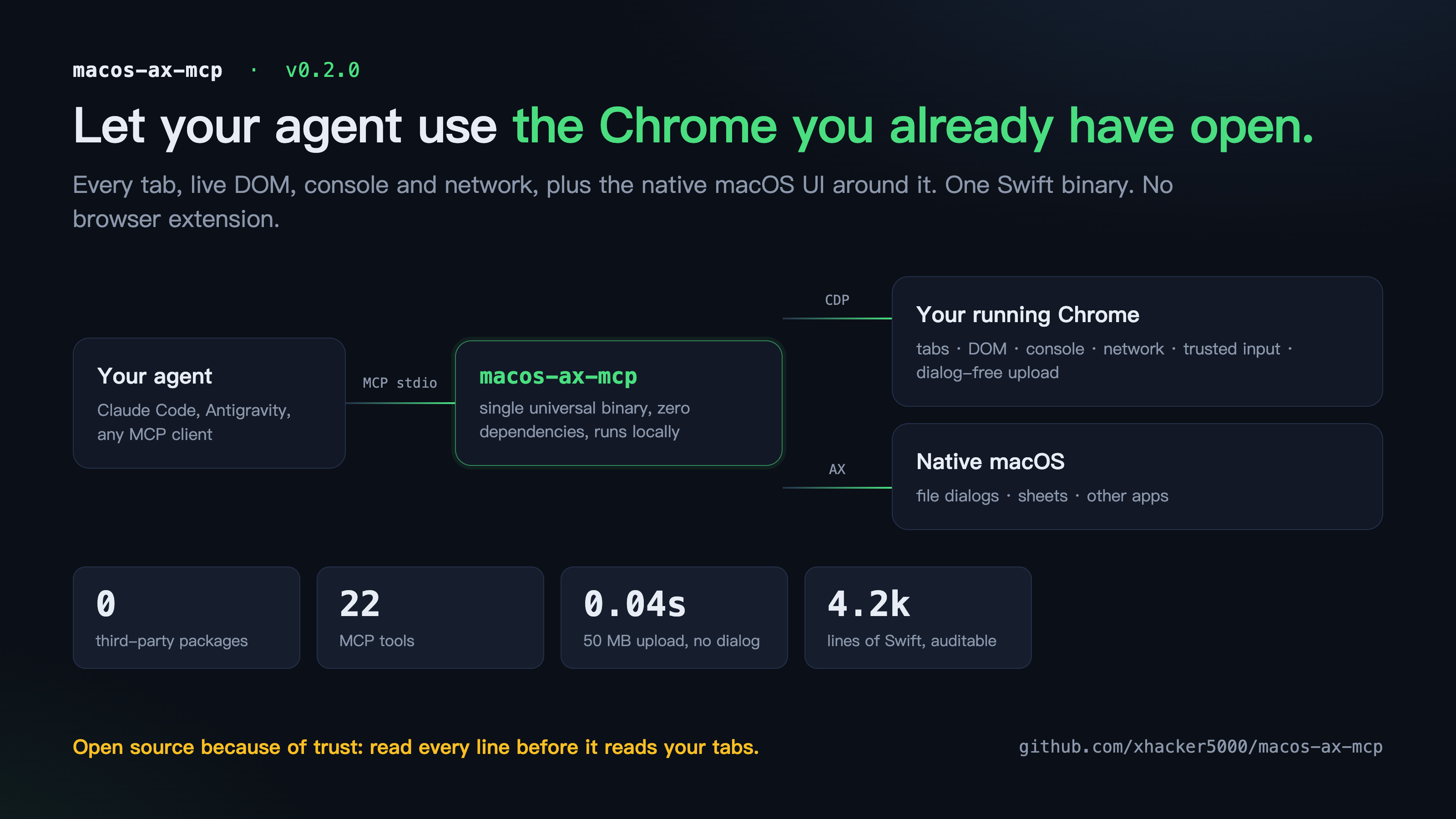
First public release. Let your local agent use the Chrome you already have open: every tab, live DOM, console, network, trusted input and dialog-free upload, plus native macOS UI. One Swift binary, zero dependencies, no browser extension.
What's inside
- 13 browser tools over CDP (direct connection to your running Chrome 144+):
browser_list_tabs,browser_read_page,browser_console(replays logs from before connect),browser_network,browser_screenshot,browser_eval,browser_open_tab,browser_close_tab,browser_navigate,browser_click(isTrusted=true),browser_type(IME-safeinsertText),browser_key,browser_upload_file(50 MB in 0.04 s, no file dialog). - 5 native macOS tools over Accessibility / CGEvent:
os_check_health,os_list_windows,os_ax_snapshot,os_ax_interact,os_handle_file_dialog. - Your tabs are write-protected: click / type / navigate / upload / close on a tab you opened returns
ERR_USER_TAB_PROTECTEDunless the agent passesconfirm_user_tab: trueafter you agreed.
Install
tar -xzf macos-ax-mcp-0.1.0-macos-universal.tar.gz
cd macos-ax-mcp-0.1.0
xattr -d com.apple.quarantine macos-ax-mcp 2>/dev/null   # ad-hoc signed, not notarized
install -m 0755 macos-ax-mcp ~/.local/bin/macos-ax-mcp
claude mcp add -s user macos-ax -- ~/.local/bin/macos-ax-mcp
Then in Chrome open chrome://inspect/#remote-debugging and enable Allow remote debugging for this browser instance.
Verify the download: shasum -a 256 -c macos-ax-mcp-0.1.0-macos-universal.tar.gz.sha256
Prefer not to trust a binary? That is the point of open source: swift build -c release --arch arm64 --arch x86_64 builds the same thing from ~3.7k lines you can read.
Binary
- Universal: arm64 + x86_64, macOS 14+, no Xcode needed at runtime
- Links only Apple system frameworks and the OS Swift runtime
- Ad-hoc signed, not notarized
Known limitations
- Chrome asks you to approve each new debugging connection (once per agent session in MCP mode) and shows the "controlled by automated test software" bar while connected.
- Hidden background tabs do not process input;
browser_open_tabuses its own window by default and input on hidden tabs fails fast withERR_TAB_HIDDEN. os_handle_file_dialog(native NSOpenPanel path) is a fallback and not fully validated on macOS 26; preferbrowser_upload_file.