Repository navigation
Releases
Inkboard v0.7.2

Inkboard is a free infinite whiteboard for pen tablets.
What's new in 0.7.2
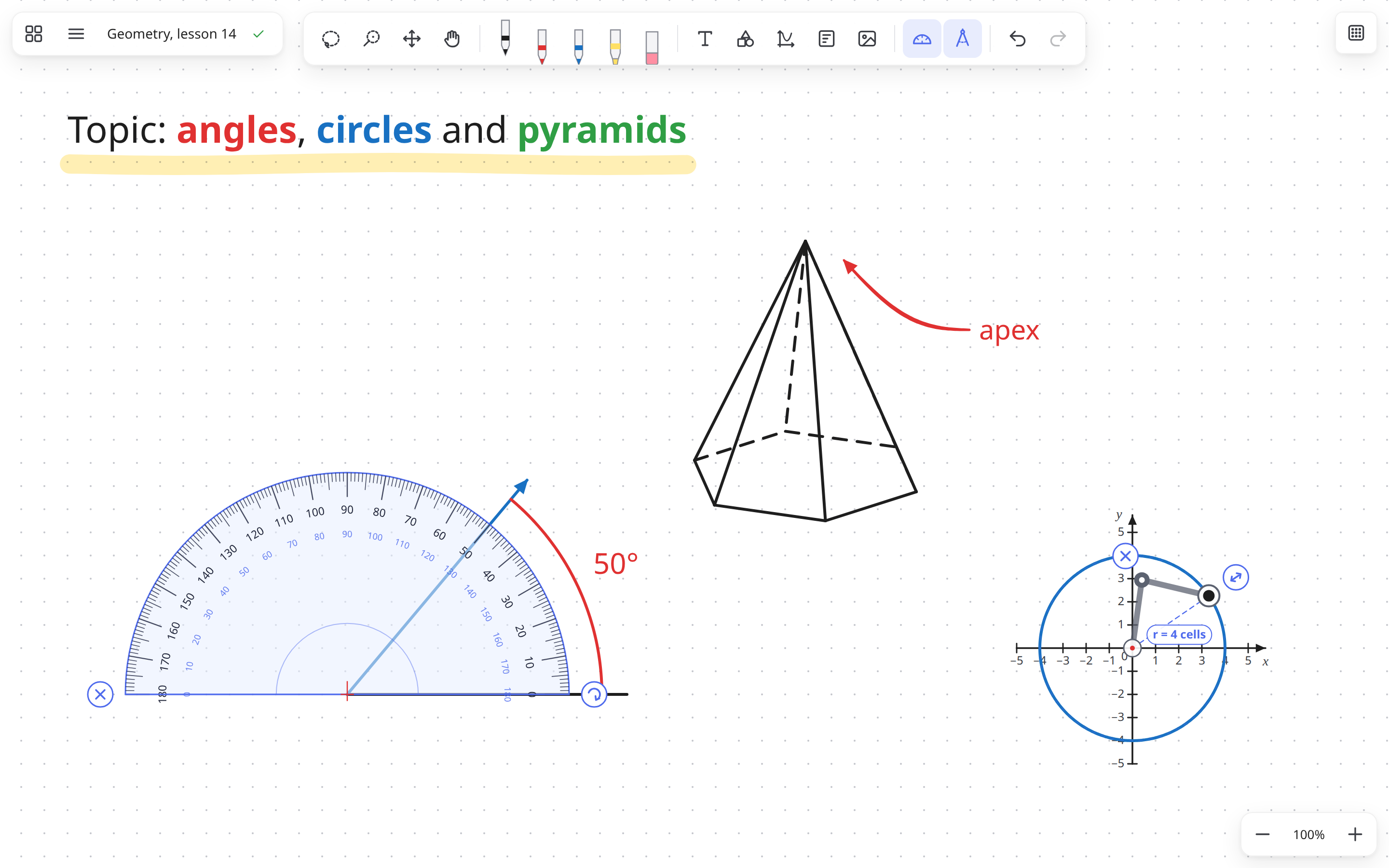
- Ruler and set squares: all measuring and drawing instruments (ruler, 45° set square, 30°/60° set square,
protractor and compass) now live in a dedicated Drawing tools menu on the toolbar. Draw with the pen
along any edge of the ruler or set square for a straight segment measured in centimetres and millimetres
(1 cm = 2 paper cells). - Grid snap for instruments: hold
Ctrl(⌘on macOS) while moving any instrument to snap its origin
(the ruler's0 cmmark, the set square's90°corner, the protractor's centre or the compass's needle)
to paper grid intersections. - New library storage: boards, templates, tags and thumbnails now live in one local database, with each
image stored once. Your boards move over automatically on first launch; the old files are kept in the
legacy-0.6folder inside the library, nothing is deleted. - Every board lives in Inkboard now. Save as file… saves a copy you can send or keep. Opening an
.inkboardfile adds it to your boards once; opening the same file again opens that board. - Autosave writes at most 5 seconds after you change something, even while you keep drawing.
- Version history has been removed.
Boards from 0.7 can't be seen by older versions, so update every computer you use.
Also in 0.6.0
- Function graphs: Graph menu → Function graph…, or select a coordinate plane and click Function.
Type formulas such asx^2,2x + 1,sin(x),sqrt(x),|x|or1/x(up to 8 per plane): the
curves appear as you type, with the formula written next to each one as in a textbook. - The protractor follows the pointer: the part under the pen lights up with a hint, the edge shows the
degree you are pointing at, and arcs and rays snap to whole degrees. The new ⚙ handle sets the step
(off, 1°, 5° or 15°). - The compass follows the pointer too: lit parts and hints, cell marks on the radius, and arcs snap to
quarter, half and full turns. - Narrow windows: the top toolbar no longer covers the menu; it moves aside or to a second row.
Boards saved by 0.6 can't be opened by older versions, so update every computer you use.
Also in 0.5.2
- macOS: the
.dmgwindow now shows how to install Inkboard and how to open it the first time.
Also in 0.5.1
- The Linux AppImage starts on Ubuntu 24.04 and newer without installing anything extra
(it used to need libfuse2). - Version history saves a snapshot every 5 minutes of editing and keeps the last 36 (about three hours).
- After restoring a version the view moves to show the whole board, so it never looks empty.
- New boards are named like "Board of 11 Nov 2026, 18:30".
- Clearer wording in the interface (English and Ukrainian) and a fuller description of the
.debpackage.
Also in 0.5.0
- Compass (K): set the radius, then drag the pencil around the needle for an arc or a full circle.
- Protractor arcs get their angle written next to them ("50°").
- Formatted text: select words (or right-click) → colour, size, bold, italic, underline.
Double-click text to edit it. - Any number of sides (3–24) for the base of a pyramid or prism.
Boards saved by 0.5 can't be opened by older versions, so update every computer you use.
Also in 0.4
- Text, line end dragging, editable shapes, lock, brush select (C), arrows on freehand lines, 3D axes,
replacing templates. Fix for the pen getting "stuck" moving the board.
Download
| System | File |
|---|---|
| Windows | Inkboard-Setup-…-x64.exe |
| macOS (Intel and Apple Silicon) | Inkboard-…-mac-universal.dmg |
| Linux | .AppImage (any distro, auto-updates) or .deb (Ubuntu / Debian) |
First launch
The builds are not code-signed yet, so the system will warn you once:
- Windows: "Windows protected your PC" → click More info → Run anyway.
- macOS: open the
.dmg, drag Inkboard to Applications and open it. macOS says it can't verify the app:
click Done, open System Settings → Privacy & Security, scroll down and click Open Anyway.
You only do this once. - Linux AppImage: allow it to run (file Properties → Executable as Program, or
chmod +x Inkboard-*.AppImage) and open it.
Feedback and bug reports: open an issue in this repository.
Inkboard v0.6.0
Inkboard is a free infinite whiteboard for pen tablets.
What's new in 0.6.0
- Function graphs: Graph menu → Function graph…, or select a coordinate plane and click Function.
Type formulas such asx^2,2x + 1,sin(x),sqrt(x),|x|or1/x(up to 8 per plane): the
curves appear as you type, with the formula written next to each one as in a textbook. - The protractor follows the pointer: the part under the pen lights up with a hint, the edge shows the
degree you are pointing at, and arcs and rays snap to whole degrees. The new ⚙ handle sets the step
(off, 1°, 5° or 15°). - The compass follows the pointer too: lit parts and hints, cell marks on the radius, and arcs snap to
quarter, half and full turns. - Narrow windows: the top toolbar no longer covers the menu; it moves aside or to a second row.
Boards saved by 0.6 can't be opened by older versions, so update every computer you use.
Also in 0.5.2
- macOS: the
.dmgwindow now shows how to install Inkboard and how to open it the first time.
Also in 0.5.1
- The Linux AppImage starts on Ubuntu 24.04 and newer without installing anything extra
(it used to need libfuse2). - Version history saves a snapshot every 5 minutes of editing and keeps the last 36 (about three hours).
- After restoring a version the view moves to show the whole board, so it never looks empty.
- New boards are named like "Board of 11 Nov 2026, 18:30".
- Clearer wording in the interface (English and Ukrainian) and a fuller description of the
.debpackage.
Also in 0.5.0
- Compass (K): set the radius, then drag the pencil around the needle for an arc or a full circle.
- Protractor arcs get their angle written next to them ("50°").
- Formatted text: select words (or right-click) → colour, size, bold, italic, underline.
Double-click text to edit it. - Any number of sides (3–24) for the base of a pyramid or prism.
Boards saved by 0.5 can't be opened by older versions, so update every computer you use.
Also in 0.4
- Text, line end dragging, editable shapes, lock, brush select (C), arrows on freehand lines, 3D axes,
replacing templates. Fix for the pen getting "stuck" moving the board.
Download
| System | File |
|---|---|
| Windows | Inkboard-Setup-…-x64.exe |
| macOS (Intel and Apple Silicon) | Inkboard-…-mac-universal.dmg |
| Linux | .AppImage (any distro, auto-updates) or .deb (Ubuntu / Debian) |
First launch
The builds are not code-signed yet, so the system will warn you once:
- Windows: "Windows protected your PC" → click More info → Run anyway.
- macOS: open the
.dmg, drag Inkboard to Applications and open it. macOS says it can't verify the app:
click Done, open System Settings → Privacy & Security, scroll down and click Open Anyway.
You only do this once. - Linux AppImage: allow it to run (file Properties → Executable as Program, or
chmod +x Inkboard-*.AppImage) and open it.
Feedback and bug reports: open an issue in this repository.
Inkboard v0.5.2
Inkboard is a free infinite whiteboard for pen tablets.
What's new in 0.5.2
- macOS: the
.dmgwindow now shows how to install Inkboard and how to open it the first time.
Also in 0.5.1
- The Linux AppImage starts on Ubuntu 24.04 and newer without installing anything extra
(it used to need libfuse2). - Version history saves a snapshot every 5 minutes of editing and keeps the last 36 (about three hours).
- After restoring a version the view moves to show the whole board, so it never looks empty.
- New boards are named like "Board of 11 Nov 2026, 18:30".
- Clearer wording in the interface (English and Ukrainian) and a fuller description of the
.debpackage.
Also in 0.5.0
- Compass (K): set the radius, then drag the pencil around the needle for an arc or a full circle.
- Protractor arcs get their angle written next to them ("50°").
- Formatted text: select words (or right-click) → colour, size, bold, italic, underline.
Double-click text to edit it. - Any number of sides (3–24) for the base of a pyramid or prism.
Boards saved by 0.5 can't be opened by older versions, so update every computer you use.
Also in 0.4
- Text, line end dragging, editable shapes, lock, brush select (C), arrows on freehand lines, 3D axes,
replacing templates. Fix for the pen getting "stuck" moving the board.
Download
| System | File |
|---|---|
| Windows | Inkboard-Setup-…-x64.exe |
| macOS (Intel and Apple Silicon) | Inkboard-…-mac-universal.dmg |
| Linux | .AppImage (any distro, auto-updates) or .deb (Ubuntu / Debian) |
First launch
The builds are not code-signed yet, so the system will warn you once:
- Windows: "Windows protected your PC" → click More info → Run anyway.
- macOS: open the
.dmg, drag Inkboard to Applications and open it. macOS says it can't verify the app:
click Done, open System Settings → Privacy & Security, scroll down and click Open Anyway.
You only do this once. - Linux AppImage: allow it to run (file Properties → Executable as Program, or
chmod +x Inkboard-*.AppImage) and open it.
Feedback and bug reports: open an issue in this repository.
Inkboard v0.5.1
Inkboard is a free infinite whiteboard for pen tablets.
What's new in 0.5.1
- The Linux AppImage starts on Ubuntu 24.04 and newer without installing anything extra
(it used to need libfuse2). - Version history saves a snapshot every 5 minutes of editing and keeps the last 36 (about three hours).
- After restoring a version the view moves to show the whole board, so it never looks empty.
- New boards are named like "Board of 11 Nov 2026, 18:30".
- Clearer wording in the interface (English and Ukrainian) and a fuller description of the
.debpackage.
Also in 0.5.0
- Compass (K): set the radius, then drag the pencil around the needle for an arc or a full circle.
- Protractor arcs get their angle written next to them ("50°").
- Formatted text: select words (or right-click) → colour, size, bold, italic, underline.
Double-click text to edit it. - Any number of sides (3–24) for the base of a pyramid or prism.
Boards saved by 0.5 can't be opened by older versions, so update every computer you use.
Also in 0.4
- Text, line end dragging, editable shapes, lock, brush select (C), arrows on freehand lines, 3D axes,
replacing templates. Fix for the pen getting "stuck" moving the board.
Download
| System | File |
|---|---|
| Windows | Inkboard-Setup-…-x64.exe |
| macOS (Intel and Apple Silicon) | Inkboard-…-mac-universal.dmg |
| Linux | .AppImage (any distro, auto-updates) or .deb (Ubuntu / Debian) |
First launch
The builds are not code-signed yet, so the system will warn you once:
- Windows: "Windows protected your PC" → click More info → Run anyway.
- macOS: open the
.dmg, drag Inkboard to Applications and open it. macOS says it can't verify the app:
click Done, open System Settings → Privacy & Security, scroll down and click Open Anyway.
You only do this once. - Linux AppImage: allow it to run (file Properties → Executable as Program, or
chmod +x Inkboard-*.AppImage) and open it.
Feedback and bug reports: open an issue in this repository.
Inkboard v0.5.0
Inkboard is a free infinite whiteboard for pen tablets.
What's new in 0.5.0
New
- Compass (K): drag ↔ to set the radius (shown in paper cells), then drag the pencil around the
needle for an arc or a full circle. It draws with the current pen. - Protractor arcs get their angle written next to them ("50°"). A short tip at the bottom explains
how to use the protractor and the compass (click "Got it" to hide it). - Formatted text: select words (or right-click) → colour, size, bold, italic, underline.
Ctrl+B / Ctrl+I / Ctrl+U work too. - Edit existing text: double-click or double-tap with the pen, or select it and press Edit text.
- Any number of sides (3–24) for the base of a pyramid or prism: type it in the "n =" box.
Changes
- The hand (move the board) sits next to the selection tools; the Move tool has the usual four-arrow icon.
- Fix: on the "All boards" screen several card menus could be open at once.
Boards saved by 0.5 can't be opened by older versions, so update every computer you use.
Also in 0.4
- Text, line end dragging, editable shapes, lock, brush select (C), arrows on freehand lines, 3D axes,
replacing templates. Fix for the pen getting "stuck" moving the board.
Download
| System | File |
|---|---|
| Windows | Inkboard-Setup-…-x64.exe |
| macOS (Intel and Apple Silicon) | Inkboard-…-mac-universal.dmg |
| Linux | .AppImage (any distro, auto-updates) or .deb (Ubuntu / Debian) |
First launch
The builds are not code-signed yet, so the system will warn you once:
- Windows: "Windows protected your PC" → click More info → Run anyway.
- macOS: open the
.dmg, drag Inkboard to Applications, then right-click the app → Open → Open.
If macOS says the app is damaged, runxattr -cr /Applications/Inkboard.appin Terminal. - Linux AppImage:
chmod +x Inkboard-*.AppImageand run it. On Ubuntu 24.04+ install FUSE 2 first:sudo apt install libfuse2t64.
Feedback and bug reports: open an issue in this repository.
Inkboard v0.4.0
Inkboard is a free infinite whiteboard for pen tablets.
What's new in 0.4.0
Fixes
- The pen no longer gets "stuck" moving the board. If the pen was lifted over a panel or outside the
window, every pen movement kept moving the board until the app was restarted. Fixed. - Resizing works in the Move tool (M). The corner handles used to move the selection instead.
- Pen buttons can no longer be set to "move"; to move the board with a pen button, give it the
Space keystroke in Wacom Center (hold = move). - The eraser removes a whole shape, not single edges.
- Picking a pen or another drawing tool clears the selection; toolbar buttons don't keep keyboard focus.
New
- Text (T button in the toolbar): click and type, Esc when done, double-click text to edit.
Pasting text puts it on the board. - Drag the ends of straight lines to change length and angle; around the protractor centre it turns
in whole degrees, with the angle shown. - Edit shapes after drawing: stretch with the side handles, or press Shape to change the kind.
Pyramids and prisms with a triangle, square, pentagon or hexagon as base. - Lock items or groups (selection bar) so they can't be erased, moved or deleted by accident.
- Brush select (C): a circle cursor, and everything it touches is selected; mouse wheel changes its size.
- Arrow / dot ends on freehand lines too, and any line width with a slider.
- 3D coordinate axes (x, y, z) in the Coordinates menu.
- Replace a template with the current selection (asks for confirmation first).
Boards saved by 0.4 can't be opened by older versions, so update every computer you use.
Also in 0.3
- Protractor, 3D shapes, line styles, move tool, shortcuts on any keyboard layout, templates, grouping.
- Automatic updates on Windows and Linux AppImage: from 0.3.0 on, new versions install themselves.
Download
| System | File |
|---|---|
| Windows | Inkboard-Setup-…-x64.exe |
| macOS (Intel and Apple Silicon) | Inkboard-…-mac-universal.dmg |
| Linux | .AppImage (any distro, auto-updates) or .deb (Ubuntu / Debian) |
First launch
The builds are not code-signed yet, so the system will warn you once:
- Windows: "Windows protected your PC" → click More info → Run anyway.
- macOS: open the
.dmg, drag Inkboard to Applications, then right-click the app → Open → Open.
If macOS says the app is damaged, runxattr -cr /Applications/Inkboard.appin Terminal. - Linux AppImage:
chmod +x Inkboard-*.AppImageand run it. On Ubuntu 24.04+ install FUSE 2 first:sudo apt install libfuse2t64.
Feedback and bug reports: open an issue in this repository.
Inkboard v0.3.1
Inkboard is a free infinite whiteboard for pen tablets.
What's new in 0.3.1
- Protractor (button in the toolbar or T): drag to move, ↻ to rotate and resize. Draw along its edge for an arc with
the angle shown, from the centre for a ray at an exact angle, along the bottom for a straight line. - 3D shapes with dashed hidden edges: cube, prism, pyramid, cylinder, cone, sphere (Shapes menu, below the flat shapes).
- Line styles: solid, dashed or dotted lines, and line ends: arrow, dot, circle, bar (pen menu).
Select lines and press Style to change colour, width, pattern or ends afterwards. - Move tool (M): hover over anything (it lights up) and just drag it. Dragging empty space moves the board.
- Pen buttons: Settings → Pen buttons: choose what the side buttons and the eraser end do, with a tester.
- Keyboard shortcuts work on any keyboard layout (e.g. Ukrainian). Full list: Settings → Keyboard shortcuts & Wacom ExpressKeys.
- X swaps pen ↔ eraser (great for a tablet ExpressKey).
- Coordinates: shorter preset names; a clear Settings button on a selected coordinate system.
- The app version is shown in the menu and on the board list; after an update you see "Updated to …".
Also in 0.3
- Straight lines with Shift, a Shapes menu, coordinate lines / planes, templates, group / ungroup (Ctrl+G).
- Automatic updates on Windows and Linux AppImage: from 0.3.0 on, new versions install themselves.
Download
| System | File |
|---|---|
| Windows | Inkboard-Setup-…-x64.exe |
| macOS (Intel and Apple Silicon) | Inkboard-…-mac-universal.dmg |
| Linux | .AppImage (any distro, auto-updates) or .deb (Ubuntu / Debian) |
First launch
The builds are not code-signed yet, so the system will warn you once:
- Windows: "Windows protected your PC" → click More info → Run anyway.
- macOS: open the
.dmg, drag Inkboard to Applications, then right-click the app → Open → Open.
If macOS says the app is damaged, runxattr -cr /Applications/Inkboard.appin Terminal. - Linux AppImage:
chmod +x Inkboard-*.AppImageand run it. On Ubuntu 24.04+ install FUSE 2 first:sudo apt install libfuse2t64.
Feedback and bug reports: open an issue in this repository.
Inkboard v0.3.0
Inkboard is a free infinite whiteboard for pen tablets.
What's new in 0.3
- Straight lines: hold Shift while drawing (snaps to horizontal / vertical / 45°).
- Shapes menu: lines, arrows, rectangle, circle, triangles, rhombus, parallelogram, trapezoid, polygons, star, cube.
Drag to draw, click for a default size, Shift keeps proportions. - Coordinates: number lines and coordinate planes with previews; set your own ranges and unit length,
save your own presets, change them after inserting (gear button on the selection). - Templates: select anything (e.g. "Given / Find / Solution"), press the bookmark button and insert it into any board later.
- Group / ungroup: select several things and press Ctrl+G (or the Group button), and they move and scale together. Ctrl+Shift+G ungroups.
- Automatic updates: from this version on, Inkboard updates itself on Windows and Linux (AppImage).
On macOS and .deb you get a notice with a download link.
Download
| System | File |
|---|---|
| Windows | Inkboard-Setup-…-x64.exe |
| macOS (Intel and Apple Silicon) | Inkboard-…-mac-universal.dmg |
| Linux | .AppImage (any distro, auto-updates) or .deb (Ubuntu / Debian) |
First launch
The builds are not code-signed yet, so the system will warn you once:
- Windows: "Windows protected your PC" → click More info → Run anyway.
- macOS: open the
.dmg, drag Inkboard to Applications, then right-click the app → Open → Open.
If macOS says the app is damaged, runxattr -cr /Applications/Inkboard.appin Terminal. - Linux AppImage:
chmod +x Inkboard-*.AppImageand run it.
Feedback and bug reports: open an issue in this repository.
Inkboard v0.2.0
Test build of Inkboard is a free infinite whiteboard for pen tablets.
What's new in 0.2
- Your work is always saved. Every board autosaves within a few seconds, even if the power goes out.
- All boards screen (Ctrl+H) with previews, search, pinned boards and colour tags (e.g. "5A", "Math").
- Version history: go back to how the board looked earlier (snapshot every 10 minutes of work).
- Recently deleted: deleted boards can be restored for 30 days.
- Save as file… puts a board in any folder; it keeps saving itself there automatically.
- Export to PNG or PDF (the whole board or just the selection), for example to send to students.
- Backup folder (Settings ⚙): every board is also copied to a USB stick or Google Drive / OneDrive folder.
- Double-clicking an
.inkboardfile opens it in Inkboard.
Download
| System | File |
|---|---|
| Windows | Inkboard-Setup-…-x64.exe |
| macOS (Intel and Apple Silicon) | Inkboard-…-mac-universal.dmg |
| Linux | .AppImage (any distro) or .deb (Ubuntu / Debian) |
First launch
The builds are not code-signed yet, so the system will warn you once:
- Windows: "Windows protected your PC" → click More info → Run anyway.
- macOS: open the
.dmg, drag Inkboard to Applications, then right-click the app → Open → Open.
If macOS says the app is damaged, runxattr -cr /Applications/Inkboard.appin Terminal. - Linux AppImage:
chmod +x Inkboard-*.AppImageand run it.
Boards from 0.1 are moved into the new board list automatically.
Feedback and bug reports: open an issue in this repository.
Inkboard v0.1.0
Early test build of Inkboard is a free infinite whiteboard for pen tablets.
Download
| System | File |
|---|---|
| Windows | Inkboard-Setup-…-x64.exe |
| macOS (Intel and Apple Silicon) | Inkboard-…-mac-universal.dmg |
| Linux | .AppImage (any distro) or .deb (Ubuntu / Debian) |
First launch
The builds are not code-signed yet, so the system will warn you once:
- Windows: "Windows protected your PC" → click More info → Run anyway.
- macOS: open the
.dmg, drag Inkboard to Applications, then right-click the app → Open → Open.
If macOS says the app is damaged, runxattr -cr /Applications/Inkboard.appin Terminal. - Linux AppImage:
chmod +x Inkboard-*.AppImageand run it.
Feedback and bug reports: open an issue in this repository.