Repository navigation
Releases
TypeMaster v1.11.13 — Exit confirmation and startup updates

TypeMaster v1.11.13 — Exit confirmation and startup update checks
- Ask before exiting TypeMaster through Esc at the welcome screen, the window Close button or tray-menu Exit. No is the default; declining keeps the application open.
- Confirmed exit uses normal cleanup and saves an unfinished typing exercise for recovery. The already-confirmed update installation avoids a duplicate exit prompt.
- Check for a newer stable release on every launch when automatic checks are enabled, including reopening on the same day.
- Stay silent at startup when up to date or offline. Declining an available update skips the notification for that launch; reopening checks again.
- Preserve existing automatic-update preferences and keep download and installation under user control.
Validation: 855 native checks passed before packaging. Release packaging reruns native checks and PDF text-selection and pagination verification. Full manual installation/upgrade is not exercised by these automated checks.
Download the Windows installer, or extract the complete portable ZIP and open native-win-x64-1.11.13/TypeMaster.exe. Close the running application before updating. Existing candidate data stays in the per-user application-data directory.
TypeMaster v1.11.12 — Reliable typing tests
TypeMaster v1.11.12 — Reliable typing tests and completed-word locking
- Recover text alignment after inserted or omitted characters, avoiding cascading error penalties. The existing five-stroke penalty arithmetic remains; new attempts identify the aligned comparison policy. Historical candidate records are preserved.
- Audit native input, session metrics and disk reload for all 128 bundled samples (up to 120 characters per sample).
- Keep passage wrapping anchored and advance by visual lines rather than shifting at each word.
- Lock completed test words after Space or Enter. The unfinished word stays editable; previous words cannot be changed through Backspace, Delete, cut or selection replacement. Recovery restores the lock.
- Move the typing instruction below the input area with a clear gap.
- Esc follows the current screen's close/cancel action, preserving test cancellation confirmation, and closes secondary windows.
- Preserve extra typed characters and prevent premature completion after insertions. Zero-net results cannot pass with unspecified minimums.
Validation: 849 native checks passed before release packaging. The release build reruns native and PDF extraction, selection and pagination checks. Installer compilation is checked; a complete manual installation/upgrade is not exercised by automated checks.
Download Setup.exe to install, or extract the complete win-x64.zip and open native-win-x64-1.11.12/TypeMaster.exe. Close TypeMaster and the Typing Meter tray icon before updating. Profiles remain in the existing per-user data folder.
TypeMaster v1.11.11 — Faster typing input
TypeMaster v1.11.11 — Faster typing input
This release shortens the synchronous typing-input path while preserving the approved UI layout and final scoring rules.
- Queued input takes priority over passage painting. Repeated text/caret events share one latest-state display update.
- Passage scrolling follows normal WPF layout; typing no longer forces passage layout.
- Empty error-feedback overlays skip line-geometry calculations and redundant idle redraws.
- The isolated benchmark now separates synchronous input work from subsequent dispatcher/redraw work.
Local measurements: average synchronous input handling fell from about 8–12 ms to 0.6–1.1 ms. These are not physical key-to-screen timings: subsequent screen redraw work still averages approximately 21–27 ms in this run and varies with machine load. Every measured character was preserved. Performance details.
Validation: 578 native checks passed, including a 600-character input burst coalesced into one latest-state passage paint, exact response/scoring preservation, number scrolling, corrections and recovery. Existing PDF extraction, selection and pagination checks passed. Installer compilation passed; a complete manual installation/upgrade was not exercised in this run.
Downloads
- Setup.exe: install/update for the current Windows account.
- win-x64.zip: extract completely and run
native-win-x64-1.11.11/TypeMaster.exewithout installing. - SHA256SUMS.txt: verify both downloads.
Windows 10/11 x64; .NET runtime included. Back up profiles and close TypeMaster and the Typing Meter before manually updating. The installer is unsigned.
TypeMaster v1.11.10 — Typing responsiveness fix
TypeMaster v1.11.10 — Typing responsiveness fix
This release fixes severe input delays during typing tests while preserving the approved UI and PDF design.
- Removed synchronous recovery disk writes from individual keystrokes. Recovery now uses a coalescing background worker with atomic file replacement.
- Reduced passage rendering from hundreds of individual character objects to grouped text runs, and removed duplicate caret redraws.
- Moved live metrics and bounded word feedback to the exercise timer. Final scoring and report comparison rules remain unchanged.
- Reused the error sound instead of reopening it on each mistake.
- Added rapid-input, slow-storage, recovery ordering and cancellation regressions and an isolated typing benchmark.
Local benchmark averages improved from 446–485 ms to 13–31 ms per character across two local runs, with all measured characters preserved. These are local measurements, not guarantees for every computer. Validation details.
Validation: 576 native checks, selectable-text PDF checks and short/long report pagination checks passed. Installer compilation passed; a full manual installation/upgrade was not exercised in this run.
Downloads
- Setup.exe: install or update the Windows application.
- win-x64.zip: extract completely and run
native-win-x64-1.11.10/TypeMaster.exewithout installation. - SHA256SUMS.txt: verify both downloads.
Windows 10/11 x64; .NET runtime included. Close TypeMaster and Typing Meter before manually replacing portable files. Back up profiles before updating. The installer is unsigned.
If a candidate completed a test while the application was visibly stalling, review that result and retest them using this version.
TypeMaster v1.11.9 — Artwork, reports and updates
TypeMaster v1.11.9
TypeMaster is a native Windows typing-practice application customised for company computer assessments and candidate reports. Developed by YATESH ROHIT.
What's new since v1.10.2
- Original TypeMaster artwork: 110 editable SVG illustrations and matching PNG exports, four photo/scene sources, logo assets and native runtime integration.
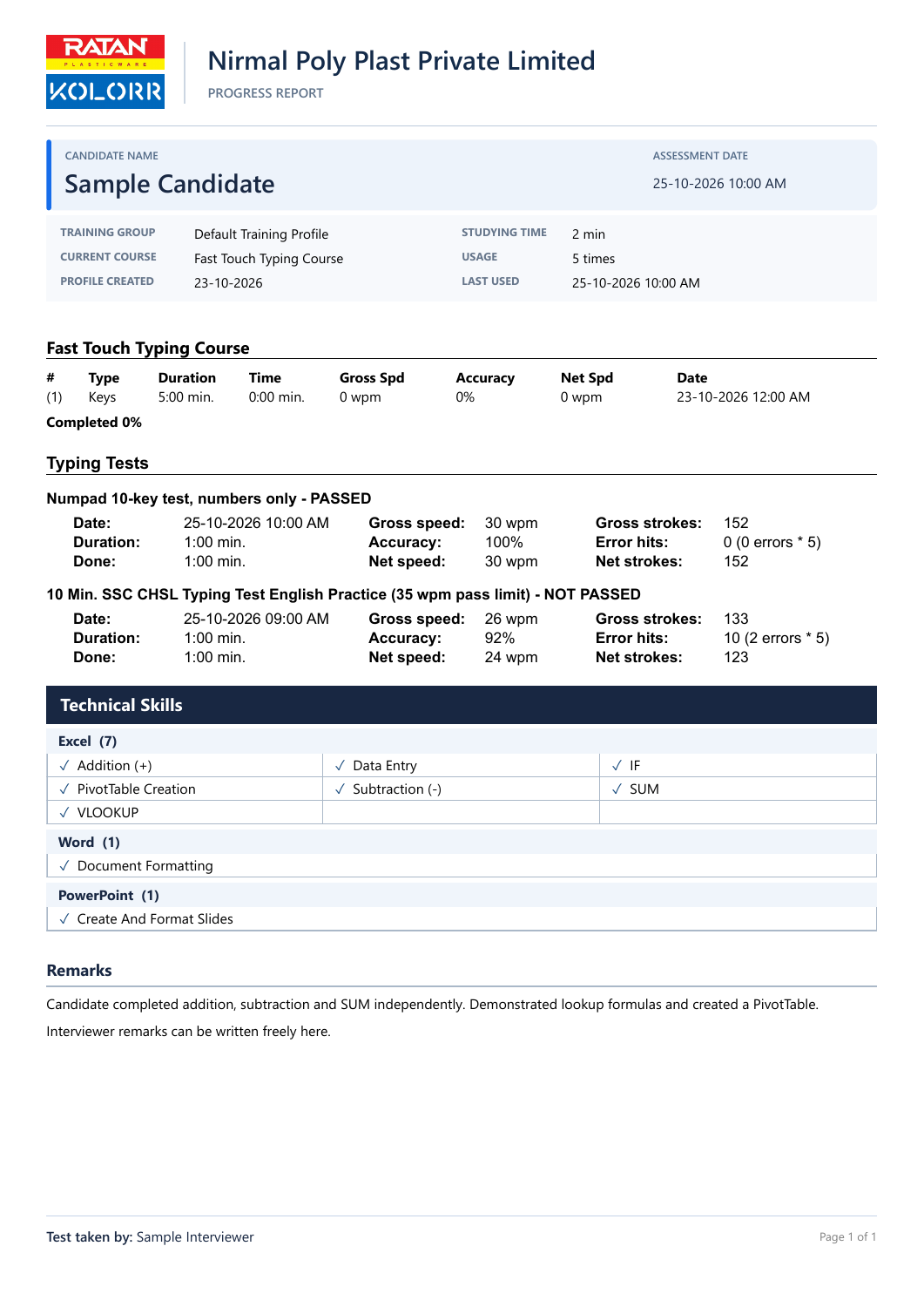
- Approved progress-report layout: aligned company masthead and divider, candidate identity panel, compact training information and original typing-result metrics.
- Three-column application skills, full-width single-skill rows, compact continuation headers, remarks after all skills and examiner details on every page.
- Selectable PDF text, embedded fonts and clearer borders/ticks for black-and-white printing.
- Clearer application rendering, explicit window/taskbar/shortcut icons, developer credit and build information.
- Branded installer pages, Getting Started information and GitHub project/release links.
- Optional daily update checks with SHA-256-verified installer downloads. Download and installation start only when the user chooses them. Profiles are saved before an update.
- Updated documentation, screenshots and demonstration PDF reports.
Downloads
| File | Purpose |
|---|---|
TypeMaster-Native-1.11.9-Setup.exe |
Install for the current Windows account |
TypeMaster-Native-1.11.9-win-x64.zip |
Extract completely and run native-win-x64-1.11.9/TypeMaster.exe without installation |
TypeMaster-Artwork-1.11.9.zip |
Individual original artwork and logo files, with editable SVG sources |
SHA256SUMS.txt |
SHA-256 hashes for these downloads |
Windows 10/11 x64. The .NET runtime is included. The installer is unsigned and Windows may display a publisher warning.
Updating from 1.10.2: download and run the new installer manually; the earlier release does not contain the new update checker. Portable users should extract the new ZIP into a separate folder and keep its files together. Close TypeMaster and the Typing Meter before replacing files. Candidate profiles are stored separately; use Profile Backup & Restore before upgrading.
Validation
568 native application checks passed, plus five PDF extraction/selection checks and short/long four-attempt report pagination checks. Installer compilation passed; a full manual installation/upgrade was not exercised in this validation run.
Office skills are examiner-entered observations; TypeMaster does not automatically execute or grade Excel, Word or PowerPoint tasks.
Source and documentation · Screenshot gallery · Sample progress PDF
TypeMaster v1.10.2 — First GitHub Release
TypeMaster v1.10.2
First GitHub release of TypeMaster, a native Windows application for typing practice and interview candidate assessments.
Highlights
- Timed text and number tests with saved speed, accuracy and error details.
- Lessons, custom key review, statistics, six games and optional Typing Meter.
- Searchable skills checklist with 521 Excel function names, practical skills and custom entries.
- Skills grouped by application, free-form examiner remarks and Test taken by.
- Compact progress reports with configurable company name and logos.
- Selectable-text PDF results, certificates, examination sheets and complete progress reports.
- Profile backup/restore and recovery support.
- Native window controls and display-layout refinements.
- Removed legacy license-key controls and license-status labels.
Download
| Asset | Instructions |
|---|---|
TypeMaster-Native-1.10.2-Setup.exe |
Run to install for the current Windows account |
TypeMaster-Native-1.10.2-win-x64.zip |
Extract completely and run native-win-x64-1.10.2/TypeMaster.exe |
SHA256SUMS.txt |
Check installer and ZIP integrity |
Windows 10/11 x64. The .NET runtime is bundled. The installer is unsigned. Close TypeMaster and exit the Typing Meter tray icon before upgrading. Portable mode still stores profiles in the current Windows account's local app-data folder.
Assessment workflow
Create/select a profile → Take the typing test → Open Statistics / Progress Report → Skills & Remarks → Apply → Preview / export PDF.
Office skills are examiner-entered observations; this release does not automatically grade Excel, Word or PowerPoint tasks.
Verification
341 native application checks passed. Five demonstration PDF reports passed extraction and viewer word-selection hit-area checks. Actual application screenshots and sample PDFs are included in the repository.
Documentation and attribution
User guide · Screenshot gallery · Build guide
Original TypeMaster source is MIT licensed; supplied assets retain their respective ownership as documented in THIRD_PARTY_NOTICES.md.
Yatesh Rohit · Nirmal Poly Plast Private Limited