Repository navigation
Releases
camber 0.3.2

88fa7f3  yuvrajangadsingh
Yuvraj Angad Singh
Windows and Linux get their menus.
- The window on Windows and Linux has no menu bar, so File, Tab and Help were out of
reach there: Import Arc File, the Chrome Web Store, making camber the default browser,
and the routing, unload and archive options. On Linux that meant no practical way to
import from Arc. A ≡ button at the top left of the sidebar now opens them.
Known gaps: nothing is signed; no Widevine; 1Password doesn't work yet; no Windows
arm64 build, no sync, Boosts or Live Folders.
camber 0.3.1
696c706
yuvrajangadsingh
Yuvraj Angad Singh
camber says it's a beta, and reporting a bug takes one click.
- A card in the sidebar on first launch (and once after this update) says camber is
in beta and links to the bug form. Feedback in the sidebar, and Help > Report a
Bug on macOS, open GitHub's issue form in your browser with camber's version and
your OS filled in. GitHub gets those two when the page opens; nothing is posted
until you submit. Ideas are welcome there too. - Homebrew on macOS:
brew install yuvrajangadsingh/tap/camber. The cask clears the
quarantine flag, so the app opens without the unsigned-app prompt. - Releases are now built, checked and drafted by CI from a tag, the Apple Silicon DMG
included, so fixes can ship sooner. From the next release on, Windows updates
download only the parts that changed.
Known gaps: nothing is signed; no Widevine; 1Password doesn't work yet; no Windows
arm64 build, no sync, Boosts or Live Folders.
camber 0.3.0

6d0e2a5
yuvrajangadsingh
Yuvraj Angad Singh
The third build of camber, the open-source browser with Arc's sidebar, spaces, pinned tabs and command bar, for macOS, Windows and Linux. No AI features. Electron 45.2.1 (still not a Chromium fork).
This release is about memory and updates.
New since 0.2.0
- Idle tabs give their memory back. A tab you haven't looked at for an hour unloads but stays in the sidebar, and clicking it loads it again (Tab > Unload After: 30m, 1h, 3h, Off). The tab on screen, both halves of a split, tabs playing sound and tabs with a picture-in-picture video stay loaded. Form input on an unloaded page is lost, like a reload.
- The numbers. 23 loaded tabs (electronjs.org docs, GitHub, Wikipedia and MDN across three spaces) took 4.9 GB; after the unload, 0.85 GB. That is the summed RSS of every camber process, measured from source in demo mode on an M5 Air. Electron is not lighter than Arc's native shell; this is what the sidebar costs with its tabs asleep.
- Fairer clocks. A tab's archive and unload timers start when it leaves the screen, so reading one page for two hours doesn't make it look idle. A today tab playing sound is never archived.
- Updates on Windows and Linux. On Windows and the AppImage, camber downloads a newer release in the background and offers Restart in the sidebar. It never restarts by itself. macOS and the .deb keep the note that links to the release page. This is the first release that carries the files the updater reads, so you'll see it working from the next release on.
- The update note in the sidebar only opens this repo's release pages.
Import from Arc is unchanged: spaces, profiles, favorites, pinned tabs, folders and today tabs come over; importing again replaces instead of duplicating.
Downloads and what was tested
| File | Platform | Tested |
|---|---|---|
| camber-0.3.0-arm64.dmg | macOS, Apple Silicon | launched from the DMG on my Mac (started, imported the sample Arc file, showed its spaces); in the same build, with 6 pages open, a forced unload dropped 5 and kept the one on screen |
| camber-0.3.0-x64.dmg | macOS, Intel | built and launched in CI on GitHub's macos-15-intel runner |
| camber-0.3.0-x64.exe | Windows, x64 | installed silently in CI, then the installed app was launched |
| camber-0.3.0-amd64.deb | Linux, x64 | installed and launched in CI (Ubuntu, virtual display) |
| camber-0.3.0-arm64.deb | Linux, arm64 | installed and launched in CI (Ubuntu, virtual display) |
| camber-0.3.0-x86_64.AppImage | Linux, x64 | launched in CI (virtual display) |
| camber-0.3.0-arm64.AppImage | Linux, arm64 | built, not run |
"Launched" means the app started, imported a sample Arc file and showed its spaces, favorites and folders. Tab unload was checked in the Apple Silicon build only. The updater has not installed a real update anywhere yet, since this is the first release that carries its files.
Check downloads against SHA256SUMS.txt.
Nothing is signed yet
- macOS: ad-hoc signed, not notarized, so the first open is refused. Try to open it once, then System Settings > Privacy & Security > Open Anyway. Or
xattr -dr com.apple.quarantine /Applications/camber.app. - Windows: SmartScreen warns about an unknown publisher. More info, then Run anyway.
- Linux:
sudo apt install ./camber-0.3.0-amd64.deb, orchmod +xthe AppImage and run it. If it complains about FUSE, run it with--appimage-extract-and-run.
Known gaps
- A site that has never asked reads its camera, microphone and notification permission as "granted" instead of "prompt" until it actually asks; the prompt still shows on first use.
- No Widevine, so Netflix, Prime Video, Disney+ and Spotify web do not play.
- 1Password doesn't work yet. Bitwarden installs and opens; autofill with a logged-in vault is untested.
- A muted video popped out of an embedded player isn't noticed, so its tab can unload.
- No Windows arm64 build, no sync, no Boosts, no Live Folders.
camber 0.2.0
4228522
yuvrajangadsingh
Yuvraj Angad Singh
The second build of camber, the open-source browser with Arc's sidebar, spaces, pinned tabs and command bar, for macOS, Windows and Linux. No AI features. Still Electron 45 (Chromium 156), still not a Chromium fork.
This release is the Arc features people said they would miss most, plus the tab hygiene that makes the sidebar livable.
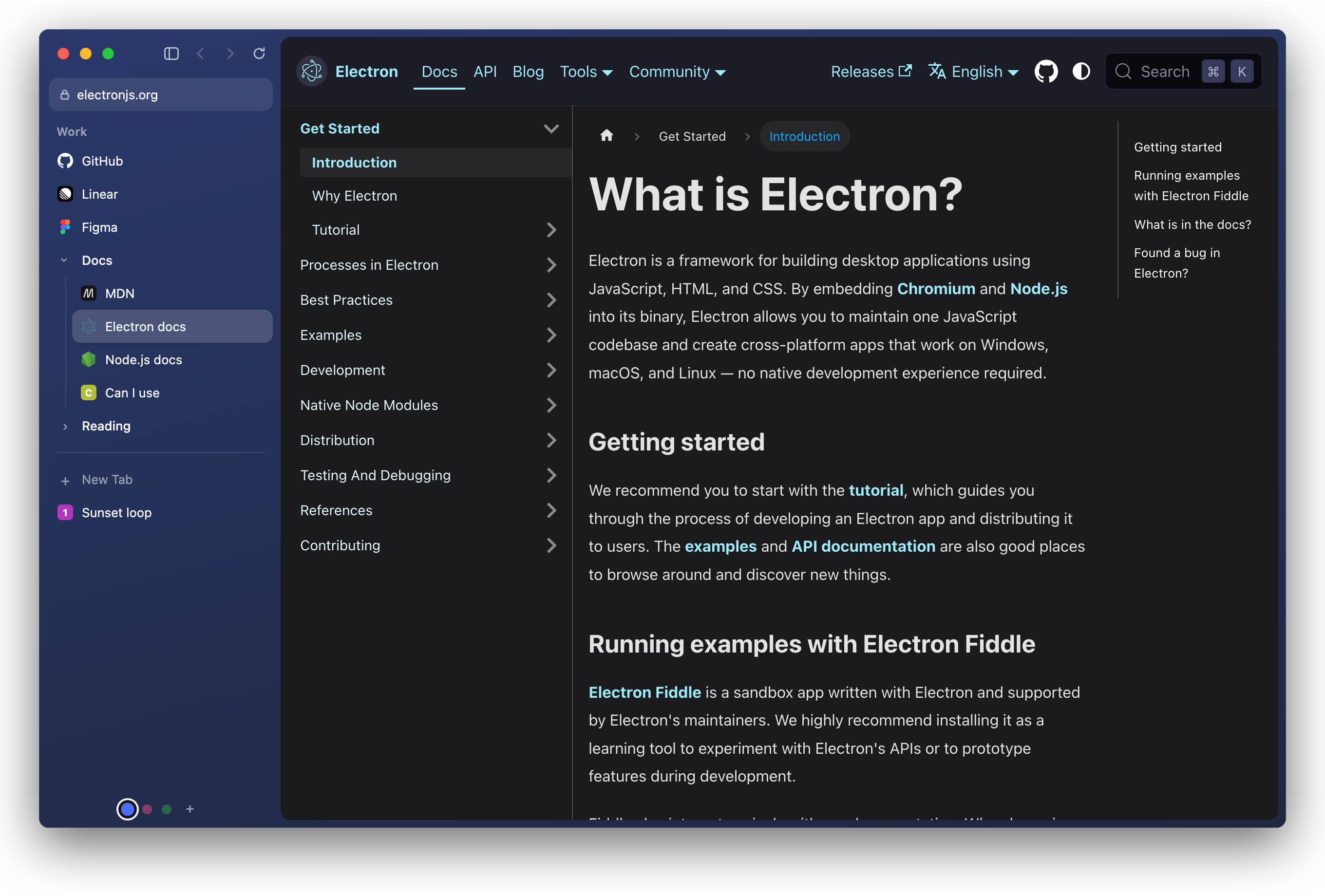
New since 0.1.0
- Little window. Links from other apps open in a small window over whatever you are doing (Cmd+Shift+N opens one too). Open in camber (Cmd+O) moves the page into the current space.
- Default browser. File > Make camber the Default Browser. On Linux,
xdg-settings set default-web-browser camber.desktopif it doesn't stick. - Air Traffic Control. Tab > Always Open Links to This Site in This Space, and links to that site and its subdomains from other apps land in that space. Rules survive a re-import from Arc.
- Split view. Tab > Split with… (or type "split" in the command bar) puts two tabs of the space side by side. Cmd+Shift+\ closes it.
- Peek. Shift+click a favorite, or Cmd+Shift+click a pinned tab, to look at it over the page. Esc or a click outside closes it, Open as tab keeps it.
- Auto picture-in-picture. A playing video pops out when you leave its tab and goes back when you return (Tab > Pop out video when leaving a tab).
- Per-site permissions. Sites ask before they get the camera, microphone, location, notifications and the rest. One dialog per question, answered once per site, on the window that asked.
- Tab hygiene. Drag to reorder (drop among the pinned ones to pin), hover close button, closing a tab returns you to the one you came from, unpinned tabs unused for 12 hours are closed (Tab > Archive After: 12h, 24h, Off), double-click a space to rename it.
- Tighter loading. Tabs only load web and extension pages. A page, a favorite, a redirect or an extension cannot point a tab at a local file.
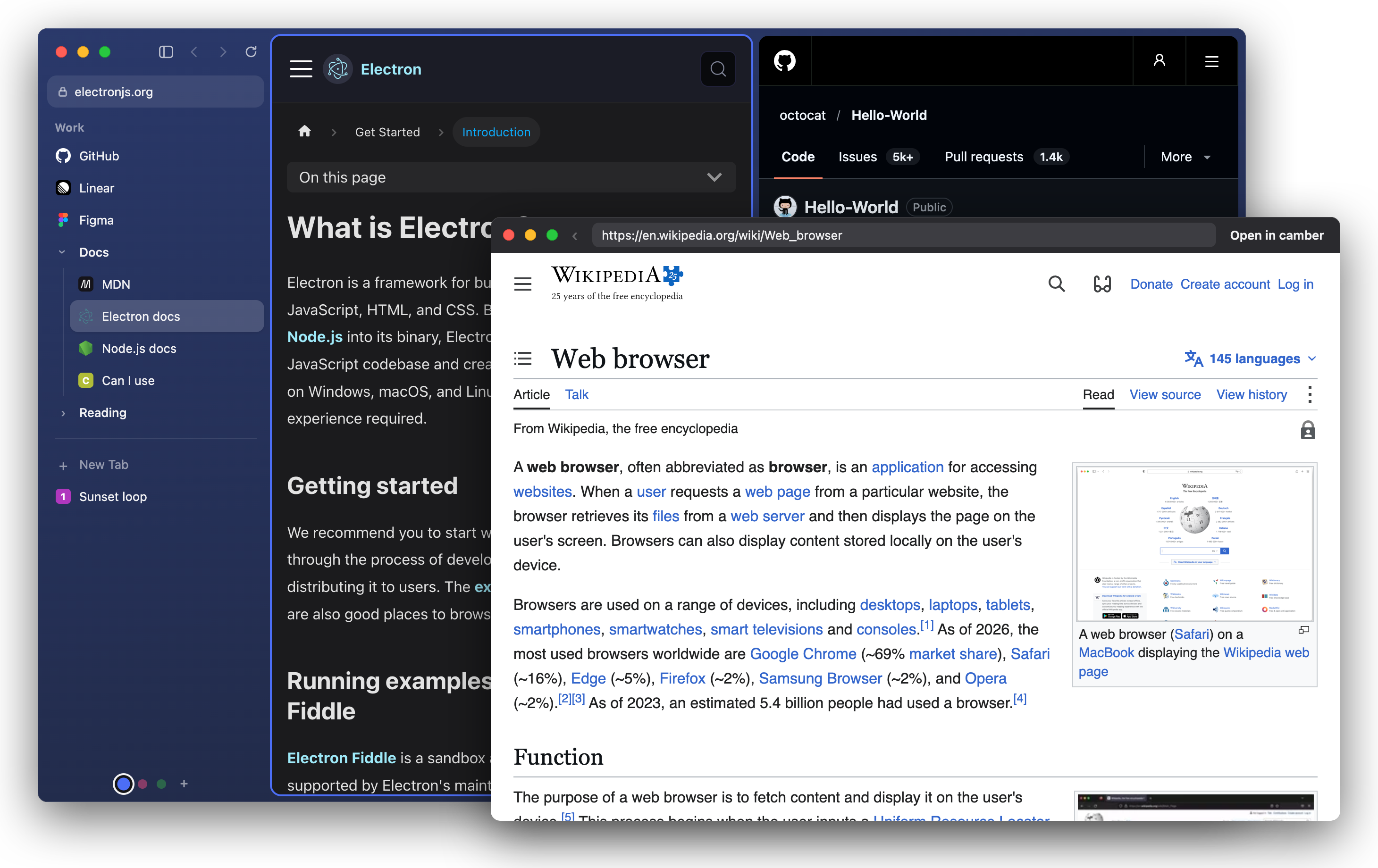
More pictures and a 30 second demo are in the README.
Import from Arc is unchanged: spaces, profiles, favorites, pinned tabs, folders and today tabs come over; importing again replaces instead of duplicating.
Downloads and what was tested
| File | Platform | Tested |
|---|---|---|
| camber-0.2.0-arm64.dmg | macOS, Apple Silicon | launched from the DMG on my Mac (started, imported the sample Arc file, showed its spaces); the same commit was run from source there and driven through split, Peek, little window, PiP, routing and the permission prompts |
| camber-0.2.0-x64.dmg | macOS, Intel | built and launched in CI on GitHub's macos-15-intel runner |
| camber-0.2.0-x64.exe | Windows, x64 | installed silently in CI, then the installed app was launched |
| camber-0.2.0-amd64.deb | Linux, x64 | installed and launched in CI (Ubuntu, virtual display) |
| camber-0.2.0-arm64.deb | Linux, arm64 | installed and launched in CI (Ubuntu, virtual display) |
| camber-0.2.0-x86_64.AppImage | Linux, x64 | launched in CI (virtual display) |
| camber-0.2.0-arm64.AppImage | Linux, arm64 | built, not run |
"Launched" means the app started, imported a sample Arc file and showed its spaces, favorites and folders. Nobody has used this build day to day on Windows or Linux yet, and the new features were exercised by driving the app, not by a week of real use.
Check downloads against SHA256SUMS.txt.
Nothing is signed yet
- macOS: ad-hoc signed, not notarized, so the first open is refused. Try to open it once, then System Settings > Privacy & Security > Open Anyway. Or
xattr -dr com.apple.quarantine /Applications/camber.app. - Windows: SmartScreen warns about an unknown publisher. More info, then Run anyway.
- Linux:
sudo apt install ./camber-0.2.0-amd64.deb, orchmod +xthe AppImage and run it. If it complains about FUSE, run it with--appimage-extract-and-run.
Known gaps
- A site that has never asked reads its camera, microphone and notification permission as "granted" instead of "prompt" until it actually asks; the prompt still shows on first use. Electron's permission check can only answer yes or no, and "no" would stop sites that check before asking from ever asking.
- No Widevine, so Netflix, Prime Video, Disney+ and Spotify web do not play.
- 1Password doesn't work yet. Bitwarden installs and opens; autofill with a logged-in vault is untested.
- No auto-update (camber shows a note in the sidebar when a newer release exists), no Windows arm64 build, no sync, no Boosts, no Live Folders.
camber 0.1.0
3524d20
yuvrajangadsingh
Yuvraj Angad Singh
First build of camber: an open-source browser with Arc's sidebar, spaces, pinned tabs and command bar, for macOS, Windows and Linux. No AI features.
It runs on Electron 45 (Chromium 156), so pages behave like they do in Chrome. It is not a Chromium fork.
Coming from Arc
File > Import from Arc reads Arc's sidebar file on macOS and Windows. On Linux, or for a file copied from another machine, use File > Import Arc File….
What comes over:
- spaces with their names and colors
- Arc's profiles: spaces that shared a profile in Arc share logins here too
- favorites, per profile
- pinned tabs with the names you gave them
- folders, nested as deep as you had them
- unpinned (today) tabs
Importing again replaces the earlier import instead of adding copies. Not imported: history, passwords, bookmarks, extensions, Boosts, Easels. Split views and tab groups become plain tabs. You'll sign in to sites again.
On Windows it looks where existing Arc export tools find the file; I haven't tried it on a real Windows Arc install yet.
Downloads and what was tested
| File | Platform | Tested |
|---|---|---|
| camber-0.1.0-arm64.dmg | macOS, Apple Silicon | launched from the DMG on my Mac, Arc import checked |
| camber-0.1.0-x64.dmg | macOS, Intel | built and launched in CI on GitHub's macos-15-intel runner |
| camber-0.1.0-x64.exe | Windows, x64 | installed silently in CI, then the installed app was launched |
| camber-0.1.0-amd64.deb | Linux, x64 | installed and launched in CI (Ubuntu, virtual display) |
| camber-0.1.0-arm64.deb | Linux, arm64 | installed and launched in CI (Ubuntu, virtual display) |
| camber-0.1.0-x86_64.AppImage | Linux, x64 | launched in CI (virtual display, sandbox on) |
| camber-0.1.0-arm64.AppImage | Linux, arm64 | built, not run yet |
"Launched" means the app started, imported a sample Arc file and showed its spaces, favorites and folders in the sidebar. The CI runs never saw SmartScreen or Gatekeeper prompts, and nobody has used this build day to day on Windows or Linux yet.
Check downloads against SHA256SUMS.txt.
Nothing is signed yet
- macOS: the app is ad-hoc signed only, not notarized, so the first open is refused. Right click camber.app, choose Open, then Open again. On macOS 15 and later that no longer works: try to open it once, then go to System Settings > Privacy & Security and click Open Anyway. Or run
xattr -dr com.apple.quarantine /Applications/camber.app. - Windows: SmartScreen warns about an unknown publisher. Click More info, then Run anyway.
- Linux:
sudo apt install ./camber-0.1.0-amd64.deb, orchmod +xthe AppImage and run it. If it complains about FUSE, run it with--appimage-extract-and-run.
Known gaps
- Extensions install from the Chrome Web Store. Bitwarden installs and its popup opens; autofill with a logged-in vault hasn't been tested. 1Password doesn't work yet.
- No auto-update. camber checks GitHub for a newer release and shows a note in the sidebar; you download it yourself.
- No Windows arm64 build.
- No sync, split view, Little Arc, Boosts or Live Folders.