Repository navigation
Kindle Scribe tap safe insets
Measured OS-band / EasyReach floors for linked PDFs (Send-to-Kindle Print Replica) on Kindle Scribe (1st gen), plus how Amazon Write-on sample chrome sits against those floors.
Canonical issue ledgers (stay open for probes / still-open work):
Device on parch: kindle-scribe (alias scribe) — 1860×2480 @ 300 ppi → 157.48 × 209.97 mm. Shipped bottom_clearance = 10.0 (#334). writing_clearance = 4 is the ink inset, not a tap floor. Default top_clearance preference is 0 (optional/off); do not invent left_clearance from thin-sliver misses alone.
Hit boxes must sit at least this far from the glass edge they are closest to:
| edge | keep the hit this far in | notes |
|---|---|---|
| top | 10 mm | live after 10 mm |
| bottom | 10 mm | below 10 miss; 10–20 solid |
| left | 8 mm only if the box is fat (~24×14) | thin slivers lose to EasyReach |
| right | 8 mm — same as left | EasyReach: ≤~20 mm from left turns prev; 24–32 mm turns next |
Measured 2026-09-12, portrait, Display Size Standard, finger (not pen). USB sideload and Display Size Large were not locked. Amazon publishes no official tap-safe inset for linked PDFs / Write-on / Print Replica.
Year at x=0 on the 8 mm-tall bottom strip HIT because the slot is wide — side chrome needs area, not only inset.
Method: measure chrome on Write-on TIFFs → fit into 1860×2480 keep-aspect → mm @ 300 ppi from screen/glass (includes letterbox). This pass does not retune device clearances.
| A — Project Planner | B — Daily + months + Home | |
|---|---|---|
| TIFF | 1486×1920 | 720×1024 |
| Fit | width-fit → ~3.3 mm letterbox top/bottom | height-fit → ~4.9 mm letterbox left/right |
| Controls | Back / Content / Next (top) | Month strip, Home, day column, bottom gap |

| Control | Size (mm) | From glass L / T / R | vs #557 |
|---|---|---|---|
| Back | 25.6×9.0 | 4.8 / 7.9 / 127 | top SHORT ~2 mm; left SHORT ~3 mm; height below “fat” 14 mm |
| Content | 17.3×13.7 | 70 / 3.2 / 70 | top SHORT ~7 mm |
| Next | 25.6×9.0 | 127 / 7.9 / 5.2 | top SHORT ~2 mm; right SHORT ~3 mm |
Takeaway: Write-on A top chrome sits inside the dead bands. Letterbox (~3 mm) does not rescue it.
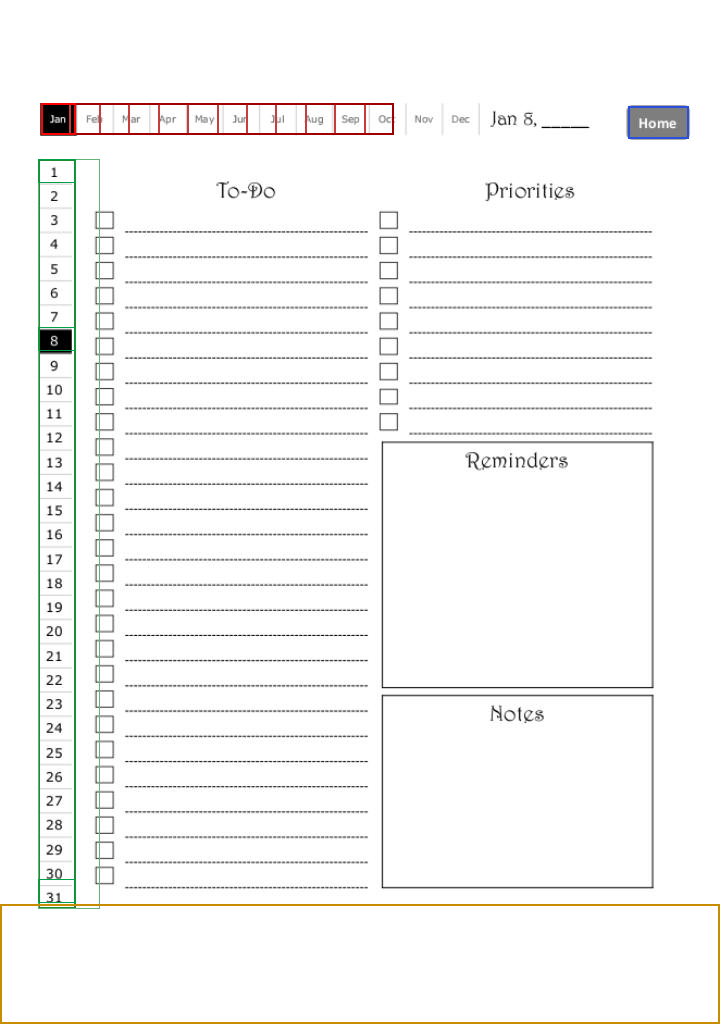


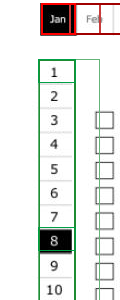

| Control | Size (mm) | From glass L / T / R / B | vs #557 |
|---|---|---|---|
| Month strip | ~72×6.4 | 13.3 / 21.1 / 72 / 183 | insets ≥10/8 on paper; thin horizontal band |
| Home | 12.3×6.6 | 134 / 21.7 / 11.5 / 182 | R/T clear 8/10; not fat (~12×7 vs 24×14) |
| Day column | 7.6×~154 | 12.7 / 33 / 137 / 23.8 | L/B clear; thin vertical sliver |
Takeaway: B mostly clears 10/8 mm insets numerically, but month/day taps are far from fat 24×14, so EasyReach still applies on the left rail. Bottom gap (~24 mm) is layout margin, not a reason to shrink bottom_clearance.
- Do not copy Write-on A’s flush top Back/Content/Next seating without lifting hits out of the 10 mm top (and side) bands.
- Side chrome needs area, not only inset — same as #557.
- Shipped
bottom_clearance = 10.0stays the bottom floor. - Header chip/meta in y 0–9 mm still open on #557; prefer not seating links there.
- Header chip/meta lift/drop after a header tap
- Display Size Large / USB viewer unmeasured
- Probe PDFs: prefer issue attachments /
archive/park before Actions artifact expiry (see #557)
- Issues: #557, #558
- Annotated crops branch:
archive/scribe-writeon-tap-558(copies also underimages/on this wiki) - Bottom clearance PR: #334