Repository navigation
Releases
Releases · zh54321/VNetAtlas
V20261026

V20261026
This release adds a Network Ranges page that lists every public IP address, connected
range and subnet in use, with the free space in each VNet. -ExportRangesPath writes the
same tables as CSV, ready to use as a scan scope. The network overview has a new layout
built around hubs. It also shows Virtual WAN hubs and VNet-to-VNet VPNs, and arrowheads
mark the directions traffic may flow. On VNet pages, resources reached through a private
endpoint now show an icon for their service type.
Added
- Network Ranges page. A new second page, linked from the overview, that lists the
address ranges actually in use:- Public IP addresses: public IP resources and prefixes, secured-hub firewall
addresses, and Virtual WAN VPN gateway addresses. Each row shows what the address is
attached to and the VNet it belongs to. - Connected ranges: local network gateway prefixes, VPN sites, VPN client pools
(both classic gateway and Virtual WAN point-to-site), Virtual Hub prefixes, and peered
VNets that have no page in the diagram. - Subnets: grouped by VNet and sorted by address. Each subnet shows its usable
address count (the 5 addresses Azure reserves are left out), its occupancy, NSG, route
table and delegation. Each VNet shows how much of its address space its subnets cover. - In a filtered run, only resources drawn on the selected VNet pages are listed.
- Public IP addresses: public IP resources and prefixes, secured-hub firewall
-ExportRangesPathwrites the Network Ranges tables as CSV, one row per prefix or
address, so the file can be used as a scan scope.- Virtual WAN on the overview. Virtual WAN hubs get cards of their own, naming their
WAN, with a line to every connected VNet. VNet-to-VNet VPNs are drawn as lines labelled
VPN. - Traffic directions. Arrowheads on peerings show the directions each side allows
traffic to flow. VPN, ExpressRoute and hub connections carry both arrowheads when
established, are red when not, and have none when Azure reports no state. - Subnet peerings are recognised: labelled on the overview, and marked on the peered
VNet and in the header of each subnet they connect. Peerings whose address spaces are not
in sync are flagged. - Overview counts. The header totals subscriptions, VNets, subnets, peerings and
regions; each subscription and each VNet card shows its own counts, and hovering a card
lists its peerings. - Connected VNets outside the overview. VNets outside the export or left out by a
filter get a section at the bottom with what their connections reveal, and a line to the
VNet they connect to. - Virtual WAN VPN on VNet pages. VPN gateways, point-to-site gateways and VPN sites are
drawn behind their hub. Behind one gateway, more than 5 sites are drawn as a single
summary node that lists them on hover. ExpressRoute circuits are drawn behind the hub's
ExpressRoute gateway. - Data collection time. Exported JSON now records
collectedAt. The overview header
and every VNet page show it, including diagrams rebuilt later with-InputDataPath. - New switches:
-SkipNetworkRangesleaves out the Network Ranges page; the CSV export still works.-SkipUnmappedResourcesleaves out the Unmapped Resources page.-SkipCreditleaves out the new "Created with VNetAtlas" line in the overview legend.
- Peering details on remote VNet nodes: state, the directions traffic may flow, the
peering name, and this side's settings (forwarded traffic, gateway transit, use of
remote gateways). - Route table cards spell out tables with one or two routes. The next hop is named
where it is a firewall, appliance or load balancer. The tooltip lists up to 25 routes and
the BGP propagation setting. - Firewall DNAT rules name the resource behind each translated address (VM, private
endpoint, load balancer, application gateway or firewall) and link to its VNet page. An
address held by more than one resource is not attributed. - Private endpoints are drawn together with their NIC. Target nodes show the resource
group and subscription, and use an icon for their service type. About 50 service types
are now recognised. - NSG and route table pages group their associations by VNet, and each group links back
to the VNet page.
Changed
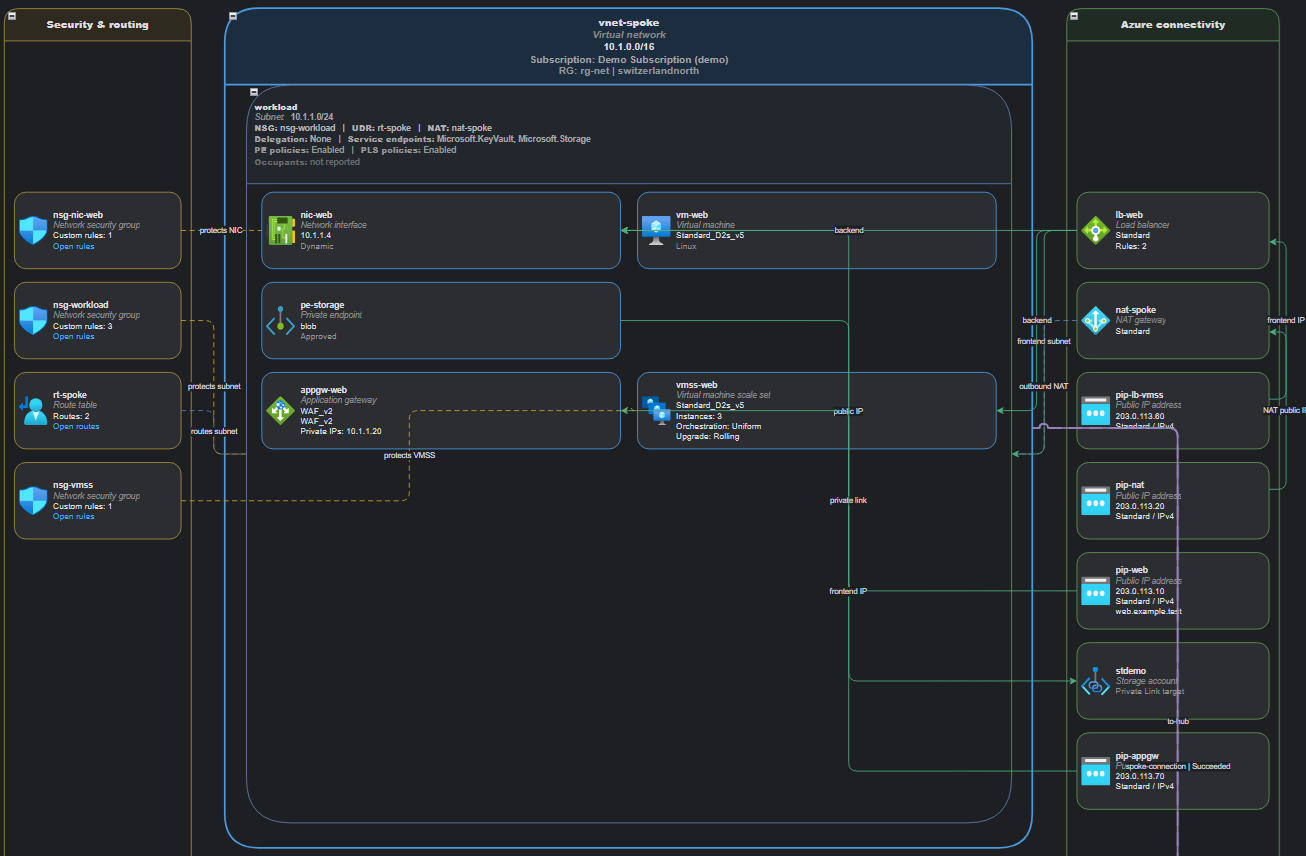
- New overview layout. Subscriptions with a hub come first, hubs sit in an inner column
with their VNets around them, and lines run through the gaps between cards instead of
across them. A hub with many lines sends them along one shared trunk. The overview is
wider (1630 px) and its cards narrower. - On the overview, a connected peering carries no label; labels mark only exceptions such
as subnet peerings and peerings that are not connected or not in sync. - Page sizes now fit the content exactly. Small pages are no longer padded to a minimum of
850×1100, which affects printing and PDF export. - The background grid is now off on all generated pages.
- On VNet pages, the "Remote & hybrid" lane is now "Peerings & gateway connections".
- On VNet pages, peering and hub connections no longer carry connector labels. The peering
or connection name is shown on the remote VNet or hub node instead. - On VNet pages, cards beside the VNet are placed next to the resource they link to, such
as a private endpoint's target or a NIC's public IP. Remote resources fill free space
beside the VNet before spilling below it, and the connectors to them share a route.
Fixed
- Virtual WAN hub connections were never found, because Resource Graph does not return
them. They are now read with one read-only Azure Resource Manager request per hub. - An expired or MFA-blocked Azure sign-in no longer looks like a tenant with no
subscriptions. The script signs in again once, and if that also fails, it stops with instructions. - A VNet without subnets no longer shows an empty subnet.
- Delegated subnets that report no resources now show "service-managed (delegated)" instead
of "none", which wrongly suggested the subnet was unused. - Azure icons keep their proportions instead of being stretched into squares.
V20261002
V20260930
Firewall policy pages
- Every firewall policy attached to an Azure Firewall now gets its own page.
- Rules are listed in the order Azure Firewall evaluates them: DNAT, then network, then application rules.
- Rules inherited from a parent policy are shown on the child policy's page, ahead of its own rules.
- The page header shows tier, threat intelligence mode, DNS settings, IDPS and TLS inspection. Application rules show whether TLS inspection is on.
- Long address, FQDN and port lists are shortened with a
(+N more)hint; hover to see the full list. -SkipFirewallRulesskips reading firewall policy rules and omits the policy pages.
VNet pages
- Azure Firewall, Application Gateway, VNet gateways and Bastion are now drawn inside the subnet they are deployed in, instead of the connectivity lane.
- Azure Firewall shapes show more detail: policy, availability zones, state, management subnet, and all public IPs.
- Firewalls in a secured Virtual WAN hub are drawn next to their hub.
Fixes
- A firewall's IP configuration no longer appears as a separate shape without an icon in
AzureFirewallSubnet. - Resources detected only from a subnet reference now have an icon.
Full Changelog: V20260929...V20260930
V20260929
V20260929
- Switched to date-based version numbers (
VYYYYMMDD) - Rewrote the README
- Improved the sample data: a more complete demo hub VNet, and all sample NSGs now
include Azure's default rules
Full Changelog: V20260914...V20260929