Repository navigation
Releases: zildjiean/Vulnerabilty-Rapid-Scanner
Release list
v2.1.1 — Container images on GHCR and Docker Hub

Added
- Published container image on GitHub Container Registry:
ghcr.io/zildjiean/vulnerabilty-rapid-scanner
(linux/amd64 + linux/arm64, tagslatest,X.Y,X.Y.Z) with an SBOM and signed build provenance, built by the
new Release image workflow on every version tag. The same image is also on Docker Hub as
zildjiean/vulnerability-rapid-scanner.
Changed
docker-compose.ymlnow runs the published image (ZDRS_VERSIONpins a version,ZDRS_IMAGEpicks Docker Hub); building from source uses the
newdocker-compose.build.ymloverride.
No application changes since 2.1.0.
Install without cloning
mkdir zdrs && cd zdrs
curl -fsSLO https://raw.githubusercontent.com/zildjiean/Vulnerabilty-Rapid-Scanner/master/docker-compose.yml
docker compose up -d| Registry | Image |
|---|---|
| GitHub Container Registry | ghcr.io/zildjiean/vulnerabilty-rapid-scanner:2.1.1 |
| Docker Hub | zildjiean/vulnerability-rapid-scanner:2.1.1 |
linux/amd64 and linux/arm64. Verify provenance: gh attestation verify oci://ghcr.io/zildjiean/vulnerabilty-rapid-scanner:2.1.1 --owner zildjiean
Upgrading an install that was built from source
The new docker-compose.yml pulls the published image; your scanner-data volume is kept:
git pull
docker compose pull && docker compose up -d
To keep building from source: docker compose -f docker-compose.yml -f docker-compose.build.yml up -d --build.
Full changelog: v2.1.0...v2.1.1
v2.1.0 — Guided tours
Added
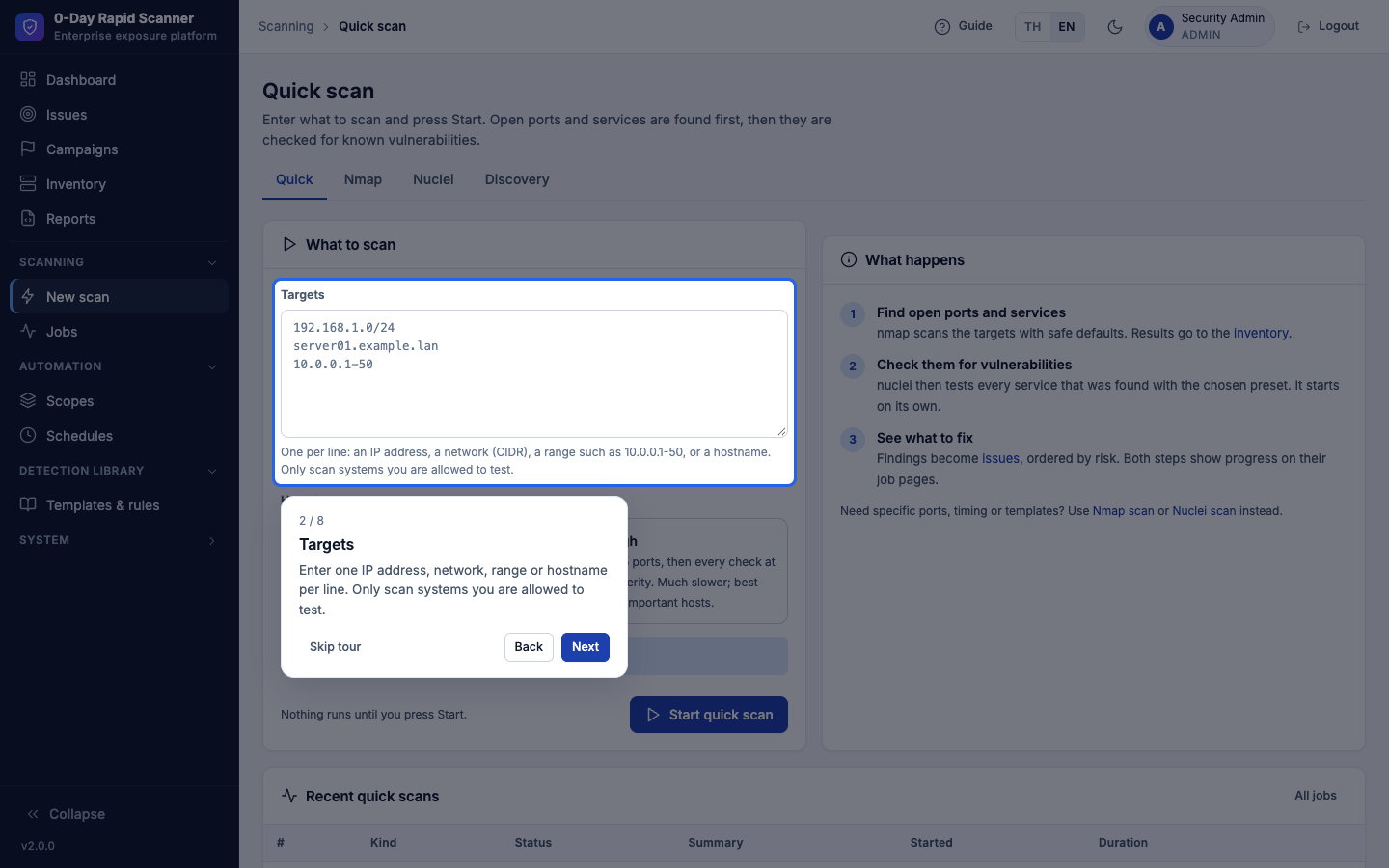
- Guided tours. A Guide button in the top bar starts short spotlight walkthroughs that dim the page,
highlight one menu item or control at a time and explain it in the user's language (English or Thai). Four tours:
Get to know the menus (everyone), Run your first scan (scan.run), Handle an issue (issues.manage) and
Set up for your team (only the admin pages the user may open). Tours cross pages, continue after a reload,
and skip steps whose control is not on the page. - Tours only point: they never click, fill or submit anything, and the page underneath is inert while a tour is open.
Keyboard (Esc, ←/→, Tab stays in the tour), screen-reader announcements, reduced motion, light/dark, and a bottom
sheet on phones. - A one-time "New here? Take a 1-minute tour" card on the Dashboard; the Profile page lists the tours with Start
links and Reset tours. Progress is stored per user (users.tours_done,users.tour_prompt_dismissed_at).
Upgrade
git pull
docker compose build && docker compose up -d
curl http://localhost:8000/healthz   # {"status":"ok","version":"2.1.0"}
Two columns are added to users automatically on start. No API or data changes.
Full changelog: v2.0.0...v2.1.0
v2.0.0 — Thai user interface
Added
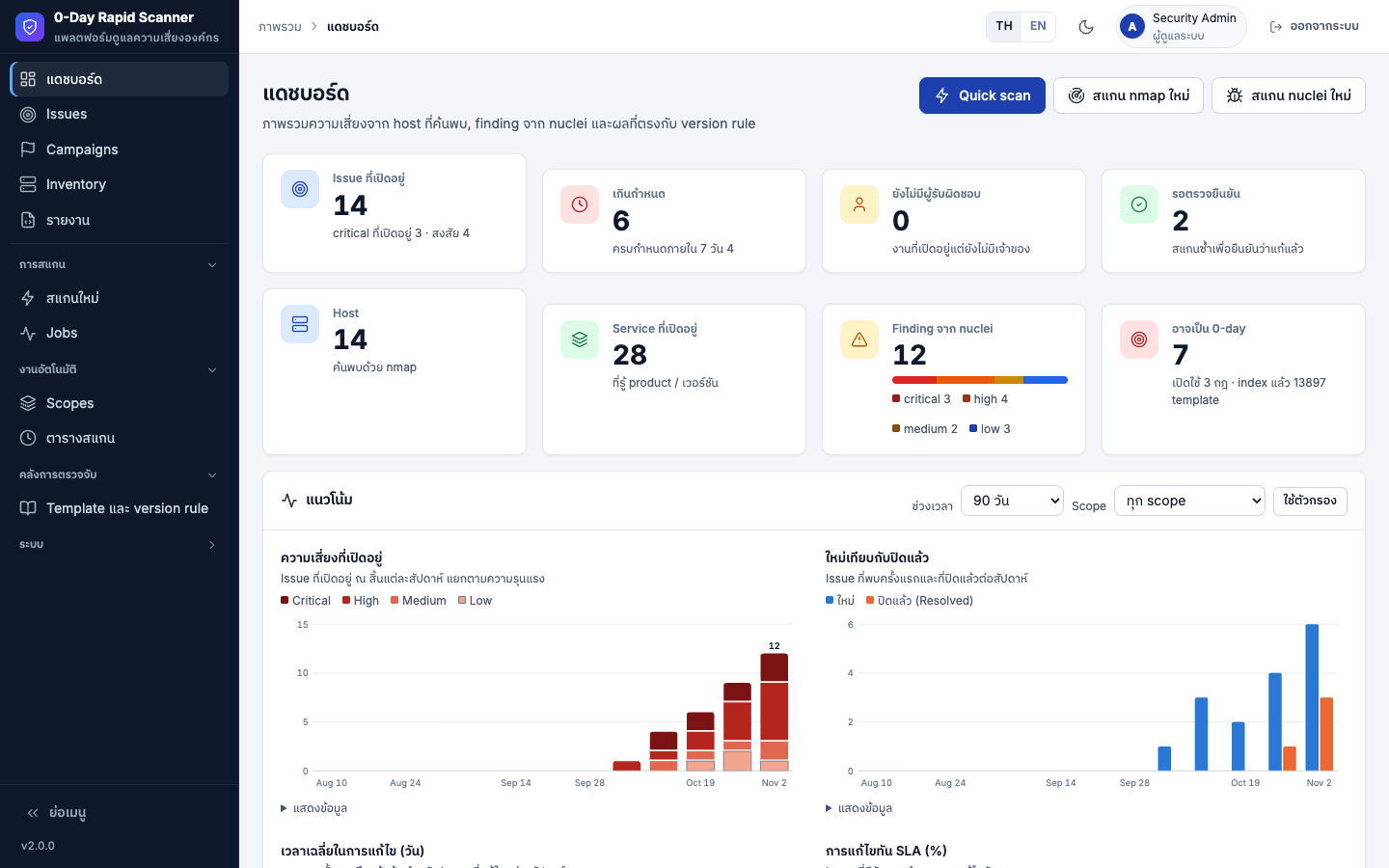
- Thai user interface. Each user chooses ไทย / English with the switch in the top bar or on the Profile page
(users.language, default English); the sign-in page follows the browser'sAccept-Language. Every page, tab,
button, form, help text, confirm dialog, flash and validation message, chart label and the in-browser reports
are translated (about 1,700 strings). Technical terms stay in English inside Thai sentences, as in the Thai guide. - Bundled IBM Plex Sans Thai (SIL OFL 1.1) for Thai text only; no external font requests.
Changed
- Breadcrumbs on the System pages read "System" (was "Administration"); the error page shows the role label.
- Scanner and intel data, AI output, the REST API, CSV / JSON exports, notifications, tickets and the audit log stay
English whatever the user's language.
Version 2.0.0 marks the end of the usability round (1.9.0 Quick scan, 1.10.0 navigation, 2.0.0 Thai UI). There are
no breaking changes to the API or stored data.
Upgrading
docker exec zero-day-rapid-scanner python -c "import sqlite3; s=sqlite3.connect('/data/scanner.db'); d=sqlite3.connect('/data/scanner.db.bak'); s.backup(d)"
git fetch --tags && git checkout v2.0.0
docker compose build && docker compose up -d
curl http://localhost:8000/healthz   # {"status":"ok","version":"2.0.0"}
New columns are added automatically on startup; data in /data is kept. Users start in English; switch with TH in the top bar.
Use this tool only against systems you own or are authorized to test.
Full changelog: CHANGELOG.md · v1.10.0...v2.0.0
v1.10.0
Changed
- Shorter sidebar with page tabs: Issues | Raw findings, Campaigns | 0-day watch, Inventory | Changes |
Discovered, New scan (Quick | Nmap | Nuclei | Discovery), and Templates & rules (Templates | Version rules);
Scopes and Schedules move to a new Automation group. The main section goes from 15 to 10 items. Every page
and URL is unchanged; breadcrumbs follow the new grouping. - Sidebar by role: viewers see Dashboard, Issues, Campaigns, Inventory and Reports; New scan needs
scan.run;
System items need their permission (Updates now needssystem.update). Profile → Show all menu items shows
every page the user may open. Menus are a convenience only; every page still checks permissions. - Issue page Next step: one primary button for the current status (Triage, Start work, Mark fixed, Verify now,
Reopen), plus Assign to me and False positive…; the status form, owner, severity, tickets, AI and verification
template move under More actions (open automatically after an error or a new AI result). Read-only users see
tickets and AI results as before. - The closed lifecycle status is now displayed as Resolved (was "Fix verified"). The stored and API value is
stillverified.
Fixed
- Verify now is no longer offered while an automatic re-verification of the same issue is running.
Upgrading
docker exec zero-day-rapid-scanner python -c "import sqlite3; s=sqlite3.connect('/data/scanner.db'); d=sqlite3.connect('/data/scanner.db.bak'); s.backup(d)"
git fetch --tags && git checkout v1.10.0
docker compose build && docker compose up -d
curl http://localhost:8000/healthz   # {"status":"ok","version":"1.10.0"}
New columns are added automatically on startup; data in /data is kept. All old page URLs still work.
Use this tool only against systems you own or are authorized to test.
Full changelog: CHANGELOG.md · v1.9.0...v1.10.0
v1.9.0
Added
- Quick scan (Scanning → Quick scan, Dashboard button,
scan.run): enter targets and press Start. Step 1 runs
nmap (Standard: top 1,000 ports; Thorough: all ports); when it finishes, step 2 starts nuclei by itself on the
services found inside those targets (Recommended or Full preset). Both job pages show "Quick scan · step N of 2"
and link to each other. No services → step 2 is skipped with a note (no alert); cancelling step 1 stops the chain.
Audited asscan.quick; APIPOST /api/v1/scans/quick. - Nuclei presets: Recommended (default; all templates, critical/high/medium), Critical CVEs only, Full and
Custom. The previous options moved under Advanced options; editing one selects Custom (also without
JavaScript). Nuclei schedules can use a preset; existing schedules keep running as before. - Get started checklist on the Dashboard: five steps that tick themselves off from real data, shown only for
steps the user may act on; Dismiss, and Show Get started again on the Profile page. - The nmap page keeps scan type, timing and skip-ping under Advanced options.
Fixed
- Discovery and 0-day watch notifications could be lost with "database is locked" when another job wrote to the
database at the same moment (a savepoint opened after a commit started a deferred SQLite transaction). This was
also the cause of an occasional test failure. - A nuclei job whose start failed (for example, the target list could not be written) no longer stays queued; it
is marked failed, and Verify now shows an error instead of a server error.
Upgrading
docker exec zero-day-rapid-scanner python -c "import sqlite3; s=sqlite3.connect('/data/scanner.db'); d=sqlite3.connect('/data/scanner.db.bak'); s.backup(d)"
git fetch --tags && git checkout v1.9.0
docker compose build && docker compose up -d
curl http://localhost:8000/healthz   # {"status":"ok","version":"1.9.0"}
New columns are added automatically on startup; data in /data is kept.
Use this tool only against systems you own or are authorized to test.
Full changelog: CHANGELOG.md · v1.8.0...v1.9.0
v1.8.0
Added
- External asset discovery (Scanning → Discovery,
scan.run): enter up to 20 root domains; subfinder
finds their subdomains from passive sources, then (optional, on by default) httpx probes which of them answer
over HTTP(S) and records IPs, status, title, web server and technologies. The probe runs as a chained
discovery_probejob (at most 5,000 hosts, ignored hosts skipped). - Discovered assets table: filters for root domain, text, web / no web, active / ignored and new in 7 days;
Scan with nmap / Scan with nuclei pre-fill the scan form with the selection (probed URL for nuclei when
known); Ignore / Unignore (issues.manage, audited). - New Changes kind New subdomain (medium), counted as Added in trends; one
surface.changednotification per
discovery job. The first job that covers a root domain is a baseline and is not notified. - Schedules: new External discovery type (root domains and the probe option).
- Settings → Discovery sources (admin): optional API keys for SecurityTrails, Shodan, Censys, VirusTotal,
Chaos, GitHub, BinaryEdge and FOFA, encrypted at rest and never shown again. They are written to a temporary
0600 provider file for the job only and removed when it ends. - Updates: Update subfinder and Update httpx.
- API:
GET /api/v1/discovered,POST /api/v1/scans/discovery. - Image: subfinder 2.17.0 and httpx 1.12.0 in
/opt/pd(SUBFINDER_BIN,HTTPX_BIN).
Upgrading
# back up the database (consistent copy, includes the WAL)
docker exec zero-day-rapid-scanner python -c "import sqlite3; s=sqlite3.connect('/data/scanner.db'); d=sqlite3.connect('/data/scanner.db.bak'); s.backup(d)"
git fetch --tags && git checkout v1.8.0
docker compose build && docker compose up -d
curl http://localhost:8000/healthz   # {"status":"ok","version":"1.8.0"}
New tables and columns are added automatically on startup; data in /data is kept.
Use this tool only against systems you own or are authorized to test.
Full changelog: CHANGELOG.md · v1.7.0...v1.8.0
v1.7.0
Added
- Trends on the Dashboard: five charts computed from issue history, so past data shows at once:
Open exposure (open issues at the end of each period, stacked by severity), New vs resolved,
Mean time to remediate (days), SLA compliance (%) and Surface changes (added vs other). Period 30 days
(daily), 90 days, 6 or 12 months (weekly) and a scope filter (trend_days,trend_scope). - Charts are server-rendered SVG (no external library, works offline) with light and dark colours checked for
colour-blind separation and contrast, a tooltip, one keyboard stop per chart (arrow keys, Home / End move
between periods), screen-reader labels and a Show data table that also prints. - The Executive report shows charts 1–4 for its period in place of the weekly trend table.
GET /api/v1/trends?days=&scope=(404 for an unknown scope).
Known limitations
- A reopened issue counts by its current state for its whole history.
Upgrading
# back up the database (consistent copy, includes the WAL)
docker exec zero-day-rapid-scanner python -c "import sqlite3; s=sqlite3.connect('/data/scanner.db'); d=sqlite3.connect('/data/scanner.db.bak'); s.backup(d)"
git fetch --tags && git checkout v1.7.0
docker compose build && docker compose up -d
curl http://localhost:8000/healthz   # {"status":"ok","version":"1.7.0"}
New tables and columns are added automatically on startup; data in /data is kept.
Use this tool only against systems you own or are authorized to test.
Full changelog: CHANGELOG.md · v1.6.0...v1.7.0
v1.6.0
Added
- Attack-surface change detection: every nmap scan is compared with the inventory as it was before the scan and
records New host (one row listing its open ports), Port opened, Port closed, Version changed (product or
version) and Not responding (a known host inside the scan's targets, not excluded, that was not up; the host is
kept and not reported again until it is seen again). Duplicate<host>blocks for one address are merged. - Changes page (core menu, after Inventory): filters for type, scope, period (default 30 days), job and state
(open / all), 50 per page; Acknowledge one change or Acknowledge all matching the filters (only changes
shown when the page was rendered;issues.manage, auditsurface.ack). - Nmap job pages show Changes from this scan; the Dashboard shows Surface changes (7 days).
- Notification event
surface.changed: one summary per scan (medium for new hosts / opened ports, else low). The
first scan of an empty inventory is recorded as a baseline and not notified. GET /api/v1/changes(days,kind,job,state,limitup to 500).
Fixed
- A scan of only some ports (custom or top ports) no longer deletes the host's other ports from the inventory. The
scanned ports are read from nmap'sscaninfo, and only those can be counted as closed. - A service whose version detection returns nothing on a rescan keeps its previous product and version.
Upgrading
# back up the database (consistent copy, includes the WAL)
docker exec zero-day-rapid-scanner python -c "import sqlite3; s=sqlite3.connect('/data/scanner.db'); d=sqlite3.connect('/data/scanner.db.bak'); s.backup(d)"
git fetch --tags && git checkout v1.6.0
docker compose build && docker compose up -d
curl http://localhost:8000/healthz   # {"status":"ok","version":"1.6.0"}
New tables and columns are added automatically on startup; data in /data is kept.
Use this tool only against systems you own or are authorized to test.
Full changelog: CHANGELOG.md · v1.5.0...v1.6.0
v1.5.0
Added
- Bulk verify: Verify selected on the Issues list (with
scan.run,POST /issues/bulk-verify, audit
issue.bulk_verify) and Verify all with proof on active campaigns (POST /campaigns/{id}/verify-issues, audit
campaign.verify_issues) verify many issues at once: one nuclei job per template, run against each issue's asset
(targets deduplicated), at most 200 issues per request. The flash says how many jobs and issues started and how
many were skipped and why (no template, template not indexed, already running, over limit). Each issue's result
(reproduced / not reproduced / inconclusive, Verified confidence and proof) only counts the finding linked to that
issue, or for info templates a finding from the issue's own scan target. - Evidence report per issue (
/reports/issues/{id}, Print proof button on the issue page): severity, risk
score with breakdown, confidence, asset / scope / owner / status / due, campaigns, CVE intel (CVSS, EPSS, KEV), the
last 15 timeline events and the full proof of the finding that verified it (else the newest finding). - Campaign and scope reports end with an Evidence appendix for verified issues (request / response cut at 2,000
characters with a link to the issue report, curl); the Include proof checkbox (?proof=0) leaves it out. - The issue page and the evidence report show at most 200,000 characters of a request / response ("… N more
characters not shown").
Upgrading
# back up the database (consistent copy, includes the WAL)
docker exec zero-day-rapid-scanner python -c "import sqlite3; s=sqlite3.connect('/data/scanner.db'); d=sqlite3.connect('/data/scanner.db.bak'); s.backup(d)"
git fetch --tags && git checkout v1.5.0
docker compose build && docker compose up -d
curl http://localhost:8000/healthz   # {"status":"ok","version":"1.5.0"}
New tables and columns are added automatically on startup; data in /data is kept.
Use this tool only against systems you own or are authorized to test.
Full changelog: CHANGELOG.md · v1.4.0...v1.5.0
v1.4.0
Added
- 0-day watch: every hour (first run 3 minutes after start) the scanner reads CVEs published or changed in NVD
since its last check (CVE API 2.0lastModwindow read in one-day sub-windows of 500 results, 60 s timeout,
checkpointed after each sub-window, 30 minutes of overlap) and new CISA KEV entries (one day of overlap; KEV CVEs
not already read from NVD are looked up one by one, at most 5 per run), keeps those at or above the minimum CVSS
(default 7.0) or known exploited, and matches their vulnerable CPE ranges against the inventory: nmap application
CPE, an alias table of common nmap product names (whole words only) and name similarity; OS CPEs count only when
the version is known and in range. A match is confirmed when the service version is inside the range and
possible when it cannot be checked. - All NVD requests (0-day watch and threat intel refresh) share one process-wide limiter: at least 6 s apart.
- Only CVEs published in the last 30 days or known exploited are drafted (older CVEs that NVD reports as modified
stay as hits), at most 20 drafts per run (setting Drafts per run; known exploited and highest CVSS first; the
run summary notes how many more were not drafted). Hits held back by the limit are drafted by later runs in the
same order, and each eligible hit on the watch page has a Draft now button (campaign managers). - Version strings that cannot be read reliably (
9.4.z-SNAPSHOT,2.x,2.0 or later, distro suffixes after a
dash) count as unknown: the match is possible, never dropped. - For each new hit a draft campaign is prepared: intel from NVD / KEV, up to 5 version rules (created
disabled), matching nuclei templates, and acampaign.draftnotification. The draft page shows the matched
assets with quality badges; Activate enables the rules, opens suspected issues and sendscampaign.created;
Dismiss turns it down for good (it can be reopened as a draft). Matched assets without a readable version
are flagged on the draft (version rules cannot cover them) and get a suspected issue on Activate. A CVE that already has a campaign, in any
status, is never drafted again. - Templates are attached automatically to draft and active campaigns that have none, after every watch run and
every template re-index (for example after a nuclei-templates update). - 0-day watch page (sidebar, after Campaigns): last run, settings (enabled, minimum CVSS, always include KEV,
include possible matches; administrators), Check now (campaign managers) and the 100 most recent hits with
CVSS, KEV, EPSS, matched assets and their campaign. - Campaigns list gains a Draft tab with a count; the dashboard shows Drafts waiting when there are any;
the APIGET /campaignsacceptsstatus=draft|dismissed.
Changed
- Draft and dismissed campaigns never produce issues: their rules are skipped by rule evaluation even when enabled,
verification is refused until the campaign is activated, and they are not counted as active anywhere.
The issue page does not list them; the Version rules page marks their rules waiting for activation, and
editing such a rule returns to its campaign.
Upgrading
# back up the database (consistent copy, includes the WAL)
docker exec zero-day-rapid-scanner python -c "import sqlite3; s=sqlite3.connect('/data/scanner.db'); d=sqlite3.connect('/data/scanner.db.bak'); s.backup(d)"
git fetch --tags && git checkout v1.4.0
docker compose build && docker compose up -d
curl http://localhost:8000/healthz   # {"status":"ok","version":"1.4.0"}
New tables and columns are added automatically on startup; data in /data is kept.
Use this tool only against systems you own or are authorized to test.
Full changelog: CHANGELOG.md · v1.3.0...v1.4.0