Repository navigation
QwenPad 2.0.0: local image generation + editing

QwenPad 2.0.0 — local image generation
Added
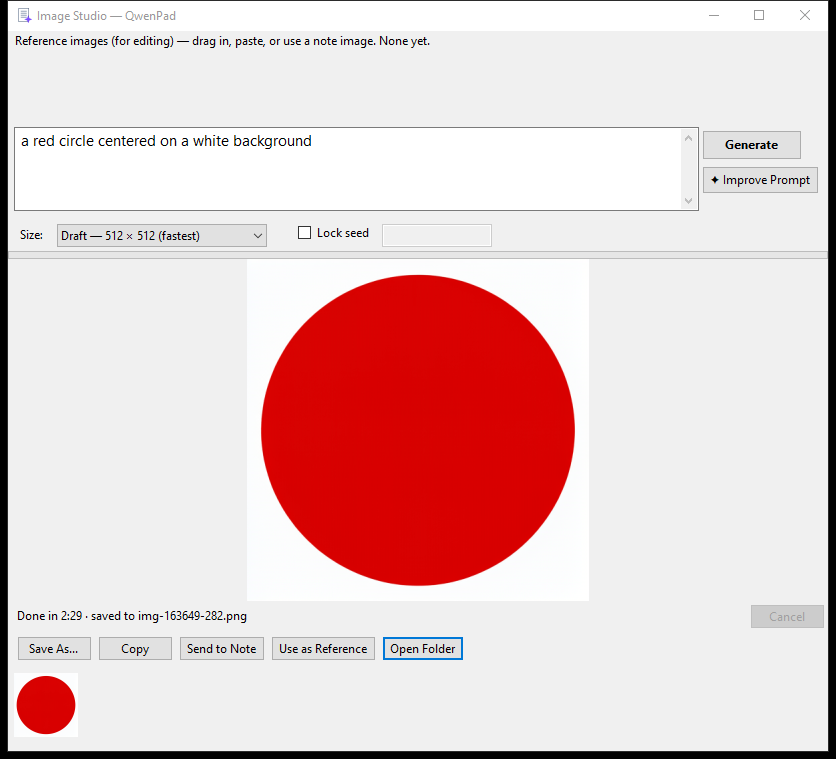
- Local image generation and editing (Qwen > Image Studio, Ctrl+Shift+J). Create images from a text prompt, or edit images you drag in, paste, or pick from a note, using Qwen-Image-2.1 running on your own PC through stable-diffusion.cpp. Nothing is uploaded.
- Live step previews, a progress bar and elapsed time while it works; Cancel any time.
- Up to 10 reference images for editing; the prompt becomes an edit instruction when references are present.
- ✦ Improve Prompt expands a short idea into a detailed prompt with the text model.
- Also reachable from a note's ⋯ > 🖼 Generate Image, a note image's right-click ✦ Edit with Qwen, and the editor's 🖼 Generate Image from Selection.
- Results are saved to
images\<date>\with their prompt; Save As, Copy, Send to Note, Use as Reference, and a history strip.
- Automatic GPU sharing. Since the text and image models don't both fit on a typical GPU, starting an image pauses the text model and loads the image model; after a few idle minutes it unloads and the text model returns. The status bar shows which is loaded.
- Qwen > Image Model menu: download the image model, stop the image engine, show its log. The image model (~11 GB) is fetched from Hugging Face on first use.
Notes
- The default image setup uses an uncensored text encoder (refusal behavior removed); a standard encoder is also offered. The only prompts refused are ones that sexualize minors.
- The Qwen-Image-2.1 weights are under the Qwen Research License: research and evaluation use only. Commercial use requires a separate license from Alibaba. QwenPad downloads the weights at your request; it does not redistribute them.
- Bundles stable-diffusion.cpp (
runtime\sd, MIT), which reuses the CUDA runtime already shipped inruntime\llama.
The image model (~11 GB) downloads on first use of the Image Studio. On a 4 GB GPU, expect a few minutes per image; a stronger GPU is much faster. Download QwenPad-v2.0.0-win-x64.zip, extract, and run QwenPad.exe.