Repository navigation
Releases
SIT 0.2.3

SIT 0.2.3 makes editing feel immersive, fixes Git sign-in over SSH, and adds a first-run guide.
What's new
- Immersive editing: IDEA-style editor tabs per worktree (drag to reorder, middle-click to close,
Alt+←/→,Ctrl+F4), restored after a restart. No more Save / Reload buttons: edits are saved automatically, and files changed on disk reload in place with your cursor and undo kept.Ctrl+F/⌘Ffinds in the open file. The toolbar can be folded away (Ctrl+Shift+F12), and sidebar groups can be dragged into any order. - Git over SSH signs in like your terminal: push / pull / fetch / clone now use the SSH agent your shell sets up (1Password, Secretive, gpg-agent,
ssh-agentin your rc files), on this computer and on servers. A new Settings → Git authentication category shows the agent, keys and ssh command for this computer or any saved server, lets you pick a key file, trust new hosts on first connection, and test a connection. When a push is refused, the error says what to do. - First-run guide: a short welcome card (appearance, where your repositories live, server monitor), a five-stop tour of the layout with its shortcuts, and one-time tips the first time you open SFTP, the Board, the monitor or the editor. Restart it any time from Settings → General → Onboarding. Existing installs don't see it unless they ask.
Fixes
- The TypeScript / JavaScript language server starts again after a one-click install (TypeScript 7 dropped
tsserver, so the install now pins TypeScript 6). Every install is now checked by starting the server once, and a server that won't start can be reinstalled from its status chip or Settings → Language servers. - Installing a language server no longer looks like it does nothing: the dialog shows each step, a progress bar and elapsed time.
- Opening a file no longer flashes uncoloured text.
Download
| Platform | File |
|---|---|
| Windows 10/11 | SIT-0.2.3-windows-amd64-setup.exe, or the portable .zip |
| macOS, Apple silicon | SIT-0.2.3-darwin-arm64.dmg |
| macOS, Intel | SIT-0.2.3-darwin-amd64.dmg |
The sit-agent-* packages are for remote machines. SIT downloads them on its own when it needs to, so you don't have to.
The builds aren't code-signed yet. On Windows, choose More info → Run anyway. On macOS, see How to open SIT.txt in the dmg. Checksums are in SHA256SUMS.
SIT 0.2.2
SIT 0.2.2 brings language servers to the file editor, with IntelliJ IDEA-style navigation and colours.
What's new
- Language servers in the editor: hover, completion, signature help, diagnostics (problem count in the status bar), rename, formatting, code actions and inlay hints for Go, TypeScript/JavaScript, Python, Rust, C/C++, Shell, YAML, JSON, CSS and HTML. Servers run on the machine the code lives on, so remote repositories work the same. A missing server can be installed in one click (SIT can also fetch Go, Node.js or rustup for you, after you agree). Manage them in Settings → Language servers.
- IDEA-style navigation:
Ctrl+B/Ctrl+click(⌘B/⌘+clickon macOS) to the declaration, or the usages when you're on it. Also implementations, the usages popup (Ctrl+Alt+F7), the Find tool window (Alt+F7), Quick Definition, File Structure (Ctrl+F12), doubleShiftSearch Everywhere, back/forward and IDEA's editor menu. Without a server, SIT's own symbol index still finds declarations and file structure. - IDEA colours: the default style now uses IntelliJ IDEA's code palette (Dark and Light). Function names, fields and the like are coloured by role from the language server.
- Blame and history of a selection: in the editor, right-click → Git for blame (your lines picked out), the history of the selected lines, or the file's history. In a diff, right-click lines → Blame Selected Lines.
- FILES tree menu: new file/folder, rename, cut / copy / paste, delete, copy path, reveal in the file manager. The open file follows worktree switches, and diffs open straight on the first change.
- Files now open editable by default (read mode is one click away).
Download
| Platform | File |
|---|---|
| Windows 10/11 | SIT-0.2.2-windows-amd64-setup.exe, or the portable .zip |
| macOS, Apple silicon | SIT-0.2.2-darwin-arm64.dmg |
| macOS, Intel | SIT-0.2.2-darwin-amd64.dmg |
The sit-agent-* packages are for remote machines. SIT downloads them on its own when it needs to, so you don't have to.
The builds aren't code-signed yet. On Windows, choose More info → Run anyway. On macOS, see How to open SIT.txt in the dmg. Checksums are in SHA256SUMS.
SIT 0.2.1
SIT 0.2.1 adds Find in Files and a reworked file history view.
What's new
- Find in Files (
Ctrl+Shift+F,⌘⇧Fon macOS, or the search button on the FILES header). Search the whole worktree, one directory or only your changed files, with match case, whole words and regex (Alt+C/Alt+W/Alt+X). Results and the code preview are syntax-coloured, andEnteropens the file at that line. Files ignored by.gitignoreare skipped, and the search runs where the repository lives, so it works the same on remote machines. - File masks with suggestions: type masks such as
*.ts, !*.test.ts, or pick from the repository's file types, most common first. - File history, reworked: the diff now sits on top at full width with the commit list below. It offers the same Hunk / Inline / Split modes as the staging diff, shows the whole file in Inline and Split, and is syntax-coloured. Drag the divider to resize the list.
- Cleaner graph: a repository with a single worktree no longer marks its HEAD node with the worktree icon.
- Releases are now published to this public repository, so SIT can download agents for remote machines without signing in.
Download
| Platform | File |
|---|---|
| Windows 10/11 | SIT-0.2.1-windows-amd64-setup.exe, or the portable .zip |
| macOS, Apple silicon | SIT-0.2.1-darwin-arm64.dmg |
| macOS, Intel | SIT-0.2.1-darwin-amd64.dmg |
The sit-agent-* packages are for remote machines. SIT downloads them on its own when it needs to, so you don't have to.
The builds aren't code-signed yet. On Windows, choose More info → Run anyway. On macOS, see How to open SIT.txt in the dmg. Checksums are in SHA256SUMS.
SIT 0.2.0
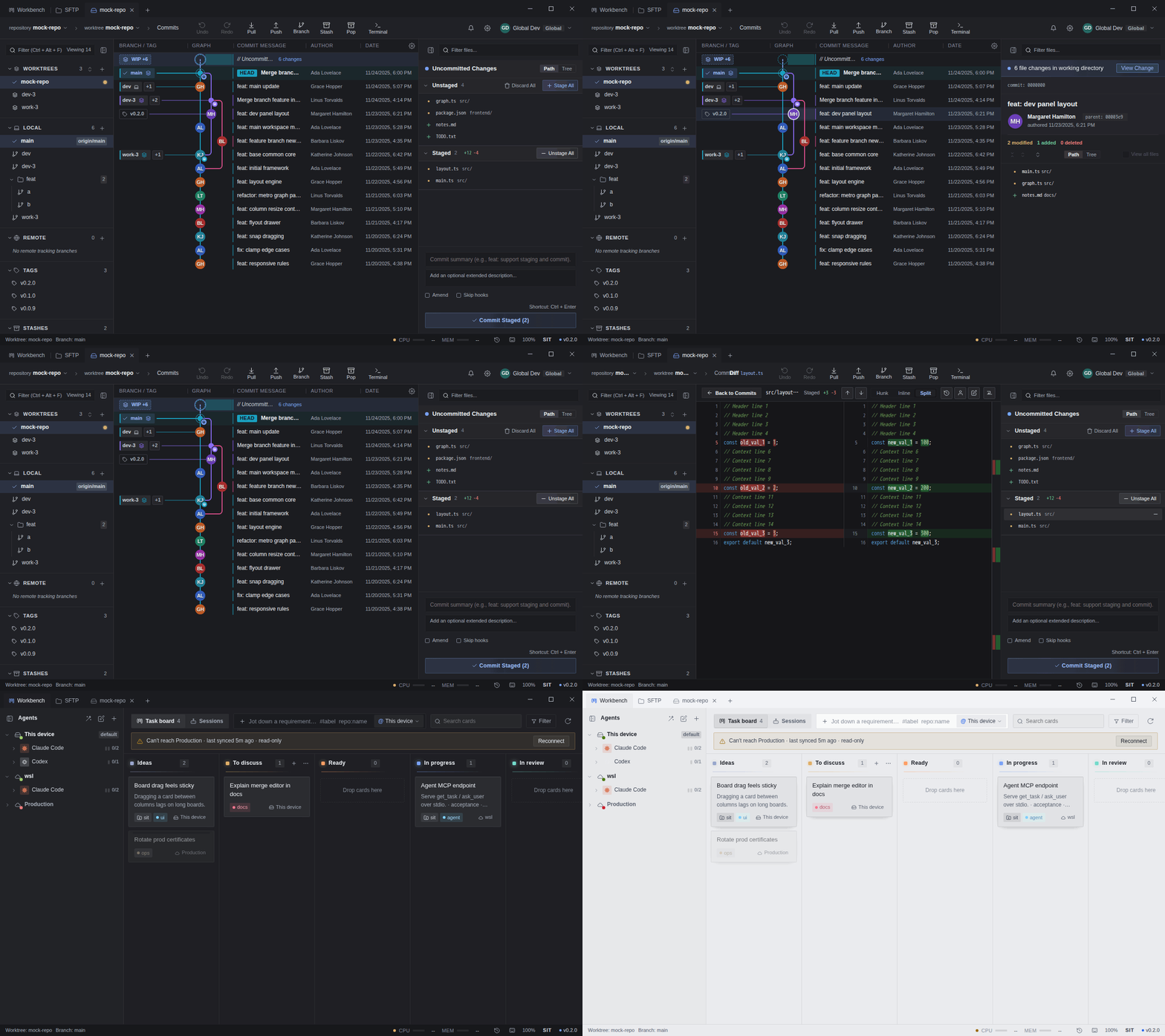
SIT is a Git workstation built around worktrees and remote machines. Open a repository on your laptop or on a server over SSH and get the same graph, the same staging area and the same terminal.
What it does
- Worktree first: worktrees at the top of the sidebar, a double-click to switch, every worktree's HEAD marked on the graph.
- Remote native: open a repository where it lives. SIT connects over SSH, places a small agent in
~/.sitwithout root and runs git on that machine. Nothing to clone or sync. - Everyday Git: a fast metro-style commit graph for repositories of any size, staging by file, hunk or line, a three-way merge editor, file history, blame and line history.
- Terminal: a terminal per worktree, backed by tmux, so sessions survive disconnects and restarts. Split panes, notifications, and pasting screenshots.
- Task board for coding agents: turn requirement cards into prompts and dispatch them to Claude Code or Codex, each in its own worktree. Agents report back through MCP.
- Server monitor and SFTP: live and historical CPU, memory, disk and process stats, and drag-and-drop file transfer between machines.
- Light and dark themes. Six languages: English, 简体中文, 繁體中文, 日本語, Français, Español.
Download
| Platform | File |
|---|---|
| Windows 10/11 | SIT-0.2.0-windows-amd64-setup.exe, or the portable .zip |
| macOS, Apple silicon | SIT-0.2.0-darwin-arm64.dmg |
| macOS, Intel | SIT-0.2.0-darwin-amd64.dmg |
The sit-agent-* packages are for remote machines. SIT downloads them on its own when it needs to, so you don't have to.
The builds aren't code-signed yet. On Windows, choose More info → Run anyway. On macOS, see How to open SIT.txt in the dmg. Checksums are in SHA256SUMS.