Repository navigation
Releases
Perfora 1.2.1

Perfora 1.2.0
Perfora v1.2.0
Changes since v1.1.0:
- feat(ci): recover previously missed runtime releases on next push (#13) (fd8286f)
- test(release): enforce runtime vs non-runtime path eligibility on PR CI (#12) (de5322f)
- ci: pin first-party GitHub Actions to organization-reviewed SHAs (#11) (54c0f5f)
- test(ci): verify tested distribution ZIPs using shared release contract (#10) (4604a5f)
- refactor(ci): remove obsolete duplicate release helpers (#9) (cd6be1d)
- ci: consume pinned shared release platform without changing publication policy (#8) (c20c6a4)
- docs: align existing AGENTS.md with 4FusionLab runtime-release standards (#7) (c9749d0)
- ci: serialize automatic runtime releases for consecutive main pushes (#6) (a587e89)
- ci: automatically release only runtime-impacting main changes (#5) (35a79fc)
- ci(release): validate GitVersion packages and immutable tag targets (#3) (d1b6ad6)
- ci(release): unify GitVersion-based release policies (#2) (6abe1ac)
- ci: configure GitVersion semantic versioning (#1) (ef3258c)
- docs: integrate search language naturally without changing layout (69868b6)
- docs: integrate search language naturally without changing layout (7a85f1a)
- docs: add Russian-language search context and links (43117e1)
- docs: improve Fusion 360 discoverability and related-tool links (ed466c0)
- docs: redesign Russian repository landing page (efc9c8a)
- docs: redesign English repository landing page (c639c34)
- docs: preserve complete Russian feature reference (3f08db1)
- docs: preserve complete English feature reference (31083f9)
Perfora 1.1.0
Perfora 1.1.0
Noise fields, more distributions, curved faces and reliable parametric rebuilding.
Download Perfora-1.1.0.zip · SHA-256 · English guide · Русская инструкция
Noise and Pattern
- Pattern contains the 12 repeating hole shapes. Noise contains Smooth Noise, Reaction Diffusion, Directional Fibers, Ridged Noise / Topographic, Gyroid Field, Blue Noise / Size Gradient, and Voronoi as its last entry.
- Cell Size, Web Thickness, Edge Offset and Seed / New Pattern define the noise. Blue Noise uses Maximum Diameter; field options expose optional Add Bridges, size variation and gradient where applicable. The fill percentage is hidden; existing Features retain their saved thresholds.
- New noise commands start with 8 mm cells and a 0.8 mm web. Fast Preview defaults to Magenta. Large fields adapt their sampling within a fixed budget, preserving physical cell size and safe partial boundary openings.
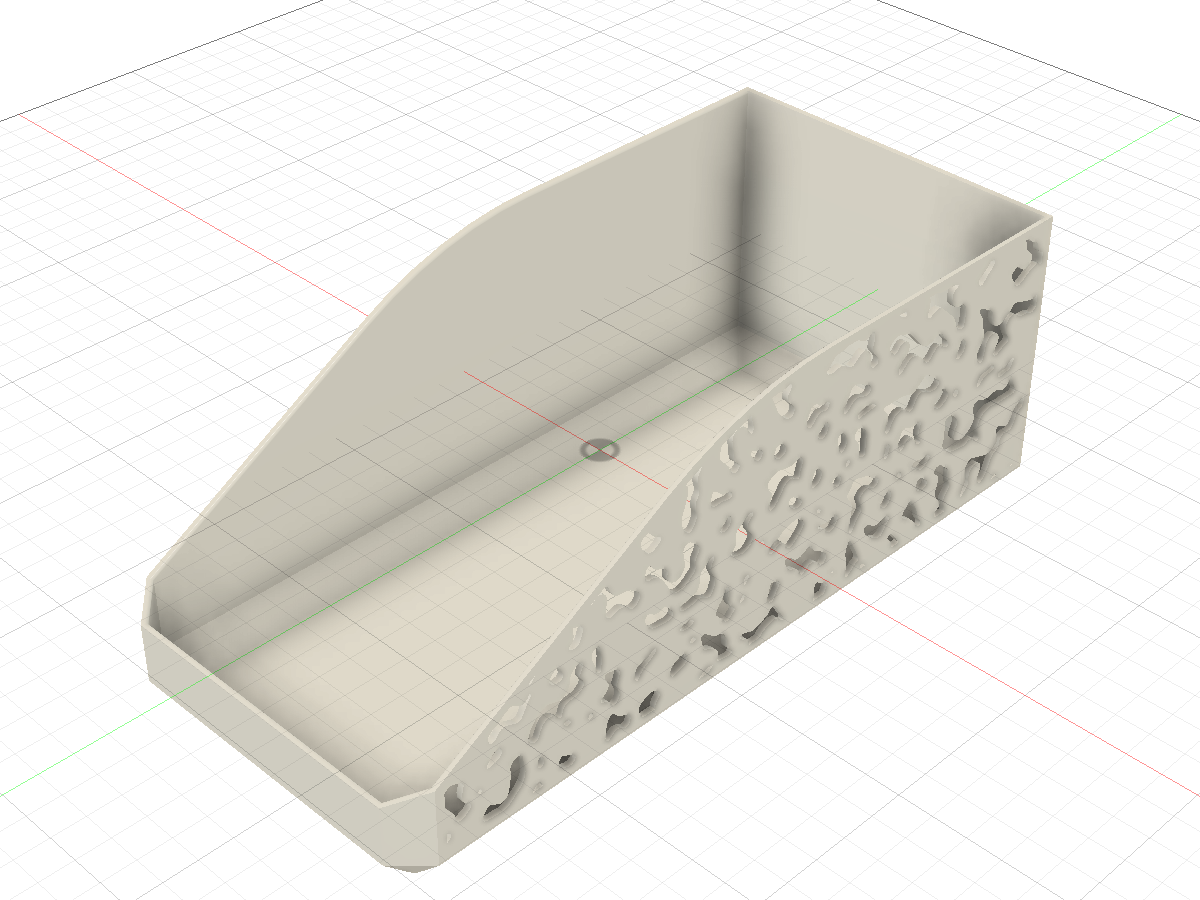
Actual Fusion Feature after changing Cell Size to 5.5 mm, with a 1.5 mm web. This image was captured during the preceding CAD acceptance and reused for this release.
Placement, surfaces and multiple regions
- 11 Distribution families: Staggered, Rectangular, Circular, Along Path, Contour, Fan, Phyllotaxis, Poisson Disk, Wave, Chevron and Between Curves. New commands use the revised shared kernel, including Follow Pattern orientation and partial boundary candidates. Saved Features retain their algorithm revision; legacy Running Bond remains editable.
- Cylindrical, conical and regular smooth freeform solid faces use the same Sketch, Extrude and Feature workflow. Distribution availability follows the source type.
- Select up to 32 regions of one surface type, in one component, with common settings and one Maximum Holes limit. Planar faces and planar sketch profiles can be combined.
- The bundled Pattern playground executes the same Python geometry sources in a browser. It includes all 19 shapes, 11 Distribution families and parameter links. See the included
demo/README.mdfor local use; no hosted-demo deployment is part of this release. - Source line endings are fixed to LF and the demo builder reads UTF-8 explicitly, keeping embedded-kernel hashes, labels and packaged sources consistent on Windows as well.
Feature recompute and editing
Object references now bind to upstream geometry before Boolean operations can consume it. This prevents a Custom Feature from depending on its own result. Edit Feature restores the correct bodies and selections, and the timeline is restored after command termination so Cancel preserves the previous model and node health.
For an existing problematic Feature, open Edit Feature and click OK once to upgrade its Object references. Existing Features remain readable. Features created before the new native path parameters must be recreated to use Along Path and its expression dependencies.
Install or update
Extract the ZIP to a permanent folder. In Fusion, stop the existing Perfora add-in, then select the inner Perfora folder through Utilities → Scripts and Add-Ins → Add-Ins → + and run it. Keep one copy running. The installer is optional and retains a backup of an earlier installation. Manifest UUID, command ID, document attribute namespace and GPL-3.0-only licensing are unchanged.
Recorded validation and limits
Before release preparation, 200 Python tests and 36 browser scenarios passed. Native acceptance used Fusion 2706.1.14 / macOS 27.0.1 (Apple Silicon) and included:
- Feature creation and Cell Size recompute for all six noise fields and Voronoi on copies of the selected real Box face.
- Actual Fast/Full Preview, Edit Feature OK/Cancel, creation and edit Undo/Redo, and recovery of a legacy rolled-back node.
- Multi-region Cut, Join, Intersect and New Body; changes to source-body thickness.
- Representative Smooth Noise cases on cylinder, cone and freeform sources, plus local F3D export, reopen and another parameter-driven recompute.
Local tests and Fusion checks are not repeated during release preparation. The existing GitHub Actions workflow builds the release commit, runs its normal Python/installation/packaging matrix on Linux, macOS and Windows, and publishes the ZIP and checksum from CI.
Performance work is bounded sampling and shared caching; no new CAD speedup ratio is claimed. Existing benchmark scripts distinguish pure-Python layout generation from source reads, preview and native construction. The real-face noise regression uses 5 mm cells, a 1.5 mm web and a 3 mm edge offset before changing Cell Size.
Native Windows CAD and cloud-save acceptance are not claimed. Custom Feature uses Autodesk's Preview API and requires Perfora to remain running. Feature supports Distance with zero taper; use native Extrude for its additional extents and New Component. Curved holes are finite straight tools, with conservative seam/curvature separation. Surface types cannot be mixed; spheres, tori and mesh bodies are unsupported. Contour uses sampled distance levels, and Between Curves requires two supported open planar guides.
По-русски
Выпуск добавляет шесть шумов, переносит Voronoi в раздел Noise и разделяет настройки Noise/Pattern. Вместо процента заполнения используются размер ячеек и толщина перемычек; цвет Fast Preview по умолчанию — Magenta.
Доступны 11 Distribution, криволинейные грани и до 32 областей одного типа. Исправлены пересчёт Feature, восстановление Objects, Edit Feature OK/Cancel и Undo/Redo. Для старого проблемного узла достаточно один раз открыть Edit Feature → OK. ZIP собирается и публикуется существующим CI; локальные и CAD-проверки при подготовке релиза повторно не запускаются.
Perfora 1.0.1
Perfora 1.0.1
Fix Feature Cut recompute when an upstream face shrinks with Trim to Boundary and a nonzero Edge Offset.
Download Perfora-1.0.1.zip · SHA-256 · English guide · Русская инструкция
Fixed
- Changing a box height from 70 mm to 20 mm could invalidate the target body of the Combine inside a Perfora Feature. The parent node could still report Healthy while the body had no geometry.
- Edge Offset now uses exact temporary BRep wire offsets. Recompute no longer edits the face-supported scratch sketch and preserves the Boolean target.
- A native Fusion regression checks repeated 70 → 20 → 70 → 20 mm changes, nested Combine health, and the visible solid. It covers rounded/unrounded Voronoi, trimming on/off, Circle, and native Extrude/Cut.
Install or update
Extract the ZIP to a permanent folder. In Fusion, stop the existing Perfora add-in, then load the inner Perfora folder through Utilities → Scripts and Add-Ins. Keep only one copy running. The manifest UUID, command ID, and document attributes are unchanged.
Validation
Earlier in this development session, 67 Python tests, 150 native CAD cases, and the preview performance suite passed on Fusion 2706.1.14 / macOS. Local tests and Fusion checks were not repeated during this release preparation. GitHub Actions runs the Python and packaging checks on Linux, macOS, and Windows before publication. Native Windows CAD acceptance is not claimed.
По-русски
Исправлена потеря целевого тела у Feature Cut при уменьшении исходной грани с Trim to Boundary и ненулевым Edge Offset. Например, высоту коробки теперь можно менять с 70 до 20 мм и обратно с пересчётом перфорации. Исправление проверено на обычных и скруглённых отверстиях Вороного; новых функций в этом выпуске нет.
Perfora 1.0.0 · First stable release
Perfora 1.0.0 — First stable release
Perforate the region you choose. Place the pattern where you need it. Keep it parametric.
Perfora 1.0 is the first stable release from 4FusionLab. It combines the existing thirteen hole shapes and parametric timeline Feature with circular patterns, point-based placement, bounded spread, direct sketch-profile regions, and faster previews.
Download Perfora-1.0.0.zip · SHA-256 · English guide · Русская инструкция
What is new
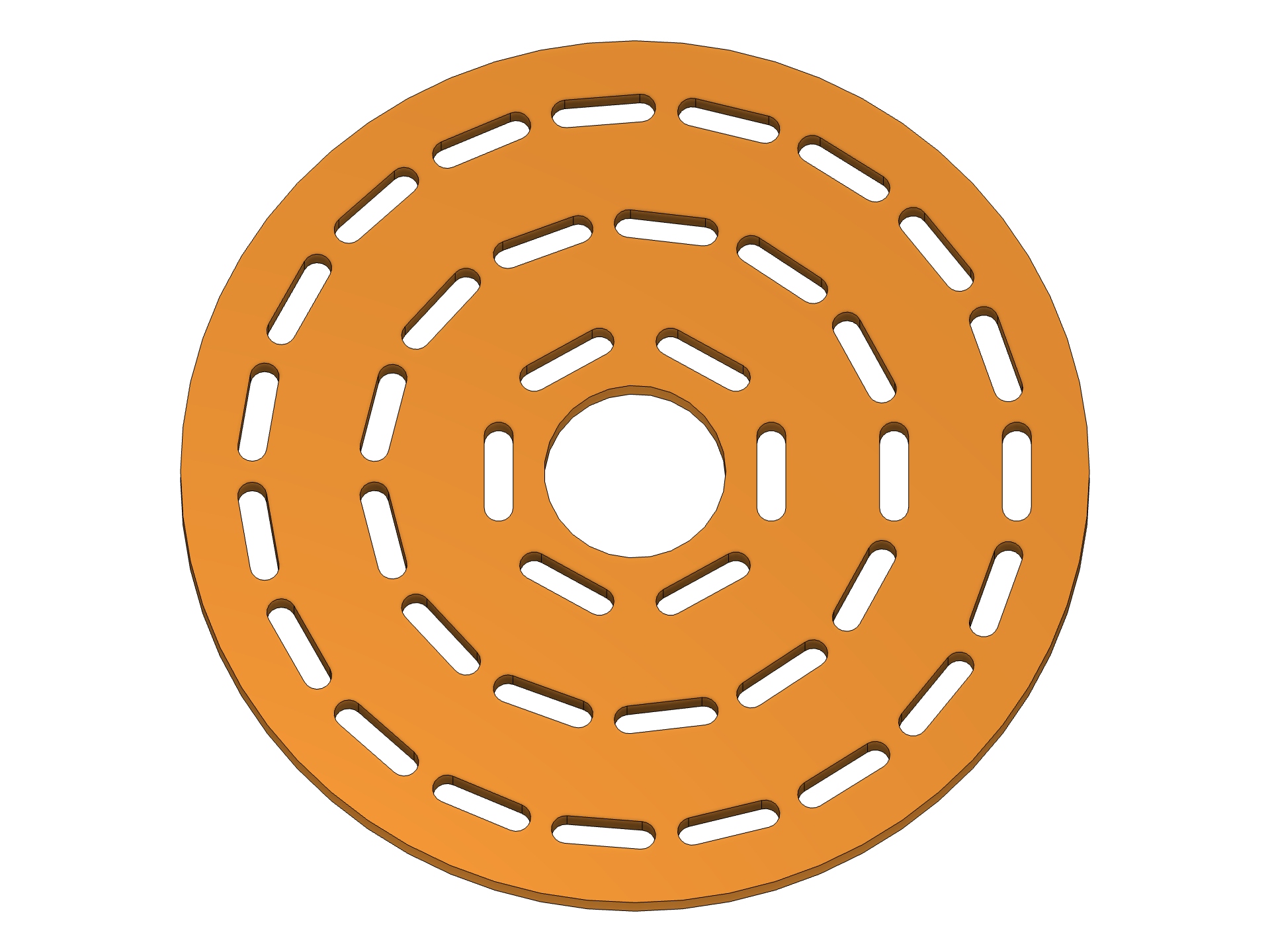
- Circular distribution: concentric rings for all twelve repeating shapes. Choose Fixed, Radial, or Tangential orientation, set the first ring's Start Radius, and add a Hole Angle. Web Thickness is preserved across each ring's closing seam.
- Start Point for every distribution: pick a sketch point, vertex, or construction point with Fusion's native Select control. Points outside the source plane are projected onto it. X/Y Offset moves the pattern from that point.
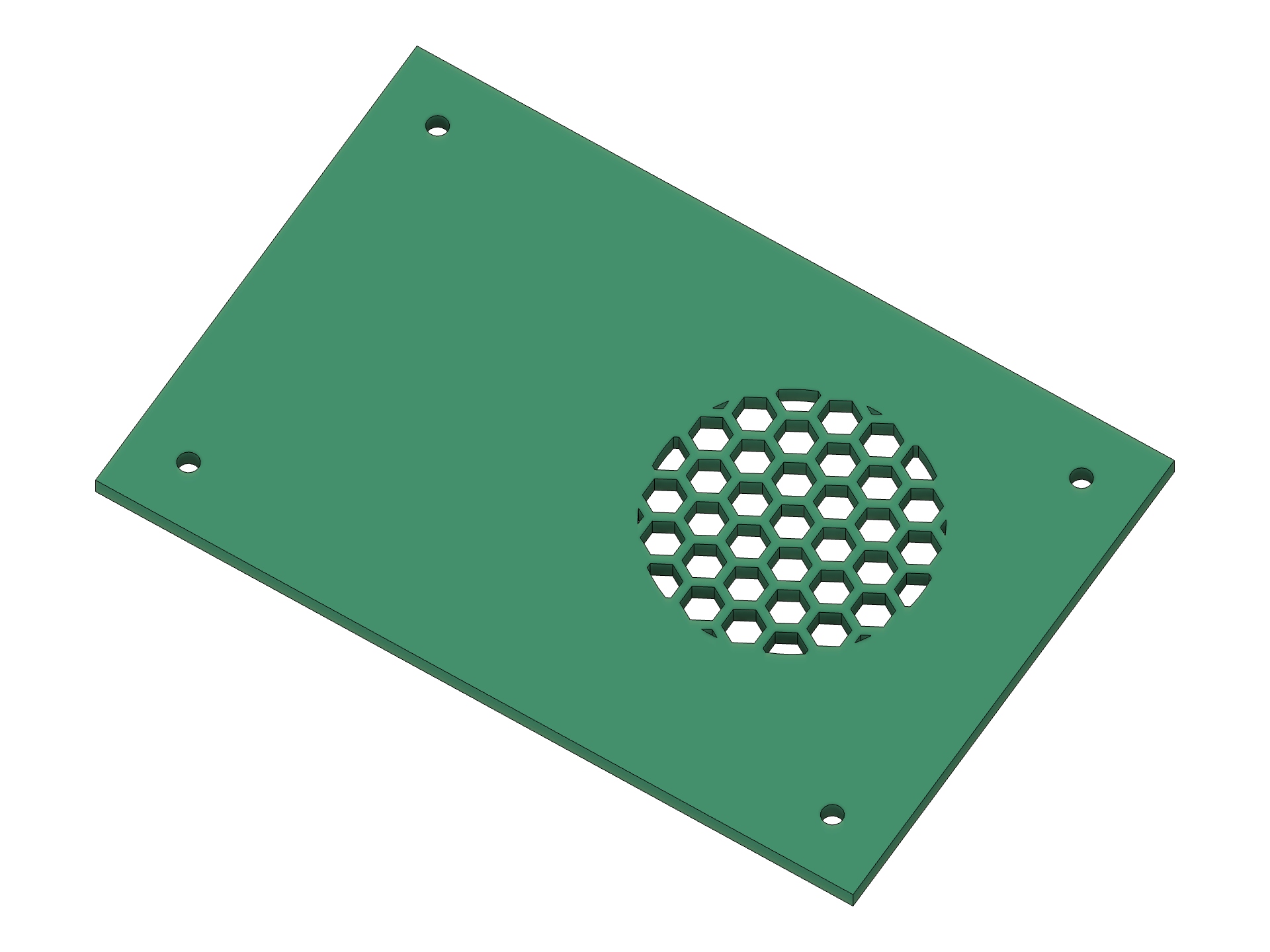
- Spread Radius: limit holes to a circular zone around the chosen origin. Zero fills the selected boundary. No extra profile is needed for a simple local perforation. Edge Offset and exact Trim to Boundary still apply.
- Profiles directly on solid faces: finish your boundary sketch and select its shaded profile in Profiles. The pattern stays inside that region, and the supporting body is selected for Cut/Intersect. No Split Face.
- Feature by default: new commands start with the parametric Perfora timeline node. Change a native parameter, upstream boundary, or Start Point and recompute the pattern. Sketch and native Extrude remain available.
- Defaults that recover: leaving any of the 36 numeric fields empty restores its default. Explicit zero, document parameters, units, and nonempty validation errors retain their meaning.
- Preview Color: Gold by default, plus Cyan, Magenta, Green, White, and Black. Fast Preview contours are thicker, and changing color reuses the prepared layout. Full Preview retains Fusion's model appearance.
Made in Fusion
These are real CAD results captured in Fusion, using the same white background and colored parts as the existing gallery.
| Circular patterns | Radial and Tangential |
|---|---|
 |
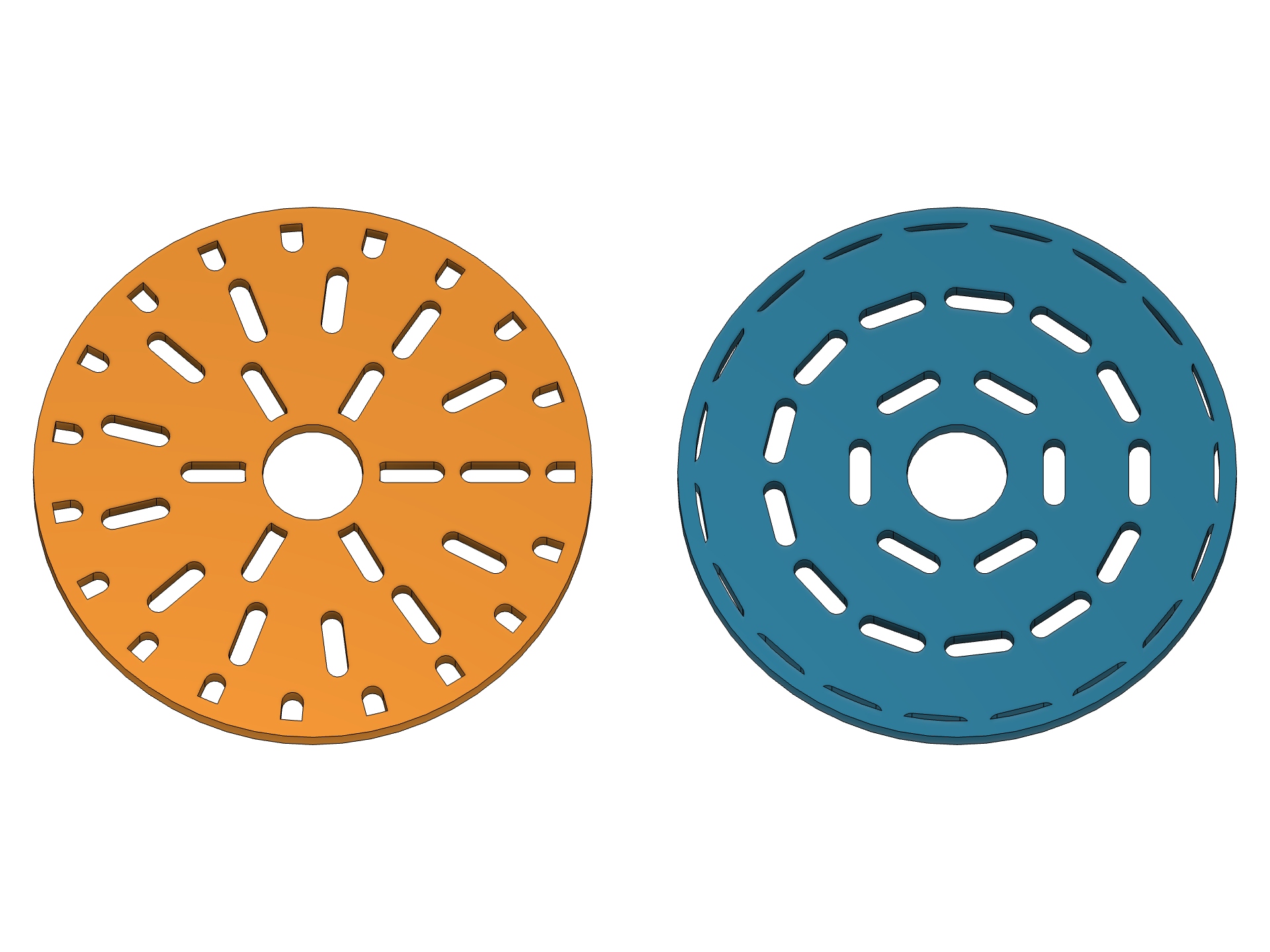 |
| Slots follow concentric rings around a center opening. | The orientation changes; the circular distribution remains. |
| Point and radius | Your sketch is the boundary |
|---|---|
 |
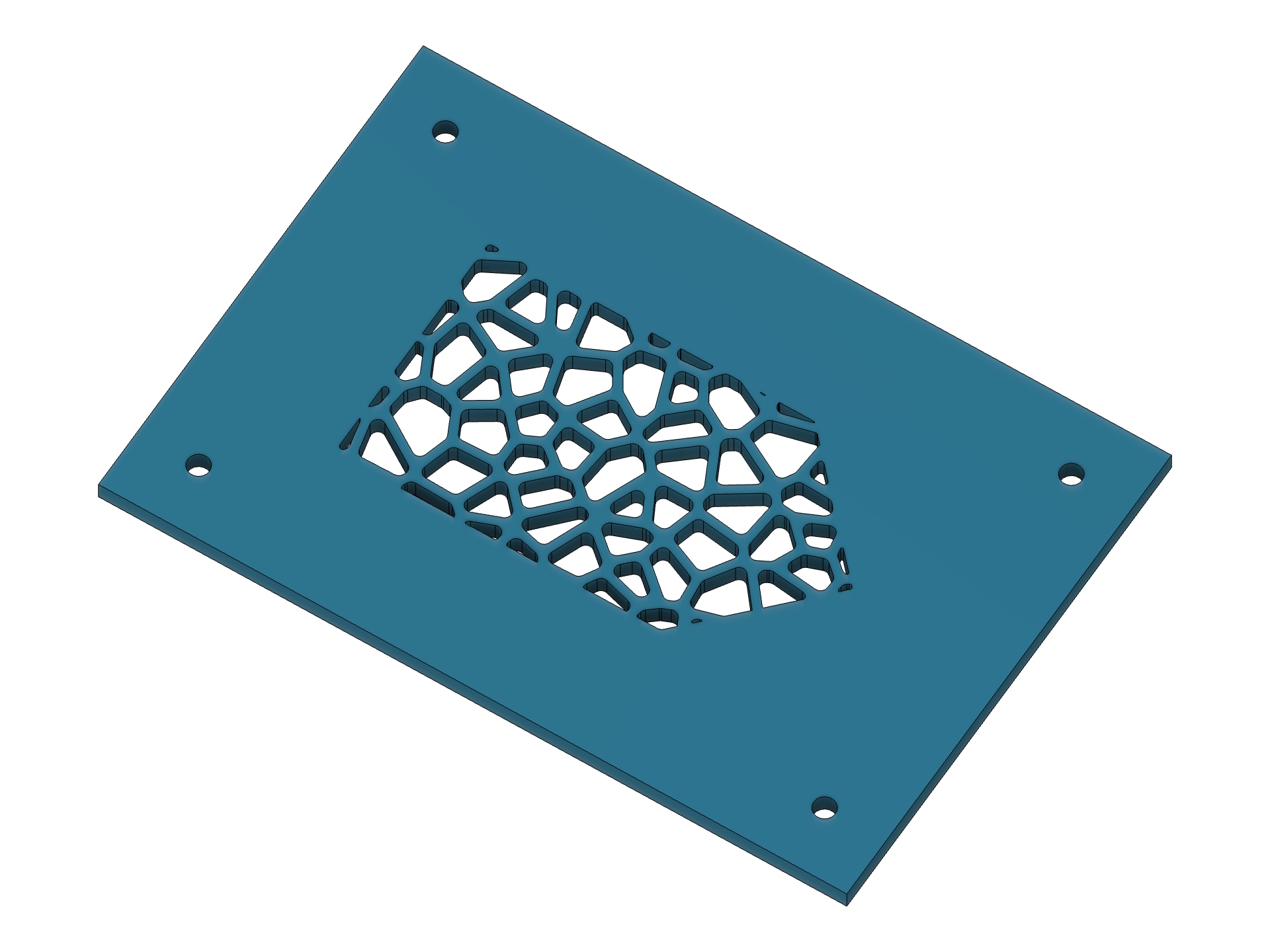 |
| An off-center circular zone on an existing plate, with its outer material intact. | Rounded Voronoi holes inside an arbitrary profile drawn on the face. |
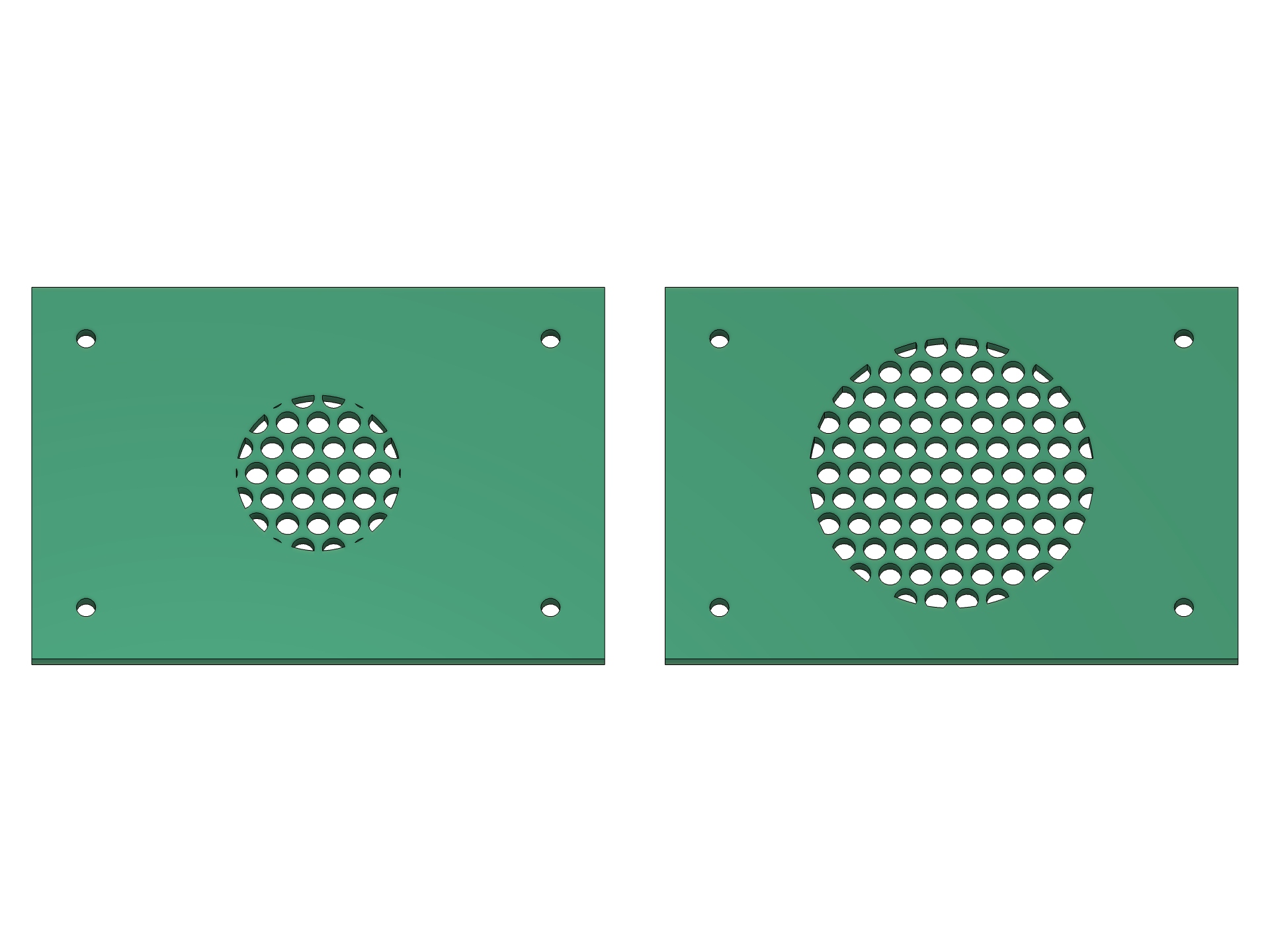
Change the radius. Rebuild the pattern. Both panels start from the same settings. The right-hand Feature is recomputed by changing its Spread Radius model parameter from 16 to 26 mm.
Benchmarks: where the time went
Measurements were taken on 24 October 2026, macOS arm64, Fusion 2706.1.14. Before/after compares a frozen pre-optimization development snapshot with the same layout features, not the published 0.2.0 package. The algorithms preserve the generated cells and contours: a 511-case differential matrix found no mismatches.
Pure Python layout generation
Median of three interleaved measurements, including index preparation; excludes native rendering, sketch construction, BRep clipping, and Extrude.
| Scenario | Holes | Before | After | Speedup |
|---|---|---|---|---|
| Hexagons, rectangular boundary | 709 | 34.005 ms | 10.588 ms | 3.21× |
| Hexagons, circular boundary | 253 | 1,282.353 ms | 96.812 ms | 13.25× |
| Ellipses, circular boundary | 45 | 4,027.185 ms | 263.233 ms | 15.30× |
| Voronoi, rectangular boundary | 1,041 | 269.651 ms | 125.366 ms | 2.15× |
Native Fusion: Fast Preview followed by build
Single paired measurements in one Fusion session. Build follows Fast Preview, so the optimized version can reuse cells while still reading the current source and constructing native geometry.
| Scenario | Holes | Fast Preview before → after | Build before → after |
|---|---|---|---|
| Hexagons inside a circle | 253 | 1.148 → 0.104 s | 2.453 → 2.193 s |
| Ellipses inside a circle | 45 | 3.424 → 0.262 s | 3.683 → 0.263 s |
| Small scoped tangential layout | 7 | 0.058 → 0.054 s | 0.105 → 0.107 s |
The small scoped case shows no meaningful build improvement. Native sketch creation can still dominate a dense pattern. These results are workload-specific; 15.30× is a measured geometry-generation result, not a universal command speedup.
The changes filter nearby boundary edges before exact checks, skip no-op Voronoi clipping, share immutable prepared cells between Fast Preview and creation, defer unused Panel Booleans, and cache source/inset/spread preparation independently. Current extrusion settings always apply, and source changes invalidate the cache.
Full methodology and scenarios · Raw samples and source fingerprints · Rerun the geometry benchmark
Install or update
- Download and extract the ZIP to a permanent folder.
- In Fusion, open Utilities → Scripts and Add-Ins → + → Script or add-in from device.
- Select the inner Perfora folder containing
Perfora.pyandPerfora.manifest, then click Run. Run on Startup is optional. - Open Design → Solid → Create → Perfora, or press S and search for Perfora.
No separate Python installation or third-party runtime packages are needed. The optional install.py installer keeps backups of prior installations.
When updating a folder already linked in Fusion, stop and reload the add-in. When linking a different folder, stop/unlink the old copy and restart Fusion before using Feature, because Fusion can retain the previous Custom Feature owner in the same session. Do not run both copies. The manifest UUID, command ID, and document attribute namespace remain unchanged.
Existing 0.2 Feature nodes remain editable. New native Start Radius and Spread Radius parameters are present on newly created nodes; older nodes retain editable values through stored settings but cannot gain those extra native parameters with the current API. Recreate a node if those new fields must appear in Fusion's Parameters dialog.
Validation and practical limits
- 67 Python tests, compile checks, reproducible ZIP construction, and installation with backups. GitHub Actions runs the Python and packaging checks on Linux, macOS, and Windows before publishing this exact commit.
- 179 native CAD scenarios covering shapes, clipping, Voronoi, circular distribution, points, Feature operations/recompute, face-backed profiles, optimization behavior, and preview performance.
- Real command acceptance on Fusion 2706.1.14 / macOS 27.0.1: defaults and color choices, Fast/Full Preview, OK/Cancel, native Undo/Redo, Feature and Extrude parameter editing, local F3D reopen, and subsequent recompute. All test documents are disposable; no user document is saved.
- Native Windows Fusion CAD, cloud save/reopen, and complex assemblies are not claimed as tested. Windows CI is not native CAD acceptance.
- Sources must be planar; curved faces and meshes are unsupported. Edge Offset must produce a valid inset; touching/intersecting offset loops can be rejected by Fusion.
- Feature supports straight Distance extents and Join, Cut, Intersect, New Body. Use native Extrude for All, To Object, taper, or New Component. Keep Perfora running for Feature edit/recompute. Autodesk's Custom Feature API itself remains Preview API; this release does not change Autodesk's API status.
- Fusion's blue selection highlighting can tint or cover custom graphics even when a different preview color is selected. Thicker contours improve contrast; Preview Color does not override Fusion's selection colors.
- Start Radius measures hole centers, not a guaranteed solid hub. Noncircular rings use conservative spacing; actual webs can be wider than requested.
По-русски
Perfora 1.0.0 — первый стабильный релиз, без отметки prerelease. В нём появились круговая раскладка с касательными и радиальными отверстиями, общая Start Point, ограничение Spread Radius, работа по профилю на грани без Split Face, восстановление пустых числовых полей и выбор цвета Fast Preview. Feature теперь выбирается по умолчанию.
Бенчмарки выше разделяют генерацию геометрии и настоящее построение Fusion: например, Fast Preview для 45 эллиптических отверстий сократился с 3,424 до 0,262 с. Это конкретные парные замеры на macOS, а не обещание такого ускорения для любой модели. Нативная работа Windows отдельно не проверялась.
[Подробная русская инструкция](https://github.com/4FusionLab/Perfora/blo...
Perfora 0.2.0 · Experimental
Parametric Perfora features and Voronoi
Perfora 0.2.0 adds a Feature output that regenerates the hole pattern when its parameters or upstream geometry change, and Voronoi as the thirteenth hole shape.
Highlights
- Type → Feature creates one Perfora timeline node. Double-click it or use Edit Feature to change the pattern, trimming, placement, profile type, and thickness.
- Parameter expressions can reference Fusion user parameters. Recompute can change the number of holes without adding timeline nodes.
- Voronoi supports reproducible Seed/New Pattern, Irregularity 0–100%, minimum web thickness, exact boundary trimming, and optional tangent corner rounding.
- All 13 shapes support Fast/Full Preview. Feature edits support OK, Cancel, and Undo/Redo.
- Sketch and native Extrude remain available, including the broader extent and operation options of Extrude.
- Fusion-generated editor configuration is excluded from installation and ZIP packages.
Install or update
Fusion supplies the Python runtime; no separate Python installation is required.
- Download Perfora-0.2.0.zip below and extract it to a permanent location.
- Stop the previous Perfora copy and remove its link from Utilities → Scripts and Add-Ins.
- Restart Fusion before using Feature from a new folder. Switching linked copies with the same UUID in one session can retain the previous Custom Feature owner and prevent recompute.
- Choose + → Script or add-in from device, select the inner Perfora folder containing
Perfora.pyandPerfora.manifest, then click Run. Keep that folder in place and run one copy. - Find Perfora under Design → Solid → Create, or press S to search. Enable Run on Startup if you want existing Feature nodes to recompute whenever Fusion opens.
The optional python3 install.py (macOS) or py -3 install.py (Windows) installer copies the add-in into Fusion's API directory and backs up previous installations. It leaves automatic startup disabled. The adjacent Perfora-0.2.0.zip.sha256 verifies the named installation package.
Validation
Native acceptance: Autodesk Fusion 2706.1.14, macOS 27.0.1, Apple Silicon.
- 40 local geometry/installer tests; 14 native smoke scenarios; 34 shape scenarios; 35 clipping scenarios; 12 Voronoi scenarios; seven preview performance configurations.
- 45 Feature scenarios on both the worktree and an installed ZIP copy after clean Fusion launches: all 13 shapes, parameter and upstream-profile changes, supported operations and directions, user expressions, trimming, and F3D archive reopen followed by recompute.
- Real OK/Cancel in Sketch, Extrude, and Feature; Edit Feature, Full Preview rollback, Undo/Redo, and editing a native Extrude through its standard Fusion dialog.
- ZIP contents, checksum, installation, and repeat-install backups verified locally. Release CI separately checks Python and packaging on Linux, macOS, and Windows; these jobs do not establish native Windows CAD behavior.
For reference, Fast Preview generated 709 hexagons in 0.101 s and 1,138 trimmed rounded Voronoi cells in 0.663 s on the tested machine. Timings vary with hardware and model complexity.
Experimental limits
This is an experimental prerelease. Use copies of working designs. Native Windows CAD behavior and complex assemblies still require acceptance testing.
Feature requires Capture Design History and a running Perfora add-in. It uses Autodesk's Preview Custom Feature API. This version supports straight Distance extents with zero taper, One Side / Two Sides / Symmetric, and Join / Cut / Intersect / New Body. Source, operation, and target bodies are fixed during edit. Use native Extrude for All, To Object, taper, or New Component.
Large topology changes can invalidate downstream face/edge references. Sketch and Extrude retain a fixed pattern. Planar geometry and solid bodies only.
Documentation · Русская инструкция
GPL-3.0-only. Independent 4FusionLab project; not affiliated with Autodesk.
Perfora 0.1.5 · Experimental
Perfora's first public release
Goddess of holes. Precision for Fusion.
Create ventilation panels, grilles, and hole patterns directly in Autodesk Fusion.
Highlights
- 12 hole shapes with web thickness, edge offset, rotation, and placement controls.
- Rectangular and staggered layouts; exact trimming along the boundary.
- Sketch profiles or native Join, Cut, Intersect, New Body, and New Component operations.
- Fast cached contour previews and optional full CAD previews.
- English interface, project artwork, and installation backups.
Install without a terminal
No separate Python installation is required: Fusion includes the runtime needed by Perfora.
- Download Perfora-0.1.5.zip below and extract it to a permanent location.
- In Fusion, open Utilities → Scripts and Add-Ins.
- Click + → Script or add-in from device and select the inner Perfora folder containing
Perfora.pyandPerfora.manifest. - Select Perfora → Run; optionally enable Run on Startup.
- Find Perfora under Design → Solid → Create, or press S to search.
Fusion links to the selected folder. Keep it in place; do not move or delete it after adding it.
Optional: if Python 3 is already installed, python3 install.py on macOS or py -3 install.py on Windows copies the add-in to Fusion's API directory and backs up previous Perfora installations. This helper is not required for the folder-linking method.
Perfora-0.1.5.zip.sha256 contains the SHA-256 checksum. The GitHub-generated “Source code” downloads are repository snapshots; the named Perfora ZIP is the installation package.
Experimental status
This is a prerelease, not a stable production build. The geometry and installer are checked by CI on macOS, Windows, and Linux; Linux is a test/build environment, not a Fusion platform. Native CAD scenarios are checked separately in Fusion on macOS. Windows CAD behavior, document save/reopen, and complex assemblies still need verification.
Output uses ordinary sketches and Extrude features. There is no custom parametric feature to reopen or regenerate the complete hole pattern. Planar faces and solid bodies only.
Upgrading from Perforator: stop and unregister the old add-in before running Perfora. Do not run both versions together.
Documentation · Русская инструкция
Licensed under GPL-3.0-only. Independent project; not affiliated with Autodesk.