Repository navigation
Releases
Halation 1.2.0

Halation 1.2.0 adds glass and solid objects, still backgrounds with retro gradient patterns, a guided tutorial and a refreshed set of 41 looks, each composed for both phone and desktop.
New
- Objects: up to six spheres, pills, panes and chain links in front of any flow, each in glass or a solid material with its own shape, color (a palette color, any color or a gradient from the library), size, position and rotation. Glass refracts, frosts and tints what is behind it and casts soft, colored shadows. Drag an object on the canvas to move it.
- None flow: a still background in a plain color or a linear, radial or conic gradient. Ripple bends it into moving waves, so together with Repeat and Posterize it makes wavy 70s stripes, concentric arcs and groovy sunbursts.
- Speckle: scatters the image into grainy speckles, like sprayed paint or a riso print.
- Composition controls: place and tilt Silhouette forms, and aim the vignette at your focal point.
- Tutorial: a one-minute guided tour from the new Tutorial button. It spotlights each part of the interface and moves on when you try what it suggests.
- 29 new looks, among them twenty graphic and retro styles such as Onyx Prism, Opal Wave, Cobalt Flutes, Sky Sunburst, Molten Glow, Dusk Horizon and Zebra Swirl (41 in total).
Improved
- Posterize bands have crisp, antialiased edges, and Repeat goes up to 40 for fine stripes and sunburst rays.
- Surprise me has a new art direction built around frosted glass objects.
- The Shapes flow is now part of Objects. Looks and share links made with it open with the same backdrop and objects, and look the same.
- First-load speed is unchanged: the object effects compile in the background.
- Fixed a thin black line that could cross Wavy glass, and Surface gloss turning black, when the light stood straight overhead.
Thirteen older looks were retired to make room. Share links and saved looks carry the full look, so ones made from them still open exactly as before, and looks saved in 1.1 and your last session are upgraded automatically.
Full changelog: CHANGELOG.md
Halation 1.1.0
Halation 1.1.0 adds new ways to light and shape the flow: threads of light, sculpted silhouettes, liquid chrome, clear liquid, iridescent films and moiré engraving. Surprise me has been rebuilt to produce finished-looking results far more often.
New
- Threads: a flow pattern of thin lines of light with depth of field and streaks that race along them. Converge pinches them into an hourglass or a starburst.
- Silhouette: shapes any flow into a sculpted ribbon, wave or blob over a backdrop color.
- Surface: a new section that lights the flow as a 3D surface. Relief and Gloss move here, joined by Chrome (polished metal), Liquid (clear liquid that bends what lies beneath it), Iridescence (thin-film color like soap bubbles, oil and holographic foil) and Sparkle.
- Moiré: a screen of fine engraved lines that bend with the image, with an optional second layer for interference fringes.
- Streaks: zoom, spin or directional motion blur in Finish.
- Aberration is now spectral, with smooth rainbow fringes, and has a new Orbit style.
- Five new looks: Moiré Ribbon, Liquid Glass, Holo Chrome, Light Speed and Prism Filaments (25 in total).
Improved
- Surprise me now picks one coherent art direction at a time, such as fluted glass, liquid metal, light trails, print screens, a sculpted form or a variation of a built-in look, with a palette chosen to suit it. It renders a few candidates offscreen and keeps the best, so washed-out, blown-out or noisy results are rare.
- The section dice change one Surface material at a time and leave your color grading alone.
- First-load shader compilation stays as fast as in 1.0 despite the new effects.
Looks saved in 1.0, share links and your last session are upgraded automatically.
Full changelog: CHANGELOG.md
Halation 1.0.0
The first public release of Halation, a free, open-source generator for fluid gradient backgrounds behind physically based glass and screen effects. It runs entirely in your browser on the GPU, with nothing to install and no account, and nothing you make is uploaded.
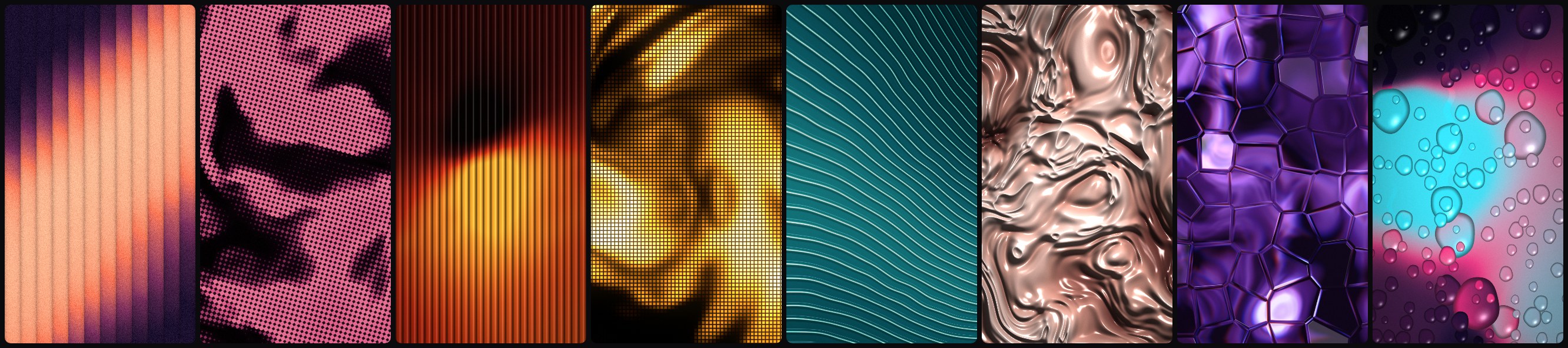
Highlights
- Flow: silk, light bands, mesh gradients, ribbons, lit shapes, a real-time fluid simulation you paint with the mouse, or any image you drop in.
- Glass: nine physically based glass types (reeded, wavy, rings, glass-block tiles, hammered, water, crystal, rain and pyramids) with adjustable index of refraction, frost, streaks, dispersion, caustics, Fresnel reflections, tint, partial panes and a second stacked pane.
- Screen: halftone, line screens, LED matrix, CRT, mosaic, topographic contours and dither.
- Color and finish: an OKLab gradient editor with a palette library and generator, relief and gloss lighting, film grain, bloom, vignette and chromatic aberration.
- Export: 8- and 16-bit PNG, JPEG and WebP at up to 4× any canvas size, copy to clipboard, burst capture as a .zip, and seamless-loop video.
- Workflow: 20 built-in looks, settings search (press
/), saved looks with import and export, share links, undo/redo and Surprise me. - Performance modes (Auto, Eco, Balanced, Max) keep the preview smooth on modest hardware. Exports always render at full quality.
Run it locally
There is no build step and there are no dependencies:
git clone https://github.com/AR13X3/halation.git
cd halation
npm start
License
Halation is licensed under the AGPL-3.0. Images and videos you make with it are yours to use anywhere, including in commercial work. See the README for details.
Full changelog: CHANGELOG.md