Repository navigation

ComiTrans v2.6.0
ComiTrans v2.6.0 现已发布。本次更新正式推出单文件 Windows x64 安装向导(内含桌面客户端、字体与默认 ONNX 模型),同时在工作流、精修编辑器、动效与启动性能上带来多项实质升级:新增作品术语库、试译与翻译消耗预估、CBZ 漫画包支持,重构精修顶部栏为单层菜单并加入气泡多选、连续样式刷、全书译稿查找替换与单气泡重译,并引入 60fps 黑白墨韵动效、独立进程模型预热与后台正式版更新提醒。
核心功能更新 · Windows 安装与升级 · English Release Notes · v2.6.0 发布页
| 模块 | 主要更新 |
|---|---|
| 翻译与全书工作流 | 新增「作品术语库」、1–3 页「试译」与真实 Token「翻译消耗」预估;支持 CBZ 导入翻译与保存后重新「导出 CBZ」 |
| 精修编辑器与批量排版 | 工具栏收纳为无嵌套单层菜单;支持多选气泡、「取样式 / 样式刷 / 撤销样式」、跨页「全书译稿」查找替换与「重译气泡」 |
| 视觉动效与启动性能 | 全界面 60fps 黑白墨韵动效与纸白/夜墨双主题统一;检测/修复模型隔离至独立进程预热;顶栏新增「有更新」低干扰提醒 |
| Windows 安装与交付 | 单文件 NSIS Setup(固实 LZMA 压缩,约 681 MiB),开箱含默认模型与字体;支持自定义中文路径、静默参数与独立用户数据目录 |
一、核心功能更新
1. 翻译前准备与全书工作流
- 作品术语库(
任务 → 作品术语库/ 翻译偏好)- 按作品记录角色、地点与统一译名;仅需填写固定译名,类型与识别线索均可选填,无需手填原文,也不会增加额外的识别请求。
- 断点指纹仅纳入当前生效术语:修改其他作品术语或调整计费单价时,不会让已付费页面重新翻译。
- 试译与翻译消耗预估(自动处理页「试译」、
任务 → 翻译消耗)- 整批翻译前可先试译队列开头的 1–3 页(PDF 按页计数);试译使用独立结果目录、独立上下文与独立断点,不污染正式任务进度,完成后可直接精修试译结果或一键启动正式翻译。
- 任务或试译结束后,基于翻译接口返回的真实 Token 用量(计入无效内容重试响应)展示「翻译消耗」,并支持填写自定义单价与按样页估算整本费用。
- CBZ 漫画包端到端支持
- 支持直接导入
.cbz漫画压缩包按页翻译,并在「嵌字精修」保存各页后通过文件 → 导出 CBZ重新打包导出。
- 支持直接导入
2. 精修编辑器重构与批量排版
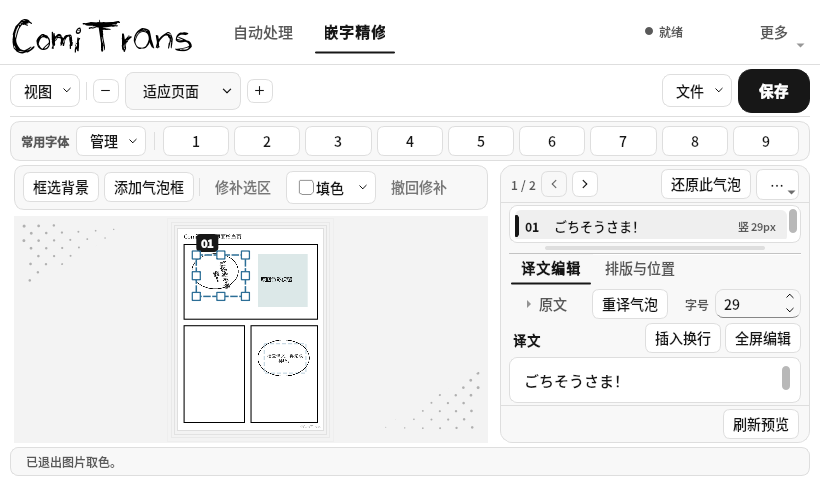
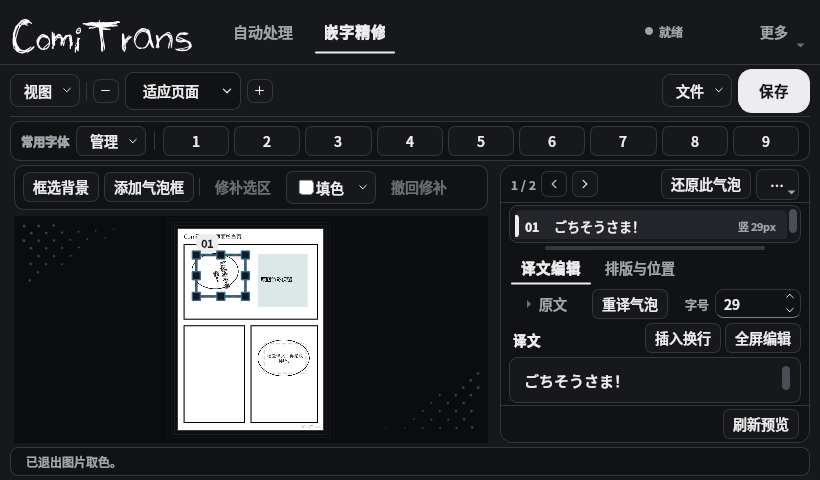
- 单层菜单与紧凑属性栏
- 将「视图」「文件」「填色」「常用字体管理」等高频能力收拢为无嵌套单层菜单,减少工具栏遮挡并释放更多画布区域;右侧属性栏新增的快捷字号框与原字号框实时双向同步。
- 气泡多选与批量样式编辑
- 气泡列表支持
Ctrl/Shift多选,画布支持Ctrl点击加选与Shift拖拽框选,右上角计数随当前选区实时更新。 - 多选修改仅同步实际发生变化的样式字段,严格保护译文文本、原文、蒙版位置/尺寸以及已还原原图的气泡。
- 气泡列表支持
- 样式取样、连续样式刷与样式撤销
- 在气泡右上角
⋯菜单、列表右键或画布右键菜单中使用「取样式」「应用样式到所选气泡」「样式刷」与「撤销样式」。 - 样式刷支持跨页共享样式剪贴板,点击或框选目标气泡即可连续套用;开启期间隐藏气泡调整手柄以防误拖,按
Esc或点击「退出样式刷」结束。 - 撤销样式可逐次撤回当前页最近的样式改动,不会覆盖后续修改过的译文内容。
- 在气泡右上角
- 全书译稿跨页查找替换 & 单气泡重译
- 新增「全书译稿」对话框,支持跨页检索、批量替换译文并快速定位修改。
- 右侧编辑栏新增「重译气泡」,可对单个气泡单独重新请求翻译 API,无需整页重跑。
3. 界面动效、双主题与启动性能
- 60fps 黑白墨韵动效与双主题统一
- 引入统一的 60fps 单色交互动效系统与精细化控件反馈,全面打磨「纸白」与「夜墨」双主题下的下拉框、按钮、卡片、对话框、工具栏与选中态表现。
- 独立进程模型预热
- 将检测(CharSpot / 文本检测)与 LaMa 背景修复等图像模型会话隔离至独立进程,彻底脱离 Qt 主事件循环;启动加载期间界面持续流畅可操作,顶栏实时反馈模型准备状态。
- 低干扰更新提醒
- 启动时在后台比较本地客户端版本与 GitHub 最新正式版;仅当存在更高正式版时,顶栏「模型已就绪」左侧才会出现「有更新」按钮,点击可查看版本对比与发布页下载入口(不会对正式版用户误报预发布测试版)。
| 纸白主题 · 嵌字精修(v2.6.0) | 夜墨主题 · 嵌字精修(v2.6.0) |
|---|---|
 |
 |
二、Windows 安装、校验与升级迁移
下载与安装
下载本页的 ComiTrans-v2.6.0-x64-Setup.exe 与 SHA256SUMS.txt(v2.6.0 发布页)。安装包采用固实 LZMA 压缩(约 681 MiB),内置桌面客户端、全部中文字体以及默认检测、OCR 和修复模型。
-
校验 SHA-256:运行安装包前,在 PowerShell 中核对两处十六进制哈希是否一致:
Get-FileHash -Algorithm SHA256 .\ComiTrans-v2.6.0-x64-Setup.exe
Get-Content .\SHA256SUMS.txt
-
运行 Setup:关闭正在运行的 ComiTrans,双击安装向导。本版安装包未签名,Windows 可能显示「未知发布者」,请确认来自官方发布页且哈希一致后手动运行。
-
配置翻译服务:安装后 CPU 模式即可直接加载本地模型。首次使用请在「设置」填写翻译 API 密钥与模型;如需 NVIDIA GPU 加速,可在「设置 → 运行与输出 → GPU 安装说明与下载」按指引配置 CUDA 12 与 cuDNN 9。
系统集成与静默参数
-
支持自定义多级目录与中文安装路径;自动创建开始菜单与桌面快捷方式、
.comitrans项目文件关联及系统「已安装的应用」卸载入口。 -
用户配置
config.yaml、导入/下载的字体user_fonts、日志与默认输出均存放在%LOCALAPPDATA%\ComiTrans,卸载程序时保留用户数据。 -
静默安装支持
/S(区分大小写)、/LOG="路径"与放在命令末尾的/D=安装路径(不加引号),例如:.\ComiTrans-v2.6.0-x64-Setup.exe /S /LOG="D:\install.log" /D=D:\Apps\ComiTrans
从历史版本升级 / 迁移
| 原安装形态 | 升级 / 迁移方式 |
|---|---|
| v2.6.0-pre.1 预发布 NSIS 版 | 关闭应用后直接运行新版 Setup,自动沿用原安装目录与 %LOCALAPPDATA%\ComiTrans 用户配置 |
| 旧版 MSI / WiX 安装版 | 请先在 Windows「已安装的应用」中卸载旧版,再运行新版 Setup(用户数据目录会保留) |
| v2.5.2 及更早 ZIP 便携版 | 可将旧目录中的 config.yaml 与 user_fonts 复制到 %LOCALAPPDATA%\ComiTrans;移动漫画项目时请保留漫画、.comitrans 索引与配套精修目录的相对位置 |
English
ComiTrans v2.6.0 introduces a single-file Windows x64 installer alongside major improvements across batch translation preparation, editor ergonomics, visual polish, and startup responsiveness.
What's New
1. Pre-Translation & Full-Book Workflow
- Work Terminology (
Task → Work terminology& Translation Preferences): Maintain per-series character names, places, and fixed translations. Only the target translation term is required (category and matching hints are optional, with no extra OCR/recognition calls). Checkpoints fingerprint only the active project's terms, so editing pricing or another series will not invalidate already-translated pages. - Trial Run & Translation Usage Estimates (
Trial&Task → Translation usage): Test the first 1–3 queued pages (counting PDF pages individually) in an isolated output directory, context, and checkpoint before committing to a full batch. After completion, inspect token usage reported by your provider (including invalid-output retries), configure custom unit pricing, and estimate full-book cost. - End-to-End CBZ Support: Import
.cbzcomic archives for page-by-page translation and export edited pages back to.cbzviaFile → Export CBZ.
2. Editor Redesign & Batch Styling
- Single-Level Menus & Compact Inspector: Reorganizes View, File, Fill, and Favorite Font Management into flat, non-nested menus to keep the canvas unobstructed. A quick font-size box stays synchronized with the inspector size control.
- Multi-Select & Batch Property Sync: Select multiple blocks in the list (
Ctrl/Shift) or directly on the canvas (Ctrl-click /Shift-drag marquee). Batch edits apply only the fields actually changed, leaving translated text, source text, mask geometry, and restored original bubbles untouched. - Style Picker, Continuous Style Brush & Undo: Access
Pick style,Apply style to selected,Style brush, andUndo stylefrom each block's⋯button or the list/canvas context menu. Style Brush keeps a cross-page style clipboard, hides drag handles while active to prevent accidental moves, and exits onEscorExit brush.Undo stylesteps backward through style changes on the current page without reverting later text edits. - Book Transcript & Single-Bubble Retranslation: Search and replace translations across all pages from
Book transcript, and re-translate an individual bubble in place withRetranslate.
3. Visual Polish, Motion & Startup Performance
- 60fps Monochrome Motion & Theme Consistency: Adds a unified 60fps monochrome motion system and refined combo-box/control feedback across both Paper (light) and Night Ink (dark) themes.
- Isolated Subprocess Model Warm-Up: Moves detector, OCR, and LaMa image model sessions out of the Qt event loop into an isolated process so the UI remains responsive while models warm up.
- Quiet Update Indicator: Checks GitHub for newer stable releases in the background at startup. Only when a newer stable version exists does a compact
Updatebutton appear to the left ofModels ready, opening a version comparison and release download link (stable users are never alerted for pre-releases).
Windows Installation, Verification & Migration
Download ComiTrans-v2.6.0-x64-Setup.exe and SHA256SUMS.txt from the v2.6.0 Release Page. The solid-LZMA installer (~681 MiB) bundles the desktop client, fonts, and default ONNX models so CPU inference works immediately after setup.
-
Verify SHA-256 in PowerShell before running Setup:
Get-FileHash -Algorithm SHA256 .\ComiTrans-v2.6.0-x64-Setup.exe
Get-Content .\SHA256SUMS.txt
-
Install: Close any running ComiTrans instance and run Setup. This release is unsigned and requires manual download/installation; Windows may show an "Unknown publisher" prompt.
-
Configure API & Optional GPU: Enter your translation API key and model in Settings. For NVIDIA GPU acceleration, follow the CUDA 12 / cuDNN 9 links under Settings → Runtime & Output → GPU setup and downloads.
-
Upgrade / Migration:
- From
v2.6.0-pre.1NSIS preview: Close the app and run the new Setup directly to upgrade in place. - From legacy MSI / WiX builds: Uninstall the older version in Windows Installed Apps first, then run Setup (user data in
%LOCALAPPDATA%\ComiTransis preserved). - From historical ZIP editions: Copy
config.yamlanduser_fonts/into%LOCALAPPDATA%\ComiTrans, and keep manga images,.comitransindexes, and editing folders together.
- From