Repository navigation
Releases
MuhOS 0.1.3

MuhOS 0.1.3: windows now behave more like Windows 11 — every new window opens a step down and to the right of the last one instead of stacking invisibly on top of it — plus fixes for raising windows from the dock and Mission Control, and for minimised windows coming back to the wrong workspace. For Fedora 44 and 45, x86_64.
Update
muhos-updateThen log out and back in. New installation: curl -fsSL https://alex-muhscience.github.io/MuhOS/install.sh | bash
Changed
- Windows cascade like Windows 11. Each new floating window opens offset from the previous one on its workspace, so opening several windows of the same app no longer leaves them pixel-perfect on top of each other, looking like a single window. The cascade stays inside the visible area, skips full-screen and zoomed windows, and starts over when a workspace is emptied.
- Minimised windows come back where they were. Restoring a window from the dock or the app menu returns it to the workspace it was minimised on, instead of always landing on the first workspace.
Fixed
- Clicked windows really come forward now. Focusing a window from the dock, the app menu or Mission Control also raises it. The previous release called Hyprland's
bring_to_topwith a window argument, but on Hyprland 0.57 it takes none, so the call failed and windows could stay buried.
Tested
- CI builds and tests the package on Fedora 44 and 45; lint, asset and translation checks run on every push.
- The cascade was verified live on Hyprland 0.57.2: three consecutive windows opened at staggered positions (+40/+32 px each), stayed inside the work area, and windows already filling the screen (zoom, maximised apps) were left in place.
- The fc45 package was built from this commit and checked to contain the new window code.
Known issues
- The fc44 packages are not attached to this release yet; the fc45 packages work on Fedora 44 as well, or build them with
packaging/fedora/build-rpminside afedora:44container. - Still open: window buttons for apps without their own title bar (#3); signed packages in a dnf repository (#4); dark WhiteSur for GNOME 50 apps (#9); app grid folders (#8).
Help build MuhOS
See where to start.
MuhOS 0.1.2
MuhOS 0.1.2: the dock now works more like the macOS dock — live window previews and windows that always come forward when you click them — plus a fix for menu bar centre modules. For Fedora 44 and 45, x86_64.
Update
muhos-updateThen log out and back in. New installation: curl -fsSL https://alex-muhscience.github.io/MuhOS/install.sh | bash
New
- Window previews in the dock. Click a dock icon for an app with several windows and live previews of them appear above the icon, like the macOS dock. Click a preview to raise and focus that window; click the icon again or click elsewhere to close them. Apps with a single window still activate directly, and Shift/Ctrl-click still opens a new instance.
Fixed
- Clicked windows always come forward. Focusing a window from the dock, the app menu or Mission Control now also raises it (
bring_to_topon Hyprland), so it comes to the front even when it's floating, just unminimised, or was buried under other windows. - Menu bar centre modules were invisible and dead. Modules chosen for the centre in Settings → Bar rendered outside the bar window's masked region, so they showed no colours and ignored clicks. They now render and respond like the left and right modules.
- The dock's window list (click previews and right-click menu) no longer offers windows sitting on the hidden minimise workspace.
Tested
- CI builds and tests the package on Fedora 44 and 45; lint, asset and translation checks run on every push.
- The fc44 and fc45 packages were built from this commit and checked to contain the new dock preview and menu bar code.
Known issues
- Window previews show a live picture on Hyprland; on other compositors a titled placeholder appears instead.
- Still open: minimise buttons in title bars (#2) and window buttons for apps without their own title bar (#3) need compositor work; signed packages in a dnf repository (#4); dark WhiteSur for GNOME 50 apps (#9); app grid drag is in, folders are not (#8).
Help build MuhOS
See where to start.
MuhOS 0.1.1
MuhOS 0.1.1: fixes for bugs found in daily use, plus Mission Control, rearranging the app grid and the first translation. For Fedora 44 and 45, x86_64.
Update
muhos-updateThen log out and back in. New installation: curl -fsSL https://alex-muhscience.github.io/MuhOS/install.sh | bash
Fixed
- Apps now run on their own, not inside the shell. Apps opened from the dock, app grid or search ran as part of the shell's service. Their memory was counted as the shell's (with Chrome open the "shell" reached 8 GB; the shell itself used about 950 MB), and a shell restart or logout closed every app with it. Each app now runs in its own systemd scope, as on GNOME (#6, which stays open to watch the shell's own memory).
- Modules chosen in Settings → Bar were never shown. The MuhOS menu bar had a fixed layout. Modules you add (system monitor, weather, visualiser, media and so on) now appear where you put them. Those the menu bar already shows its own way (Wi-Fi, volume, battery, clock and so on) aren't shown twice.
- Dark Style did nothing with the default colours (#11). It now switches between the macOS and macOS Dark colours (and other preset pairs), and MuhOS's own wallpapers switch to their light or dark version.
- Music: covers embedded in the file (for example from mpv) now show, and the output chip names the real device instead of "Equaliser".
New
- Mission Control: Super+G or a three-finger swipe up shows every window on the workspace, live and side by side. Click one to bring it forward (#7).
- Rearrange the app grid: press and hold an icon, drag it, and let go. Drag to a page's edge to move it to another page (#8; folders still to come).
- Translations for MuhOS's own wording, starting with French (#10). Help translate: translations/muhos.
Tested
- CI builds and tests the package on Fedora 44 and 45 (78 package checks each); lint, asset and translation checks pass.
- In a Fedora Workstation VM with this package, each fix was checked with real key and mouse events:
- kitty opened from search ran in its own scope and kept running across a shell restart;
- the centre bar modules appeared in light and dark mode;
- Dark Style switched presets and wallpapers back and forth;
- an embedded mpv cover showed;
- Mission Control showed three live windows, and a click focused one;
- an app dragged in the grid moved, and the order was saved;
- the logo menu appeared in French.
- A fresh session after installing started with no shell errors or restarts, and logging out returned to the login screen.
Known issues
- In two of four automated tests, pressing Enter on "log out" in search did nothing; it then worked every time once looked into. Clicking the result always works. If it happens to you, please say so in an issue.
- Zoom after resizing a zoomed window by hand restores the size from before zooming.
- Still open: minimise buttons in title bars (#2) and window buttons for apps without their own title bar (#3) need compositor work; signed packages in a dnf repository (#4); dark WhiteSur for GNOME 50 apps (#9).
Help build MuhOS
See where to start.
MuhOS 0.1.0
MuhOS 0.1.0, the first release. A macOS-style desktop for Fedora Linux on Hyprland: a menu bar, a glass dock, floating windows, Launchpad-style app grid, Spotlight-style search, control centre, notifications, an equaliser and apps themed to match. For Fedora 44 and 45, x86_64.
This is the same software as pre-release 9, released after nine pre-releases and testing in Fedora virtual machines and on a real laptop (15.6-inch 4K, Intel and NVIDIA graphics, Fedora 45).
Install
curl -fsSL https://alex-muhscience.github.io/MuhOS/install.sh | bashThe installer lists the files with their sizes, shows download progress, checks every package against SHA256SUMS, and asks before installing with dnf. Then log out, choose MuhOS (Hyprland) with the gear button on the login screen, and sign in.
Update
From pre-release 8 or 9:
muhos-updateFrom older pre-releases, run the install command above once. Choose how MuhOS updates with muhos-update --mode manual|notify|auto (manual is the default; nothing runs in the background unless you choose it).
Highlights
- Menu bar and app menus: About, Settings, sleep, restart, shut down, lock and log out; the focused app's menu with Minimize, full screen and Quit.
- Glass dock with pinned and running apps; it brings back minimised windows.
- Windows as on a Mac:
- they float and open centred, and a click focuses a window and brings it forward;
- Super+Tab or Alt+Tab switches windows;
- new windows cascade;
- Super+M minimises;
- zoom fills the screen but stays an ordinary window.
- App grid in pages (as in Launchpad), search (Super+D) for apps, files, settings and a calculator.
- Control centre, notifications, lock screen, colours from your wallpaper, wallpapers from anywhere on your disks.
- Equaliser on PipeWire, for whichever output you use.
- HiDPI: screens scale automatically.
- Updates your way:
muhos-update, a daily notification, or automatic. - Leaves your system alone: a separate login session; GNOME and your settings are untouched, and removing the package leaves the system as it was.
Tested
- CI builds and tests the package on Fedora 44 and 45; the package tests (74 checks) pass on both; asset-licence and lint checks pass.
- Full login sessions in Fedora 44 and 45 virtual machines, including logging out back to the login screen.
- Daily use on a real laptop, where most of the pre-release fixes were found.
Known issues
- Apps' title bars have no minimise button: Hyprland ignores apps' own minimise requests (#2). Use Super+M or the app menu.
- Apps without their own title bar have no window buttons (#3).
- Packages aren't signed or in a dnf repository yet (#4).
- The shell's memory can grow large over a long session on a 4K screen (#6).
- In dark mode, apps use GNOME's own dark style rather than WhiteSur (#9).
Help build MuhOS
Collaborators are welcome: see where to start.
MuhOS 0.1.0 pre-release 9
Ninth MuhOS pre-release: windows no longer freeze when another window is maximized. For Fedora 44 and 45, x86_64.
Update
muhos-update(From pre.7 or older: curl -fsSL https://alex-muhscience.github.io/MuhOS/install.sh | bash.) Then log out and back in.
Fixed
-
Other windows froze while a maximized window was open. For example, a terminal stopped responding to clicks once a Chrome window opened, until Chrome was closed. Hyprland maximizes a window by giving it a kind of full screen: it's drawn above every other window and takes focus back. Chrome reopens maximized, so this happened as soon as it opened. Found from Hyprland's event log on real hardware.
Now zoom works as on macOS. A window that is maximized (by the app itself, the green zoom button or Super+Alt+F) fills the space between the menu bar and the dock as an ordinary window, so other windows can come in front of it and be used. Zoom again to return to the old size and place. Real full screen (F11, videos, Enter Full Screen in the app menu) is unchanged.
Tested
- Package tests pass on Fedora 44; CI runs them on Fedora 44 and 45.
- On the real laptop: the event log shows the cause; with the fix applied live, a test window acting like Chrome (asking to be maximized, then clicking zoom) zoomed and restored four times in a row; Hyprland never counted it as full screen; the other window kept focus when clicked.
- In a Fedora 45 VM with this package: the full config loads without errors; zoom and restore work; real full screen still works.
Known issues
- If you click zoom after resizing a zoomed window by hand, it goes back to its size from before zooming.
- Apps' title bars have no minimise button (#2); use Super+M or the app menu.
- Quickshell, Matugen and WhiteSur are unchanged since pre.5.
MuhOS 0.1.0 pre-release 8
Eighth MuhOS pre-release: a clearer installer, muhos-update, and a choice of how MuhOS updates. For Fedora 44 and 45, x86_64.
Install or update
New installation:
curl -fsSL https://alex-muhscience.github.io/MuhOS/install.sh | bashComing from pre.7 or older, run the same command once more; from this release on, update with:
muhos-updateNew
-
The installer shows what it's doing: the release's files with their sizes and the total download, a progress bar for each file, and numbered steps (checking the system, finding the release, downloading, verifying, installing). dnf shows its own progress while installing.
-
muhos-update: checks the newest MuhOS release for your Fedora version, shows the download size, then downloads, verifies and installs it, asking first. Settings' Update button runs it in a terminal.muhos-update --checkonly reports. -
Choose how MuhOS updates. The installer asks once at the end of a new installation; change it any time:
Command What happens muhos-update --mode manualDefault. Nothing in the background. muhos-update --mode notifyChecks once a day; a notification with an Update button opens a terminal running muhos-update.muhos-update --mode autoInstalls new releases once a day in the background (a system timer), then a notification says to log out and back in. muhos-update --modeshows the current choice. Changing it asks for your password. -
Only MuhOS's own releases: nothing in MuhOS asks upstream Serpantinum for updates any more, and About's changelog button opens MuhOS's releases.
Tested
- CI and the package tests pass on Fedora 44 and 45 (73 checks each, including
muhos-update, its timers and the update modes); asset and lint checks pass. - In a Fedora 45 VM with this package:
muhos-updateand--checkreported correctly against pre.7.- Each mode set the config and turned the system and user timers on and off as described.
- The automatic-update service ran and found nothing newer.
- The update notification showed the new version and download size; clicking Update opened a terminal running
muhos-update, which stayed open with the result. - The "MuhOS was updated" notice appeared after a simulated automatic update.
- The installer's file list, sizes and progress bars displayed in a terminal (a dry run).
- Not yet seen end to end: an automatic update installing a real newer release, since this is the newest one. The first chance is the next release.
Known issues
- Apps' title bars have no minimise button (#2); use Super+M or the app menu.
- Apps without their own title bar have no window buttons (#3).
- Packages aren't signed or in a dnf repository yet (#4).
- The shell's memory can grow large over a long session on a 4K screen (#6).
- Quickshell, Matugen and WhiteSur are unchanged since pre.5.
Help wanted
MuhOS is looking for collaborators: see where to start.
MuhOS 0.1.0 pre-release 7
Seventh MuhOS pre-release: window handling, logout and updates, from more testing on real hardware (a 15.6-inch 4K laptop with Intel and NVIDIA graphics, Fedora 45). For Fedora 44 and 45, x86_64.
Install or update
curl -fsSL https://alex-muhscience.github.io/MuhOS/install.sh | bashThen log out and back in to MuhOS. The installer verifies every package against SHA256SUMS before installing it with dnf, and asks first. From this release on, Settings offers updates itself (see below).
Fixed
- Logging out left a black screen with only a cursor; only powering off got back to the login screen. The logout script ran inside the shell's own service and was stopped with it before it could tell Hyprland to exit. It now runs on its own, and logging out returns to the login screen.
- Several windows of one app (e.g. Chrome profiles) were hard to use, and some seemed frozen. Focus followed the mouse, so passing the pointer over a window behind gave it the keyboard without bringing it forward, and typing went to a hidden window. Now a click focuses a window and brings it forward, as on macOS.
- Apps pinned from a running window (e.g. Google Chrome) didn't open from the dock, though they opened from the app grid.
- Settings showed updates that couldn't be installed. Its hint, "sudo dnf upgrade", can't find MuhOS updates because MuhOS isn't in a dnf repository. See Updates below.
New
- Minimise: Super+M or Minimize in the app menu (the app's name in the menu bar). Click the app in the dock to bring the window back. Music moves to Super+Shift+M.
- Switch windows: Super+Tab or Alt+Tab; add Shift to go backwards.
- Cascade: a new window that would open exactly over another is moved down and to the right.
- Apps may bring their own new windows forward (e.g. a browser opening a window for another profile).
- App grid in pages, as in Launchpad: as many apps per page as fit the screen; swipe or scroll sideways, click the page dots or use ←/→. The dock now always stays above the grid.
- Updates: when Settings opens, it compares your installed MuhOS with the newest release for your Fedora version on GitHub. Update opens a terminal and runs the installer, which asks before installing. There are still no checks in the background.
Tested
- CI builds and tests the package on Fedora 44 and 45; package tests (67 checks, including the new ones) pass on both; asset and lint checks pass.
- In a Fedora 45 VM with this package, using real key and mouse events: logging out from the shell ended Hyprland cleanly and GDM's login screen came back; Super+Tab, Alt+Tab and Super+Shift+Tab cycled windows; Super+M minimised; a dock click restored a minimised window; three windows opening in the same place cascaded 32 px apart; the app grid showed 63 apps on two pages, turned pages with the arrow keys and searched across all apps.
- The updater was run against this release on GitHub: MuhOS 0.15, as installed on the test laptop, sees 0.17; background checks stay offline.
- On the real laptop, the focus, switching, cascade and minimise settings were applied to a running session and checked.
Known issues
- Apps' title bars have close and zoom but no minimise button: Hyprland ignores apps' own minimise requests (#2). Use Super+M or the app menu.
- Apps that don't draw their own title bar have no window buttons (#3).
- The shell's memory use can grow large over a long session on a 4K screen (#6).
- In dark mode, apps use GNOME's own dark style rather than WhiteSur (#9).
- Quickshell, Matugen and WhiteSur are unchanged since pre.5.
Help wanted
MuhOS is looking for collaborators: see where to start.
MuhOS 0.1.0-pre.6: real-hardware fixes
Sixth MuhOS pre-release: fixes from the first test on real hardware (a 15.6-inch 4K laptop with Intel and NVIDIA graphics, Fedora 45). For Fedora 44 and 45, x86_64.
Install or update
curl -fsSL https://alex-muhscience.github.io/MuhOS/install.sh | bashThen log out and back in to MuhOS. The installer verifies every package against SHA256SUMS before installing it with dnf, and asks first.
Fixed
- Tiny text on HiDPI screens. Screens were forced to scale 1, so a 4K laptop showed everything at a quarter of its size. Hyprland now chooses the scale (2 on a 15.6-inch 4K panel).
- The dock disappeared whenever an app was maximized. Hyprland reports a maximized window as a kind of full screen. Now only real full screen hides the dock.
- Open apps weren't shown in the dock. Apps you open now appear there even when they aren't pinned.
- The Terminal icon and Super+Enter did nothing on systems without kitty. A new
muhos-terminalhelper opens whichever terminal is installed (Ptyxis on Fedora Workstation), and the broken kitty pin is gone. - Wallpapers were hard to set. The picker only looked in
~/Pictures/Wallpapers. New Choose picture… buttons (in the wallpaper picker and Settings → Theme) and Choose folder… (Settings) open the normal file chooser, so pictures anywhere, including other disks, can be used. A chosen picture is applied straight away and its folder is remembered. - App grid labels were hard to read on light wallpapers. The grid now darkens the backdrop and uses white labels, as on macOS.
- Blank icons for apps that give a file path as their icon (for example apps in
/opt). - The minimise button did nothing. Hyprland ignores apps' minimise requests (checked at the protocol level), so the window buttons are now close and zoom only.
Notes
- If you'd already pinned apps or changed dock settings, turn on "Show running apps" in Settings → Dock to see open apps there.
- Window buttons: zoom (green) maximizes and restores. Apps under Hyprland always believe they are maximized, but Hyprland treats each click as a toggle, so it works.
- Quickshell, Matugen and WhiteSur are unchanged since pre.5.
Tested
- CI builds and tests the package on Fedora 44 and 45; asset and lint checks pass.
- On the real laptop (Fedora 45, Hyprland 0.57.2): screen scaling, the file chooser (opened and cancelled), maximize and close requests from a GTK test window and a raw Wayland test client, and the dock hiding on maximize (seen in Hyprland's event stream) were checked; the fixes were made from those findings.
Known issues
- No minimise (see above).
- In dark mode, apps use GNOME's own dark style rather than WhiteSur.
- Some windows keep Serpantinum's design: music, network, wallpaper and settings.
MuhOS 0.1.0-pre.5: Fedora 45, equaliser, app grid
Fifth MuhOS pre-release, now for Fedora 44 and Fedora 45 (x86_64) with Hyprland 0.57. It brings an equaliser built on PipeWire, an app grid, and a one-command installer.
Install
curl -fsSL https://alex-muhscience.github.io/MuhOS/install.sh | bashThe installer checks that you're on Fedora 44 or 45, downloads this release's packages for your version, verifies each against SHA256SUMS (it stops if one doesn't match), enables the Hyprland COPR and installs with dnf after asking. Then log out and choose MuhOS (Hyprland) with the gear button on the login screen. Running it again updates MuhOS.
To install by hand, take the files with fc44 or fc45 in the name (for your Fedora version) plus SHA256SUMS, and follow the README. The packages aren't signed yet; verify them with SHA256SUMS. Source RPMs for MuhOS, Quickshell, Matugen and WhiteSur are attached.
What's new since 0.1.0-pre.4
New
- Fedora 45. Every package is built for Fedora 45 as well as 44, CI builds and tests on both, and a full login session was tested in a Fedora 45 VM.
- Equaliser on PipeWire. The music equaliser no longer needs EasyEffects. It runs on PipeWire's own filters, follows whichever output you use, and switches itself off while flat. In the test VM it used 4.9 MiB and 1.3 % of a core, where EasyEffects used 119.8 MiB and 2.25 % (report). Its settings now survive restarts.
- Equaliser window. Open it from the new Equaliser toggle in the control centre: presets, ten bands drawn as a live response curve (drag the dots), balance, mono, swap, dynamics (Even out, Night) and a speaker test.
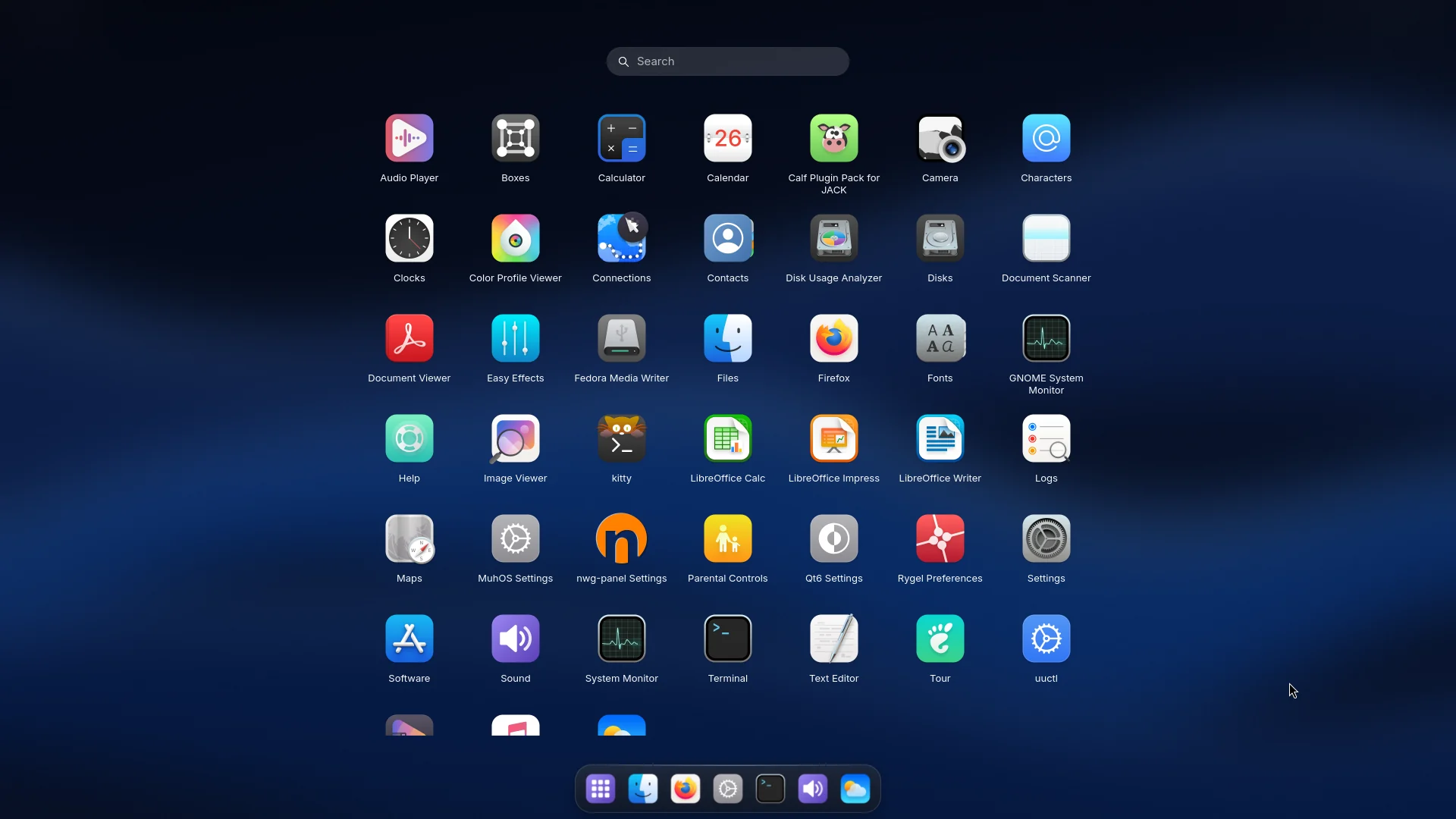
- App grid. The new Apps icon, first in the dock, shows every app in a grid, like the Apps view on a Mac. Type to search. The dock stays visible above it, and opening an app closes it.
- One-command installer, and a website with downloads and a full user guide.
- Hyprland 0.57. MuhOS's configuration is checked against 0.57.2, the version the COPR now ships.
Fixes
- The equaliser stops when you log out, so it never affects a GNOME session afterwards.
- The equaliser window shows the right setting on a fresh install.
- New users get Inter as the shell font, matching apps.
Changes
- MuhOS now recommends
ladspa-swh-plugins(used for the equaliser's dynamics) instead of EasyEffects. - README and website screenshots updated; the README is redesigned.
Tested
- The package builds and passes its install tests on Fedora 44 and 45. CI (builds on both versions, tests, asset-licence and lint checks) passes.
- Fedora 45 VM: all packages install with their dependencies, and a GDM login session starts MuhOS on Hyprland 0.57.2 (all 11 session checks pass). The equaliser engine, the equaliser window and the app grid work.
- Fedora 44 VM, Hyprland 0.57.2:
- Equaliser checked by recording what reaches the speakers: band changes, balance and swap apply live, dynamics works, and the engine stops at logout and returns at login.
- App grid, dock, search and focus, using real clicks.
- The installer: dry run, a tampered download (refused, nothing installed), and a full install.
Benchmarks: the equaliser numbers above. The shell and Hyprland were not re-measured for this release.
Known issues
- Not yet tested on real hardware, including NVIDIA and hybrid graphics. Reports are very welcome: use the hardware report form.
- In dark mode, apps use GNOME's own dark style, because WhiteSur's dark theme doesn't display GNOME 50 apps correctly yet. Switching Dark Style while apps use WhiteSur takes effect for apps at the next login.
- Hyprland uses about 28 MiB more memory than in pre.1. The cause is still unknown.
- Some windows keep Serpantinum's design: music, network, wallpaper and settings (Settings is only recoloured). Side and auto-hiding bars also use Serpantinum's bar.
- Firefox keeps its own look.
MuhOS 0.1.0-pre.4: the macOS look
Fourth MuhOS pre-release, for testing on Fedora 44 x86_64 with Hyprland. MuhOS now looks and behaves like macOS: a macOS menu bar, floating windows, and apps with macOS-style window buttons, icons and font.
Install
sha256sum --check --ignore-missing SHA256SUMS
sudo dnf copr enable lionheartp/Hyprland
sudo dnf install ./muhos-0.1.0-0.14.fc44.noarch.rpm ./quickshell-0.3.2-1.muhos1.fc44.x86_64.rpm ./matugen-4.2.0-1.muhos1.fc44.x86_64.rpm ./whitesur-gtk-theme-20260910-1.muhos1.fc44.noarch.rpm ./whitesur-icon-theme-20260910-1.muhos1.fc44.noarch.rpm
Then log out and choose MuhOS (Hyprland) on the GDM login screen. The packages are not signed yet; verify them with SHA256SUMS. New in this release: the two WhiteSur packages are required. Quickshell and Matugen are unchanged since pre.2. Source RPMs for all five are attached. Full instructions: README.
What's new since 0.1.0-pre.3
macOS look
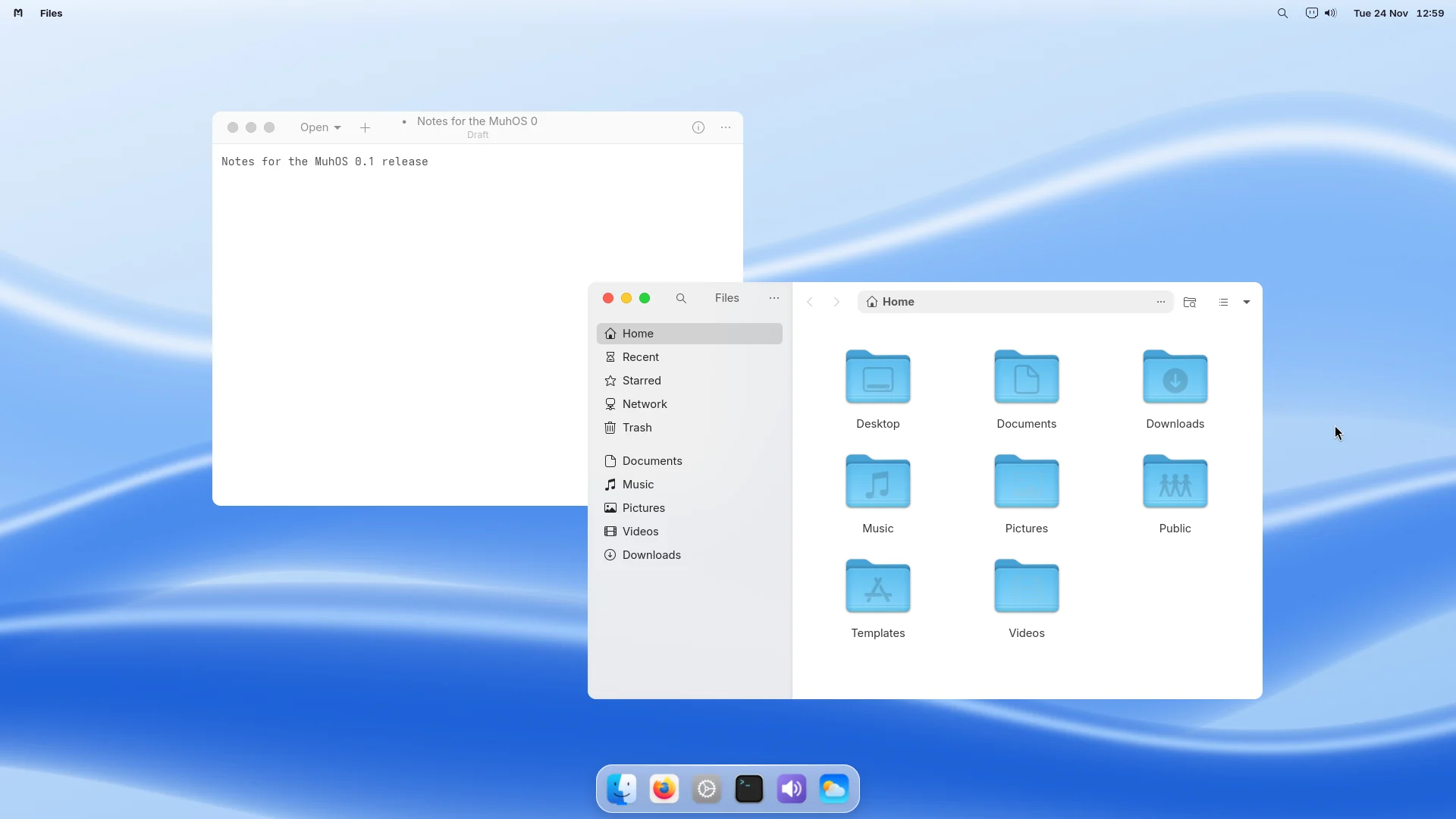
- Menu bar. On the left, the MuhOS logo opens a menu (About, System Settings, Search, Sleep, Restart, Shut Down, Lock Screen, Log Out), followed by the focused app's name in bold (Full Screen, Quit). On the right are search, the status icons, and the date and time, which open the notification centre beneath them.
"bar": { "layout": "hybrid" }brings back the previous layout. - Apps. In the MuhOS session, apps use the WhiteSur GTK theme and icons, the Inter font, and red/yellow/green window buttons on the left. The dock and shell use WhiteSur icons too. These settings live in a dconf profile used only by MuhOS, so your GNOME session keeps its own theme. MuhOS clears that profile when you log out.
- Windows float and open centred, as on macOS. Super+T tiles the focused window or floats it again.
- Themes. New macOS and macOS Dark presets, two original macOS-style wallpapers (light and dark), soft window shadows and new animations.
- Accent colour. Settings → Theme offers ten accent colours, as in macOS (Theme, Blue, Purple, Pink, Red, Orange, Yellow, Green, Teal, Graphite), on top of any preset.
Fixes
- Settings is readable on light themes: each section has a coloured icon, as in macOS System Settings, and each row's icon follows the accent colour.
- Windows fit small screens. Settings, the calendar and other fixed-size windows shrink to fit instead of overflowing.
- New users get pinned dock apps: Files, Terminal, MuhOS Settings and Sound.
WhiteSur is packaged by MuhOS: the GTK theme is MIT and the icons are GPL-3.0. The Apple logo icons are removed, because Apple's logo is a trademark.
Tested
- The package builds and passes its install tests (now including the dconf profile, floating windows, pinned dock apps and wallpapers). CI (build, tests, asset-licence and lint checks) passes.
- In a Fedora 44 Workstation VM, with real logins through GDM:
- the menu bar, logo menu, accent colours, notification centre, lock screen and unlocking;
- floating and Super+T tiling;
- light and dark mode across a login;
- after a forced logout, the MuhOS theme settings are gone from the user's systemd environment.
Benchmarks: not re-measured for this release. The figures for pre.3 are in the README and bench/results/; WhiteSur, floating windows and the new bar have not been benchmarked yet.
Known issues
- Dark mode uses GNOME's dark style for apps, not WhiteSur's. WhiteSur's dark variant does not render GNOME 50 apps correctly. If you switch Dark Style while apps are using WhiteSur, apps change at the next login.
- Firefox keeps its own look; GTK themes don't style it.
- Hyprland uses about 28 MiB more memory than in pre.1. Unchanged; the cause is not found yet.
- Blur cost on a real GPU is unmeasured.
- Some windows keep Serpantinum's design: the music, network, wallpaper and settings windows (Settings is only recoloured).
- Side bars and an auto-hiding bar still use Serpantinum's bar.
- Not yet tested on real hardware, including NVIDIA graphics.