Design Overview
The main purpose of the BearLibTerminal library is (or at least, it was) to provide user with a window impersonating the system console, but much more customizable and geared more toward the game development. Here is what the BearLibTerminal window may look like. Spot the differences with the original ones =)
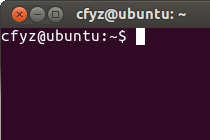
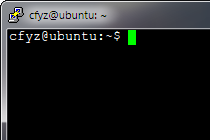
That is how it looks. However, the way it works is different from a console. You don't get a continuous in/out streams to write to and to read from. Instead, you get a grid of cells which can be addressed independently, a scene.

To be precise, a scene is not a single grid, but a number of them, called layers. For a simple game you might not need more than one layer, but sometimes they can be indispensable.
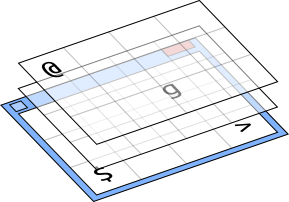
Each cell, in turn, can store a number of tiles. Because the library takes full advantage of alpha (transparency) channel of tile images, this effectively allows to combine several images into one, constructing them on the fly instead of preparing tiles for every combination beforehand. Note that each tile in a stack can have its own color.

Whats more, each tile in a stack can have its own offset from the default position in a cell.

Now, where are those tiles come from?
In BearLibTerminal each character code can have a tile associated with it, e. g. a tile for '@' or a tile for '#'. The range of character codes the library operates on is basic multilingual plane of Unicode. This means there are around 65k of slots for tiles.
Assigning a single tile to the slot is very straightforward:
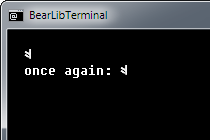
terminal_set("0x5E: tile.png");Which effectively replaces whatever there was in the slot with a new image. In the given example it was a circumflex character. Now it can be used just like any other glyph:
terminal_put(2, 1, 0x5E);
terminal_print(2, 2, "once again: ^");
Which will produce something like this:
Note that tile size is not restricted by the library. You can have a tile as big as the window, e. g. background image for a menu. By default tile is centered in a cell but it can be easily overriden.
Assigning images one slot at a time is tedious and positively counterproductive. BearLibTerminal allows loading whole tilesets at once. Lets say a tileset contains four tiles, each of them is 16×16 pixels in size. It is loaded in almost the same way as a single tile:
terminal_set("0x1000: tileset.png, size=16x16");The only difference is that you have to specify a size of a single image in the tileset bitmap. The library will slice the bitmap up into pieces and assign them to the character code points. The order BeralibTerminal iterates over them is fixed: row by row, from left to right. By default the tiles are placed into consecutive slots. In the example above there will be four tiles assigned to character points 0x1000 through 0x1003.
There is no difference between a tileset and a tile. A single tile is just a small tileset with one image.
The number specified as the starting code point identifies the tile or tileset. To remove the loaded tilesets, you just have to say that there is nothing in the slots:
terminal_set("0x5E: none; 0x1000: none");Now there is a bit tricky part about using bitmap tilesets as a font. BearLibTerminal uses the Unicode plane for tiles. Usually you can just write:
terminal_print(0, 0, "Unicode: α"); // UTF-8And the library will look up the tile for greek symbol alpha in the U+03B1 slot, the number assigned by the Unicode standard. But most of the bitmap fonts usually come as a single image where all the glyphs are packed together, for example:
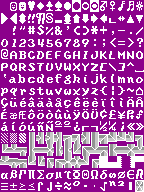
While the alpha symbol is 0x03B1 in Unicode, it may be placed anywhere in the image. For example, in the Dwarf Fortress font shown above, the beta symbol is in the 15th row, 1st column, which is the 224th image piece. Far from the 0x03B1. And no matter what starting code point you choose, you won't get all of the characters in their proper Unicode slots.
This is where a codepage is used. A codepage is a simple mapping from one character code space to another. In this case it is a mapping from indices in the font bitmap to the Unicode code points. By specifying a codepage when loading a tileset you can instruct the library to place tiles not consecutively but according to some list.
terminal_set("font: Nobbins.png, size=9x12, codepage=437");The codes in a codepage are offsets from the starting code point. In the example above, the library reads a mapping for 224th index (which is 0x03B1 in the codepage 437), adds it to the starting point (the “font” part is just a synonym to zero) and places the tile in the right slot.
Its just happens that Dwarf Fortress fonts are in codepage 437. There are a few codepages built into the BearLibTerminal, namely 437, 866, 1250 and 1251. However, you can use any codepage, e. g. custom one, by specifying a name of the codepage file:
terminal_set("font: font.png, size=9x12, codepage=custom.txt");As you can see now, the main font is just a tileset loaded from starting code point “0”. There is a default built-in bitmap font generated from the Fixedsys Excelsior with a codepage matching the WGL4 list, which is automatically selected upon library initialization.