Design Overview
The main purpose of the BearLibTerminal library is (or at least, it was) to provide user with a window impersonating the system console, but much more customizable and geared more toward the game development. Here is what the BearLibTerminal window may look like. Spot the differences with the original ones =)
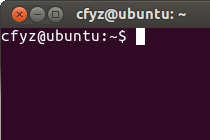
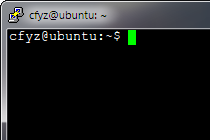
That is how it looks. However, the way it works is different from a console. You don't get a continuous in/out streams to write to and to read from. Instead, you get a grid of cells which can be addressed independently, a scene.

To be precise, a scene is not a single grid, but a number of them, called layers. For a simple game you might not need more than one layer, but sometimes they can be indispensable.
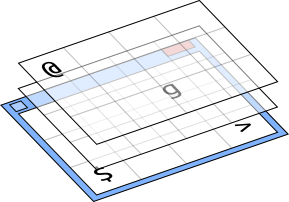
Each cell, in turn, can store a number of tiles. Because the library takes full advantage of alpha (transparency) channel of tile images, this effectively allows to combine several images into one, constructing them on the fly instead of preparing tiles for every combination beforehand. Note that each tile in a stack can have its own color.

Whats more, each tile in a stack can have its own offset from the default position in a cell.

Now, where are those tiles come from?
In BearLibTerminal each character code can have a tile associated with it, e. g. a tile for '@' or a tile for '#'. The range of character codes the library operates on is basic multilingual plane of Unicode. This means there are around 65k of slots for tiles.
Assigning a single tile to the slot is very straightforward:
terminal_set("0x5E: tile.png");Which effectively replaces whatever there was in the slot with a new image. In the given example it was a circumflex character. Now it can be used just like any other glyph:
terminal_put(2, 1, 0x5E);
terminal_print(2, 2, "once again: ^");
Which will produce something like this:
Note that tile size is not restricted by the library. You can have a tile as big as the window, e. g. background image for a menu. By default tile is centered in a cell but it can be easily overriden.