
- Operators
- LEGB
- Class
- Copy and Deepcopy
- Parameter Passing and Inheritance
- Basic Data Structures
- String
- Decimal Numbers
- Exceptions
- Generators and Iterators
- Decorators
- Regular Expression
- Functions
- Lambda Function
- Future Module
Operator > is NOT limited to comparisons between int/float.
5.5 > True  # True (between float and boolean)
1 > True  # False (between int and boolean)
'ab'>'aa'  # True (between str and str)
[10,5]<[6,20,30]  # True, 6>20
[3,100,[5,6]]<[3,4,6]  # False, 100>4
[1,2,[5,6]]<[1,2,6]  # typeError: '<' not supported between instances of 'list' and 'int'
5 > 3 == 3 # True 5>3 and 3==3Operator + can concatenate tupes.
(1, 2)+(3, 4) # (1,2,3,4)Operator * can multiply tupes, but if there is only one item in the tuple, \ * operation will convert it to the item type unless you explicitly add a comma.
(1, 2)*3  # (1,2,1,2,1,2)
(1)*3  # int -> 3
(1,)*3 # (1, 1, 1)

("abc")*3  # "abcabcabc"
("abc", )*3  # ("abc", "abc", "abc")
Operator += on lists does NOT create a new object, instead uses extend methods.
list1 = [1, 2]
list2 = list1
print(id(list1), id(list2))
list1 = list1 + [3, 4]
print(id(list1), id(list2))
print(list1, list2)

list3 = [1, 2]
list4 = list3
print(id(list3), id(list4))
list3 += [3, 4]
print(id(list3), id(list4))
print(list3, list4)
2247395101320 2247395101320
2247391021896 2247395101320 [1, 2, 3, 4] [1, 2]
2247395032456 2247395032456
2247395032456 2247395032456 [1, 2, 3, 4] [1, 2, 3, 4]
Operation AND and OR can be used between tuples and lists respectively. AND takes the last tuple/list as the return, while OR returns the first tuple/list.
a = [1, 2, 3] and [4, 5, 6] and [7, 8, 9]
b = [1, 2, 3] or [4, 5, 6] or [7, 8, 9]
c = [1, 2, 3] and [4, 5, 6] or [7, 8, 9]
print(a)  # [7, 8, 9]
print(b)  # [1, 2, 3]
print(c) # [4, 5, 6]bool(0) # False
bool(bool(0.0001)) # True
bool("0") # True
bool([1,2,3,4]) # True
bool((1,2,3,4)) # True
bool({1:2}) # Trueis checks if refer to the same object, whereas == compares the value or equality of two objects invoking the __eq__ method.
class Person:
    def __init__(self, age):
        self.age = age

    def __eq__(self, other):
        return self.age == other.age

class Animal:
    def __init__(self, age):
        self.age = age

    def __eq__(self, other):
        return self.age == other.age

John = Person(25)
Peter = Person(25)
Bird = Animal(25)
print(John is Peter) # False
print(John == Peter) # True
print(John == Bird) # TrueThe LEGB rule is a kind of name lookup procedure, which determines the order in which Python looks up names. LEGB stand for Local, Enclosing, Global, and Built-in scopes. Enclosing (or nonlocal) scope is a special scope that only exists for nested functions.
Blow is an example of enclosing scope:
note: when you really want to change the enclosing variable, use the nonlocal key word
x = "global x"
def outer():
    x = "outer x"

    def inner1():
        x = "inner x"
        print(x)

    inner1()
    print(x)

outer()
print(x)
inner x
outer x
global x
It is worth noting that the variable explicitly declared as the global variable is not necessarily declared at the module level. However, this way is not recommended.
def global_test():
    global x
    x = "global x"
    print(x)
global_test()
global x
Don not use i+= or i-= to change the enclosing or global variables, because it will raise UnboundLocalError.
i =1
def func():
    i += 2
func()
UnboundLocalError: local variable 'i' referenced before assignment
Until now everything goes well right? Keep in mind, the company will always find a way to torture you. You will see why I said that after going through the following examples.
name = "global variable"

def func1():
    print(name)

def func2():
    name = "local variable"
    func1()

func2()
global variable
name = "global variable"

def func2():
    name = "local variable"
    def func1():
        print(name)
    func1()

func2()
local variable
name = "global variable"

def func2():
    def func1():
        print(name)
    func1()
    name = "local variable"

func2()
NameError: free variable 'name' referenced before assignment in enclosing scope
If you want to extend the searching scope, go for nonlocal
count = 0
def outer():
    count = 10
    def inner():
        nonlocal count
        count = 20
        print(count)  # count = 20
        def inner2():
            nonlocal count
            count = 30
            print(count)  # count = 30
        inner2()  # count = 30
        print(count)  # count = 30
    inner()  # count = 30
    print(count)  # count = 30
outer()  # count = 0
print(count)  # count = 0
20 30 30 30 0
You must declare the variable first when using nonlocal.
def outer():
    count = 10
    def inner():
        count = 20
        nonlocal count
        print(count)
    inner()
    print(count)
outer()
SyntaxError: name 'count' is assigned to before nonlocal declaration
name = "global variable"
def f():
    def inner():
        nonlocal name
        name = "local variable"

    name = "global variable"
    print(name)
    inner()
    print(name)
f()
global variable
local variable
The single underscore (_) is for indication only and does NOT prevent the method from being overrided. Instead, double underscores (__) should be used.
class Parent:
    def __init__(self, iterable):
        self.container = []
        self._item_print(iterable)
        self.__append(iterable)

    def _item_print(self, iterable):
        print("Parent private method.")

    def __append(self, iterable):
        for item in iterable:
            self.container.append(item)

class Children(Parent):
    def _item_print(self, iterable):  # _item_print is overrided
        print("Children private method.")

    def __append(self, iterable):  # __append is NOT overrided
        for item in iterable:
            print("It is an override method.")
            continue

p = Parent(("a", "b"))
print(p.container)
c = Children(("c", "d"))
print(c.container)  # still implement parent's method
Parent private method.
['a', 'b']
Children private method.
['c', 'd']
An abstract class in Python is typically created to declare a set of methods that must be created in any child class built on top of this abstract class. Python has a module called abc (abstract base class) that offers the necessary tools for crafting an abstract base class.
from abc import ABC, abstractmethod

class Animal(ABC):
    @abstractmethod
    def roar(self):
        pass

class Dog(Animal):
    def roar(self):
        print("dog bark")

dog = Dog()
dog.roar()
dog bark
When we create an object from a class, the attributes of the object will be stored in a dictionary called dict. We use this dictionary to get and set attributes. It allows us to dynamically create new attributes after the creation of the object.
class A:
    def __init__(self):
        self.__j=1
        self.number=5
a = A()
print(a.__dict__)
{'_A__j': 1, 'number': 5}
However, when it comes to creating thousands or millions of objects, we might face some issues:
- Dictionary needs memory. Millions of objects will definitely eat up the RAM usage.
- Dictionary is in fact a hash map. The worst case of the time complexity of get/set in a hash mapis O(n).
__slots__ allows us to explicitly declare data members (like properties) and deny the creation of __dict__ and __weakref__ (unless explicitly declared in __slots__ or available in a parent).
class SlotsDemo:
    __slots__ = ["a", "b"]
    def __init__(self):
        self.a = 1
        self.b = 1
slots_demo = SlotsDemo()
print(SlotsDemo.__dict__)
print(slots_demo.__dict__)
{'__module__': '__main__', '__slots__': ['a', 'b'], '__init__': <function SlotsDemo.__init__ at 0x000001F698A4CAF8>, 'a': <member 'a' of 'SlotsDemo' objects>, 'b': <member 'b' of 'SlotsDemo' objects>, '__doc__': None} AttributeError: 'SlotsDemo' object has no attribute '__dict__'
Below, I list the pros and cons of using __slots__.
-
pros: __slots__ can be definitely useful when you have a pressure on memory usage. It’s extremely easy to add or remove with just one-line of code. The possibility of having __dict__ as an attribute in __slots__ gives developers more flexibility to manage attributes while taking care of the performance.
-
cons: You need to be clear about what you are doing and what you want to achieve with __slots__, especially when inheriting a class with it. The order of inheritance, the attribute names can make a huge difference in the performance.
You can’t inherit a built-in type such as int, bytes, tuple with non-empty __slots__. Besides, you can’t assign a default value to attributes in __slots__. This is because these attributes are supposed to be descriptors. Instead, you can assign the default value in __init__().
When a class is derived from more than one base class it is called multiple Inheritance. The derived class inherits all the features of the base case. When some parents have the same function, we need an algorithm to iterate over them, which is name method resolution order (MRO) algorithm.
When a class inherits from multiple parents, Python build a list of classes to search for when it needs to resolve which method has to be called when one in invoked by an instance. This algorithm is a tree routing, and works this way, deep first, from left to right:
- Look if method exists in instance class
- If not, looks if it exists in its first parent, then in the parent of the parent and so on
- If not, it looks if current class inherits from others classes up to the current instance others parents.
class Class1:
    def m(self):
        print("In Class1")

class Class2(Class1):
    def m(self):
        print("In Class2")
        super().m()

class Class3(Class1):
    def m(self):
        print("In Class3")
        super().m()

class Class4(Class2, Class3):
    def m(self):
        print("In Class4")
        super().m()

print("MRO:", [x.__name__ for x in Class4.__mro__])
obj = Class4()
obj.m()
MRO: ['Class4', 'Class2', 'Class3', 'Class1', 'object'] In Class4 In Class2 In Class3 In Class1
The order of "Class3" and "Class1" is quiet unexpected, right? If you follow the instructions above, you will end up with "4 - 2 - 1 - 3". This is because in Python 3 or in Python 2, using object as a parent class, the new MRO algorithm is used. The definition of the new classes algorithm is that it is the same than the old one, except with this difference : each time a class is found in built search path, Python asked the question « Is it a good head ? » and if not, it removes the class from the final search path.
A class is said as being a « good head » if there is no other class in the tail of the search path which inherits from it. In this case it is more natural to use the method defined by its derived class.
In the example above, the atucal searching path is "4 - 2 - 1 - 3 - 1". Since Class4 inherits from Class, Class1 is not searched the first time but after Class3 instead.
I am sorry, but it's not done yet! Suppose we have the structure as follows:
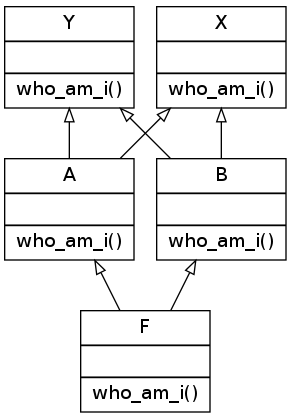
class X():
    def who_am_i(self):
        print("I am a X")

class Y():
    def who_am_i(self):
        print("I am a Y")

class A(X, Y):
    def who_am_i(self):
        print("I am a A")

class B(Y, X):
     def who_am_i(self):
         print("I am a B")

class F (A, B):
    def who_am_i(self):
        print("I am a F")
In Python2, it run successfully, with the search path as F, A, X, Y, B
I am a F
However, in Python3, it raises TypeError. The path should be F, A, B, Y, X regarding the explanations above.
TypeError: Cannot create a consistent method resolution order (MRO) for bases C, B
The algorithm described before for Python 3 is not exactly the real one. Here is the definition of linearization algorithm used to defined the search path. The linearization of a class C is the sum of C plus the merge of the linearizations of the parents and the list of the parents. In symbolic notation:
- L[C(B1 ... BN)] = C + merge(L[B1] ... L[BN], B1 ... BN)
So in our case L[F(A, B)] = F + merge(L[A], L[B], A, B)
And the algorithm to merge linearized lists is:
1. Take the head of the first list, i.e L[B1][0].
2. If this head is not in the tail of any of the other lists, then add it to the linearization of C and remove it from the lists in the merge. Otherwise look at the head of the next list and take it.
3. If it is a good head. Then repeat the operation until all the class are removed or it is impossible to find good heads.
In this case, it is impossible to construct the merge, Python 2.3 will refuse to create the class C and will raise an exception.
L[A(X,Y)] = A + merge(L[X], L[Y], X, Y) = A, X, Y
L[B(Y,X)] = B + merge(L[Y], L[X], Y, X) = B, Y, X
So, L[F(A,B)] = F + merge( (A, X, Y) + (B, Y, X), A, B).
So, applying the algorithm, A is a good head, so we keep it : L[F(A,B)] = F, A + merge( (X, Y) + (B, Y, X), B).
So applaying the algorithm, X is not a good head as it appears in the tail of (B, Y, X), so we skip it and continue with next list to merge:(B, Y, X). B is a good head, so we keep it : L[F(A,B)] = F, A, B + merge( (X, Y) + (Y, X))
So, applying the algorithm X is not a good head as it appears in the tail of (Y, X) so we skip it and jump to (Y, X). Y is not a good head too as it appears in the head of (X, Y). So we continue to the next list. But there is no other. Thus, Python 3 cannot linearize the class F to build the MRO and raise the exception!
For primitive types, copy equals to deepcopy. As for reference types, copy inserts references while deepcopy constructs a new compound object.
import copy

listA = [0, [0, 0]]
listB = copy.copy(listA)
listC = copy.deepcopy(listA)
listA[0] = 1
listA[1][0] = 2
print(listA, listB, listC)
print(id(listA[1]), id(listB[1]), id(listC))
[1, [2, 0]] [0, [2, 0]] [0, [0, 0]]
2247372890504 2247372890504 2247372861320
= gives the same id, and list equals to copy method.
l1 = [[1, 2], [3, 4], [5, 6]]
l2 = list(l1)
for i in range(len(l1)):
    print(id(l1[i]), id(l2[i]))
l3 = l1
l1.append(7)
print(l1, l2, l3)
2247391114888 2247391114888
2247391114760 2247391114760
2247391114824 2247391114824
[[1, 2], [3, 4], [5, 6], 7] [[1, 2], [3, 4], [5, 6]] [[1, 2], [3, 4], [5, 6], 7]
Using * on list of reference types equals to copy method, and all item generated have the same id.
l1 = ["FlyingSPA"]
l2 = [l1]*3
for item in l2:
    print(id(item))
l2[1][0] = "Ramen"
print(l2)
2247391211016
2247391211016
2247391211016
[['Ramen'], ['Ramen'], ['Ramen']]
Python keeps small integers and strings permanently so it doesn't have to create an object every time.
import copy

string1 = "Flying"
string2 = "Flying"
print(id(string1), id(string2))

list1 = [1, 2]
list2 = copy.deepcopy(list1)
print(id(list1[0]), id(list2[0]))
2247307226032 2247307226032
140707511574928 140707511574928
Slicing and list() are shallow copy.
a = [[1, 2, 3, 4],[4, 5, 6, 7]]
b = a[0:1]
a[0][1] = 9
print(a, b)

c = list(a)
a[1][2] = 99
print(a, c)
[[1, 9, 3, 4], [4, 5, 6, 7]] [[1, 9, 3, 4]] [[1, 9, 3, 4], [4, 5, 99, 7]] [[1, 9, 3, 4], [4, 5, 99, 7]]
If you pass immutable arguments like integers, strings or tuples to a function, the passing acts like call-by-value. The object reference is passed to the function parameters. They can't be changed within the function, because they can't be changed at all. If we pass mutable arguments, they are also passed by object reference, but they can be changed in place within the function.
As we can see below, the parameter x inside the function remains a reference to the argument's variable, as long as the parameter is not changed. As soon as a new value is assigned to it, Python creates a separate local variable.
a = 1

def int_add(x):
    print(x, id(x))
    x+=10
    print(x, id(x))
int_add(a)
print(a, id(a))

list1 = [1, 2, 3]

def list_change(list_input):
    list_input[0] = 10
list_change(list1)
print(list1)
1 140707511574928
11 140707511575248
1 140707511574928
[10, 2, 3]
Subclasses will inheritance their parent class's variable value unless you explicitly revise it.
class Parents(object):
	age = 1

class ChildPeter(Parents):
    pass

class ChildKate(Parents):
    pass

ChildPeter.age = 2
print(Parents.age, ChildPeter.age, ChildKate.age)
Parents.age = 3
print(Parents.age, ChildPeter.age, ChildKate.age)
1 2 1
3 2 3
Python’s default arguments are evaluated once when the function is defined, not each time the function is called. This means that if you use a mutable default argument and mutate it, you will and have mutated that object for all future calls to the function as well.
def bad_append(new_item, list_input=[]):
    list_input.append(new_item)
    print(id(list_input), list_input)
    return

def good_append(new_item, list_input=None):
    print(id(list_input)) # the same id each time the function is called
    if list_input is None:
        list_input = []

    list_input.append(new_item)
    print(id(list_input), list_input)
    return

bad_append("1")
bad_append("2")
good_append("1")
good_append("2")
1835597774152 ['1'] 1835597774152 ['1', '2']
140707511098592 1835514390280 ['1']
140707511098592 1835594568776 ['2']
If you pass a variable, the function will use the variable reference instead of the default argument.
def list_append(new_item, list_input=[]):
    print(id(list_input))
    list_input.append(new_item)
    print(id(list_input), list_input)
    return list_input

list1 = list_append(1)
list2 = list_append(1, [])
list3 = list_append(2)
list4 = list_append(2, [])
print(list1, list2, list3, list4)
1835585422600 1835585422600 [1]
1835585421704 1835585421704 [1]
1835585422600 1835585422600 [1, 2]
1835596669064 1835596669064 [2]
[1, 2] [1] [1, 2] [2]
- The remove() method will raise an error if the specified item does not exist, and the discard() method will not.
- We may also use the pop() method to remove and return an item. However, there is no way to know which item will be popped because the set is an unordered data type. It's absolutely random!
set1 = {1, 2, 3}
set1.add(4)  # add element
print(set1)  # {1, 2, 3, 4}

set2 = {1, 2, 3}
set2.update([3, 4, 5])  # add more than one element
print(set2)  # {1, 2, 3, 4, 5}

set3 = {1, 2, 3}
set3.discard(3)  # remove element
print(set3)  # {1, 2}

set4 = {1, 2, 3}
set4.remove(3)  # remove element
print(set4)  # {1, 2}

set5 = {1, 2, 3}
set5.pop()  # pop one element

set6 = {1, 2, 3}
set6.clear()  # delete all elements
print(set6)  # set()
Set operations are performed in one of two ways: by an operator or by a method. In this situation, a set, it's worth noting that each operator corresponds to a distinct Python special function. So, they both accomplish the same thing but have distinct syntax requirements. Keep in mind, the set methods do NOT change any set in place, but return a new set.
set1 = {1, 2, 3}
set2 = {3, 4, 5}
combined_set1 = set1 | set2
combined_set2 = set1.union(set2)
print(set1 ,set2)  # {1, 2, 3} {3, 4, 5}
print(combined_set1, combined_set2)  # {1, 2, 3, 4, 5} {1, 2, 3, 4, 5}

set3 = {1, 2, 3}
set4 = {3, 4, 5}
intersected_set1 = set3 & set4
intersected_set2 = set3.intersection(set4)
print(set3 ,set4)  # {1, 2, 3} {3, 4, 5}
print(intersected_set1, intersected_set2)  # {3} {3}

set5 = {1, 2, 3}
set6 = {3, 4, 5}
diff_set1 = set5 - set6
diff_set2 = set5.difference(set6)
print(set5 ,set6)  # {1, 2, 3} {3, 4, 5}
print(diff_set1, diff_set2)  # {1, 2} {1, 2}

set7 = {1, 2, 3}
set8 = {3, 4, 5}
sym_diff_set1 = set7 ^ set8
sym_diff_set2 = set7.symmetric_difference(set8)
print(set7 ,set8)  # {1, 2, 3} {3, 4, 5}
print(sym_diff_set1, sym_diff_set2)  # {1, 2, 4, 5} {1, 2, 4, 5}
Notice: there is no "-" operation for set.
There are four ways for string concatenation:
- "+" operator ("stringA" + "stringB")
- "%" operator ("My name is, %s!" % name)
- format ("My name is {}".format(name))
- f string (f"My name is {name}))
- operator is used for simple string concatenation, and % operator is not recommended. Using f-strings is suggested for Python 3.6 and above while .format() is best suited for Python 2.6 and above.
It is often the case that you need to split a string into a list. The split() method splits a string into a list of strings after breaking the given string by the specified separator. You may specify the delimiter and the maximum number of splits.
str1 = "FlingSPA is the best contributor."
print(str1.split(" "))
print(str1.split(" ", maxsplit = 3))
['FlingSPA', 'is', 'the', 'best', 'contributor.']
['FlingSPA', 'is', 'the', 'best contributor.']
The find(), rfind() and index() method all return the index of a certain pattern(substring). rfind() returns the highest index (from the right) for the provided substring, whereas find() and index() return the index position of the element's first occurrence. The difference is that find() and rfind() return -1 when the substring is not found, while index() raises ValueError.
str1 = "Python is the best programming language in the world."
print(str1.find("the"))
print(str1.rfind("the"))
print(str1.index("the"))
10 43 10
The floating-point calculations are inaccurate in Python because the rationals are approximating that cannot be represented finitely in base 2 and in general they are approximating numbers which may not be representable in finitely many digits in any base. In a word, inaccuracies occur due to conversion between fractions and decimals. One way to solve is problem is to use decimal package.
from decimal import Decimal
print(0.1+0.2 == 0.3)
print(0.1+0.2)
print(Decimal("0.1")+Decimal("0.2") == Decimal("0.3"))
False 0.30000000000000004 True
If you want to compare float numbers, try to use tolerance scope instead of ==.
x = 1.0 - 0.8
y = 0.8 - 0.6
EPSILON = 1e-15
if abs(x - y) < EPSILON:
    print("x is equal to y")
x is equal to y
If you have Python 3.5 or higher version, use math.isclose.
import math

x = 1.0
y = 0.9999997
print(math.isclose(x, y, rel_tol=1e-5))
True
In the try-except-else-finally block, you need to explicitly declare the Exception type apart from "except" suite. Even though a RuntimeError is raised, all corresponding blocks are still executed.
try:
    print("try process")
    raise
except Exception as err:
    print("except process")
    raise
else:
    print("else process")
    raise
finally:
    print("finally process")
    raise
try process except process finally process
RuntimeError: No active exception to reraise
All codes after "raise" statement will NOT be executed.
class MyException(Exception):
    code = 404

try:
    print("before raise")
    raise MyException
    print("after exception")
except:
    print("except process")
before raise except process
It is forbidden to use return, break and continue within a finally suite since it leads to behaviour which is not at all obvious. The return within the finally will silently cancel any exception that propagates through the finally suite, and break and continue have similar behaviour (they silence exceptions) if they jump to code outside the finally suite. The following two functions are equivalent:
def foo():
    try:
        foo()
    finally:
        return
def foo():
try:
foo()
except:
pass
returnExcept suite can only catch exceptions from try suite, and all exceptions from other suits should be handled separately.
class MyException(Exception):
    code = 404

try:
    print("try process")
    raise MyException
except MyException as err:
    print("except process")
    raise MyException
finally:
    print("finally process")
    raise MyException
try process except process finally process
MyException MyException MyException
A parent’s exception class can catch the child’s exception class, but what is actually obtained is the child exception.
class ChildException(Exception):
    def __init__(self):
        super().__init__(self, "Child Exception")

try:
    raise ChildException
except Exception as exc:
    print("catch exception: %s" % exc)
catch exception: (ChildException(...), 'Child Exception')
An iterator is an object which contains a countable number of values and it is used to iterate over iterable objects like list, tuples, sets, etc. Using an iterator:
- iter() keyword is used to create an iterator containing an iterable object.
- next() keyword is used to call the next element in the iterable object.
- After the iterable object is completed, to use them again reassign them to the same object.
list1 = [1, 2, 3]
list1_iterator = iter(list1)
print(next(list1_iterator))
print(next(list1_iterator))
print(next(list1_iterator))
1 2 3
To create an object/class as an iterator you have to implement the methods iter() and next() to your object. It is possible to create an infinite or finite iterator.
class InfiniteNumbers:
  def __iter__(self):
    self.a = 1
    return self

  def __next__(self):
    x = self.a
    self.a += 2
    return x


infIterator = iter(InfiniteNumbers())

print(next(infIterator))
print(next(infIterator))
print(next(infIterator))
1 3 5
Generator is another way of creating iterators in a simple way where it uses the keyword "yield" instead of returning it in a defined function. Generators are implemented using a function. When it reaches the final item, a StopIteration exception will be raised.
def squared_num(n):
    for i in range(1, n+1):
        yield i**2

squared_seq = squared_num(3)
print(next(squared_seq))
print(next(squared_seq))
print(next(squared_seq))
print(next(squared_seq))
1 4 9
StopIteration
Generators can also be created without using the keyword "yield".
add_gen = (x+y for x in range(2) for y in range(2))
print(next(add_gen))
print(next(add_gen))
print(next(add_gen))
print(next(add_gen))
0 1 1 2
A decorator is a design pattern in Python that allows a user to add new functionality to an existing object without modifying its structure. It is recommended to use functools.wraps to create decorators since the general method can change internal properties.
def general_decorator(func):
    def wrapper(*args, **kwargs):
        print("call decorated function")
        return func(*args, **kwargs)
    return wrapper

@general_decorator
def new_func():
    """docstring of new_func"""
    print("this is the new_func")
    return

new_func()
print(new_func.__name__)
print(new_func.__doc__)
call decorated function this is the new_func
wrapper
None
If we use functools.wraps, the corresponding properties will still be the same as the original function and the function of the decorator remains the same.
from functools import wraps

def general_decorator(func):
    @wraps(func)
    def wrapper(*args, **kwargs):
        print("call decorated function")
        return func(*args, **kwargs)
    return wrapper

@general_decorator
def new_func():
    """docstring of new_func"""
    print("this is the new_func")
    return

new_func()
print(new_func.__name__)
print(new_func.__doc__)
call decorated function this is the new_func
new_func
docstring of new_func
Python’s property() is the Pythonic way to avoid formal getter and setter methods in your code. This function allows you to turn class attributes into properties or managed attributes. Be aware that in the following example, you simply add an attribute, namely __age, and the class attribute remains unchanged.
class Person(object):
    def __init__(self):
        self.__age = 30
    @property
    def age(self):
        return self.__age

p = Person()
p.__age = 25
print(p.__dict__)
print(p.age, p.__age)
{'_Person__age': 30, '__age': 25}
30 25
Re module in Python provides regular expression matching operations. There are three commonly used methods: match(), search() and findall(). The re.match() method finds match if it occurs at start of the string. The re.search() method is similar to re.match() but it does NOT limit us to find matches at the beginning of the string only. The re.findall() helps to get a list of all matching patterns, which means it searches from start or end of the given string.
import re

score = "FlyingSPA_100, Jack_50, Kate_80"
score_match = re.match(r"([a-zA-Z]*)_(\d*)", score)
score_search = re.search(r"([a-zA-Z]*)_(\d*)", score)
score_findall = re.findall(r"([a-zA-Z]*)_(\d*)", score)
print(score_match.groups())
print(score_search.groups())
print(score_findall)
('FlyingSPA', '100')
('FlyingSPA', '100')
[('FlyingSPA', '100'), ('Jack', '50'), ('Kate', '80')]
The match() and search() method both have a group and groups function, as follows:
import re

score = "FlyingSPA_100, Jack_50, Kate_80"
score_match = re.match(r"([a-zA-Z]*)_(\d*)", score)

print(score_match.group())  # return a string
print(score_match.group(0))  # return all occurrence
print(score_match.group(1))  # return the first element
print(score_match.group(2))  # return the second element
print(score_match.groups())  # return a tuple based on your expression
The inditer() works exactly the same as the findall() method except it returns an iterator yielding match objects matching the regex pattern in a string instead of a list.
import re

score = "FlyingSPA_100, Jack_50, Kate_80"
score_finditer = re.finditer(r"([a-zA-Z]*)_(\d*)", score)
print(next(score_finditer))
print(next(score_finditer))
print(next(score_finditer))
<re.Match object; span=(0, 13), match='FlyingSPA_100'>
<re.Match object; span=(15, 22), match='Jack_50'>
<re.Match object; span=(24, 31), match='Kate_80'>
If you want to find some patterns and replace them, the sub() can help you do this. It returns a string where all matching occurrences of the specified pattern are replaced by the replace string.
import re

statement = "FlyingSPA is a nice person."
statement_revised = re.sub("[aA]", "#", statement)
print(statement)
print(statement_revised)
FlyingSPA is a nice person.
FlyingSP# is # nice person.
Python's default arguments are evaluated once when the function is defined, not each time the function is called. This means that if you use a mutable default argument and mutate it,** you will and have mutated that object for all future calls to the function as well**. As a result, only use integer boolean, float, string and None as default arguments.
def fun(arg_a, list_arg=[]):
    list_arg.append(arg_a)
    print(list_arg)
fun(1)
fun(1)
fun(1, [])
[1] [1, 1] [1]
A lambda function is a small anonymous function. A lambda function can take any number of arguments, but can only have one expression. For intermediate learners, writing a lambda function is not a big deal, but they might come across some unexpected results when facing function closure.
fun = [lambda x: print(i, x, i * x) for i in range(3)]

for item in fun:
    item(2)
2 2 4
2 2 4
2 2 4
The result is not we want right? It is not easy to debug from the lambda expression, and let's rewrite it.
def func():
    func_list = []
    for i in range(3):
        def multi(x):
	    print(i, x, i * x)
            return
        func_list.append(multi)
    return func_list

for item in func():
    item(2)
2 2 4
2 2 4
2 2 4
The problem is that the multi() function is not executed until we explicitly call it. So the multi() function does NOT know the value of i when we put it into the list. When we call it(item()), the multi() function gets the value of i which is 2 at that time. As long as we find the reason, it is easy to get it on the right track.
fun = [lambda x, i = i: print(i, x, i * x) for i in range(3)]

for item in fun:
    item(2)
0 2 0
1 2 2
2 2 4
Don't know why I put i = i?
def func():
    func_list = []
    for i in range(3):
        def multi(x, i =i):
	    print(i, x, i * x)
            return
        func_list.append(multi)
    return func_list

for item in func():
    item(2)
future module is a built-in module in Python that is used to inherit new features that will be available in the new Python versions. The basic idea of the future module is to help migrate to use Python 3.X features. The future statements must at the top of the file, otherwise the Python interpreter will raise SyntaxError
"""This is a module
Functions of this module
"""

from __future__ import print_function

__all__ = ['hello', 'world']
__version__ = 'V1.0'