bamliquidator
- Overview
- Install / Upgrade / Uninstall
- Usage
- Performance
- Developers
- Frequently Asked Questions (FAQ)
- Troubleshooting

- bamliquidator is a set of tools for analyzing the density of short DNA sequence read alignments in the BAM file format
- the read counts across multiple genomes are grouped, normalized, summarized, and graphed in interactive html files
- for an interactive graph example, see this summary and this breakdown for a single chromosome
- a BAM file is a binary sequence alignment map -- see SAMtools for more info
- the read counts and summaries are stored in HDF5 format where they can be efficiently read via Python PyTables or the HDF5 C apis
- the HDF5 files can be viewed directly with the cross platform tool HDFView
- there is an option to output the data in tab delimited text files as well
- there is also a command line utility for counting the number of reads in specified portion of a chromosome, and the count is output to the console
These instructions only currently work on Ubuntu 12.04 LTS and Ubuntu 14.04 LTS. If you aren't running either of these, please follow the developer instructions to build from source or contact jdimatteo@gmail.com for additional help.
- Add the Bradner Lab pipeline PPA from a terminal:
sudo add-apt-repository ppa:bradner-computation/pipeline
sudo apt-get update
- If you get an error "add-apt-repository: command not found", then first do
sudo apt-get install python-software-properties
- Install using the ppa:
sudo apt-get install bamliquidator
- OPTIONAL: If you'd like to utilize the graphing capabilities, install Bokeh, e.g.
sudo pip install bokeh==0.9.3 "openpyxl>=1.6.1,<2.0.0"
sudo apt-get update
sudo apt-get install bamliquidator
You can check what the most current released version here:
You can check the current local installed version with dpkg -s bamliquidator, e.g.
$ dpkg -s bamliquidator | grep 'Version'
Version: 0.9.3-0ppa1~trusty
$
sudo apt-get remove bamliquidator
Note that older versions also had a pip component, which may require an additional command:
sudo pip uninstall BamLiquidatorBatch
real 4m20.028s user 15m31.558s sys 3m9.160s $ ls output chr10.html chr13.html chr16.html chr19.html chr21.html chr3.html chr6.html chr9.html chrY.html chr11.html chr14.html chr17.html chr1.html chr22.html chr4.html chr7.html chrM.html counts.h5 chr12.html chr15.html chr18.html chr20.html chr2.html chr5.html chr8.html chrX.html summary.html $
* run `bamliquidator_batch --help` for the latest documentation, including optional arguments, but here is a snapshot:
$ bamliquidator_batch --help usage: bamliquidator_batch [-h] [-v] [-b BIN_SIZE | -r REGIONS_FILE] [-o OUTPUT_DIRECTORY] [-c COUNTS_FILE] [-f] [-s] [-e EXTENSION] [--sense {+,-,.}] [-m] bam_file_path
Count the number of base pair reads in each bin or region in the bam file(s) at the given directory, and then normalize, plot bins, and summarize the counts in the output directory. For additional help, please see https://github.com/BradnerLab/pipeline/wiki
positional arguments: bam_file_path The directory to recursively search for .bam files for counting. Every .bam file must have a corresponding .bai file at the same location. To count just a single file, provide the .bam file path instead of a directory. The parent directory of each .bam file is interpreted as the cell type (e.g. mm1s might be an appropriate directory name). Bam files in the same directory are grouped together for plotting. Plots use normalized counts, such that all .bam files in the same directory have bin counts that add up to 1 for each chromosome. If your .bam files are not in this directory format, please consider creating a directory of sym links to your actual .bam and .bai files. If the .bam file already has 1 or more reads in the HDF5 counts file, then that .bam file is skipped from liquidation, but is still included in normalization, plotting, and summaries.
optional arguments: -h, --help show this help message and exit -v, --version show program's version number and exit -b BIN_SIZE, --bin_size BIN_SIZE Number of base pairs in each bin -- the smaller the bin size the longer the runtime and the larger the data files (default is 100000) -r REGIONS_FILE, --regions_file REGIONS_FILE a region file in either .gff or .bed format -o OUTPUT_DIRECTORY, --output_directory OUTPUT_DIRECTORY Directory to create and output the h5 and/or html files to (aborts if already exists). Default is "./output". -c COUNTS_FILE, --counts_file COUNTS_FILE HDF5 counts file from a prior run to be appended to. If unspecified, defaults to creating a new file "counts.h5" in the output directory. -f, --flatten flatten all HDF5 tables into tab delimited text files in the output directory, one for each chromosome (note that HDF5 files can be efficiently queried and used directly -- e.g. please see http://www.pytables.org/ for easy to use Python APIs and http://www.hdfgroup.org/products/java/hdf-java- html/hdfview/ for an easy to use GUI for browsing HDF5 files -s, --skip_email skip sending performance tracking email -- these emails are sent by default during beta testing, and will be removed (or at least not be the default) when this app leaves beta -e EXTENSION, --extension EXTENSION Extends reads by n bp (default is 0) --sense {+,-,.} Map to '+' (forward), '-' (reverse) or '.' (both) strands. For gff regions, default is to use the sense specified by the gff file; otherwise, default maps to both. -m, --match_bamToGFF match bamToGFF_turbo.py matrix output format, storing the result as matrix.gff in the output folder
#### bamliquidator
bamliquidator is run from the command line with required positional arguments:
$ ./bamliquidator [ bamliquidator ] output to stdout
- bam file (.bai file has to be at same location)
- chromosome
- start
- stop
- strand +/-, use dot (.) for both strands
- number of summary points
- extension length
Example counting the number of positions overlapped by a read on both strands from base pair 100 to 200 on chromosome 1 (inclusive):
$ bamliquidator 04032013_D1L57ACXX_4.TTAGGC.hg18.bwt.sorted.bam chr1 100 200 . 1 0 120 $
Example counting the number of positions overlapped by a read on the forward strand from base pair 0 to 100000 on chromosome 1 (inclusive), extending the read by 200 base pairs, and getting two summary points (the first output line corresponds to base pair 0 to 50000, and the second to 50000 to 100000):
$ bamliquidator 20130221_629_hg19.sorted.bam chr1 0 100000 + 2 200 195261 59617 $
<a name="flattener"/>
#### bamliquidator_flattener
* flattener writes hdf5 files to text files
* flattener is either run via the --flatten argument of bamliquidator_batch, or directly via bamliquidator_flattener
* for example:
$ bamliquidator_flattener --table sorted_summary ../output/counts.h5 ../output $ head ../output/sorted_summary_chr1.tab bin_number avg_cell_type_percentile cell_types_gte_95th_percentile cell_types_lt_95th_percentile lines_gte_95th_percentile lines_lt_95th_percentile cell_types_gte_5th_percentile cell_types_lt_5th_percentile lines_gte_5th_percentile lines_lt_5th_percentile 1498 99.986831275720164 1 0 1 0 1 0 1 0 2032 99.963786008230443 1 0 1 0 1 0 1 0 1549 99.957201646090539 1 0 1 0 1 0 1 0 1214 99.944032921810702 1 0 1 0 1 0 1 0 1561 99.848559670781896 1 0 1 0 1 0 1 0 2287 99.809053497942386 1 0 1 0 1 0 1 0 1181 99.753086419753089 1 0 1 0 1 0 1 0 1559 99.703703703703709 1 0 1 0 1 0 1 0 1564 99.683950617283941 1 0 1 0 1 0 1 0
* bamliquidator_flattener usage is described with the --help argument:
$ bamliquidator_flattener --help usage: bamliquidator_flattener [-h] [-t TABLE] h5_file output_directory
Writes bamliquidator_batch hdf5 tables into tab delimited text files, one for each chromosome. Note that this is provided as a convenience, but it is hoped that the hdf5 files will be used directly since they are much more efficient to work with -- e.g. please see http://www.pytables.org/ for easy to use Python APIs and http://www.hdfgroup.org/products/java/hdf-java- html/hdfview/ for an easy to use GUI for browsing HDF5 files. For more info, please see https://github.com/BradnerLab/pipeline/wiki/bamliquidator .
positional arguments: h5_file the hdf5 file generated by bamliquidator_batch.py output_directory directory to store the tab files (must already exist)
optional arguments: -h, --help show this help message and exit -t TABLE, --table TABLE the table to write to hdf5, e.g. "region_counts" for a regions counts.h5 file, or one of the following for a uniform bins counts.h5 file: "bin_counts", "normalized_counts", "sorted_summary", or "summary". If none specified flattens every table in the h5 file, using the table name as a file prefix.
<a name="Performance"/>
# Performance

Peak performance has been observed at over 11 million reads liquidated per second (with 100K bins).  Storage speed is usually the bottleneck, and performance is usually improved by disabling hyperthreading.

CPU | Memory | Storage | OS | Liquidation seconds (cold/warmed) | Batch seconds (cold/warmed) | Notes
----|--------|---------|----|-----------------------------------|-----------------------------|------
2GHz Core i7-3667U (dual core) | 8 GB 1600MHz DDR3 | Apple SSD TS128E | Mac OS 10.8.5 | 22.070482 / 20.853430 | 26.841s / 25.203s | git commit [566a2eb](https://github.com/BradnerLab/pipeline/tree/566a2eb86a5a2224780a666d60bef26fc7f66bc2)
2.1GHz Opteron 6272 (32 cores) | 128 GB | ~12 MB/sec NAS | Ubuntu 12.04.4 LTS | 134.242138s / 3.260263s | 143.31s / 9.23s | git commit [4d4b018](https://github.com/BradnerLab/pipeline/tree/4d4b018244440eda555608f4b7a129e679a99434)
2.1GHz Opteron 6272 (32 cores) | 128 GB | Dual SSD | Ubuntu 12.04.4 LTS | 3.468793s / 4.535103s | 8.858s / 13.398s | git commit [4d4b018](https://github.com/BradnerLab/pipeline/tree/4d4b018244440eda555608f4b7a129e679a99434)

Tests results are from the following command:
time bamliquidator_batch 04032013_D1L57ACXX_4.TTAGGC.hg18.bwt.sorted.bam
The batch time is the real time reported by the time command, and the liquidation time is the time reported in the output formatted like "Liquidation completed in 22.070482 seconds".  The first time is from a cold run, and the second time is from a consecutive run which probably utilizes the bam file cached in RAM.  To ensure the cold run is really cold, execute with a fresh boot of the computer, or on Linux [clear the cache](http://www.linuxinsight.com/proc_sys_vm_drop_caches.html) by running `sync` followed by `echo 3 > /proc/sys/vm/drop_caches` .

Please email jdimatteo@gmail.com to share your performance results.  Please use the same files for testing: the [.bam file](https://www.dropbox.com/s/bu75ojqr2ibkf57/04032013_D1L57ACXX_4.TTAGGC.hg18.bwt.sorted.bam) and [.bai file](https://www.dropbox.com/s/a71ngagu2k8pgiv/04032013_D1L57ACXX_4.TTAGGC.hg18.bwt.sorted.bam.bai); note that this .bam file is a processed version of a publicly available dataset that can be found at http://www.ncbi.nlm.nih.gov/geo/query/acc.cgi?acc=GSE44931 .

<a name="Developers"/>
# Developers
* bamliquidator was originally developed by Xin Zhong in the laboratory of Ting Wang at Washington University St
* bamliquidator_batch/bamliquidator_bins/bamliquidator_regions are developed/maintained by John DiMatteo under the direction of Charles Lin (laboratory of James Bradner, Dana-Farber Cancer Institute)
* additional contributors are welcome, please see [Collaboration Workflow](Collaboration-Workflow)
* source code is available under [The MIT License](http://opensource.org/licenses/MIT): https://github.com/BradnerLab/pipeline

<a name="check-list"/>
#### Developer Getting Started Check List
1. install dependencies: SAMtools, HDF5, boost, Intel TBB, tcmalloc, PyTables (version 3 or later), Bokeh, NumPy
    * Ubuntu 13.10 or later
        * dependencies in default apt repo:
        ````
sudo apt-get install git libbam-dev libhdf5-serial-dev libboost-dev libboost-timer-dev libgoogle-perftools-dev libtbb-dev samtools python python-numpy python-pandas python-redis python-pip python-software-properties python-tables python-numexpr
        ````
        * install bokeh:
            * `sudo pip install bokeh`
    * Ubuntu 12.04 LTS
        * dependencies in default apt repo:
        ````
sudo apt-get install git libbam-dev libhdf5-serial-dev libboost-dev libboost-timer-dev libgoogle-perftools-dev python-numpy python-pandas python-redis python-pip python-software-properties samtools libtbb-dev
        ````
        * install bokeh
             * `sudo pip install six --upgrade`
             * `sudo pip install bokeh`
        * upgrade to pytables 3 or later
             * `sudo pip install --upgrade numexpr`
             * `sudo pip install --upgrade cython`
             * `sudo pip install --upgrade tables`
    * Mac OS X (10.8 or later)
        * install [XCode](https://developer.apple.com/xcode/) (5 or later) and the command line utilities
            * on XCode 5 or earlier, install the command line utilities: go to the Downloads tab within the Xcode Preferences menu and click "Install" next to the Command Line Tools entry
            * in a terminal, verify that you can run `g++`.  you may get a message that you need to `sudo g++` and accept some Apple terms and conditions
        * install and use [homebrew](http://brew.sh/) for the rest of the dependencies, and then run:
            * `brew tap homebrew/science`
            * `brew install samtools boost hdf5 google-perftools tbb`
            * `ln -s /usr/local/Cellar/samtools/0.1.19/include/bam /usr/local/include/samtools`
                * the installed samtools version may vary on your system, e.g. replace 0.1.19 with 0.1.20 or whatever number is installed in your /usr/local/Cellar/samtools/ directory
                * this is so that the sam.h can be found in a default search path in the same directory "samtools" as setup by the Ubuntu package libbam-dev
            * if `/usr/local/include/` and/or `/usr/local/lib` aren't included in the C++ default search paths, add it, e.g. by adding the following to your `~/.profile`:
            ```
export CPATH=/usr/local/include
export LIBRARY_PATH=/usr/local/lib
            ```
        * install [pip](https://pip.readthedocs.org/en/stable/installing/#install-pip)
             * e.g. download `get-pip.py` then `run sudo python get-pip.py`
        * `pip install six numexpr cython tables --upgrade --user`
             * optionally also `pip install bokeh --upgrade --user`
    * CentOS 6
        * these instructions assume the [EPEL](https://fedoraproject.org/wiki/EPEL) repository is used, which can be installed like this:
            * `sudo yum install wget`
            * `wget https://dl.fedoraproject.org/pub/epel/epel-release-latest-6.noarch.rpm`
            * `sudo rpm -ivh epel-release-latest-6.noarch.rpm`
        * `sudo yum install git make automake gcc gcc-c++ samtools-devel python-devel boost-devel hdf5-devel gperftools-devel tbb-devel zlib-devel lapack-devel samtools cmake`
        * python 2.7 is required for bamliquidator, this can be installed along with the required modules like this:
            * `sudo yum install centos-release-SCL scl-utils-build`
            * `sudo yum install python27`
            * `scl enable python27 bash`
            * `sudo easy_install-2.7 pip`
            * `sudo pip install bokeh tables unittest2 scipy`
            * note that whenever you run bamliquidator_batch, you will need to do so with python 2.7 or later, e.g. by first running `scl enable python27 bash`
2. checkout, build the code, and verify runs
    * for CentOS users, the default gcc install is probably too old, you can install a newer version of gcc and set it as the default for a new bash session like this:
        * `wget http://people.centos.org/tru/devtools-1.1/devtools-1.1.repo -P /etc/yum.repos.d`
        * `sudo sh -c 'echo "enabled=1" >> /etc/yum.repos.d/devtools-1.1.repo'`
        * `sudo yum install devtoolset-1.1`
        * `scl enable devtoolset-1.1 bash`
$ git clone https://github.com/BradnerLab/pipeline.git $ cd pipeline/bamliquidator_internal $ make $ ./bamliquidator_bins usage: ./bamliquidator_bins cell_type bin_size bam_file hdf5_file chr1 lenght1 ...
e.g. ./bamliquidator_bins mm1s 100000 /ifs/hg18/mm1s/04032013_D1L57ACXX_4.TTAGGC.hg18.bwt.sorted.bam chr1 247249719 chr2 242951149 chr3 199501827 note that this application is intended to be run from bamliquidator_batch.py -- see https://github.com/BradnerLab/pipeline/wiki for more information $ cd ../ $ ./bamliquidator_batch.py usage: bamliquidator_batch.py [-h] [--output_directory OUTPUT_DIRECTORY] [--counts_file COUNTS_FILE] [--bin_size BIN_SIZE] [--regions_file REGIONS_FILE] bam_file_path bamliquidator_batch.py: error: too few arguments $
<a name="ml-check-list"/>
#### Motif Liquidator Checklist
For Ubuntu 14.04:
1. `sudo apt-get install git libbam-dev libboost-dev libboost-timer-dev libgoogle-perftools-dev libtbb-dev samtools cmake libz-dev libhdf5-serial-dev libboost-program-options-dev libboost-filesystem-dev libboost-system-dev`
2. `git clone -b motif_liquidator_matrix https://github.com/BradnerLab/pipeline.git`
3. `cd pipeline/liquidator`
4. `make cpp_test && make`
5. `./cpp_test`
6. verify last line of cpp_test output says `[ PASSED ]`
7. for usage, review output of `./motif_liquidator -h`
<a name="components"/>
#### Program Components
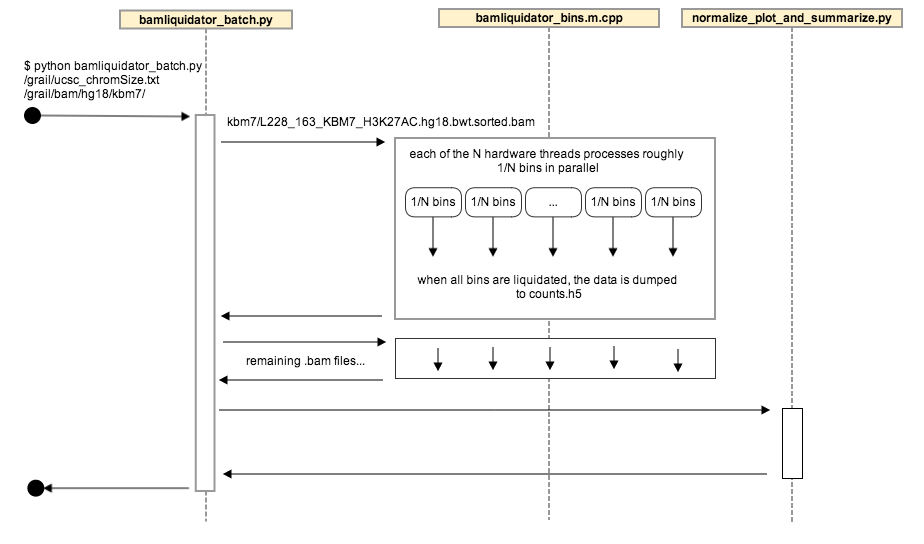
The components of bamliquidator can all be used independently, but are run together by bamliquidator_batch:
1. [bamliquidator.h](https://github.com/BradnerLab/pipeline/blob/master/bamliquidator_internal/bamliquidator.h)/[cpp](https://github.com/BradnerLab/pipeline/blob/master/bamliquidator_internal/bamliquidator.cpp): generates the raw bin counts
* defines the function `liquidate`, which reads a .bam file to do the counting
* used to create the bamliquidate command line executable ([bamliquidator.m.cpp](https://github.com/BradnerLab/pipeline/blob/master/bamliquidator_internal/bamliquidator.m.cpp)), and is the core of bamliquidator_batch
2. [bamliquidator_bins.m.cpp](https://github.com/BradnerLab/pipeline/blob/master/bamliquidator_internal/bamliquidator_bins.m.cpp)
* calls the [liquidate](https://github.com/BradnerLab/pipeline/blob/master/bamliquidator_internal/bamliquidator.h) function on each chromosome in parallel, and writes the results in HDF5 format
* used to create the bamliquidator_internal/bamliquidator_bins command line utility, which is called by bamliquidator_batch
2. [bamliquidator_batch](https://github.com/BradnerLab/pipeline/blob/master/bamliquidator_internal/bamliquidatorbatch/bamliquidator_batch.py): orchestrates the whole process, and is intended to be the primary user facing application
1. unless an h5 file has been provided for appending to, creates the counts.h5 file in the output directory
2. finds the .bam files to include in processing (see functions all_bam_files_in_directory and bam_files_with_no_counts called by main function)
3. runs bamliquidator_internal/bamliquidator_batch executable on each .bam file (see python function liquidate), storing the results in the counts.h5 file
4. calls the normalize_plot_and_summarize module
3. [normalize_plot_and_summarize.py](https://github.com/BradnerLab/pipeline/blob/master/bamliquidator_internal/bamliquidatorbatch/normalize_plot_and_summarize.py): the post-processing of the bin counts
* normalized counts, percentiles, and summaries are calculated and stored in hdf5 tables in the counts.h5 file
* plots are stored in .html files
<a name="FAQ"/>
# Frequently Asked Questions (FAQ)
<a name="count-meaning"/>
## What do the counts and normalized counts mean exactly?
* The count is the number of bases in a bin or region.
* The normalized count is bases per million reads per base: first the count is divided by the total million number of reads in the bam, then we divide by the size of the bin or region.
* this normalized count is sometimes described as "rpm/bp" or "rpm per bp"
For example, suppose we run the following command:
$ bamliquidator_batch -r single_region_test.gff --flatten test_hg19.sorted.bam
With the following region file:
$ cat single_region_test.gff chr1 Test1 10000 10005 . Test1
And we get the following count and normalized count:
$ cat output/region_counts_chr1.tab file_name region_name start stop strand count normalized_count 20130221_629_hg19.sorted.bam Test1 10000 10005 . 13 0.07964825126597067
If we visualize this same area in a graphical viewer like [Tablet](http://ics.hutton.ac.uk/tablet/), we see the following:

To the right we see the 13 bases that bamliquidator is reporting as the count in the chr1 region starting at 10,000 and ending at 10,005. (Note that there are 3 reads 40 bases long, and bamliquidator counts all the bases of these 3 reads that overlap the region, even though none of the reads is completely contained in the region.)
The total number of mapped reads is 32,643,529 (note that this is the total number of mapped reads, not the total number of mapped bases). With a region size of 5 and 32.643529 million mapped reads, the normalized count is calculated as 13/32.643529/5, which equals 0.07964825126597067.
Note that bamliquidator (as opposed to bamliqudator_batch.py) reports the count the same way, e.g.
$ bamliquidator test_hg19.sorted.bam chr1 10000 10005 . 1 0 13
<a name="Troubleshooting"/>
# Troubleshooting
## apt-get/pip versions out of sync
*Problem*

I installed with pip and apt-get, and I see messages like `usage: bamliquidator_regions` followed by error messages like `bamliquidator_regions failed with exit code 1`

*Solution*

Check the version of your install, e.g.
jdimatteo@ubuntu:$ bamliquidator_batch --version
bamliquidator_batch 1.1.0
jdimatteo@ubuntu:$ dpkg -s bamliquidator | grep 'Version'
Version: 1.1.0-0ppa1precise
jdimatteo@ubuntu:$
If the versions do not match, please follow the upgrade instructions:

https://github.com/BradnerLab/pipeline/wiki/bamliquidator#upgrade

## git clone build is out of date

*Problem*

I did a git clone of pipeline and built from source, and I see messages like `usage: bamliquidator_regions` followed by error messages like `bamliquidator_regions failed with exit code 1`

*Solution*

Verify that you have the latest and did a recent build, e.g.
jd-mba:pipeline jdimatteo$ git checkout master Already on 'master' jd-mba:pipeline jdimatteo$ git pull Already up-to-date. jd-mba:pipeline jdimatteo$ cd bamliquidator_internal jd-mba:bamliquidator_internal jdimatteo$ make make: Nothing to be done for `all'. jd-mba:bamliquidator_internal jdimatteo$
## my question isn't answered here
Please report bugs, ask questions, or otherwise contact developers by creating a GitHub issue:

https://github.com/BradnerLab/pipeline/issues/new

Any feedback is appreciated.

You may also consider searching already submitted questions to see if you issue has already been answered or is currently being investigated:

https://github.com/BradnerLab/pipeline/issues?q=is%3Aissue+

To make it easier for someone to help you, please consider including the following information:

1. Whether you installed from apt-get or whether you built from source
2. the output from the following commands:
    1. if you installed from apt-get:
        * bamliquidator_batch --version
        * dpkg -s bamliquidator | grep 'Version'
        * which bamliquidator_batch
        * which bamliquidator_bins
        * which bamliquidator_regions
    2. if you built from source, the following run from your pipeline clone directory:
        * git branch
        * git log | head
        * (cd bamliquidator_internal; make)
        * which bamliquidator_batch
        * which bamliquidator_bins
        * which bamliquidator_regions