Repository navigation
Universal GPU Unlock v2.0.0 — Persistent S3 Sleep, Stickless UEFI, Vanguard & Cockpit UI
Latest
🚀 Universal GPU Unlock v2.0.0
Persistent S3 Sleep · Stickless Auto-Unlock · Secure Boot + Riot Vanguard · Windows Cockpit Dashboard
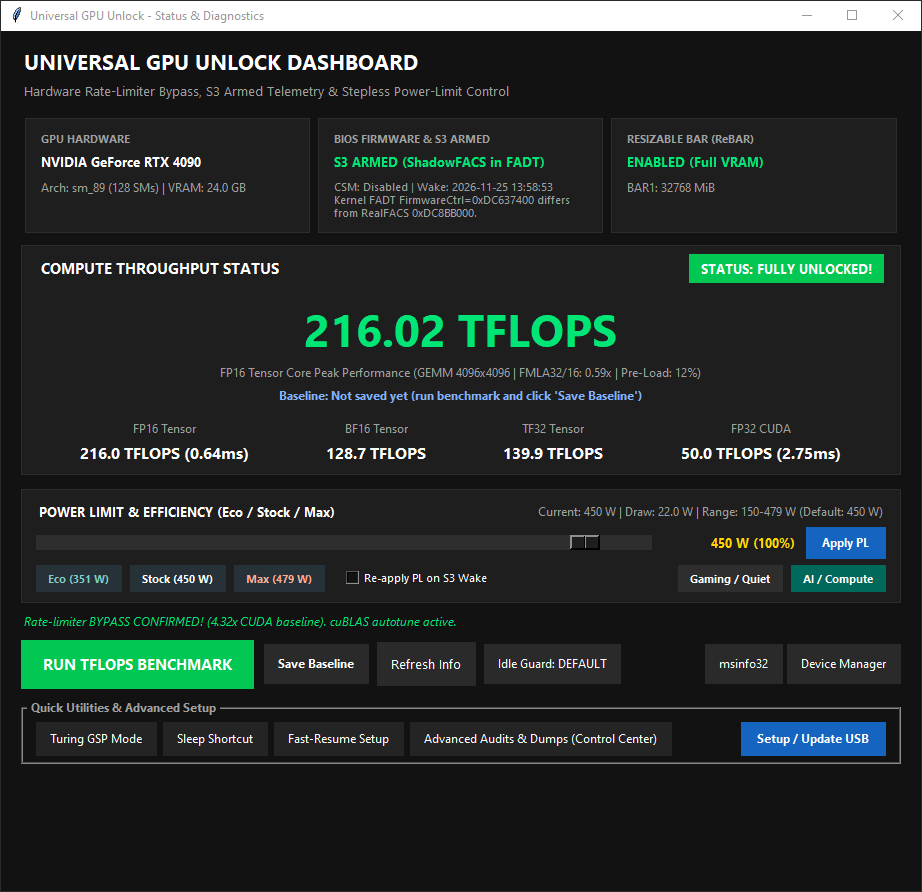
v2.0.0 is the biggest architectural leap since the project began — solving the hardest problem in volatile GPU unlocking (surviving ACPI S3 Sleep / Wake cleanly alongside Stickless UEFI + Secure Boot + Riot Vanguard) across 100+ hours and ~70 engineering iterations.
With v2.0.0, unlocking full FP16 / BF16 Tensor Core throughput across consumer NVIDIA GPUs (Turing, Ampere & Ada Lovelace) stops feeling like a fragile boot workaround and becomes a seamless daily-driver setup — without flashing your VBIOS, without leaving a USB stick plugged in, and without sacrificing Secure Boot, Windows Sleep (S3), or Riot Vanguard.
🌟 The 4 Breakthroughs in v2.0.0
1. 🔌 True Stickless Operation ([I] Mode) — Even on 100 MB Windows ESPs
Until now, keeping ~80 MB of Ada/Ampere GSP firmware permanently in UEFI NVRAM hit a wall on standard 100 MB Windows EFI partitions (EFI_VOLUME_FULL).
Setup.bat [3]now creates an optional hidden512 MB FAT32(GPU_UNLOCK) partition with one click (invisible in Windows Explorer).- Boot once, press
[I], unplug the USB drive permanently, and boot normally through the Windows Boot Manager.
2. 🛡️ S3 Sleep + Secure Boot + Riot Vanguard — Working Together
Previously you had to pick between normal Windows Boot Manager / Riot Vanguard ([I]) and S3 sleep persistence ([P]).
AdaUnlockDxe.efinow refreshes post-BDS shadow ACPI tables right before Windows boots — keeping ACPI S3 Suspend-to-RAM persistence armed alongsideConfirm-SecureBootUEFI: Trueand Riot Vanguard (vgk/vgtray/ League of Legends / Valorant).- Live-verified on final
v2.0.0signed binaries with zero USB drives connected: 224.52 TFLOPS FP16 on cold stickless boot and 221.19 TFLOPS FP16 after S3 wake.
3. 🎛️ Brand-New Windows Cockpit Dashboard (Launch-Dashboard.bat)
No more guessing whether S3 is really armed or juggling scattered scripts:
- Live
S3 ARMEDTelemetry: Reads WindowsGetPwrCapabilities, kernelACPI\FADT(FirmwareCtrl&S0ixflags), and boot logs (RUN*.TXT). - Stepless 1-W Power-Limit Control: Slider across
[Min, Max]with clickable Eco (~78%) / Stock / Max snap presets, readback verification, 1-click Gaming & AI profiles, and optional Re-apply Power Limit on S3 Wake. - Baseline Comparison & Unified Setup: Save a reference TFLOPS baseline (
Save Baseline) and run BitLocker / Secure Boot / ESP / S0ix pre-flight safety checks directly fromSetup.bat.
4. 📊 External-Load-Aware Verification & Expanded GPU Support (refs #21, refs #22)
- No More False Throttling Alerts (
#22):Check-GPU-Unlock.batand the Dashboard inspect livenvidia-smiGPU load (> 15%) plusFMLA32/FMLA16precision ratios, cleanly separating real external workloads (renders, games, video upscalers) from a stock-clamped GPU. - Desktop RTX 4060 Ti (
AD106) Support (#21): Added0x2803,0x2805, and0x2807. - Verified RTX 3060 Ti Breakthrough (
#22):@karadeveciverified 29.95 ➔ 61.23 TFLOPS FP16 (+104.4%) and 61.97 TFLOPS BF16 (holding 60.19 TFLOPS BF16 even under 74% concurrent Topaz Video AI load).
📊 Verified Hardware & Real-World Gains
- AI / Compute Only (
0%Gaming Boost): Accelerates local LLMs, PyTorch, ComfyUI / FLUX.1-dev (+64.2%), LoRA training, and MiniMax-H3 DiT (+36.3%) with unmodified official NVIDIA drivers.
| Card | Architecture | Stock -> Unlocked Throughput | Source |
|---|---|---|---|
| RTX 4090 24GB | Ada (AD102) |
~160 ➔ 224.5 – 255.0 TFLOPS FP16 | Bench / #444 / #14 |
| RTX 4080 16GB | Ada (AD103) |
174.29 TFLOPS FP16 | #9 |
| RTX 3090 Ti 24GB | Ampere (GA102) |
65.55 ➔ 132.4 TFLOPS FP16 (+102%) / 136.6 BF16 | @m4ttfx |
| RTX 3090 24GB | Ampere (GA102) |
117.24 TFLOPS FP16 | #13 |
| RTX 3080 Ti 12GB | Ampere (GA102) |
127.61 TFLOPS FP16 | #16 |
| RTX 3060 Ti 8GB | Ampere (GA104) |
29.95 ➔ 61.23 TFLOPS FP16 (+104.4%) / 61.97 BF16 | @karadeveci (#22) |
| RTX 2080 Ti 11GB | Turing (TU102) |
105.4 TFLOPS (GSP Mode) | #15 |
| RTX 2060 6GB | Turing (TU104) |
25.82 TFLOPS (4.21x vs FP32) |
@resYuto (#20) |
⚡ 60-Second Upgrade & Quick Start
- Extract & Run
Setup.bat: Download Universal_GPU_Unlock_v2.0.0.zip (clean flat layout — no nested wrapper folder), extract it, and runSetup.bat([1]new USB,[2]update existing USB,[3]hidden512 MBGPU_UNLOCKpartition). - Boot Once & Pick Mode: Boot from USB (
F8/F11/F12) and press[U](RAM-only),[P](ACPI S3 sleep persistence), or[I](stickless auto-unlock + S3 persistence). - Verify & Control in Windows: Launch
Launch-Dashboard.batorCheck-GPU-Unlock.bat.
(Requires CSM = Disabled in BIOS; Above 4G Decoding + Resizable BAR recommended. S3 persistence requires classic ACPI S3 rather than Modern Standby S0ix.)
🔧 Technical Deep-Dive, Safeguards & SHA-256 Checksums (Click to expand)
Engineering Highlights
- Post-BDS ACPI Chain Refresh:
AdaUnlockDxe.efihooksBootServices->StartImage(EfiLoaderCode) and invokesGuAcpiRefreshShadowChain()immediately beforebootmgfw.efi/winload.efi, cloning freshShadowFADT,ShadowXSDT, andShadowRSDPtables (ShadowFACSpointed viaFirmwareCtrl = 0xDC637400). - Chunked UEFI File Staging:
OpenOrCreateDirRecursive()and1 MiBstreaming chunked copy (src/driver_nvram.c) guarantee safe staging across UEFIFatDxedrivers and multi-volume ESP layouts (Primary ESP➔GPU_UNLOCK/UNLOCK_ESP➔ small FAT32<= 2 GiB). - UEFI & Resume Hardening: Read-only zeroed OEM Root-Port
0x18hint logging (GuLogZeroedRootPortHint()), isolated GOP handover (avoiding OVMF/virtio-fsAllHandlesreconnect hangs), clean package entries consolidated toSetup.bat,Launch-Dashboard.bat, andCheck-GPU-Unlock.bat, plus explicit S4 Hibernate + Pre-Boot ReBAR (0x610/0xBC0) / Windows Fast Startup (0xC00000D4) safety guidance.
SHA-256 Checksums
Universal_GPU_Unlock_v2.0.0.zip : C69E45B2A7EDA4227A30E2E77AD7FB6C10733BEF51566923EE35BD625E2F1036
bin/BOOTX64.EFI                 : C03F875B5E3B60BB4D64C7205F08D677131D6C7411354E98E75F1F5A1728C98F
bin/AdaUnlockDxe.efi            : 876A39255048E67AFCEDE936F6AB003DD84046229F6ADBABD1500253A79FD813