- Object Storage is activated.
- The AccessKey and SecretKey are created
- iOS V7.0 and later
- Set the SDK version as iOS7 or above iOS7
- Add WCSiOS.framework to the project environment, and confirm that WCSiOS.framework has been addded to Build Phases -> Link Binary With Libraries
- SDK is depended on the below system libraryS, please make sure that add below lib to Link Binary With Libraries
MobileCoreServices.framework
libz.dylib(libz.tbd for Xcode7+)
- The framework in SDK includes Category, so it need to add -ObjC, or there may comes abnormity that selector can't be recognized during the using.
e.g.
-[__NSCFDictionary safeStringForKey:]: unrecognized selector sent to instance 0x7f8c51d3c260
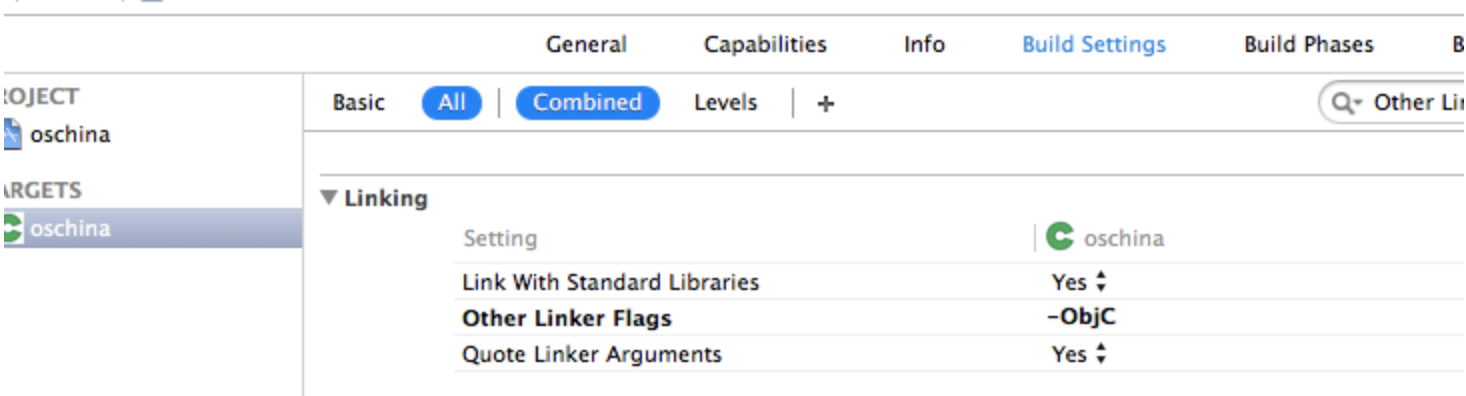
For server end development environment please refer to wcs-Java-SDK
- A valid pair of AK and SK is required to authenticate the user's signature when accessing Object Storage. In order to ensure the security of AK and SK, it is recommended that customers deliver authentication credentials through their own servers.
- Configure upload domain & time out
self.client = [[WCSClient alloc] initWithBaseURL:[NSURL URLWithString:@"http://yourUploadDomain.com"] andTimeout:30];
- Returnurl can be turned on for page jumping when using the sheet upload. Otherwise, it is recommended not to set Returnurl.
- If the file size is more than 20M, it is recommended to use multipart upload
- The upload domain provided by Object Storage is a normal domain. If you are sensitive to the upload speed, we suggest you to use our CDN for the upload acceleration.
- (void)normalUpload {
  WCSUploadObjectRequest *request = [[WCSUploadObjectRequest alloc] init];
  request.token = @"token of uploading, provided by server end";
  request.fileName = @"File name";
  request.key = @"the file name in Object storage, if remain it empty, it will follow as fileName";
  request.fileData = fileData; // The file need to be uploaded
  request.uploadProgress = ^(int64_t bytesSent, int64_t totalBytesSent, int64_t totalBytesExpectedToSend) {
    NSLog(@"%lld bytes sent, %lld total bytes sent, %lld total byte exptected", bytesSent, totalBytesSent, totalBytesExpectedToSend);
  };

  WCSClient *client = [[WCSClient alloc] initWithBaseURL:nil andTimeout:30];

  // Notes: If you are using callback upload, you need to use uploadRequestRaw, which will avoid unnecessary abnormity in base64 resolve
  [[client uploadRequest:request] continueWithBlock:^id _Nullable(WCSTask<WCSUploadObjectResult *> * _Nonnull task) {
    if (task.error) {
      NSLog(@"The request failed. error: [%@]", task.error);
} else {
  // Request successfully, the content returned by server are as belows
      NSDictionary *responseResult = task.result.results;
    }
    return nil;
  }];
}
Example
- (void)normalUploadCancelled {
  WCSUploadObjectRequest *request = [[WCSUploadObjectRequest alloc] init];
  request.token = @"Token for upload, provided by server end";
  request.fileName = @"File name";
  request.key = @"the file name in object storage, if remain it empty, it will follow as fileName";
  request.fileData = fileData; // The file need to be uploaded
  request.uploadProgress = ^(int64_t bytesSent, int64_t totalBytesSent, int64_t totalBytesExpectedToSend) {
    NSLog(@"%lld bytes sent, %lld total bytes sent, %lld total byte exptected", bytesSent, totalBytesSent, totalBytesExpectedToSend);
  };

  WCSClient *client = [[WCSClient alloc] initWithBaseURL:nil andTimeout:30];
  [[client uploadRequest:request] continueWithBlock:^id _Nullable(WCSTask<WCSUploadObjectResult *> * _Nonnull task) {
    if (task.error) {
      // Request is cancelled
      if (task.error.code == NSURLErrorCancelled) {
        NSLog(@"request cancelled.");
      } else {
        NSLog(@"%@", task.error);
      }
    } else {
      NSLog(@"%@", task.result.results);
}
return nil;
  }];
  dispatch_after(dispatch_time(DISPATCH_TIME_NOW, (int64_t)(0.5 * NSEC_PER_SEC)),   dispatch_get_main_queue(), ^{
    [uploadRequest cancel];
  });
}
Examples
- (void)normalUpload {
  WCSUploadObjectRequest *request = [[WCSUploadObjectRequest alloc] init];
  request.token = @"token of uploading, provided by server end";
  // Customized variables, which will be returned to client end after successful upload
  request.customParams = @{@"x:test" : @"customParams"};
  request.fileName = @"File name";
  request.key = @"the file name in object storage, if remain it empty, it will follow as fileName";
  request.fileData = fileData; // The file need to be uploaded
  request.uploadProgress = ^(int64_t bytesSent, int64_t totalBytesSent, int64_t totalBytesExpectedToSend) {
    NSLog(@"%lld bytes sent, %lld total bytes sent, %lld total byte exptected", bytesSent, totalBytesSent, totalBytesExpectedToSend);
  };
  // it is recommended to use WCSClient
  WCSClient *client = [[WCSClient alloc] initWithBaseURL:nil andTimeout:30];

  // Notes: If you are using callback upload, you need to use uploadRequestRaw, which will avoid unnecessary abnormity in base64 resolve
  [[client uploadRequest:request] continueWithBlock:^id _Nullable(WCSTask<WCSUploadObjectResult *> * _Nonnull task) {
    if (task.error) {
      NSLog(@"The request failed. error: [%@]", task.error);
} else {
  // Request successfully, the content returned by server are as belows
      NSDictionary *responseResult = task.result.results;
    }
    return nil;
  }];
}
Normally, it takes a long time to upload large files on the mobile end. Once abnormalities occur in the transmission process, all files need to be retransmitted, which will affect the user experience. To avoid this problem, multipart upload mechanism is introduced. Multipart upload slice a large file into many custom sized blocks, and then upload these blocks in parallel. Once a block upload fails, the client just needs to re-upload the block. Note: The maximum size of each block should not exceed 100M and the minimum size should not be less than 4M.
Example
- (void)chunkedUpload {
  WCSBlockUploadRequest *blockRequest = [[WCSBlockUploadRequest alloc] init];
  blockRequest.fileKey = @"the file name in object storage, if remain it empty, it will follow as fileName";
  blockRequest.fileURL = fileURL; // URL of this file
  blockRequest.token = @"token of uploading, provided by server end";
  blockRequest.chunkSize = 256 * 1024; // Note: the chunk size must be multiple of 64K, and the max size can't exceed the block size
  blockRequest.blockSize = 4 * 1024 * 1024; // Note: the bock size must be multiple of 4M, and the max size can't exceed 100M
  [blockRequest setUploadProgress:^(int64_t bytesSent, int64_t totalBytesSent, int64_t totalBytesExpectedToSend) {
    NSLog(@"%@ %@", @(totalBytesSent), @(totalBytesExpectedToSend));
  }];
  // it is recommended to use WCSClient
  WCSClient *client = [[WCSClient alloc] initWithBaseURL:nil andTimeout:30];

  // Notes: If you are using callback upload, you need to use blockUploadRequestRaw, which will avoid unnecessary abnormity in base64 resolve
  [[client blockUploadRequest:blockRequest] continueWithBlock:^id _Nullable(WCSTask<WCSBlockUploadResult *> * _Nonnull task) {
    if (task.error) {
      NSLog(@"error %@", task.error.localizedDescription);
} else {
  // Request successfully, the content returned by server are as belows
      NSLog(@"results %@", task.result.results);
    }
    return nil;
  }];
- Method cannot be recognized, e.g. -[__NSCFDictionary safeStringForKey:]: unrecognized selector sent to instance 0x7f8c51d3c260. Please make sure you have already add -ObjC in Other Linker Flags.
- Link _crc32 abnormal. Please add libz.tbd to project.
- Link _UTTypeCopyPreferredTagWithClass is abnormal. Please add MobileCoreServices.framework to project.
- Save nslog info to local. Please refer to demo, [self redirectNSLogToDocumentFolder] of AppDelegate.m.