To-do 테스트 작성하기 #99
To-do 테스트 작성하기 #99
Conversation


 moonkii
left a comment
moonkii
left a comment
moonkii
left a comment
There was a problem hiding this comment.

테스트 코드 작성이 처음이시면 익숙하지 않을거에요.
하다보면 대략적인 패턴이 있기 때문에 강의에 나온 내용들을 반복해서 연습해보시면 좋아요!
src/Input.test.jsx
Outdated
| fireEvent.click(getByText('추가')); | ||
| expect(handleClick).toBeCalled(); | ||
|
|
||
| expect(getByRole('textbox').value).toBe('test'); |
There was a problem hiding this comment.
getByRole 을 사용하신 이유가 있나요?
input 테스트에서 추가버튼 작동확인과 textbox 작동확인 구분
해당 Item 컴포넌트 출력확인

|
올려주신 것에서 답글이 안달려서 여기에 적습니다! |

테스트를 작성하실 때
|
input태그를 선택하기위해서 getByText를 어떻게 정말 사용할지 모르겠습니다... 차선책으로 getByLabelText로 사용해보도록하겠습니다.ㅜㅜ... |
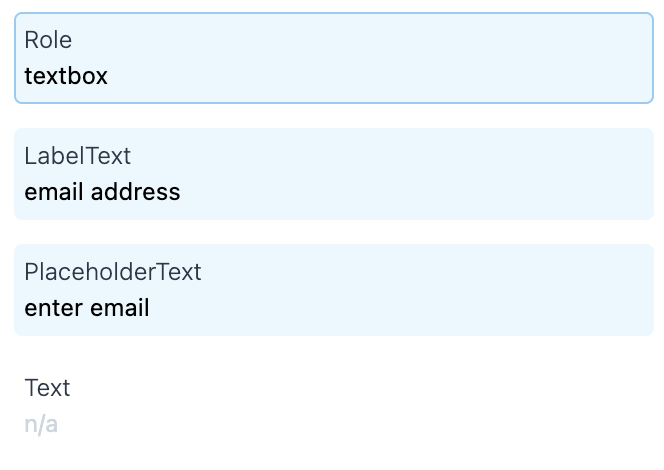
테스크 코드 내용 수정
'1개 이상'이란 표현을 구체적으로 '2개'로 표현
eslint 적용
리뷰주어진 피드백 잘 반영했습니다 피드백으로 향상되어감이 느껴집니다. 감사합니다. 그런데 저희가 1-2주차에서 사용한 테스트 코드는 codeceptjs를 사용하셨던데 |
src/App.test.jsx
Outdated
| expect(getByLabelText('할 일').value).toBe(''); | ||
| }); | ||
|
|
||
| it('할 일을 추가하고 모두 삭제하면 "할 일이 없어요!"가 뜬다. ', () => { |
There was a problem hiding this comment.
여기서 핵심으로 확인하고 싶은게 무엇일까요?
그걸 테스트 시나리오에 드러내주면 좋을 것 같아요.
src/Input.test.jsx
Outdated
| const { getByLabelText } = InputComponent(); | ||
| expect(getByLabelText('할 일')).toHaveAttribute('value', value); | ||
| }); | ||
|
|
||
| it('추가 버튼이 작동한다.', () => { | ||
| const { getByText } = InputComponent(); | ||
| expect(handleClick).not.toBeCalled(); | ||
| fireEvent.click(getByText('추가')); | ||
| expect(handleClick).toBeCalled(); | ||
| }); | ||
|
|
||
| it('textbox에 값이 입력된다.', () => { | ||
| const { getByLabelText } = InputComponent(); | ||
| expect(handleChange).not.toBeCalled(); | ||
| fireEvent.change(getByLabelText('할 일'), { | ||
| target: { | ||
| value: 'test2', | ||
| }, | ||
| }); | ||
| expect(handleChange).toBeCalled(); |
There was a problem hiding this comment.
의미상으로 구분되는 경우 빈 줄을 넣어서 구분해주면 코드 가독성이 더 좋을 것 같아요!
src/Input.test.jsx
Outdated
|
|
||
| const value = 'test'; | ||
|
|
||
| const InputComponent = () => render( |
There was a problem hiding this comment.
어떤 역할을 하는지 함수의 이름을 더 명확하게 해줄 수 있을까요?
src/List.test.jsx
Outdated
| const ListComponent = (task) => render( | ||
| <List | ||
| tasks={task} | ||
| onClickDelete={handleClick} | ||
| />, | ||
| ); |
There was a problem hiding this comment.
| const ListComponent = (task) => render( | |
| <List | |
| tasks={task} | |
| onClickDelete={handleClick} | |
| />, | |
| ); | |
| const ListComponent = (task) => render(( | |
| <List | |
| tasks={task} | |
| onClickDelete={handleClick} | |
| /> | |
| )); |
괄호로 두 번 감싸주면 콤마를 없앨 수 있어요!
src/List.test.jsx
Outdated
| { id: 101, title: '물 마시기' }, | ||
| ]; | ||
|
|
||
| const ListComponent = (task) => render( |
There was a problem hiding this comment.
컴포넌트를 render 해주는 함수는 describe 내부에 있는게 좋아요.
src/Page.test.jsx
Outdated
| { id: 100, title: '숨 쉬기' }, | ||
| ]); | ||
|
|
||
| context('언제든지', () => { |
인수테스트는 아마 미리 작성되어 있을거에요. |
src/Input.test.jsx
Outdated
| expect(handleClick).toBeCalled(); | ||
| }); | ||
|
|
||
| it('textbox에 값이 입력된다.', () => { |
There was a problem hiding this comment.
값이 입력되는 것 보다는 handleChange 함수가 호출되는게 핵심인 것 같아요.
src/List.test.jsx
Outdated
| { id: 101, title: '물 마시기' }, | ||
| ]; | ||
|
|
||
| const renderComponent = (task) => render(( |
There was a problem hiding this comment.
어떤 컴포넌트를 render 해주는지 구체적으로 이름을 지어주시면 좋을 것 같아요.
만약에 저라면 renderList 정도로 표현했을 것 같아요 ;)
src/Page.test.jsx
Outdated
| given('noTask', () => []); | ||
| given('tasks', () => [ | ||
| { id: 100, title: '숨 쉬기' }, | ||
| ]); |
There was a problem hiding this comment.
task 는 하나의 변수로 관리해주면 좋을 것 같아요.
| context('List에게 task가 없을 떄', () => { | ||
| it('"할 일이 없어요"를 그린다.', () => { | ||
| const { container } = render(<Page tasks={given.noTask} />); | ||
|
|
||
| expect(container).toHaveTextContent('할 일이 없어요!'); | ||
| }); | ||
| }); | ||
|
|
||
| context('List에게 task가 있을 때', () => { | ||
| it('task를 그린다.', () => { | ||
| const { container, getAllByText } = render(<Page tasks={given.tasks} />); | ||
|
|
||
| expect(container).toHaveTextContent(given.tasks[0].title); | ||
| expect(getAllByText('완료')[0]).toContainHTML('button'); | ||
| }); | ||
| }); |
There was a problem hiding this comment.
| context('List에게 task가 없을 떄', () => { | |
| it('"할 일이 없어요"를 그린다.', () => { | |
| const { container } = render(<Page tasks={given.noTask} />); | |
| expect(container).toHaveTextContent('할 일이 없어요!'); | |
| }); | |
| }); | |
| context('List에게 task가 있을 때', () => { | |
| it('task를 그린다.', () => { | |
| const { container, getAllByText } = render(<Page tasks={given.tasks} />); | |
| expect(container).toHaveTextContent(given.tasks[0].title); | |
| expect(getAllByText('완료')[0]).toContainHTML('button'); | |
| }); | |
| }); | |
| context('List에게 task가 없을 떄', () => { | |
| given('tasks', () => []); | |
| it('"할 일이 없어요"를 그린다.', () => { | |
| const { container } = render(<Page tasks={given.noTask} />); | |
| expect(container).toHaveTextContent('할 일이 없어요!'); | |
| }); | |
| }); | |
| context('List에게 task가 있을 때', () => { | |
| given('tasks', () => { | |
| id: 100, | |
| title: '할 일', | |
| }); | |
| it('task를 그린다.', () => { | |
| const { container, getAllByText } = render(<Page tasks={given.tasks} />); | |
| expect(container).toHaveTextContent(given.tasks[0].title); | |
| expect(getAllByText('완료')[0]).toContainHTML('button'); | |
| }); | |
| }); |
given 을 context 에 따라 활용한다면 이런 형태가 될거에요.
|
일요일날 마지막까지 리뷰 정말 감사합니다. |

2 participants


안녕하세요 이번에 처음으로 jest를 배워보고 테스트 코드를 작성해보았습니다.
질문은 fileChanged에 추가하겠습니다.
감사합니다.
진도