Repository navigation
2.0

The biggest update yet: Ryu ga Gotoku Kenzan! at 60 or 120 FPS, everywhere, at the game's original speed, with a much cleaner picture.
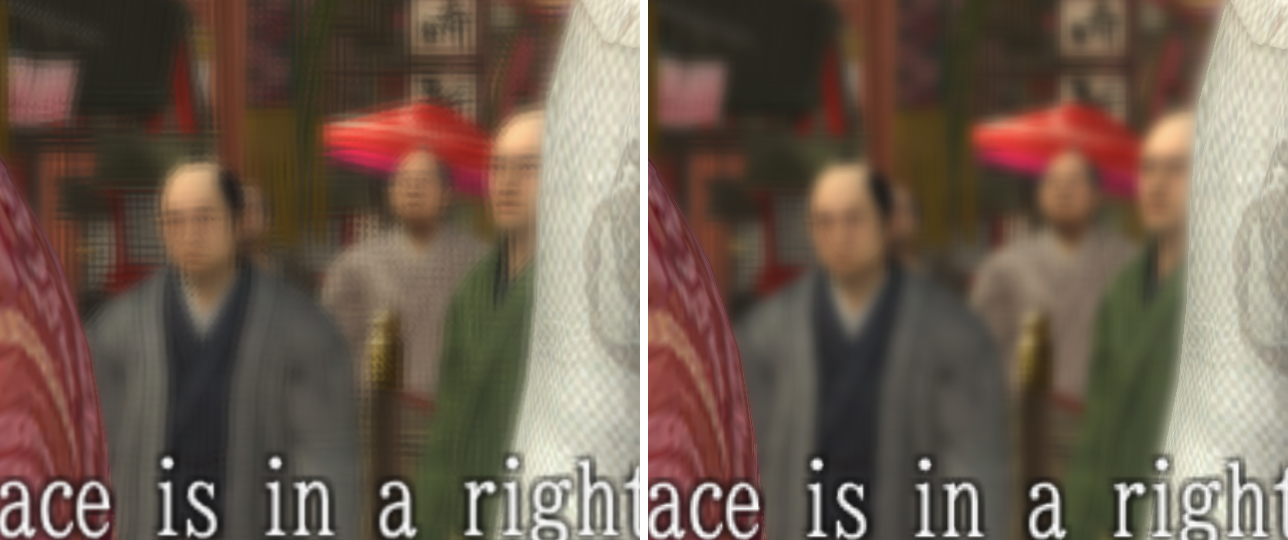
Drag the slider to see the difference. Left: the original picture. Right: 2.0 with the Clean picture entry.
New in this update:
Clean picturereplaces the optional file. Tick theClean pictureentry for your game in Game Patches and the picture fix is done. You no longer need to download or copysh_iori_ps3.par. If you copied it before, you can leave it or restore your backup of the original: either is safe, and the picture is the same.
What's new
- A much cleaner picture, with one tick. The new
Clean pictureentry stops the game blurring every finished frame, removes the grid from blurred backgrounds and keeps edges clean at high resolution. No files to copy anymore. - Steady game speed. Logic now runs at a fixed rate, so when your PC falls behind, the game draws fewer frames and keeps its pace. On a weaker PC, use the 60 FPS entry.
- All 14 minigames at the full frame rate, with new support for Hanafuda, Karuta and Tintiro, and dozens of timing and physics fixes. Bowling's throw is fixed too. Thanks to MrAdam36 (#12).
- The 20 FPS cutscene sections now run at the full frame rate.
- Many fixes across fights, towns and cutscenes, so guards, grabs, trails, fades, sounds and effects take as long as in the original.
- English translation patches 6, 7, 8 and 9 all work with the same entries, and the initial release stays supported.
Install
- Replace
patches/imported_patch.ymlin your RPCS3 folder with the file below. - In Game Patches, tick your frame-rate entry,
Clean pictureand theMinigame fixesentries for your version: the README has a short table. Upgrading from 1.7? Your ticks stay: just addClean picture,Hanafuda,KarutaandTintiro.
Full setup: README.