Repository navigation
Releases
KenzanPatches 3.0

KenzanPatches 3.0
KenzanPatches is a set of RPCS3 patches for Ryu ga Gotoku Kenzan!: the whole game at 60 FPS or 120 FPS at its original speed, full ultrawide support, save anywhere from the pause menu (Experimental), easier substory tracking, and a wide variety of patches for visuals and game functionality, with optional cheats.
It works with the English fan translation (patch 13, the current version and the default; also patches 6 to 12 and the initial release) and the Japanese original.
Everything is one file, imported_patch.yml, with entries you tick in RPCS3. No game file is changed.
Highlights
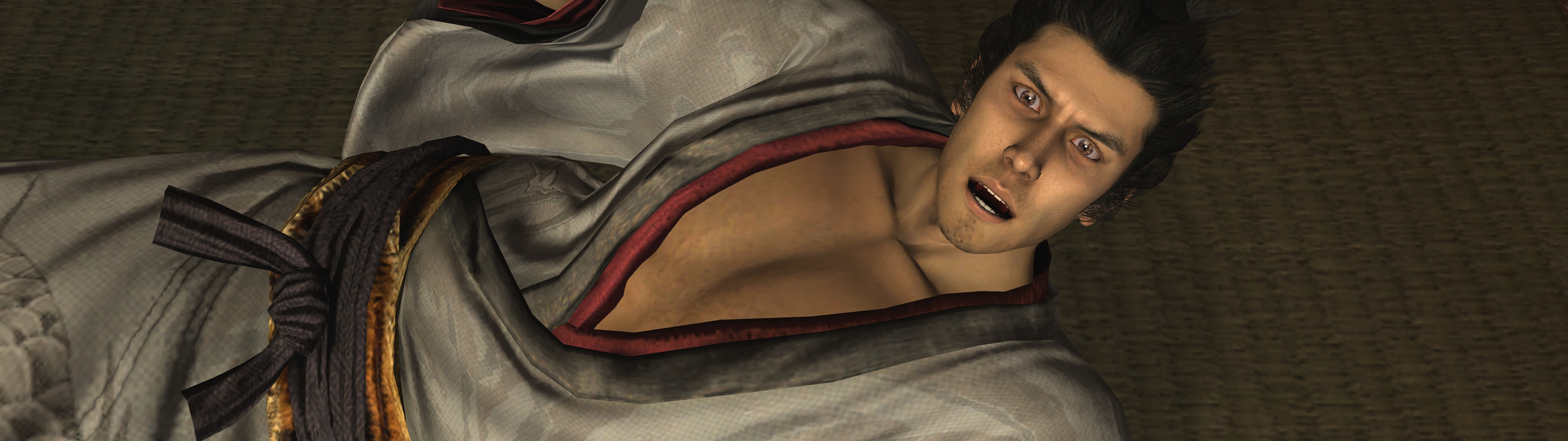
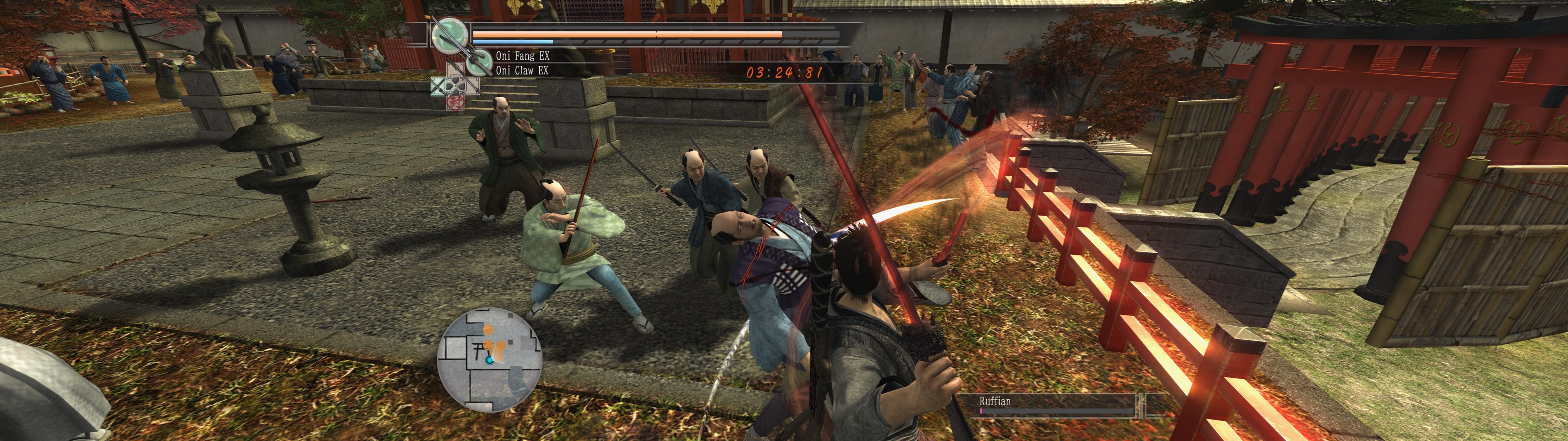
The game at 3840x1080 with Ultrawide (32:9), 120 FPS, Clean picture and the shadow and stage detail entries.
- 60 FPS and 120 FPS. The frame-rate entries and all 14 minigame entries work as in 2.2. The minigame entries now use the English translation's names (for example Tokkuri Toppling, "Bowling" in 2.2).
- Full ultrawide support. Ultrawide for 21:9 and 32:9 screens: a wider 3D view, with the HUD, menus and text at their true shape. Two spots stay stretched: the Ultimate Match quit dialog and some menu backdrops.
- Save anywhere (Experimental). Triangle in the pause menu opens the save list. It is greyed out where a save is not safe; do not save during the Oyo chase or on the walk to a yujo date.
- Easier substory tracking. The Notebook lists every substory and what to do first, and the row of Request 100 counts your progress toward the secret boss (English builds only). Marks on the map show where a substory can start now.
- A wide variety of patches for visuals and game functionality, with optional cheats. Clean picture, Photo mode, Hide HUD, field of view and camera options, shadows, bloom, depth of field, stage detail, time of day, weather, a volume balance, text speed, shorter fades and skip holds, stick and lock-on options, vibration strength; fifteen minigame assists and cheats for health, damage, Heat, money, experience, items, weapons, prices, street thugs and the Coliseum prizes; and
Bug fix: Turtle title race freeze, which ends a hang of the original game in two Turtle Racing title races.
The README lists every entry with its values and its default. Six entries are marked Experimental: Save from the pause menu, Retry on Legend, Side missions at any hour, Money multiplier, Free spending and Assist - Scarecrow Formations.
Game versions
Game Patches lists the game four times, one title per executable hash. Open the one for your version:
Ryu ga Gotoku Kenzan! (English translation): translation patch 13, the current version and the defaultRyu ga Gotoku Kenzan! (English translation, patches 6 to 12)Ryu ga Gotoku Kenzan! (English translation, initial release)Ryu ga Gotoku Kenzan! (Japanese original)
If you come from 2.2
- Tick your entries again, once. 3.0 lists the game once per version and renames every entry, so RPCS3 no longer finds your old ticks. Open the title for your version and tick again. The README has a table of old and new names.
- Untick the old entries under the plain title
Ryu ga Gotoku Kenzan!in RPCS3's own patch list. Entries ticked in both lists can apply twice. - Moving to translation patch 13? It has its own executable hash, and RPCS3 keeps each tick under the hash, the entry name and the title. Tick your entries again once under
Ryu ga Gotoku Kenzan! (English translation)(the minigame entries keep their ticks). - The repository is now called KenzanPatches. Old links still open, except the old address of the picture slider: the README has the new one.
Install
Download imported_patch.yml, put it in RPCS3's patches folder, open Manage → Game Patches, open the title for your version and tick the entries you want. For 120 FPS, set Advanced > Vblank Rate 120 in a custom configuration for the game. For an ultrawide screen, turn on GPU > Stretch To Display Area in that custom configuration and pick the Ultrawide Aspect ratio value that names your screen. The README has every step.
Known limits
- Cheats change what is written to your save. Keep a copy.
Thanks
To the English translation team, the RPCS3 team, and everyone who reported a problem with 2.x.
Found a problem? Open an issue with your game version, 60 or 120 FPS, the ticked entries and their values, and what happened.
2.2
Two fixes, cutscene camera cuts and the Talk prompt, and clearer entry names.
What's fixed
- Clean camera cuts in cutscenes. At 60 and 120 FPS, every camera cut in the in-engine cutscenes showed one frame from a camera half way between the two shots, like a glimpse of the ceiling or a red blur. The camera now holds the old shot right up to the cut, as at 30 FPS. Thanks to ElKev118, who also tracked the cause down to the cutscene camera files (#14).
- The Talk prompt stays steady when the frame rate dips. When your PC drew fewer frames than the game's tick rate, prompts like Talk next to an NPC kept fading out and back in. Thanks to RussellA152 (#15).
- Clearer entry names. The entries for the English translation's old version (its first release) now end in
(English translation, old version), so Game Patches shows plain names with no hashes added.
Install
- Replace
patches/imported_patch.ymlin your RPCS3 folder with the file below. - Upgrading from 2.1 or 2.0: that's all. Your ticks stay, and there are no new entries. Only on the translation's old version: tick its renamed entries again. New to the patch or upgrading from 1.7? See the README.
2.1
A fix for enemy arrows and thrown weapons.
What's fixed
-
Arrows, shuriken, kunai, caltrops and bombs reach you again. Enemies threw them with half their strength at 60 FPS and a quarter at 120 FPS, so they dropped short, most visibly with the fire archers across the gap in the final chapter's fortress. They now fly as far as in the original on both entries. Thanks to MrAdam36 (#13).
Measured against the original game: the Yellow Oni's shuriken flew about 18 m in the original, 3 m on 2.0 at 120 FPS and 17 to 18 m on 2.1 at 60 and 120 FPS. Fire arrows match too.
Install
- Replace
patches/imported_patch.ymlin your RPCS3 folder with the file below. - Upgrading from 2.0: that's all. Your ticks stay, and there are no new entries. New to the patch or upgrading from 1.7? See the README.
sh_iori_ps3.par is no longer needed since 2.0: tick the Clean picture entry instead.
2.0
The biggest update yet: Ryu ga Gotoku Kenzan! at 60 or 120 FPS, everywhere, at the game's original speed, with a much cleaner picture.
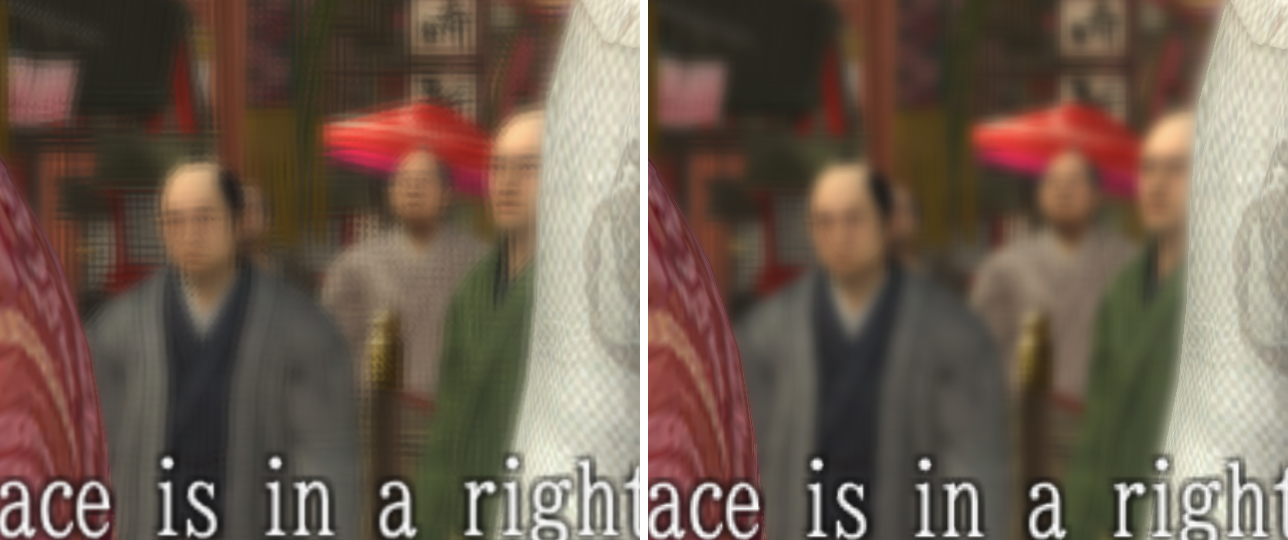
Drag the slider to see the difference. Left: the original picture. Right: 2.0 with the Clean picture entry.
New in this update:
Clean picturereplaces the optional file. Tick theClean pictureentry for your game in Game Patches and the picture fix is done. You no longer need to download or copysh_iori_ps3.par. If you copied it before, you can leave it or restore your backup of the original: either is safe, and the picture is the same.
What's new
- A much cleaner picture, with one tick. The new
Clean pictureentry stops the game blurring every finished frame, removes the grid from blurred backgrounds and keeps edges clean at high resolution. No files to copy anymore. - Steady game speed. Logic now runs at a fixed rate, so when your PC falls behind, the game draws fewer frames and keeps its pace. On a weaker PC, use the 60 FPS entry.
- All 14 minigames at the full frame rate, with new support for Hanafuda, Karuta and Tintiro, and dozens of timing and physics fixes. Bowling's throw is fixed too. Thanks to MrAdam36 (#12).
- The 20 FPS cutscene sections now run at the full frame rate.
- Many fixes across fights, towns and cutscenes, so guards, grabs, trails, fades, sounds and effects take as long as in the original.
- English translation patches 6, 7, 8 and 9 all work with the same entries, and the initial release stays supported.
Install
- Replace
patches/imported_patch.ymlin your RPCS3 folder with the file below. - In Game Patches, tick your frame-rate entry,
Clean pictureand theMinigame fixesentries for your version: the README has a short table. Upgrading from 1.7? Your ticks stay: just addClean picture,Hanafuda,KarutaandTintiro.
Full setup: README.
2.0 release candidate 1
Known bugs in rc1, fixed in the next build: Shogi pieces flicker at 120, Shogi toss and Karuta shake run at double rate at 120, Bowling phases run at double speed on the 60 entry.
Release candidate. This is a pre-release: if you want the stable version, use 1.7.
Tenth release of the 60/120 FPS patch for Ryu ga Gotoku Kenzan! (BLJM60064) on RPCS3, and the biggest so far.
- Game speed stays correct when the frame rate drops. Logic runs at a fixed rate on both entries, and a PC that falls behind draws fewer frames, down to about 30 FPS, instead of slowing the game down. This works as long as your PC keeps up with the logic itself. It does not raise the frame rate. If you have a VRR display, this is the update for you.
- On a weaker PC, use the 60 FPS entry. It asks much less of your CPU. In testing it held cutscene timing with about three times the extra load the 120 FPS entry could take.
- All 14 minigames now run at the full rate. Hanafuda, Karuta, Tintiro, Mahjong, Shogi and Suika are new, and the Revelation after Spirit Tempering is included. Tick the three new
Minigame fixesentries in Game Patches. - A sharper picture. The game was blurring its own finished frame. Fixed in the patch, at any Resolution Scale, and it costs nothing.
- Sharper edges, optional.
sh_iori_ps3.parnow also corrects an edge filter that reaches too far at high resolution, at any Resolution Scale. - The 20 FPS cutscene sections run at the full frame rate of your entry, with the same timing.
- Fades run at their original length, and the fade-in on entering free roam no longer drops to 30 FPS. Short fade-ins after talk missions are longer again, as in the original.
What has and has not been tested. On one PC, a Ryzen 9 9950X3D: boots, scene tours, return to title, and every cutscene with a 20 FPS section, on both entries. Slower PCs were only simulated. The minigames have not been played yet in this build. They are checked by emulating each change, not in the game, so a minigame could run at the wrong speed or stop. If one does, disable its Minigame fixes entry and please open an issue with your CPU and what you saw.
Replace patches/imported_patch.yml in your RPCS3 folder with the file below. On patch 6, tick the line with your hash in Game Patches. The optional file goes in PS3_GAME/USRDIR/bin/shader/: back up the original first.
v1.7
Eighth release of the 60/120 FPS patch for Ryu ga Gotoku Kenzan! (BLJM60064) on RPCS3.
Support for patch 6 of the English fan translation, 60 FPS cutscene sections, a door fix and an optional shader.
- English translation patch 6 is supported. If the game stayed at 30 FPS on patch 6, this is why. The
(English translation)entries now cover patch 6 and the initial release. RPCS3 lists them once per hash, so tick the line ending in your hash, or both. (#11) - The game's 20 FPS cutscene sections now run at 60 FPS on both entries, with the same cutscene timing.
- Doors open again. The sliding door at Tatsuya and other animated scene parts stalled at 60 and 120 FPS. Thanks to SK91no. (#10)
- Optional
sh_iori_ps3.parremoves the grid pattern Depth of Field leaves on blurred backgrounds at high resolution. It is separate from the patch: see the README. - Correction: the 120 FPS setup needs Framerate Limiter on Auto, not Off.
Replace patches/imported_patch.yml in your RPCS3 folder with the file below. On patch 6, tick the line with your hash in Game Patches.
v1.6
Seventh release of the 60/120 FPS patch for Ryu ga Gotoku Kenzan! (BLJM60064) on RPCS3.
Two Suika fixes.
- Suika no longer crashes when it starts. The cause was a cache problem that could affect any patched minigame, so the fix covers all 11. Thanks to RubrumRedEX and detect-henlo, who reported it and tested the fix. (#7)
- The frame rate no longer drops to 30 after a Revelation in Spirit Tempering. This comes from reading the game's code and has not been played through yet. Thanks to MrAdam36 and RubrumRedEX. (#9)
Replace patches/imported_patch.yml in your RPCS3 folder with the file below.
If a minigame crashes with the patches turned off, delete the ppu-...-mng_... folders under cache/BLJM60064 in your RPCS3 folder. RPCS3 will rebuild them.
v1.5
Sixth release of the 60/120 FPS patch for Ryu ga Gotoku Kenzan! (BLJM60064) on RPCS3.
Download imported_patch.yml below and replace your current one (entry names are unchanged, so your ticked entries stay enabled).
- Fan Toss: the fan flies as far as in the original: in the Tousenkyo (fan toss) minigame at Azamiya, thrown fans lost their speed and dropped short at 60 FPS, and almost on the spot at 120 FPS. The fan's air resistance and lift were applied once per physics step, 2 or 4 times as often per second as in the original. They now act at the original rate, so a throw follows the same path as at 30 FPS. (#5)
- No more crash in Jiraiya training: throwing a shuriken in the K Yabusame minigame crashed the game at 60 and 120 FPS, because the throw animation could trigger a second throw with no shuriken in hand. A throw now only happens with a shuriken in hand, as in the original. (#6)
Thanks to Kyouma00001 and detect-henlo for the reports, the save file and the log!
v1.4
Fifth release of the 60/120 FPS patch for Ryu ga Gotoku Kenzan! (BLJM60064) on RPCS3.
Download imported_patch.yml below and replace your current one (entry names are unchanged, so your ticked entries stay enabled).
- No more crash in the chapter 2 opening cutscene at 120 FPS: about four seconds into the rainy night cutscene, the game ran out of memory for particle effects and RPCS3 stopped with "The PS3 application has likely crashed". Rain splashes were created 4 times as often as in the original at 120 FPS (twice as often at 60), so far more of them were alive at once. Rain splashes on the ground and on characters now appear at the original rate, and as a safety net the game skips a particle instead of crashing if the effect memory ever fills up. (#4)
- No more sound stutter when skipping a movie: skipping an FMV (for example the intro movie) could make the movie's sound jump back up in short bursts while it faded out. It happened on some skips only, mostly at 120 FPS: a timing race in the original game's movie player that 120 FPS made easy to hit. The fade-out is now smooth. (#4)
Thanks to BeanButCoffee for the report, the logs and the save file!
v1.3
Fourth release of the 60/120 FPS patch for Ryu ga Gotoku Kenzan! (BLJM60064) on RPCS3.
Download imported_patch.yml below and replace your current one (entry names are unchanged, so your ticked entries stay enabled).
- No more freeze after eating at a restaurant: after a meal the shop dialogue never came back and the game was stuck (at 120 FPS it stuck earlier, on the black screen). The meal's fades now run at the original speed and always finish. This affected every restaurant meal in 1.0 to 1.2, at 60 and at 120 FPS. (#3)
Thanks to MrAdam36 for the report!