Config
Plugin configuration files are split into separate files to organize options. All the config files are automatically reloaded.
Config files are not translatable but the language file and all the GUIs are.
Kingdoms configs aren't completely YAML compliant, for more info, refer to YAML section.
All the configs except GUIs (due to the reasons specified in the following link) support auto config updates. When the auto updater is disabled, the plugin tries to use the default value.
For information specific to language files, refer to Languages section.
Most of the config options are explained in their config, however here we'll take a look at some basic and advanced features that Kingdoms plugin allows you to use for the config options.
- Most numeric options can be disabled by setting their value to 0 (or lower) unless specified otherwise. This disables any side effects that the option might have (such as sending messages)
- You can use
\nline break to break lines for messages. - All the Minecraft materials can be found here.
- Potion effects are defined using the
<potion>, <duration>, <level> [%chance]where is one of these and the duration is in seconds. Also the level doesn't start from 0 unlike the standards. The chance (the percent sign is required before it, but notice there's no comma) is from 0 to 100 - Sounds are parsed using the
[~]<sound>, [volume], [pitch]format. All the Minecraft sounds can be found here. Minecraft volumes start from0.0to1.0Any number higher than that will just increase the radius the player can hear the sound from, normal is1.0. Pitch starts from0.5to2.0normal is1.0You can also test this by using the /k admin testSound command. Where~is also an optional prefix to play the sound at the player's location rather than to the player only so other nearby players can hear it too. - Options that you can specify commands for always take one or multiple commands.
- Singular like
commands: "k admin rp %kingdoms_name% add 100"orcommands: [ "k admin rp %kingdoms_name% add 100" ] - Multiple like
commands: [ "give %player% diamond 10", "give %player% grass 4" ] - The slash at the beginning of the commands are optional, but if you ever had to use a plugin which uses 2 slashes (such as
//wand) you have to use 3 slashes insteadcommands: "///wand" - There are two command directive prefixes that change the executor of the command:
-
OP:By default commands are executed as if the player executed them. Using this directive will make the player execute the commands as op. -
CONSOLE:This tells the server to execute the command from console. This is preferred over OP directive. - E.g.
commands: [ "CONSOLE:give %player% diamond 10", "OP:give %player% diamond 10" ]
-
- Singular like
- Surprisingly one thing that some people don't know, is that you can use Ctrl + F to search for something in a file. This is useful for searching for config options or language entries. If you didn't know this, Google Ctrl + Z and Ctrl + R as well.
- Most of the config options in the config that represent a time, support time suffixes. The default time suffix is seconds. Please also note that most of the cooldown options in the config are temporary, meaning that the timer will reset after server restarts. Some time suffixes:
- You might see some config options that only support ticks. In Minecraft each second is 20 ticks.
-
ms,millisec,millisecs,millisecond,milliseconds(Note: Due to the tick-based nature of Minecraft, not all options use this accurately) -
s,sec,secs,second,seconds -
m,min,mins,minutes,minutes -
h,hr,hrs,hour,hours -
d,day,days -
Example:
time-limit: 10days
Kingdoms configs aren't 100% YAML compliant. Features such as explicit tags, directives, explicit document start and ends, and a few others. 99% of the time, people don't even bother which these features when dealing with configuration files, so there's no issue.
In YAML files you can define variables using two things called anchor and alias.
Variables are obviously used to write something just once without writing it over and over again. Image you have this option:
# Lets say this option is for a turret that gives you the ability to configure which entities it targets for each level.
# Most leveling systems in the config already inherit their values from previous levels, but just for the sake of example.
targets:
  1: [ZOMBIE, SKELETON, ENDERMAN, PLAYER, WITHER_SKELETON, COW, PIG]
  2: [ZOMBIE, SKELETON, ENDERMAN, PLAYER, WITHER_SKELETON, COW, PIG]
  3: [ZOMBIE, SKELETON, ENDERMAN, PLAYER, WITHER_SKELETON, COW, PIG]

# This list might even become a lot longer and every time you want to add something, you have to do it 3 times
# So instead we can do this:

common-entites: &common-entities [ZOMBIE, SKELETON, ENDERMAN, PLAYER, WITHER_SKELETON, COW, PIG]
targets:
  1: *common-entites
  2: *common-entites
  3: *common-entites
&common-entities is called an anchor, which defines a variable. The option name and the anchor name can be different, they have nothing to do with each other. That's just there because some people like to define their variables like this:
targets:
  1: &common-entities [ZOMBIE, SKELETON, ENDERMAN, PLAYER, WITHER_SKELETON, COW, PIG]
  2: *common-entites
  3: *common-entites
Which is shorter, but the later is more concise in my opinion.
*common-entities is called an alias. You use this when you want to refer to a variable defined before, not when defining a new variable. Note that before accessing a variable it must be defined before using an alias, for example, this won't work:
name: *zombie-name
zombie-name: &zombie-name "My name is zombie"
This of course works with config sections:
common-settings: &common-settings
  enabled:
    condition: true
    glow: true
    name: "Enabled"
  else:
    name: "Disabled"

first-option: *common-settings
second-option: *common-settings
is transferred to:
first-option:
  enabled:
    condition: true
    glow: true
    name: "Enabled"
  else:
    name: "Disabled"
second-option:
  enabled:
    condition: true
    glow: true
    name: "Enabled"
  else:
    name: "Disabled"
Sometimes you want to change certain options from a section alias, you can do what's called merging:
common-settings: &common-settings
  condition: true
  glow: true
  name: "Enabled"

first-option:
  enabled:
    <<: *common-settings
    name: "&2Open"

# ->

first-option:
  enabled:
    condition: true
    glow: true
    name: "&2Open"
This puts all the options from common-settings but uses name: "&2Open" instead of name: "Enabled"
This also works with lists but with a slightly different format:
list1: &list
 - 1
 - 2

list2:
 - 0
 - <: *list
 - 3

# Gives you
list2:
 - 0
 - 1
 - 2
 - 3
Kingdoms also adds a special syntax called alias functions. It's a more advanced form of aliases which allows you to build your own options.
A great practical example can be found in the default misc-upgrades GUI. Again to be clear the name [fn-misc] isn't important at all, but this format is chosen to avoid conflict. However the name fn-misc is important since all yaml functions should start with fn- prefix. This option takes 3 arguments of any type which can later be used inside the returned value. It's kinda similar to how Haskell works. The only important note here is that list parameters can be used inside of lists here without needing to do the - <: *argument thing. They automatically expand the list (Note that this only works with list-like lores, not when using the | format lores).
You can see how the function is called here. Just like section merging but with a normal yaml list after it.
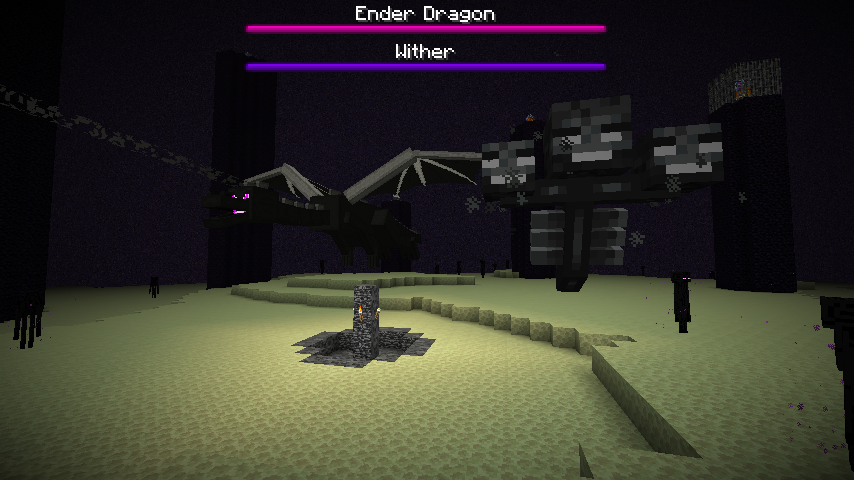
Boss bars are the progress bars that you usually see on the top of your screen when fighting withers and the ender dragon. You can test different values using the /bossbar vanilla command.
You can see both of them in this image:
Options:
-
enabledUsually this option is present to determine whether the bar should be shown at all or not. -
titleThe title of the bar which supports colors (including hex colors) and placeholders, but they do not support line breaks. -
colorThe color of the bar. You can find all the colors here. -
styleThe style of the bar. Bars can be either a solid line just like the ones shown in the image above, or segmented with indicators that divide the bar with small vertical lines. You can find all the styles here. -
flagsA list of cool visual side-effects. You can find all the flags here.
Styles:


- Note that these rules apply to all the math equations in any configs.
- Supports all the mathematical operators such as
+,-,/,*,%,(),^, etc...-
/You should know this one! It's the division operator. Fractional numbers! -
%in computers, this is calledmodulowhich is basically theremainderof a division. For example,4 / 3has a remainder of1so4 % 3is1and4 / 2has a remainder of0so4 % 2is0 -
*in computers meansmultiply -
^in computers usually refers to bitwise operators, but itexponentiateshere. E.g.2^3=2³=2 * 2 * 2=8 - They support Order of operations (Operator Precedence). Bitwise operator precedence are the same as Java's. E.g.
2 + 2 * 100is2 + 200and not4 * 100
-
-
Placeholder support depending on the context. For example, in some cases only the kingdom is present with no player. That means you can use
%kingdoms_name%, but not%kingdoms_rank_name%because there are no players present. Some equations provide custom placeholders that should be explained above the equation in configs. For example,lvlis a custom placeholder commonly used in equations. For more info, visit the linked wiki. The compiler also interprets boolean placeholders. Returning1fortrueand0forfalse. This can be used with conditional functions. - You can test your equations with the /k admin evaluate command.
- They support integers, decimals and hexadecimals.
- They also support all the Java Math functions (other than the functions with
exactin their name which are useless anyway). You're definitely familiar with functionsf(x), but here we will use meaningful names other thanfto use functions. In order to understand this document, simply ignore the header description, just scroll down to read the method names. You'll see stuff likeint,long,floatanddoublenext to the parameter names, they're all basically representing a number.intandlongare numbers without decimals, andfloatanddoubleare numbers with or without decimals. If a function requires an integer, it'll automatically convert into an integer if the passed parameter is a decimal by rounding it. - Some options rarely support equations for time formats. In these equations you can represent the time by surrounding it with square brackets. E.g.
lvl * [1 day] -
Special Functions:
- random(min, max) Get a random decimal number between the given minimum and the maximum numbers.
- randInt(min, max) Get a random integer number between the given minimum and the maximum numbers.
-
whatPercentOf(x, y) Finds X is What % of Y which is equivalent to
(x / y) * 100 -
percentOf(x, y) Gets X percent of Y which is equivalent to
(x / 100) * y - naturalSum(n) Calculates the natural sum from 1 to the given number.
- reverse(n) Returns the value obtained by reversing the order of the bits in the two's complement binary representation of the specified number.
- reverseBytes(n) Returns the value obtained by reversing the order of the bytes in the two's complement representation of the specified number.
- Conditional functions:
-
eq(var1, var2, var3, var4) Gives
var3ifvar1is equal tovar2, otherwise it'll givevar4 -
ne(var1, var2, var3, var4) Gives
var3ifvar1is not equal tovar2, otherwise it'll givevar4 -
gt(var1, var2, var3, var4) Gives
var3ifvar1is greater thanvar2, otherwise it'll givevar4 -
lt(var1, var2, var3, var4) Gives
var3ifvar1is less thanvar2, otherwise it'll givevar4 -
ge(var1, var2, var3, var4) Gives
var3ifvar1is greater than or equal tovar2, otherwise it'll givevar4 -
le(var1, var2, var3, var4) Gives
var3ifvar1is less than or equal tovar2, otherwise it'll givevar4
-
eq(var1, var2, var3, var4) Gives
- They support Bitwise Operations too. This is a more simplified version specifically for Java. However, some of them use a different operator since the operator system in the math evaluator works per a character. They might conflict if used in conditional GUIs.
-
&Bitwise AND operator -
|Bitwise OR operator -
!Bitwise XOR operator^ -
~Bitwise Compliment Operator -
>Bitwise Binary Right Shift Operator>> -
<Bitwise Binary Left Shift Operator<< -
$Bitwise Shift Right Zero Fill Operator>>>
-
When we say a math equation you'll normally expect to see something like the common Quadratic equation or a simpler Polynomial equation such as x + 3 = 10 (which would be x = 10 - 3), but in configs, the core concept is represented a little differently.
Let's say there's an option for the max number of members that can join your kingdom.
max-members: 10Obviously this doesn't look really fun because a kingdom can only have 10 members no matter how big it is, so for this option, we're going to spice things up a little and use a math expression. We can use the %kingdoms_max_members% placeholder as our variable that the equation is going to be solved for and %kingdoms_lands% as a factor for the equation. Let's say we want kingdoms to have 2 members for every one land that they claimed.
max-members: %kingdoms_max_members% = %kingdoms_lands% * 2While this looks logical, it's just redundant. If you look at the option name, it's already named max-members, so it's like you're writing
maxMembers = maxMembers = lands * 2The point is that the option name itself is the variable that we're solving. We can rewrite this as:
max-members: %kingdoms_lands% * 2There's one issue left, in equations the percent signs % are useless and even cause errors. Because instead they're interpreted as modulus operator ("operators" are things like plus + and multiply *) so you'll have to write:
max-members: kingdoms_lands * 2Now if we wanted to get a little more advanced and say we want to cap this value at 50 members, we can use the function feature.
max-members: min(kingdoms_lands * 2, 50)Now even if a kingdom claimed 100 lands (100 * 2 = 200) they'll only have 50 max members, because that's what the min() function is doing.
Functions are just like normal math functions f(x) the only difference is that their name is a little more obvious.
min(x, y) function is really simple. It says I'll take both x and y inputs and give you the minimum of the two values as the output. So for example min(3, 1) gives you 1 obviously because 1 < 3
For you math students out there, the equivalent mathematical definition would look like:
This is where things get juicier. You could also choose different numbers based on different conditions. Let's say you wanted max-members to be 10 if the kingdom has less than 10 lands, 35 if it has less than 20 lands, 50 if it has less than 30 lands and if none of those conditions match, just give them 100 lands (here we know that they definitely have more than 30 lands based on the previously failed conditions)
The solution to this isn't really pretty, but it is what it is:
max-members: lt(kingdoms_lands, 10, 10, lt(kingdoms_lands, 20, 30, lt(kingdoms_lands, 30, 50, 100))The math definition for lt function:
These functions are conditional functions which you can read more about them above. There's nothing new about them except their functionality of course. In this example, the function just happen to take another function as its parameter. Because they still return a number as their output which can be used as an input for another function and that's all it matters. If you remember, this is an example of function composition. (Holy shit, Math just got useful!)
The plugin provides a lot more operators and functions that you can use, but most of the time you don't need to use them all.
Conditions are used across the plugin to perform an action when a condition is true. Conditions tend to follow the basic syntax for conditionals in most programming languages, specially Java.
An example of what a condition looks like: kingdoms_kingdom_is_pacifist && kingdoms_members > 30
Conditions use placeholders and special operators called logical operators (just like arithmetic operators such as +, -, etc.)
| Logical Operator Symbol | Description |
|---|---|
! |
Negation. E.g. !test will be false if test is true and vice versa. |
== |
Checks if two numbers are equal. |
!= |
Checks if two numbers are not equal. |
> |
Checks if a number is greater than a number. |
< |
Checks if a number is less than a number. |
>= |
Checks if a number is greater than or equals to a number. |
<= |
Checks if a number is less than or equal to a number. |
&& |
Checks if both conditions are true. |
|| |
Checks if either conditions are true. |
Condition options support placeholders of course, but just like math equations, you have to omit the %s when writing them.
All conditional options also support a special placeholder that checks whether the player has a permission. The format is perm_<permission> where <permission> is the same as the permission text that you use in permission plugins, but instead of being separated by dots, they're separated by underscores. E.g. kingdoms.command.show would be perm_kingdoms_command_show and just like all the other placeholders in condition options, this one doesn't need to be surrounded by %s either.
You can use the new 1.16 custom hex colors. There are various formats to use hex colors. We'll go through them all. Note that all the formats below are case-insensitive.
-
&#<hex>where<hex>is a 6-digit hexadecimal color in the form ofRRGGBBe.g.ʒb9e-A -
{#<hex>}where<hex>can either be a 3 or 6 digit hexadecimal color in the form ofRGBorRRGGBBe.g.{#68e}-{#62231a} -
{#<color>}where<color>is a predefined color name inchat.ymle.g.{#Navy}-{#Maroon} -
{#<r>, <g>, <b>}it's the simple RGB format. E.g.{#255, 0, 0}-{#120, 0, 120}The format to do this is&#<hex>the<hex>is a hex 6-character code for RGB colors. You can pick one from here
Example:&2The bffa5quick {#754646}&lbrown {#c82}&ofox {#255, 0, 0}&mjumped {#Navy}&nover &rȓb52the alazy 񢩈&kdog
This plugin also offers backwards compatible hex colors with pre-1.16 version. It has a simple built-in system which tries to find the closest color to the given hex color. The result is almost always accurate. This feature works everywhere in Kingdoms plugin that colors are supported.
Some options in configs require an item to be matched in order for the item to be used. This includes accepting certain special items for resource points, siege cannon and warp pad fuels, etc.
While their syntax is very similar to the original item options, they don't support all of their options, however they have a few new special values.
Once an option is defined for an item matcher, the item must have that property, otherwise the matching will fail. Other properties that are not defined here will be ignored. Which means if you only define a "name" option, even if the item has lore, enchants, etc, it will only check if the name of the item matches correctly.
How to read this documentation?
name: StringCheckerOptions # The name of the item.
lore: StringCheckerOptions # The lore of the item.
material: StringCheckerOptions # https://hub.spigotmc.org/javadocs/spigot/org/bukkit/Material.html
custom-model-data: Number # The 1.14 custom data models feature.

enchants: [Enchant]
class Enchant
  EnchantmentName: EnchantmentLevelCondition # The level of the enchantment.
end

# NBTName is a dot separated name of the path to the NBT value. The names are something that most plugins will not document
# since they're not used by server admins most of the time. Although you shouldn't be using them either when other options
# are available, they're the most reliable options as it relies on hidden internal data.
nbt: NBTName -> StringCheckerOptions

alias StringCheckerOptions: for Text
  "CONTAINS:..." # Any lore line must contain the given text (case-insensitive)
  or "REGEX:..." # Any lore line must match with the given RegEx.
  or Text        # Any lore line must match exactly with this text

alias EnchantmentLevelCondition: for Text
  Condition # With the placeholder "lvl" -> https://github.com/CryptoMorin/KingdomsX/wiki/GUIs#conditional
  or *      # Meaning any level is acceptable as long as the item has the enchantment.
  or Number # The exact number (same as "lvl == number" condition)
Example:
cool-thing:
  name: "REGEX:Awesome Sword \(\d+\)"
  lore: "CONTAINS:best sword"
  material: NETHERITE_SWORD
  custom-model-data: 40065
  enchants:
    SHARPNESS: '*' # You need to surround it with quotes.
    UNBREAKING: 3
    FIRE_ASPECT: 2 <= lvl < 6
  nbt:
    "Kingdoms.Structure": 'siege-cannon'
    "Kingdoms.Mail.Subject": 'CONTAINS:war'