3. VSCode & extensions
In this section, you'll install and configure Visual Studio Code (VSCode), an open-source IDE we love :)
- Download & install Visual Studio Code.
- Go to Extensions (Ctrl+Shift+X) and install "C/C++ Extension Pack".
- Open the Command Palette (Ctrl+Shift+P) - this is a useful shortcut that provides access to many VSCode commands. Type and choose "Remote-WSL: New WSL Windows".
- In the newly opened window, go to Source Control (Ctrl+Shift+G), and choose "Clone Repository", and then "Clone from GitHub". Sign in.
- Open the Terminal (Ctrl+`) and run these commands with your information:
git config --global user.email "you@example.com"
git config --global user.name "Your Name"
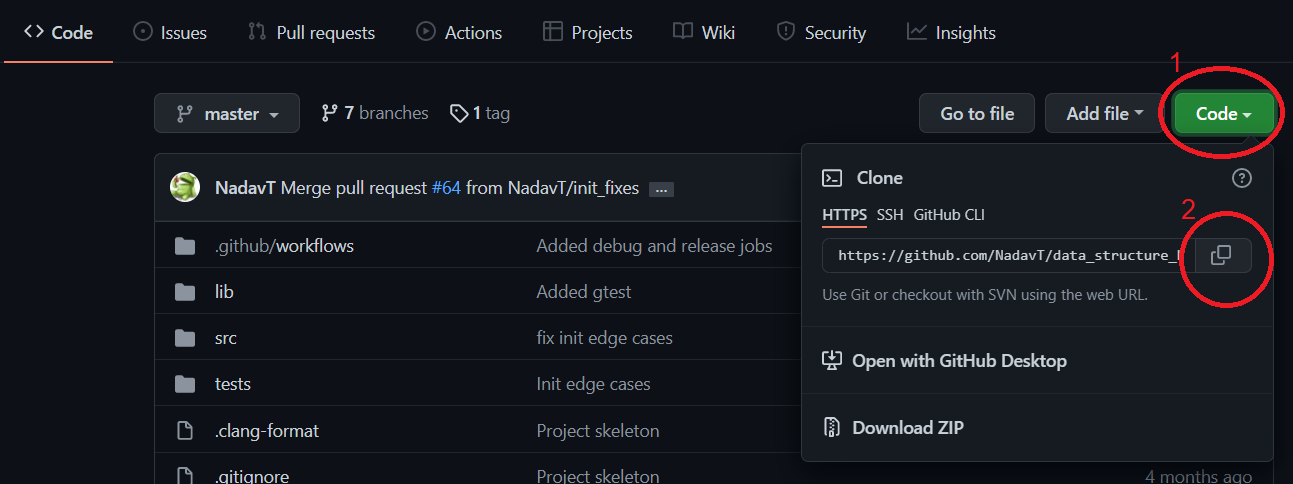
- Open the Command Palette (Ctrl+Shift+P), type "Clone from GitHub", then copy and paste your repository link from GitHub, as shown in the image.
Now that you have cloned the repository, let's practice making another contribution to the project, this time using VSCode.
If your project isn't already open, open it (File -> Open Folder).
- Install another extension: "Clang-Format". This extension will allow you to completely forget about formatting (indentation, blank lines, ...). Instead, you'll create a file specifying your desired conventions, and the code will be reformatted on every save.
- From VSCode, create a new branch (Ctrl+Shift+P, "Create branch").
- Download .clang-format and put it in your project directory.
- Commit and push your changes. You can do it all from VSCode, using the Source Control window (Ctrl+Shift+G).
- Open your project on GitHub. You'll see a pop-up message about a recent push. Click "Compare & pull request", and then "Create pull request".
- As before, your partner should now review this pull request, merge it, and then delete the branch.
- Check out other recommended extensions: "Python", "Clang-Tidy".