3. VSCode & extensions
[TO ADD: short explanation of what VSCode is and why it's useful]
- Download & install Visual Studio Code
- Go to Extensions (Ctrl+Shift+X) and install the Remote-WSL extension.
- Open the Command Palette (Ctrl+Shift+P) - this is a useful shortcut that provides access to many VSCode commands. Type and choose "Remote-WSL: New WSL Windows".
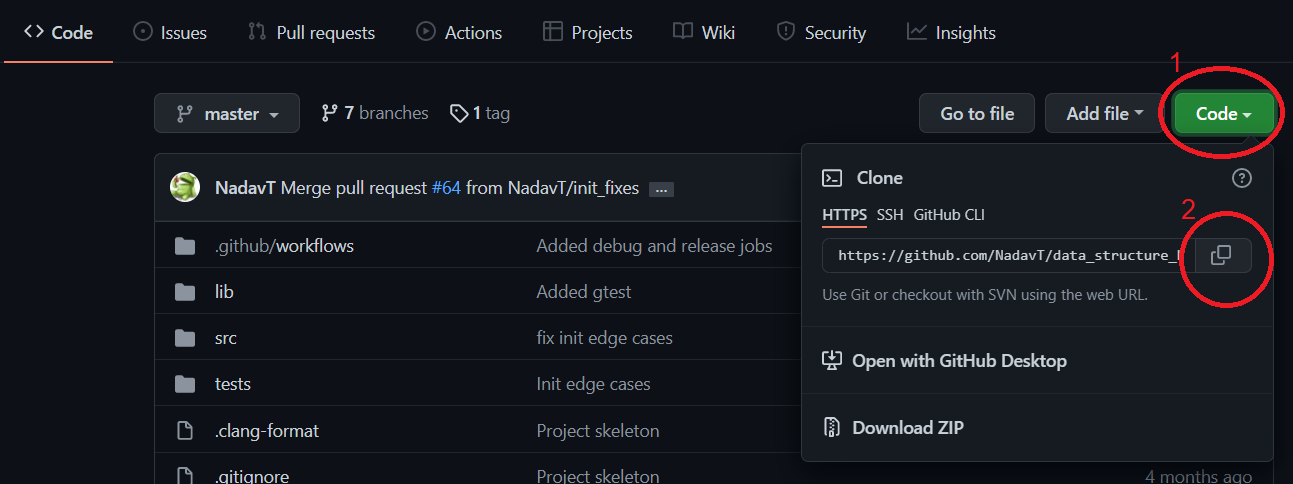
- In the newly opened window, open the Command Palette (Ctrl+Shift+P). Type and choose "Clone from GitHub". Then, copy and paste your repository link from GitHub, as shown in the image.
- You'll be asked where you'd like to clone your repository to - choose
/home/<username>.
- Other recommended extensions: [TO ADD]