Repository navigation
Releases
PlayBridge 13.0.2

Jellyfin PlayBridge 13.0.2
Changelog
- Fix #9
- Fix: with settings imported from an old MPC-JF script, PotPlayer received "/fullscreen" and the video didn't open. PotPlayer has no fullscreen option: set it in PotPlayer > Preferences > General > Startup > Window size
- Settings saved by 13.0.1 are repaired: run
Install.cmdof this version and click Next - Better import of old MPC-JF settings: the MPCJF.ps1 really used by the
mpcjf://link (any folder), player paths with environment variables, PotPlayer64.exe / PotPlayerMini64.exe, a player that no longer exists, other ways of starting the player etc. - Player options are passed exactly as typed, like a Windows shortcut (only the video is in quotes)
- Setup reminds you to delete the old MPC-JF script from Violentmonkey (two scripts open the video twice);
PlayBridge.logmarks links sent by an old MPC-JF script - Browser scripts 13.0.1 unchanged: no need to install them again
Important
Major version since v13: MPC-JF becomes PlayBridge
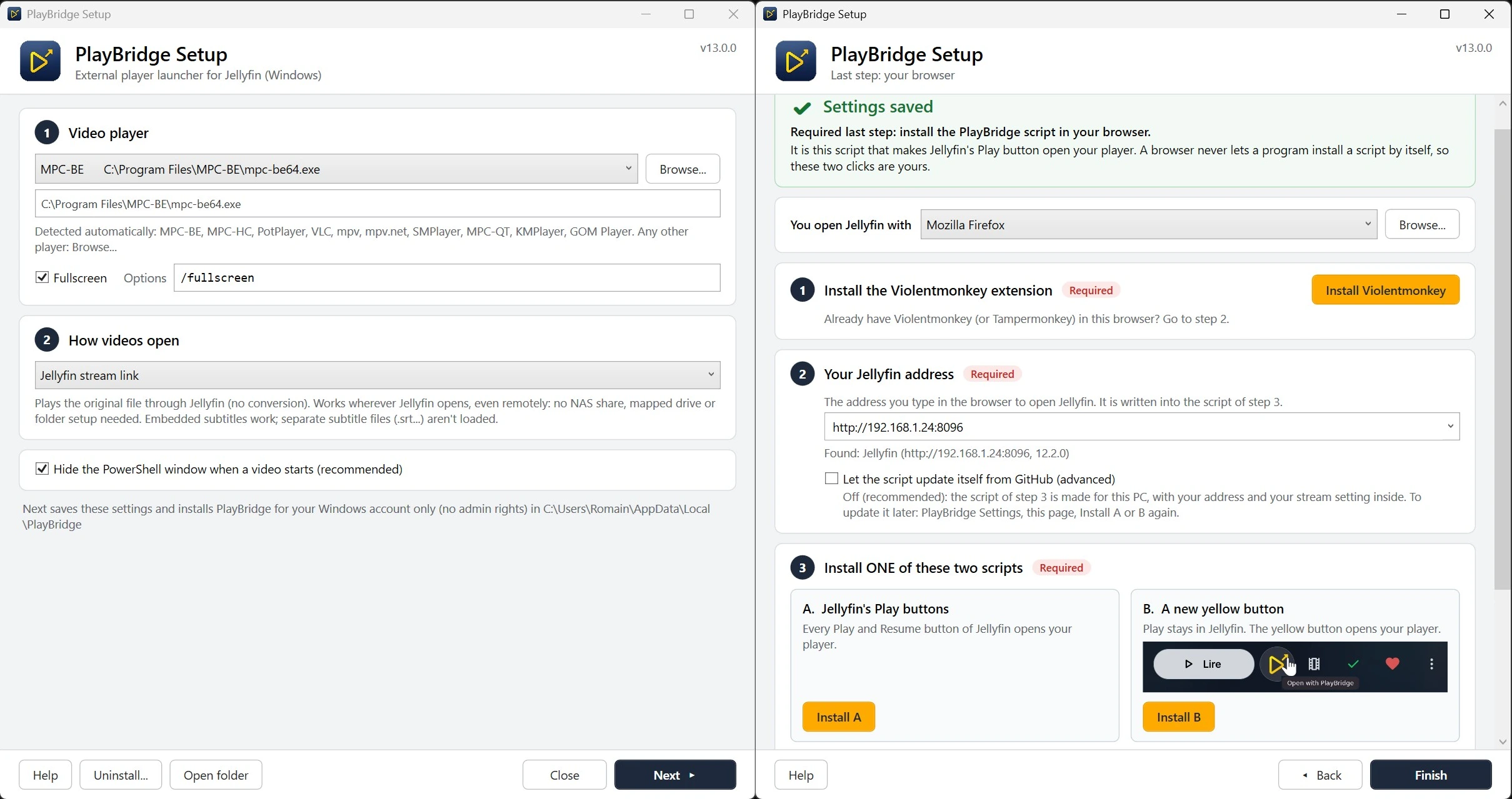
- Easy install with a GUI: double-click
Install.cmd, pick your player, click Next. No admin rights, no file to edit. - Works remotely too: new Jellyfin stream mode (default), at home or away. No NAS share or mapped drive needed.
- Configurable: Jellyfin stream or download link (Jellyfin API), Windows file path (local disk, NAS share), or file path with stream fallback.
- All settings in one window: player, fullscreen, how videos open, browser, Jellyfin address, browser script, NAS folders.
- Jellyfin 12+ ready
- Safe to Update from MPC-JF (settings lines imported automatically)
Restart the browser after the installation: it learns the new playbridge:// link only when it starts.
Please report issues with your PlayBridge.log.
Known limitations
- Watched states are not synced in Jellyfin.
- Stream or download modes : the player must be able to open http links.
- Windows File path mode: compatible with all players.
- Windows File path mode: your videos must be reachable from Windows (local disk, NAS share, mapped drive).
- Stream or download modes : separate subtitle files (.srt next to the video) are not loaded; embedded work; subtitles located in the JF directory are not loaded.
- Windows File path mode: separate subtitle files (.srt next to the video) work; embedded work; subtitles located in the JF directory are not loaded.
- Stream or download modes : A stream contains your Jellyfin access token. Your player may keep it in its "recent files" list. Select the Windows file path option to avoid this.
- Recommended : if videos folders are reachable from Windows, use
Windows file path, or Jellyfin stream when not foundoption.
PlayBridge 13.0.1
Jellyfin PlayBridge 13.0.1
Important
Major version: MPC-JF becomes PlayBridge
- Easy install with a GUI: double-click
Install.cmd, pick your player, click Next. No admin rights, no file to edit. - Works remotely too: new Jellyfin stream mode (default), at home or away. No NAS share or mapped drive needed.
- Configurable: Jellyfin stream or download link (Jellyfin API), Windows file path (local disk, NAS share), or file path with stream fallback.
- All settings in one window: player, fullscreen, how videos open, browser, Jellyfin address, browser script, NAS folders.
- Jellyfin 12+ ready
- Safe to Update from MPC-JF (settings lines imported automatically)
Restart the browser after the installation: it learns the new playbridge:// link only when it starts.
Please report issues with your PlayBridge.log.
Changelog
- New guided installer (
Install.cmd) with a GUI - New Jellyfin link modes: stream link or download link, at home and remotely, no NAS setup (ApiKey, Jellyfin 12 ready)
- Jellyfin link modes: the player starts once Jellyfin is ready (waits for sleeping NAS disks, "Waiting for Jellyfin" window with Cancel); clear message when Jellyfin refuses a video
- Windows file path mode: NAS videos found automatically through mapped drives and network shares; folder assistant when a video can't be found; optional stream fallback
- Older MPC-JF settings and "YOUR NAS CONFIG" lines imported automatically (they keep the file path mode)
- Detects installed players, browsers and your Jellyfin server; the Windows default video player is preselected; any other player or browser with Browse...
- Browser page of the setup: Violentmonkey, Jellyfin address, script A or B prepared for your PC and installed in one click, warning when it must be installed again, optional auto-update, "Test from the browser"; Jellyfin Media Player / Jellyfin Desktop as a choice (experimental)
- Clicks open the player more reliably: the video is looked up in advance, so the browser accepts the link
- Browser scripts renamed
PlayBridge.user.js/PlayBridgeIcon.user.js, newplaybridge://link; oldmpcjf://links and old scripts keep working - New icon
- Start menu shortcut "PlayBridge Settings" to change anything or uninstall;
PlayBridge.logfor diagnostics (never contains your token) - Development heavily LLM-assisted since this version (Claude Opus & Fable). The previous stable version (MPC-JF 12.1) stays available.
Known limitations
- Watched states are not synced in Jellyfin.
- Stream or download modes : the player must be able to open http links.
- Windows File path mode: compatible with all players.
- Windows File path mode: your videos must be reachable from Windows (local disk, NAS share, mapped drive).
- Stream or download modes : separate subtitle files (.srt next to the video) are not loaded; embedded work; subtitles located in the JF directory are not loaded.
- Windows File path mode: separate subtitle files (.srt next to the video) work; embedded work; subtitles located in the JF directory are not loaded.
- Stream or download modes : A stream contains your Jellyfin access token. Your player may keep it in its "recent files" list. Select the Windows file path option to avoid this.
- Recommended : if videos folders are reachable from Windows, use
Windows file path, or Jellyfin stream when not foundoption.
MPC-JF 12.1.0
Changelog
-
Tested OK on Jellyfin 12+ and modern layout, still compatible with Jellyfin 11
-
Playlist support: clicking an item now opens it in the external player (not the playlist's main Play)
-
fix: no longer launches external player when clicking a movie/show card whose title contains "Play"
-
fix: no longer launches external player when opening some playlist buttons (Add to playlist, Playlists library...)
-
fix: audio items (music, audiobooks) are now excluded and keep playing in the Jellyfin player
-
fix: MPC-JF button hidden on playlists and audio items
-
MPC-JF-JSinjector-deviceID.js: feat: untilPUT_DEVICE_ID_HEREis replaced, the desktop app displays its DeviceId with a Copy button, no need to search the logs anymore -
MPC-JF-JSinjector-deviceID.js: fix: script no longer stays disabled when Jellyfin loads slower than the script -
fix: broken auto-update links
Important
- Only the .js userscript files need to be updated from the previous version
- Update your .js and make sure you don't have any duplicate or outdated scripts
- If your Jellyfin server is not at the default address
http://localhost:8096/, add your own address without editing the script, so auto-updates keep working :
- Violentmonkey : Dashboard → click</>on MPC-JF → Settings tab → add your address in the @match rules
- Tampermonkey : Dashboard → MPC-JF → Settings tab → Includes/Excludes → User matches → Add... → e.g. :http://192.168.1.10:8096/*
Contributors

Assets 3
MPC-JF External media player launcher for Jellyfin Web
Changelog
Minor fixes, only required if you use the Jellyfin Media Player script version
- fix:
MPC-JF-JSinjector-deviceID.jsstop Media Player from opening when clicking 'Mark Played' by @monstercatyy - Update README with authentication instructions
Contributors

Assets 3
MPC-JF External media player launcher for Jellyfin Web
Changelog
- fix:
MPCJF.user.jsstop Media Player from opening when clicking 'Mark Played' by @monstercatyy in #1
New Contributors
- @monstercatyy made their first contribution in #1
Full Changelog: 10.11...10.11.8
Contributors
Assets 3
MPC-JF External media player launcher for Jellyfin Web
Changelog
- Add compatibility with Jellyfin Media Player (Jellyfin Desktop Windows App) using deviceId
- Add Alternative : a new yellow Play button to the item pages so playback with the external player is only triggered from that icon.