Repository navigation
PlayBridge 13.0.1

Jellyfin PlayBridge 13.0.1
Important
Major version: MPC-JF becomes PlayBridge
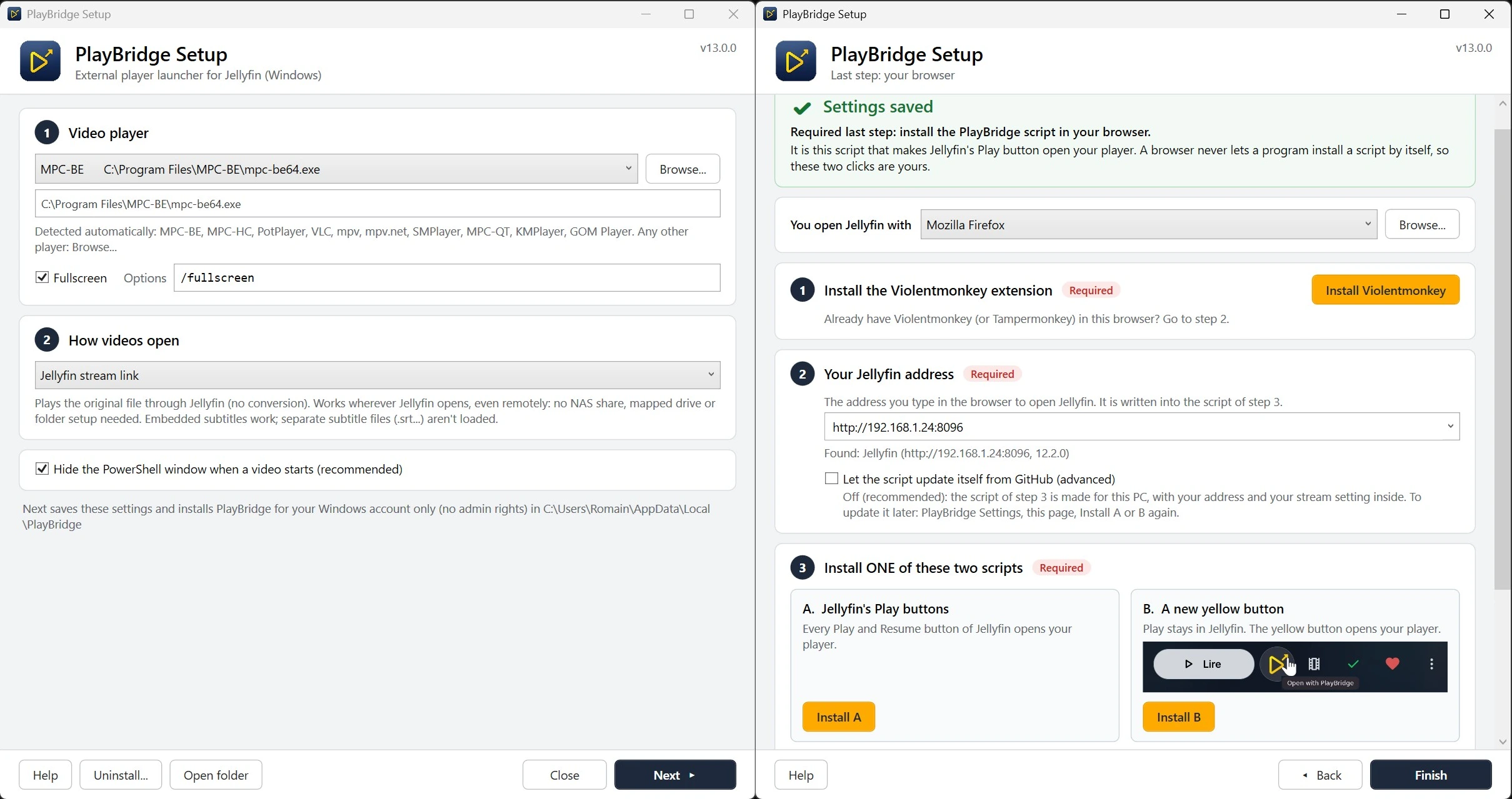
- Easy install with a GUI: double-click
Install.cmd, pick your player, click Next. No admin rights, no file to edit. - Works remotely too: new Jellyfin stream mode (default), at home or away. No NAS share or mapped drive needed.
- Configurable: Jellyfin stream or download link (Jellyfin API), Windows file path (local disk, NAS share), or file path with stream fallback.
- All settings in one window: player, fullscreen, how videos open, browser, Jellyfin address, browser script, NAS folders.
- Jellyfin 12+ ready
- Safe to Update from MPC-JF (settings lines imported automatically)
Restart the browser after the installation: it learns the new playbridge:// link only when it starts.
Please report issues with your PlayBridge.log.
Changelog
- New guided installer (
Install.cmd) with a GUI - New Jellyfin link modes: stream link or download link, at home and remotely, no NAS setup (ApiKey, Jellyfin 12 ready)
- Jellyfin link modes: the player starts once Jellyfin is ready (waits for sleeping NAS disks, "Waiting for Jellyfin" window with Cancel); clear message when Jellyfin refuses a video
- Windows file path mode: NAS videos found automatically through mapped drives and network shares; folder assistant when a video can't be found; optional stream fallback
- Older MPC-JF settings and "YOUR NAS CONFIG" lines imported automatically (they keep the file path mode)
- Detects installed players, browsers and your Jellyfin server; the Windows default video player is preselected; any other player or browser with Browse...
- Browser page of the setup: Violentmonkey, Jellyfin address, script A or B prepared for your PC and installed in one click, warning when it must be installed again, optional auto-update, "Test from the browser"; Jellyfin Media Player / Jellyfin Desktop as a choice (experimental)
- Clicks open the player more reliably: the video is looked up in advance, so the browser accepts the link
- Browser scripts renamed
PlayBridge.user.js/PlayBridgeIcon.user.js, newplaybridge://link; oldmpcjf://links and old scripts keep working - New icon
- Start menu shortcut "PlayBridge Settings" to change anything or uninstall;
PlayBridge.logfor diagnostics (never contains your token) - Development heavily LLM-assisted since this version (Claude Opus & Fable). The previous stable version (MPC-JF 12.1) stays available.
Known limitations
- Watched states are not synced in Jellyfin.
- Stream or download modes : the player must be able to open http links.
- Windows File path mode: compatible with all players.
- Windows File path mode: your videos must be reachable from Windows (local disk, NAS share, mapped drive).
- Stream or download modes : separate subtitle files (.srt next to the video) are not loaded; embedded work; subtitles located in the JF directory are not loaded.
- Windows File path mode: separate subtitle files (.srt next to the video) work; embedded work; subtitles located in the JF directory are not loaded.
- Stream or download modes : A stream contains your Jellyfin access token. Your player may keep it in its "recent files" list. Select the Windows file path option to avoid this.
- Recommended : if videos folders are reachable from Windows, use
Windows file path, or Jellyfin stream when not foundoption.