Repository navigation
Releases
nextime 0.3.0

The year as a heat map
A fourth view beside Day, Week and Month (key J): the twelve months on one page, each day a field tinted in four
fixed steps by how many events it holds, with a ring on today and a dot on highlighted holidays. A click on a day opens
it, a click on a month's name opens the month. The year works out from the size of the view how many months stand side
by side, so it fits without scrolling. The server counts: GET /api/events/year gives the number of events per day for
the calendars shown (about 0.4 s for 20 calendars and 20,000 events).
Upcoming
A new place in the sidebar. On top what comes next (how soon, when and where, what follows that day) and the next
14 days as bars by fullness, with the next calm stretch named. Below the coming weeks as columns side by side: this
week, the next, the one after, and "Later" with whole days and holidays only. Free days stand between the days. The
chips on top set the same choice as the collection and "Show only this one".
A tidier sidebar
The sidebar now holds places: Today, Calendar and Upcoming. Day, Week, Month or Year is chosen in the switch on top;
"Calendar" opens the view you had last. A click on a calendar in the sidebar keeps the view you are in.
Also
- Settings › Appearance › "Events in the month": a dot in the calendar's color, or the row tinted in it.
- A click on a day in the month, or on "+ n more", opens that day; a new event comes from the "+" in its corner.
- Pages load without flicker (one list of calendars for the whole page), and the month opens much faster.
- The column of coming events stands beside the year too.
Upgrading
docker compose pull && docker compose up -d. Nothing changes in the data.
nextime 0.2.1
Fixed
- An event opened from a link (a notification, "Open in nextime" in nexmail) now shows its calendar in the view
behind it. Before, the view kept the calendars chosen on the device, so the day could show another calendar than
the event's. When the event's calendar is not shown (another calendar shown alone, a collection without it, a
hidden calendar), it is now shown alone; ending that from the bar above the views returns to the collection chosen.
Upgrading
docker compose pull && docker compose up -d. Nothing changes in the data.
nextime 0.2.0
Highlight its days
A background calendar can now tint its days, as public holidays do, so a holiday calendar from iCloud, Google or a
subscription stands out too. The box "Highlight its days" sits under "Show in the background" in the calendar's dialog
and is each person's own. The built-in public holidays are highlighted from the start, school holidays are not.
An API for mail clients (nexmail)
GET /api/v1/calendarsnames each calendar'sgroup,source_nameand whether it ishidden. A key for all
calendars lists hidden ones too and reads their events only when a question names them.GET /api/v1/events?uid=finds an event by its iCalendar UID across the key's calendars.- Every event carries
uid,originandweb_url; one event alsoorganizerandattendees. POST /api/v1/events/{id}/answeranswers an invitation and says who replies to the organizer (reply_by).POST /api/v1/events/icalenters an invitation from a mail (iMIP), idempotent by UID; nextime sends nothing for it
(SCHEDULE-AGENT=CLIENTandSchedule-Reply: Ftowards iCloud and CalDAV,events.importat Google). When the
same event later arrives from the source, the copy from the mail steps aside.GET /api/v1/statechanges whenever something the key sees changes.GET /api/v1/melists the newfeatures:calendar_groups,uid_lookup,answer,ical_import,state.
Upgrading
docker compose pull && docker compose up -d. New columns are added on start; a backup is made before.
nextime 0.1.0
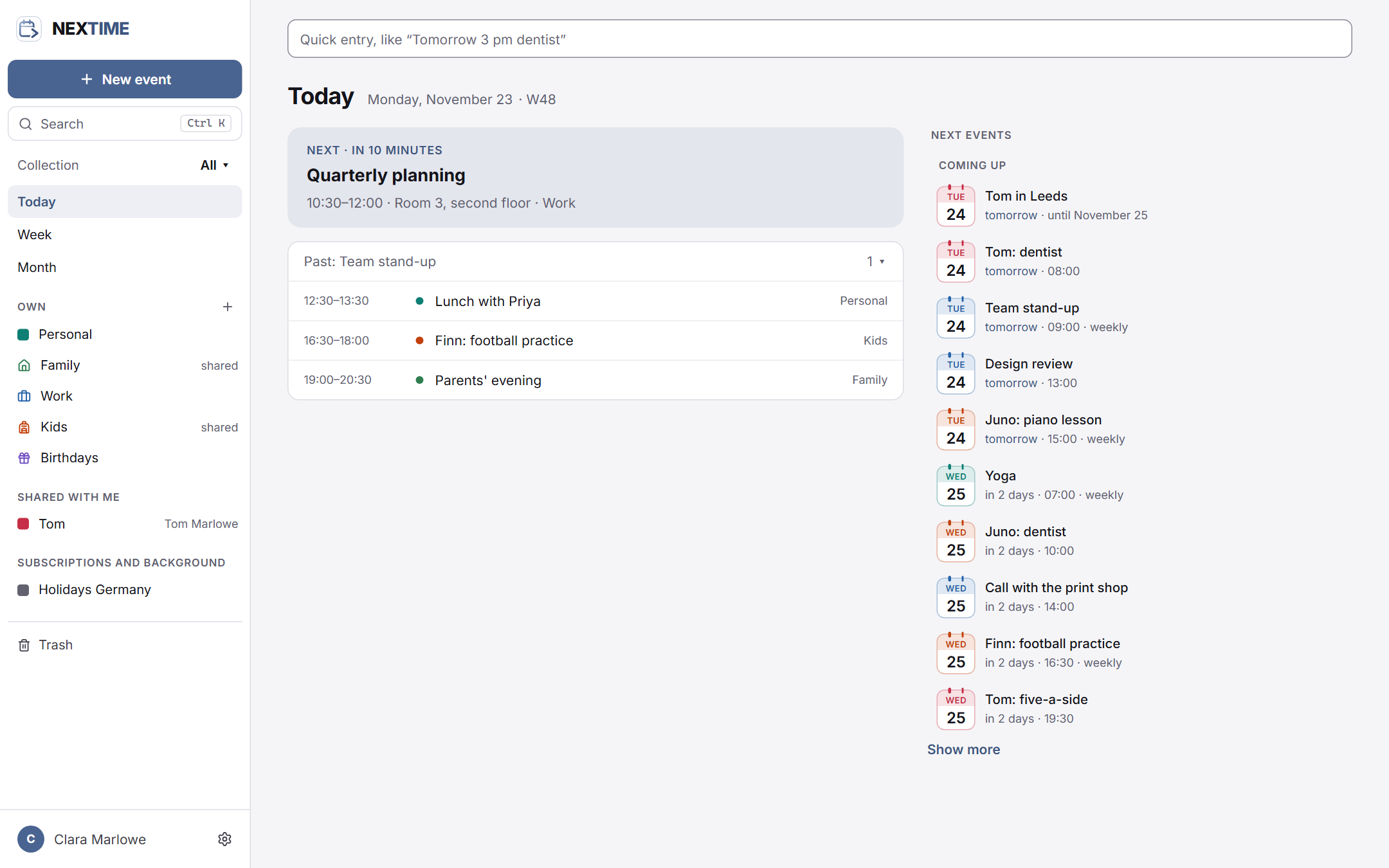
The first release of nextime: a self-hosted calendar for families and small groups. Your own calendars on your own
server, in the browser and through CalDAV on iPhone and Android, next to iCloud, Google and other CalDAV calendars.
What is in it
- Today, day, week and month, with "Coming up" beside week and month, dragging events in day and week, and keys
T, W, M and H to switch views. - Own calendars with eleven colors or one of your own and a symbol; events all day or with a time and time zone,
busy or free, series with exceptions. - Sharing with accounts on the same server (busy only, read, edit) and with guests through a read-only link;
web push when others change something. - iCloud, Google and other CalDAV servers read and written, synced every minute; subscriptions to calendar links;
public and school holidays of Germany, Austria and Switzerland built in; answers to invitations. - A calendar account for phones: a CalDAV server under
/dav/for Apple Calendar, DAVx5 and Thunderbird, a
password per device, a QR code and profile for the iPhone. Needs HTTPS. - Everyday: reminders per person and device, a place with suggestions and a small map, attachments, quick entry in
one line, defaults for new events per calendar, search, a trash with undo. - Sister apps: due tasks from nextasks and deadlines from nexpaper in the calendar.
- Take along and move: every calendar as ICS, all as ZIP, ICS files loaded with a preview, a calendar moved over from
iCloud or Google. - For programs: a REST API and an MCP server, each key with its own rights.
- German and English, light and dark, installable as a web app, the next four weeks readable without a connection.
Install
services:
  nextime:
    image: ghcr.io/derkezorm/nextime:0.1.0
    container_name: nextime
    ports:
      - "8585:8000"
    volumes:
      - ./data:/data
    environment:
      TZ: Europe/Berlin
    restart: unless-stopped
The first account is the operator; the setup code is in docker logs nextime. Phones connect only over HTTPS: put
nextime behind a reverse proxy and name it in NEXTIME_TRUSTED_PROXIES. All settings are in the
README.