Repository navigation
Secure Backend and Secrets
DigitalRCS provides the required companion digitalrcs-intelligencegateway-datasource. Panel 1.1.0 requires companion 1.1.0 or later. Install it beside the panel, create an Intelligence Gateway Secure AI data-source instance, store the provider credential in Grafana secureJsonData, and select that instance under AI provider > Secure AI data source.
The data source has its own installation and operations wiki, including a credential-free reviewer environment and troubleshooting.
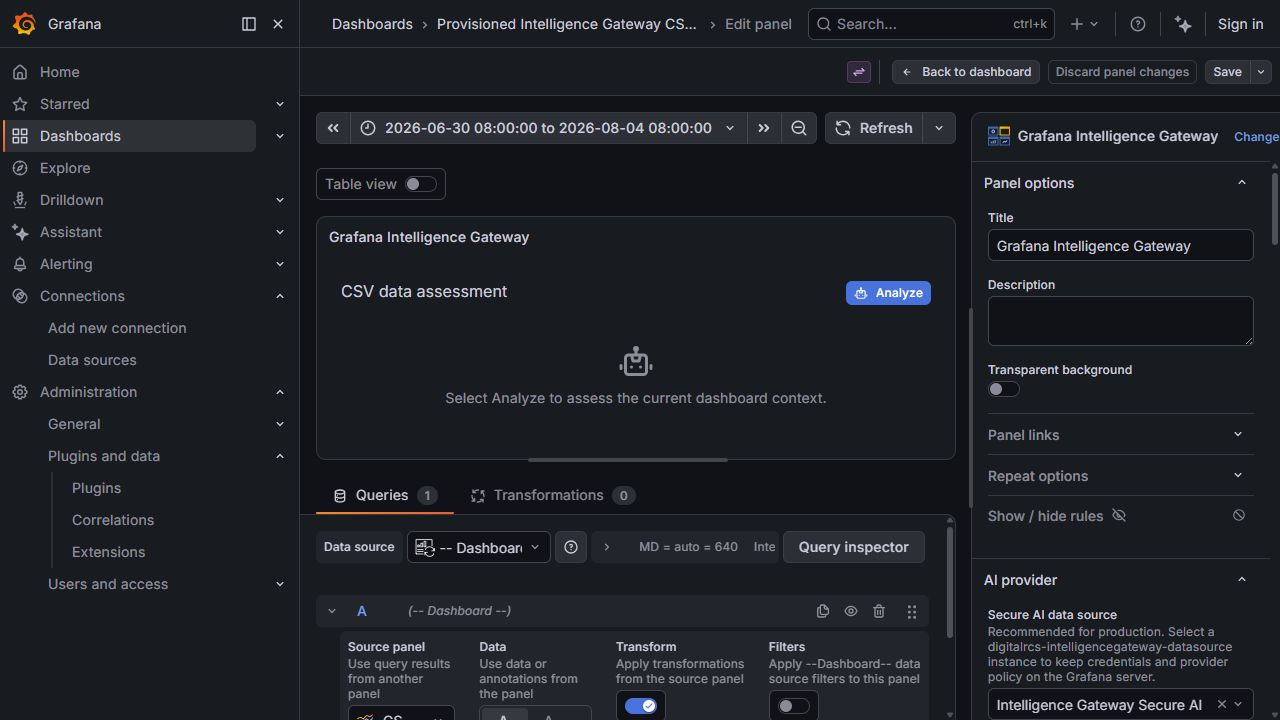
The panel stores the data-source UID and non-secret analysis settings, including model, prompt, generation limits, and display choices. Grafana resolves the instance server-side; the companion backend decrypts the credential, enforces administrator policy, calls the provider, and returns the answer or sanitized error metadata.
The panel has no direct browser credential or provider-URL mode. The companion data source is declared as a required plugin dependency and is the only provider transport.
Secure AI data source is required for data-only, images-only, and combined assessment. It is separate from Queries → Dashboard, which shares another panel's measurements. An images-only assessment does not require query data, but it still requires this secure backend.
Official references:
- Grafana plugin authentication and secureJsonData
- Grafana backend resource handlers
- Grafana plugin security best practices
- Install the compatible companion release first, then the panel, following each release's signature and artifact instructions. Grafana 11.6 or later is required; optional provider apps may require newer Grafana versions.
- Restart Grafana after installation or a
plugin.jsonchange. - Open Connections > Data sources > Add new data source.
- Select Intelligence Gateway Secure AI.
- Configure the provider URL, default model or agent alias, allowed models, timeout, and administrator token ceiling. Responses are buffered; streaming is not supported. Copilot Direct Line has separate agent-controlled generation limits.
- Enter only the credential required by the provider and select Save & test.
- Edit the Intelligence Gateway panel and select the saved instance under Secure AI data source.
- Enter or securely load an administrator-allowed model. Use Analyze for data only, or enable the vision policy and follow Image Analysis for explicit preview and submission.
Non-secret jsonData:
{
  "provider": "openai",
  "baseUrl": "https://api.openai.com/v1",
  "defaultModel": "gpt-4.1-mini",
  "timeoutSeconds": 300,
  "allowedModels": ["gpt-4.1-mini", "gpt-4.1"],
  "maxOutputTokens": 8192,
  "allowInsecureHttp": false,
  "enableVision": false,
  "allowedVisionModels": []
}| Property | Purpose |
|---|---|
provider |
openai, lmstudio, openwebui, grafana-llm, custom, or copilot-studio. Copilot is a Direct Line preview, not enterprise SSO. |
baseUrl |
Administrator-controlled provider base URL. Resource requests cannot replace it. |
defaultModel |
Model used when a request does not override it. |
timeoutSeconds |
Server-side provider deadline, from 1 to 600 seconds. |
allowedModels |
Administrator allow-list for panel-requested model IDs. The default model must be included; when empty, only the default model is permitted. |
maxOutputTokens |
Administrator ceiling applied even when the panel omits its cap, for supported Chat Completions adapters. Must also fit model limits. Not enforced through Copilot Direct Line. |
allowInsecureHttp |
Explicit administrator override for HTTP provider URLs when organizational DNS/address locality cannot be classified reliably. Defaults to false. |
enableVision |
Enables image submission; off by default. |
allowedVisionModels |
Explicit non-empty vision allow-list when vision is enabled; must be a subset of approved models. It does not discover or confer vision capability. |
Secret secureJsonData for an API-key provider:
{
  "apiKey": "provider-key-written-only-during-save"
}
The browser later receives configured/reset flags through secureJsonFields, never the decrypted values. Configure only the credential the selected provider requires. For bearer authentication, use bearerToken instead of apiKey; a bearer token takes precedence if both are set. The Grafana LLM app requires a dedicated Grafana service-account bearer token with access to that app, not a browser SSO cookie. LM Studio may require neither.
Copilot uses its own secure field instead:
{
  "directLineSecret": "approved-channel-secret-written-only-during-save"
}
A Direct Line secret grants channel access, not an end user's identity or enterprise SSO. It must not be replaced with a browser token or an arbitrary service-account password. See Copilot Studio Notes.
An arbitrary JSON data source is not a supported secret store. Its query results may reach dashboards, browsers, and exports; the panel must not retrieve decrypted credentials from them. Keep credentials in this backend's secureJsonData, or supply them to Grafana provisioning through an approved server-side secret process. Store only non-secret routing and policy fields in jsonData.
apiVersion: 1

datasources:
  - name: Intelligence Gateway Secure AI
    uid: intelligence-gateway-secure
    type: digitalrcs-intelligencegateway-datasource
    access: proxy
    jsonData:
      provider: openai
      baseUrl: https://api.openai.com/v1
      defaultModel: gpt-4.1-mini
      timeoutSeconds: 300
      allowedModels:
        - gpt-4.1-mini
      maxOutputTokens: 8192
      allowInsecureHttp: false
      enableVision: false
      allowedVisionModels: []
    secureJsonData:
      apiKey: ${OPENAI_API_KEY}
Set OPENAI_API_KEY in the Grafana server/container secret environment. Never commit it in provisioning, a dashboard, or the source repository. Use Grafana data-source permissions to restrict who may edit and query the instance.
- Fixed provider-specific paths; panel requests cannot choose an arbitrary host or path. Chat Completions adapters use model/chat routes; Copilot uses a bounded Direct Line token/conversation/activity/upload flow.
- HTTPS is required by default. Allow insecure HTTP explicitly overrides that requirement without trying to classify the hostname or IP as local. Enabling it can expose provider credentials and prompts in transit and should be paired with trusted-network and firewall controls.
- OpenAI remains restricted to
api.openai.comeven when the HTTP override is enabled. - Redirects, prohibited network addresses, unsupported message roles, disallowed models, and invalid temperatures are rejected. Model discovery returns only administrator-approved IDs.
- Text-only request bodies are capped at 1 MiB. Image requests are capped at 18 MiB including base64, with non-image content still limited to 1 MiB. Buffered responses are capped at 16 MiB. Image byte/pixel/count limits and vision-model approval apply separately.
- Each instance permits four concurrent calls and 30 calls per minute.
- Provider error bodies, prompts, answers, and credentials are not logged by default.
- Provider authentication failures and rate limits return sanitized metadata.
Treat provider-side budgets and organization billing controls as the authoritative cost limit, and use network egress/firewall policy as a second SSRF boundary.
For supported Chat Completions models, the effective hard cap is min(panel Maximum output tokens, data-source maxOutputTokens), subject to any lower upstream limit. If Provider/model default output limit is enabled, the panel omits its cap but the administrator ceiling is still sent: output is not unlimited. Requested answer max tokens (soft) is only a prompt instruction and cannot guarantee an exact token count.
Reasoning tokens can exhaust the output budget before the visible answer. Raise both relevant hard caps within approved model/cost limits; increasing only the data-source ceiling does not raise a smaller panel request. The model's context window is not its maximum output. The plugin does not expose a separate reasoning-effort control. Copilot owns its generation limits; Direct Line does not enforce the panel's token or temperature settings.
The shortest panel, backend, reverse-proxy, and provider timeout can terminate a request. For example, Grafana LLM app 1.2.0 has a two-minute upstream timeout even when both DigitalRCS limits are higher. See AI Providers for compatibility constraints.
The panel repository's Docker Compose environment mounts both sibling dist directories and provisions the secure instance plus a dashboard already configured with UID intelligence-gateway-secure. Build both plugins, start the panel Compose project, and open http://localhost:3004. The default deterministic mock requires no credential or OPENAI_API_KEY and performs no AI inference. To test a real provider, follow the Reviewer Walkthrough; configure a server-side API key only when the selected provider requires one, such as OpenAI.