Repository navigation
OOXML Toolkit 0.1.1

·
62 commits
to main
since this release
66f9b22
This commit was signed with the committer’s verified signature.
 DominikPalo
Dominik Paľo
Patch release that fixes the macOS builds, which could not be opened after a browser download in 0.1.0.
Fixed
- macOS: “OOXML Toolkit is damaged and can't be opened.” The 0.1.0 app still carried the original
Electron binary's signature, which is invalid for the re-packaged bundle, so Gatekeeper called it
damaged once a browser had quarantined the download. The app is now signed ad hoc with a valid
signature, and the release workflow fails if that signature is ever invalid.
Downloads
| Platform | File |
|---|---|
| macOS — Apple Silicon (M1 and later) | OOXML-Toolkit-0.1.1-mac-arm64.dmg |
| macOS — Intel | OOXML-Toolkit-0.1.1-mac-x64.dmg |
| Windows 10/11 (64-bit) — installer | OOXML-Toolkit-0.1.1-win-x64-setup.exe |
| Windows 10/11 (64-bit) — portable, no install | OOXML-Toolkit-0.1.1-win-x64-portable.exe |
| Linux (64-bit) — any distribution | OOXML-Toolkit-0.1.1-linux-x86_64.AppImage |
SHA256SUMS.txt lists the checksum of every file. Windows and Linux builds are unchanged from 0.1.0.
First launch — the builds are not notarized yet
- macOS: drag the app from the
.dmgto Applications and open it once — macOS blocks it. Then open
System Settings → Privacy & Security, scroll down and click Open Anyway next to
“OOXML Toolkit was blocked”. (macOS 14 and earlier: right-click the app → Open instead.)
From a terminal, this does the same:xattr -dr com.apple.quarantine "/Applications/OOXML Toolkit.app".
Notarization needs a paid Apple Developer ID; until then this one-time step is required. - Windows: SmartScreen may warn about an unrecognised app — choose More info → Run anyway.
- Linux:
chmod +x OOXML-Toolkit-0.1.1-linux-x86_64.AppImage && ./OOXML-Toolkit-0.1.1-linux-x86_64.AppImage.
If it does not start, install FUSE 2 (libfuse2/fuse2).
About OOXML Toolkit
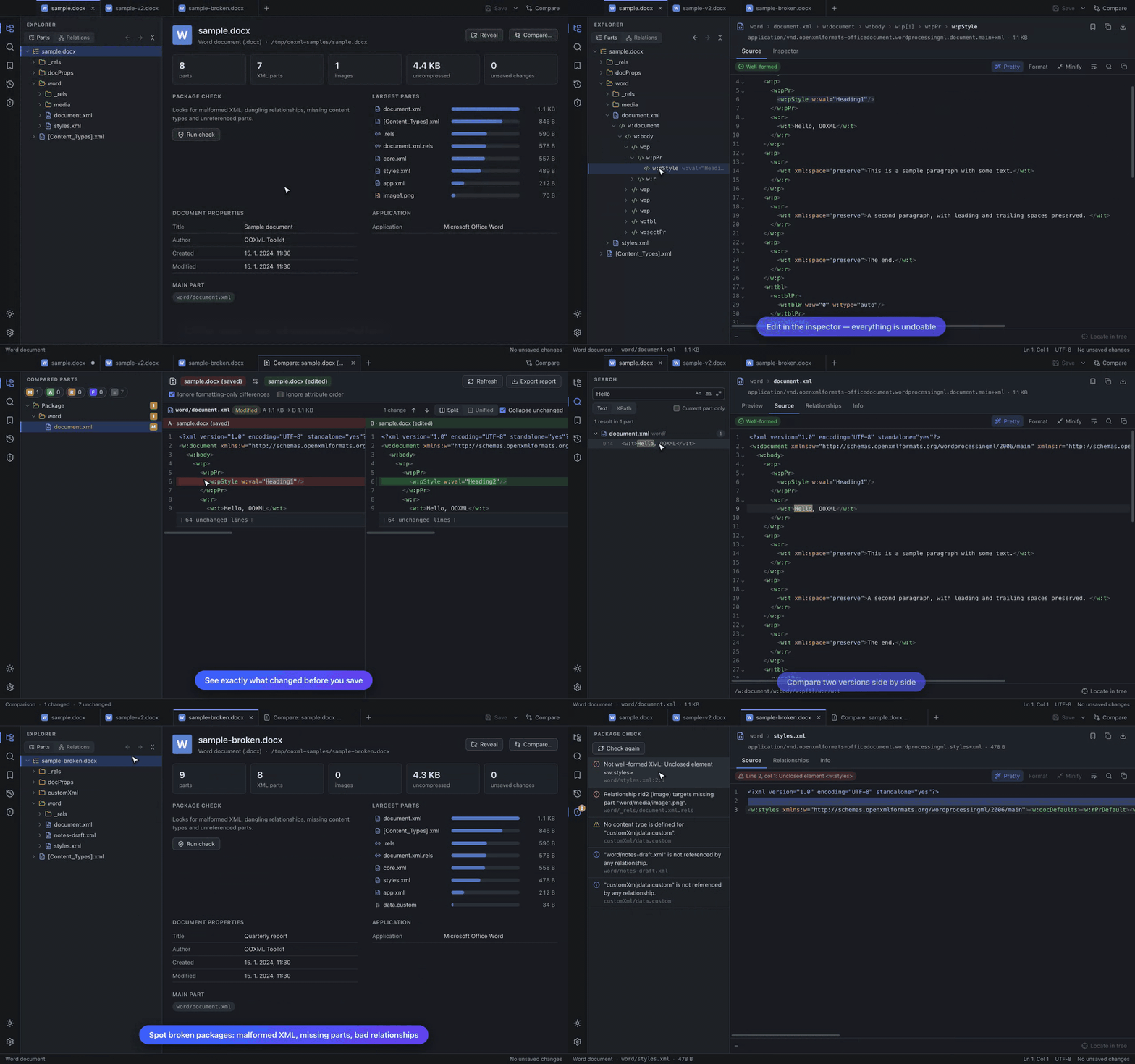
View, edit and compare Office Open XML packages (.docx, .xlsx, .pptx and friends) right down to the
XML: a tree of every part and element, source editor and inspector, worksheet / document / slide previews,
text / regex / XPath search, side-by-side comparison, bookmarks and history, and a package check. Everything
in 0.1.0 is included — see the
README and the
user guide.
Known limitations
- Password-protected Office files and legacy binary formats (
.doc,.xls,.ppt) cannot be opened. - The package check verifies structure, not ECMA-376 schema validity.
- The slide and worksheet previews are simplified (no fonts/fills/charts; raw cell values).
- Builds are not notarized (see above) and there is no auto-update yet.