Repository navigation
Releases
Password Manager v4.1.1

**🛡️ دكتور سعد لإدارة كلمات المرور —4.1.1 Dr.Saad Password Manager
نسيت كلمة مرور؟ كتبتها في ورقة؟ ولا بتعيد نفس الباسورد في كل موقع؟ ❌
وقت التعامل بجدية مع أمانك الرقمي! 🔐
دكتور سعد برنامج سطح مكتب لويندوز بيخزّن كل كلمات مرورك مشفّرة على جهازك أنت — بدون إنترنت وبدون سيرفرات وبدون اشتراك شهري 💪
✨ ليه دكتور سعد؟
🔐 تشفير عسكري AES-256-GCM + اشتقاق مفتاح Argon2id — حتى لو حد ملش ملف الخزنة مش هيقدر يفتحها
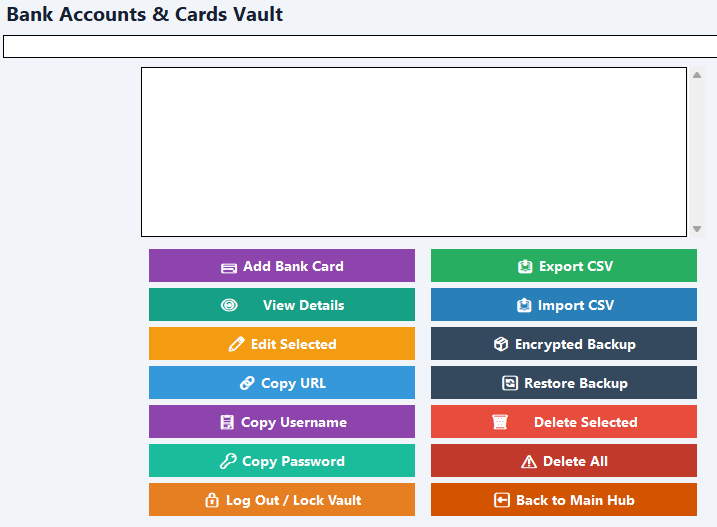
🏦 خزنتين منفصلتين: واحدة للمواقع وواحدة للحسابات البنكية
🧩 إضافة متصفح بتملّي بيانات الدخول بضغطة واحدة
⚡ اختصارات ذكية: Ctrl+Alt+S للملء التلقائي و Ctrl+Alt+L للقفل الفوري
🔄 نسخ احتياطي تلقائي كل 6 ساعات — بياناتك في أمان دايمًا
⏱️ أكواد TOTP (التحقق بخطوتين) داخل البرنامج
🌐 6 لغات: العربي، الإنجليزي، التركي، الفرنسي، الإسباني، الألماني
🧹 أي حاجة تنسخها بتتمسح من الحافظة تلقائيًا بعد 30 ثانية
👨💻 تطوير: د. إبراهيم سعد
📩 للاستفسار والترخيص: ibrahimsaad30@gmail.com
💾 حمّله الآن وجهازك يبقى خزنتك الشخصية — مشفّرة بالكامل!
تحديث أمني وجذري ضخم ببرنامج Dr.Saad Password Manger v4.1.1
شهد الإصدار v4.1.1 قفزة نوعية وهندسية كبرى شملت إعادة هيكلة النظام وتوسيع نطاق العمل المكتبي ودعم متصفحات الويب:
- دعم خوارزميات اشتقاق المفاتيح الحديثة:
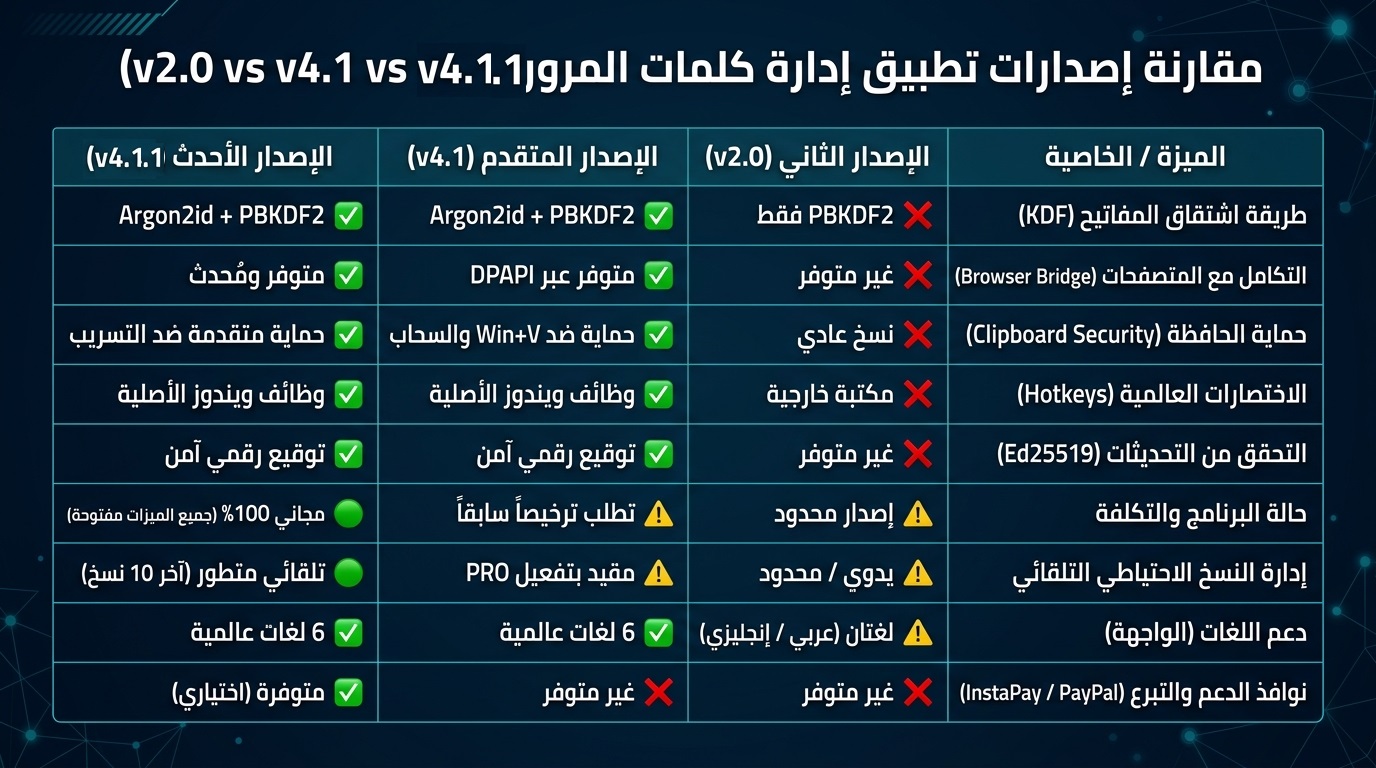
- الانتقال من اعتماد خوارزمية بي بي كيه دي إف 2 وحدها كما في الإصدار v2.0 إلى دعم أرجون 2 آي دي المقاوم لهجمات وحدات المعالجة الرسومية مع الاحتفاظ بالخوارزمية القديمة كخيار بديل للتوافق الخلفي.
- تخزين معاملات الخوارزمية داخل ملف الخزنة نفسها لضمان التوافق الأمامي والخلفي.
- التكامل مع المتصفحات وملحقاتها:
- إدخال نظام خادم محلي يعمل عبر بروتوكول الاتصال المحلي للتواصل مع إضافات متصفحات كروم وإيدج وفايرفوكس.
- إضافة ميزة حماية الرمز المميز باستخدام تقنية ويندوز الحية لحماية البيانات بتشفير مقيد بحساب المستخدم الحالي.
- تسجيل برنامج الربط المحلي لضمان تعبئة الحقول تلقائياً داخل صفحات الويب.
- تعزيز حماية الحافظة:
- تطوير دالة النسخ لتعمل بنظام يستثني البيانات الحساسة من سجل النظام ومحاذاة التخزين السحابي لحماية كلمات المرور من التسريب.
- نظام الاختصارات العالمي دون مكتبات خارجية:
- الاستغناء عن مكتبة لوحة المفاتيح الخارجية التي تُصنف أحياناً كبرمجيات مشبوهة من قِبل مضادات الفيروسات والاعتماد على وظائف ويندوز الأصلية لتنفيذ اختصارات التعبئة السريعة والقفل الفوري.
- التحقق من التحديثات والتوقيع الرقمي:
- إضافة آلية للتحقق من سلامة التحديثات عبر التوقيع الرقمي باستخدام خوارزمية إي دي 25519 ومنع تنزيل أي إصدارات غير موثوقة أو معدلة.
- دعم المصادقة الثنائية:
- إضافة حقل وحساب رموز التحقق الثنائي استناداً إلى مفاتيح التشفير وعرض الأكواد الزمنية مباشرة داخل تفاصيل الحسابات.
- توسيع اللغات المدعومة لتشمل ست لغات عالمية وعربية وهي الإنجليزية والعربية والتركية والفرنسية والإسبانية والألمانية بعد أن كان الإصدار v2.0 يقتصر على الإنجليزية والعربية.
ثانياً: ما تم إضافته وتعديله في الإصدار v4.1.1 مقارنة بالإصدار v4.1
الإضافات والتحسينات المضافة في الإصدار v4.1.1 فيما يلي: - التحول الكامل إلى مجاني بالكامل وإلغاء قيود التراخيص:
- تحسين آليات النسخ الاحتياطي التلقائي:
- تطوير نظام النسخ التلقائي في الخلفية كل ست ساعات أو عند أول تشغيل بعد الفاصل الزمني مع ميزة الاحتفاظ بآخر عشر نسخ احتياطية فقط تلقائياً لتوفير المساحة.
- إضافة رسائل توجيهية وحلول تلقائية عند تعارض النسخ مع حماية مجلدات ويندوز مع توجيه المستخدم لاختيار مجلدات بديلة بعيدة عن قرص النظام الأساسي.
- تحديث واجهات البدء والتوجيه:
- إضافة شاشة ترحيبية ذكية عند الاستخدام الأول تدعو المستخدم لتحديد مجلد آمن للنسخ الاحتياطي على وحدة تخزين خارجية بعيداً عن صلاحيات النظام ومخاطر التهيئة.
- تعديلات برمجية طفيفة لتحسين الاستقرار:
- تحسين معالجة الأخطاء عند فشل قراءة الملفات التالفة أو استعادة النسخ الاحتياطية وتأمين التعامل مع المسارات البرمجية لمنع انهيار الواجهة الرسومية.
🛡️ Dr.Saad Password Manager 4.1.1 — Your vault. Your machine. Zero internet.
Still reusing the same password everywhere? Writing them on paper? ❌
Time to get serious about your digital security! 🔐
Dr.Saad is a Windows desktop app that stores all your passwords fully encrypted on your own machine
no cloud, no servers, no monthly fees. 💪
✨ Why Dr.Saad?
🔐 Military-grade AES-256-GCM encryption + Argon2id key derivation
🏦 Two separate vaults: websites & banking
🧩 Browser extension for one-click login filling
⚡ Smart hotkeys: Ctrl+Alt+S to auto-fill, Ctrl+Alt+L to lock instantly
🔄 Auto-backup every 6 hours
⏱️ Built-in TOTP (2FA) codes
🌐 Available in 6 languages
🧹 Clipboard auto-wipes in 30 seconds
📩 ibrahimsaad30@gmail.com
Massive Security and Core Update for Dr. Saad Password Manager v4.1.1
Version v4.1.1 marks a major qualitative and architectural leap, featuring a complete system restructuring, expansion of desktop capabilities, and robust web browser support:
- Support for Modern Key Derivation Algorithms:
- Transitioned from relying solely on PBKDF2 (as in v2.0) to supporting Argon2id, which is resistant to GPU-based attacks, while retaining the legacy algorithm as a fallback option for backward compatibility.
- Storing algorithm parameters directly inside the vault file itself to ensure both forward and backward compatibility.
- Browser Integration and Extensions:
- Introduced a local server running via the local communication protocol to interface with Chrome, Edge, and Firefox browser extensions.
- Added token protection using Windows DPAPI (Data Protection API) to secure data with encryption tied to the current user account.
- Registered the native messaging host to ensure seamless auto-fill functionality across web pages.
- Enhanced Clipboard Protection:
- Upgraded the copy function to exclude sensitive data from the system clipboard history and aligned cloud storage handling to protect passwords from leakage.
- Native Global Hotkeys Without External Libraries:
- Eliminated the external keyboard hook library—which is sometimes flagged as suspicious by antivirus software—by relying on native Windows APIs to execute quick-fill shortcuts and instant locking.
- Update Verification and Digital Signatures:
- Added a mechanism to verify update integrity via digital signatures using the Ed25519 algorithm, preventing the download of untrusted or modified versions.
- Two-Factor Authentication (2FA) Support:
- Added a dedicated field and account support for 2FA verification codes based on secret keys, displaying time-based codes (TOTP) directly within account details.
- Expanded Language Support:
- Expanded supported languages to include six global and regional languages—English, Arabic, Turkish, French, Spanish, and German—whereas version v2.0 was limited to English and Arabic.
Part II: Additions and Modifications in v4.1.1 Compared to v4.1
The following additions and improvements have been introduced in version v4.1.1:
- Complete Transition to Freeware (Removal of All License Restrictions):
- Improved Automatic Backup Mechanisms:
- Developed an automated background backup system that runs every six hours or upon the first launch after the interval, with a feature to automatically retain only the latest ten backups to save storage space.
- Added guidance messages and automatic workarounds for backup conflicts with Windows folder protections, prompting the user to select alternative folders away from the primary system drive.
- Updated Welcome and Onboarding Interfaces:
- Added an intelligent welcome screen upon first use prompting the user to designate a secure backup folder on external storage, away from system permission restrictions and formatting risks.
- Minor Code Adjustments for Enhanced Stability:
- Improved error handling for failed reads of corrupted files or backup restorations, and secured path handling to prevent GUI crashes.


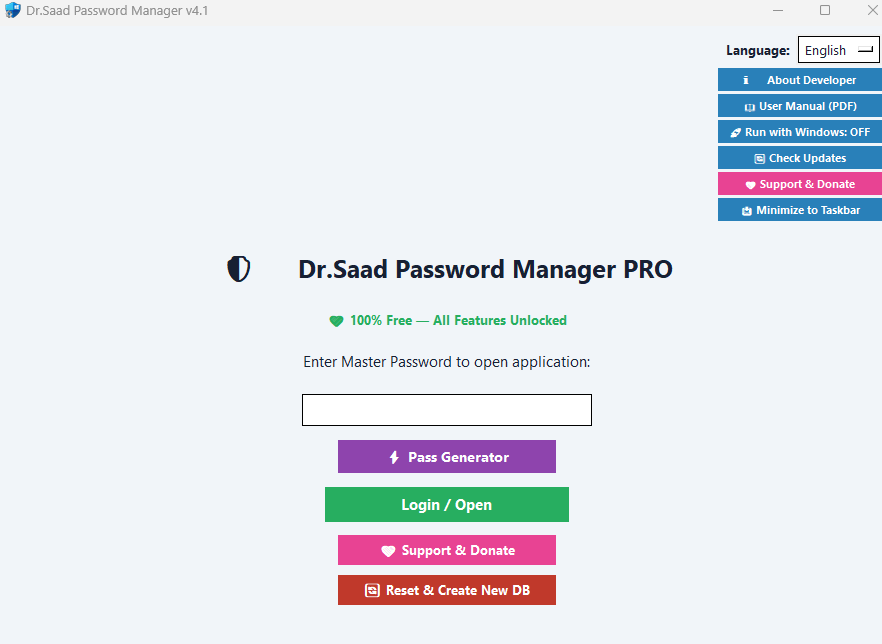
Password Manger v 4.1
🛡️ دكتور سعد لإدارة كلمات المرور — Dr.Saad Password Manager
نسيت كلمة مرور؟ كتبتها في ورقة؟ ولا بتعيد نفس الباسورد في كل موقع؟ ❌
وقت التعامل بجدية مع أمانك الرقمي! 🔐
دكتور سعد برنامج سطح مكتب لويندوز بيخزّن كل كلمات مرورك مشفّرة على جهازك أنت — بدون إنترنت وبدون سيرفرات وبدون اشتراك شهري 💪
✨ ليه دكتور سعد؟
🔐 تشفير عسكري AES-256-GCM + اشتقاق مفتاح Argon2id — حتى لو حد ملش ملف الخزنة مش هيقدر يفتحها
🏦 خزنتين منفصلتين: واحدة للمواقع وواحدة للحسابات البنكية
🧩 إضافة متصفح بتملّي بيانات الدخول بضغطة واحدة
⚡ اختصارات ذكية: Ctrl+Alt+S للملء التلقائي و Ctrl+Alt+L للقفل الفوري
🔄 نسخ احتياطي تلقائي كل 6 ساعات — بياناتك في أمان دايمًا
⏱️ أكواد TOTP (التحقق بخطوتين) داخل البرنامج
🌐 6 لغات: العربي، الإنجليزي، التركي، الفرنسي، الإسباني، الألماني
🧹 أي حاجة تنسخها بتتمسح من الحافظة تلقائيًا بعد 30 ثانية
البرنامج مجانى بالكامل
👨💻 تطوير: د. إبراهيم سعد
📩 للاستفسار : ibrahimsaad30@gmail.com
💾 حمّله الآن وجهازك يبقى خزنتك الشخصية — مشفّرة بالكامل!
🛡️ Dr.Saad Password Manager — Your vault. Your machine. Zero internet.
Still reusing the same password everywhere? Writing them on paper? ❌
Time to get serious about your digital security! 🔐
Dr.Saad is a Windows desktop app that stores all your passwords fully encrypted on your own machine
no cloud, no servers, no monthly fees. 💪
✨ Why Dr.Saad?
🔐 Military-grade AES-256-GCM encryption + Argon2id key derivation
🏦 Two separate vaults: websites & banking
🧩 Browser extension for one-click login filling
⚡ Smart hotkeys: Ctrl+Alt+S to auto-fill, Ctrl+Alt+L to lock instantly
🔄 Auto-backup every 6 hours
⏱️ Built-in TOTP (2FA) codes
🌐 Available in 6 languages
🧹 Clipboard auto-wipes in 30 seconds
it is free for all
📩ibrahimsaad30@gmail.com


Password Manger Free Edition
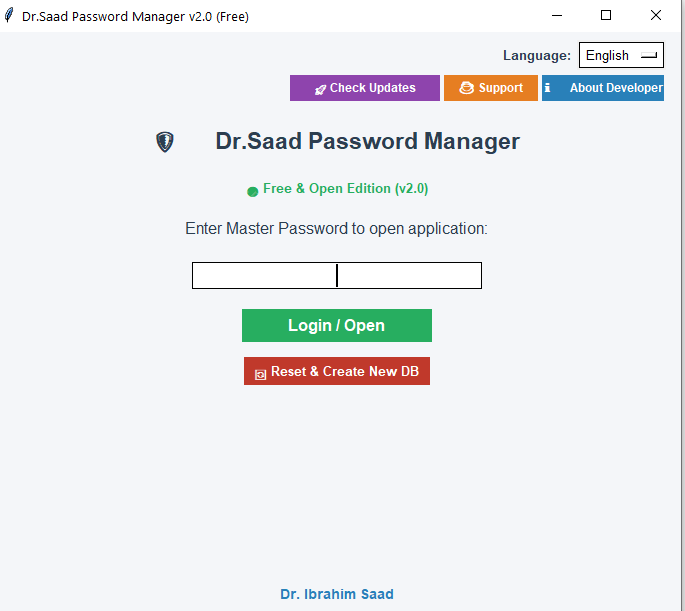
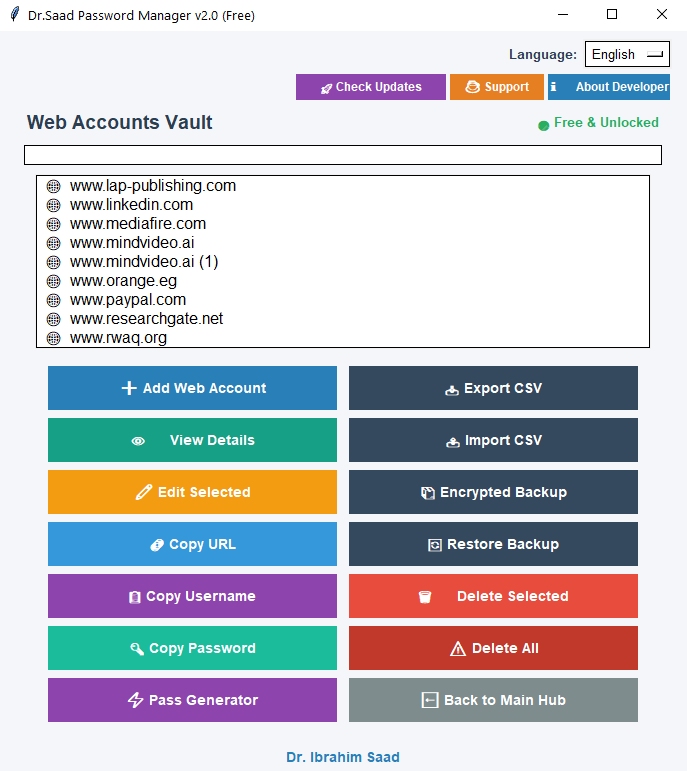
Dr Saad Password Manager v2.0 We are pleased to announce the official release of Dr Saad Password Manager v2.0 combining the highest levels of military-grade encryption and security with absolute ease of use. It operates entirely locally to grant you absolute sovereignty and strict security for your data, accounts, and bank cards, without needing to trust any cloud servers or third parties. Key Features and Highlights: 100 Percent Military-Grade Local Encryption: Powered by AES-256-GCM advanced encryption paired with PBKDF2-HMAC-SHA256 key derivation under a strict Zero-Knowledge architecture. Your master password and unencrypted credentials never leave your machine. Built-in Strong Password Generator: Instantly generate complex and secure passwords with a single click. Smart Memory and Clipboard Protection: Automatic clipboard clearing 30 seconds after copying sensitive data to prevent theft software, alongside an automatic application lock after 5 minutes of inactivity. Security Audit Engine: Built-in proactive auditing tool to instantly scan and detect weak, reused, or commonly breached passwords. Multi-Language Offline Interface: Fully operational without an internet connection, providing dynamic support for 6 international languages including English, Arabic, French, German, Spanish, and Turkish. System Compatibility and Portability: Compatible exclusively with 64-bit Windows operating systems. Securely import and export your database via encrypted backup files in enc format or standard CSV files, ensuring absolute impenetrability. Important Security Note: Due to our strict Zero-Knowledge design, there are no backdoors or cloud reset mechanisms. Please ensure you keep a safe physical written copy of your Master Password. Software Availability: The software is completely free and fully unlocked for all users without any restrictions, limitations, or trial periods, granting full access to all advanced features including the bank vault, backups, and security audits at no cost. End-User License Agreement: Copyright and Ownership: This software Dr Saad Password Manager is developed, owned, and copyrighted exclusively by Dr Ibrahim Saad, protected under international copyright laws. All rights are reserved. Grant of License: This local-first secure application is provided free of charge for personal and professional use. Unauthorized modification, reverse engineering, redistribution of the source code as ones own, or resale in any form is strictly prohibited. Disclaimer of Warranty: The software is provided as is, without warranty of any kind, express or implied. The developer shall not be held liable for any data loss or direct or indirect damages arising from the use or misuse of this application. Downloads and Support: Watch Video Overview: https://www.youtube.com/watch?v=r9OTC3-BVOI For official inquiries and technical support, contact via email: [ibrahimsaad30@gmail.com]
ibrahimsaad30@gmail.com
Developed by: Dr Ibrahim Saad
**الإصدار الرسمي والنهائي مدير كلمات المرور للدكتور إبراهيم سعد الإصدار الثاني مجاني بالكامل يسعدنا الإعلان عن إطلاق الإصدار الجديد من برنامج إدارة كلمات المرور والذي يدمج أعلى مستويات التشفير والأمان مع سهولة الاستخدام ليمنحك سيطرة مطلقة وأمانا صارما على بياناتك وحساباتك وبطاقاتك المصرفية دون الحاجة إلى الوثوق بأي خوادم سحابية أو أطراف خارجية. يعتمد البرنامج على خوارزمية التشفير ذات المعايير العسكرية المقترنة بتقنية اشتقاق المفاتيح بمعيار المعرفة الصفرية مما يضمن أن كلمة المرور الرئيسية أو بياناتك غير المشفرة لا تغادر جهازك الشخصي أبدا. يحتوي البرنامج على مولد كلمات مرور قوية لإنشاء كلمات سر معقدة وآمنة بضغطة زر واحدة. يوفر البرنامج حماية الحافظة الذكية عبر مسح تلقائي لمحتويات الحافظة بعد ثلاثين ثانية من نسخ أي كلمة مرور أو بيانات مصرفية لحمايتك من برمجيات السرقة إلى جانب قفل تلقائي للتطبيق بعد خمس دقائق من عدم النشاط. يتضمن البرنامج محرك التدقيق الأمني لفحص خزنتك فورا للكشف عن كلمات المرور الضعيفة أو المعاد استخدامها أو التي تعرضت للاختراق سابقا. يتميز البرنامج بدعم متعدد اللغات واكتفاء ذاتي حيث يعمل بدون إنترنت تماما ويدعم ست لغات عالمية ديناميكيا وهي العربية والإنجليزية والفرنسية والألمانية والإسبانية والتركية. البرنامج متوافق حصريا مع أنظمة تشغيل ويندوز ويدعم استيراد وتصدير قاعدة بياناتك بشكل آمن عبر ملفات نسخ احتياطي مشفرة أو ملفات قياسية. ملاحظة أمنية هامة نظرا للاعتماد الصارم على مبدأ المعرفة الصفرية لا توجد أي أبواب خلفية أو آليات لاستعادة الوصول عبر السحابة لذا يرجى التأكد تماما من الاحتفاظ بنسخة مادية مكتوبة وآمنة من كلمة المرور الرئيسية الخاصة بك. إتاحة البرنامج البرنامج مجاني بالكامل ومتاح لكافة المستخدمين دون أي قيود أو فترات تجريبية ويشمل جميع الميزات والخصائص المتقدمة بما فيها الخزنة البنكية والنسخ الاحتياطي وفحص الأمان بشكل مفتوح ومجاني للجميع. اتفاقية ترخيص المستخدم النهائي تشمل حقوق النشر والملكية حيث أن البرنامج مطور ومملوك حصريا للدكتور إبراهيم سعد ومحمي بموجب قوانين حقوق النشر والتأليف الدولية وجميع الحقوق محفوظة كما يقدم التطبيق مجانا للاستخدام الشخصي والمهني ويحظر تماما إجراء أي تعديلات غير مصرح بها على الكود أو الهندسة العكسية أو إعادة توزيع الكود المصدري كعمل خاص أو إعادة البيع بأي شكل من الأشكال ويقدم البرنامج كما هو دون أي ضمانات صريحة أو ضمنية ولا يتحمل المطور أي مسؤولية عن فقدان البيانات أو أي أضرار مباشرة أو غير مباشرة قد تنشأ عن استخدام هذا التطبيق أو سوء استخدامه. روابط مشاهدة الفيديو التعريفي
https://www.youtube.com/watch?v=r9OTC3-BVOI
وللدعم الفني والاستفسارات يرجى التواصل عبر البريد الإلكتروني الخاص بالمطور
ibrahimsaad30@gmail.com