Repository navigation

**🛡️ دكتور سعد لإدارة كلمات المرور —4.1.1 Dr.Saad Password Manager
نسيت كلمة مرور؟ كتبتها في ورقة؟ ولا بتعيد نفس الباسورد في كل موقع؟ ❌
وقت التعامل بجدية مع أمانك الرقمي! 🔐
دكتور سعد برنامج سطح مكتب لويندوز بيخزّن كل كلمات مرورك مشفّرة على جهازك أنت — بدون إنترنت وبدون سيرفرات وبدون اشتراك شهري 💪
✨ ليه دكتور سعد؟
🔐 تشفير عسكري AES-256-GCM + اشتقاق مفتاح Argon2id — حتى لو حد ملش ملف الخزنة مش هيقدر يفتحها
🏦 خزنتين منفصلتين: واحدة للمواقع وواحدة للحسابات البنكية
🧩 إضافة متصفح بتملّي بيانات الدخول بضغطة واحدة
⚡ اختصارات ذكية: Ctrl+Alt+S للملء التلقائي و Ctrl+Alt+L للقفل الفوري
🔄 نسخ احتياطي تلقائي كل 6 ساعات — بياناتك في أمان دايمًا
⏱️ أكواد TOTP (التحقق بخطوتين) داخل البرنامج
🌐 6 لغات: العربي، الإنجليزي، التركي، الفرنسي، الإسباني، الألماني
🧹 أي حاجة تنسخها بتتمسح من الحافظة تلقائيًا بعد 30 ثانية
👨💻 تطوير: د. إبراهيم سعد
📩 للاستفسار والترخيص: ibrahimsaad30@gmail.com
💾 حمّله الآن وجهازك يبقى خزنتك الشخصية — مشفّرة بالكامل!
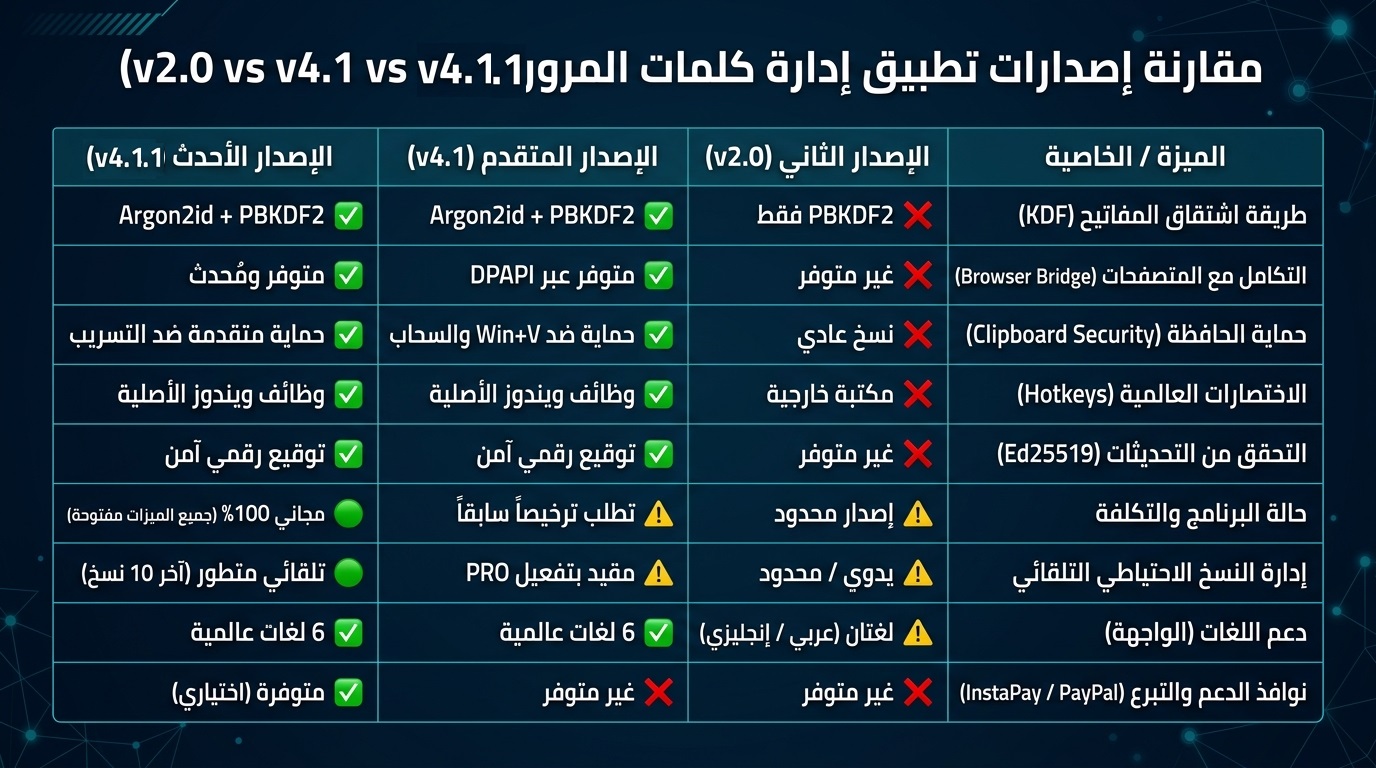
تحديث أمني وجذري ضخم ببرنامج Dr.Saad Password Manger v4.1.1
شهد الإصدار v4.1.1 قفزة نوعية وهندسية كبرى شملت إعادة هيكلة النظام وتوسيع نطاق العمل المكتبي ودعم متصفحات الويب:
- دعم خوارزميات اشتقاق المفاتيح الحديثة:
- الانتقال من اعتماد خوارزمية بي بي كيه دي إف 2 وحدها كما في الإصدار v2.0 إلى دعم أرجون 2 آي دي المقاوم لهجمات وحدات المعالجة الرسومية مع الاحتفاظ بالخوارزمية القديمة كخيار بديل للتوافق الخلفي.
- تخزين معاملات الخوارزمية داخل ملف الخزنة نفسها لضمان التوافق الأمامي والخلفي.
- التكامل مع المتصفحات وملحقاتها:
- إدخال نظام خادم محلي يعمل عبر بروتوكول الاتصال المحلي للتواصل مع إضافات متصفحات كروم وإيدج وفايرفوكس.
- إضافة ميزة حماية الرمز المميز باستخدام تقنية ويندوز الحية لحماية البيانات بتشفير مقيد بحساب المستخدم الحالي.
- تسجيل برنامج الربط المحلي لضمان تعبئة الحقول تلقائياً داخل صفحات الويب.
- تعزيز حماية الحافظة:
- تطوير دالة النسخ لتعمل بنظام يستثني البيانات الحساسة من سجل النظام ومحاذاة التخزين السحابي لحماية كلمات المرور من التسريب.
- نظام الاختصارات العالمي دون مكتبات خارجية:
- الاستغناء عن مكتبة لوحة المفاتيح الخارجية التي تُصنف أحياناً كبرمجيات مشبوهة من قِبل مضادات الفيروسات والاعتماد على وظائف ويندوز الأصلية لتنفيذ اختصارات التعبئة السريعة والقفل الفوري.
- التحقق من التحديثات والتوقيع الرقمي:
- إضافة آلية للتحقق من سلامة التحديثات عبر التوقيع الرقمي باستخدام خوارزمية إي دي 25519 ومنع تنزيل أي إصدارات غير موثوقة أو معدلة.
- دعم المصادقة الثنائية:
- إضافة حقل وحساب رموز التحقق الثنائي استناداً إلى مفاتيح التشفير وعرض الأكواد الزمنية مباشرة داخل تفاصيل الحسابات.
- توسيع اللغات المدعومة لتشمل ست لغات عالمية وعربية وهي الإنجليزية والعربية والتركية والفرنسية والإسبانية والألمانية بعد أن كان الإصدار v2.0 يقتصر على الإنجليزية والعربية.
ثانياً: ما تم إضافته وتعديله في الإصدار v4.1.1 مقارنة بالإصدار v4.1
الإضافات والتحسينات المضافة في الإصدار v4.1.1 فيما يلي: - التحول الكامل إلى مجاني بالكامل وإلغاء قيود التراخيص:
- تحسين آليات النسخ الاحتياطي التلقائي:
- تطوير نظام النسخ التلقائي في الخلفية كل ست ساعات أو عند أول تشغيل بعد الفاصل الزمني مع ميزة الاحتفاظ بآخر عشر نسخ احتياطية فقط تلقائياً لتوفير المساحة.
- إضافة رسائل توجيهية وحلول تلقائية عند تعارض النسخ مع حماية مجلدات ويندوز مع توجيه المستخدم لاختيار مجلدات بديلة بعيدة عن قرص النظام الأساسي.
- تحديث واجهات البدء والتوجيه:
- إضافة شاشة ترحيبية ذكية عند الاستخدام الأول تدعو المستخدم لتحديد مجلد آمن للنسخ الاحتياطي على وحدة تخزين خارجية بعيداً عن صلاحيات النظام ومخاطر التهيئة.
- تعديلات برمجية طفيفة لتحسين الاستقرار:
- تحسين معالجة الأخطاء عند فشل قراءة الملفات التالفة أو استعادة النسخ الاحتياطية وتأمين التعامل مع المسارات البرمجية لمنع انهيار الواجهة الرسومية.
🛡️ Dr.Saad Password Manager 4.1.1 — Your vault. Your machine. Zero internet.
Still reusing the same password everywhere? Writing them on paper? ❌
Time to get serious about your digital security! 🔐
Dr.Saad is a Windows desktop app that stores all your passwords fully encrypted on your own machine
no cloud, no servers, no monthly fees. 💪
✨ Why Dr.Saad?
🔐 Military-grade AES-256-GCM encryption + Argon2id key derivation
🏦 Two separate vaults: websites & banking
🧩 Browser extension for one-click login filling
⚡ Smart hotkeys: Ctrl+Alt+S to auto-fill, Ctrl+Alt+L to lock instantly
🔄 Auto-backup every 6 hours
⏱️ Built-in TOTP (2FA) codes
🌐 Available in 6 languages
🧹 Clipboard auto-wipes in 30 seconds
📩 ibrahimsaad30@gmail.com
Massive Security and Core Update for Dr. Saad Password Manager v4.1.1
Version v4.1.1 marks a major qualitative and architectural leap, featuring a complete system restructuring, expansion of desktop capabilities, and robust web browser support:
- Support for Modern Key Derivation Algorithms:
- Transitioned from relying solely on PBKDF2 (as in v2.0) to supporting Argon2id, which is resistant to GPU-based attacks, while retaining the legacy algorithm as a fallback option for backward compatibility.
- Storing algorithm parameters directly inside the vault file itself to ensure both forward and backward compatibility.
- Browser Integration and Extensions:
- Introduced a local server running via the local communication protocol to interface with Chrome, Edge, and Firefox browser extensions.
- Added token protection using Windows DPAPI (Data Protection API) to secure data with encryption tied to the current user account.
- Registered the native messaging host to ensure seamless auto-fill functionality across web pages.
- Enhanced Clipboard Protection:
- Upgraded the copy function to exclude sensitive data from the system clipboard history and aligned cloud storage handling to protect passwords from leakage.
- Native Global Hotkeys Without External Libraries:
- Eliminated the external keyboard hook library—which is sometimes flagged as suspicious by antivirus software—by relying on native Windows APIs to execute quick-fill shortcuts and instant locking.
- Update Verification and Digital Signatures:
- Added a mechanism to verify update integrity via digital signatures using the Ed25519 algorithm, preventing the download of untrusted or modified versions.
- Two-Factor Authentication (2FA) Support:
- Added a dedicated field and account support for 2FA verification codes based on secret keys, displaying time-based codes (TOTP) directly within account details.
- Expanded Language Support:
- Expanded supported languages to include six global and regional languages—English, Arabic, Turkish, French, Spanish, and German—whereas version v2.0 was limited to English and Arabic.
Part II: Additions and Modifications in v4.1.1 Compared to v4.1
The following additions and improvements have been introduced in version v4.1.1:
- Complete Transition to Freeware (Removal of All License Restrictions):
- Improved Automatic Backup Mechanisms:
- Developed an automated background backup system that runs every six hours or upon the first launch after the interval, with a feature to automatically retain only the latest ten backups to save storage space.
- Added guidance messages and automatic workarounds for backup conflicts with Windows folder protections, prompting the user to select alternative folders away from the primary system drive.
- Updated Welcome and Onboarding Interfaces:
- Added an intelligent welcome screen upon first use prompting the user to designate a secure backup folder on external storage, away from system permission restrictions and formatting risks.
- Minor Code Adjustments for Enhanced Stability:
- Improved error handling for failed reads of corrupted files or backup restorations, and secured path handling to prevent GUI crashes.