Repository navigation
Fussel 1.1.1 · A fresh overview


Fussel 1.1.1
Less fluff, more Mac.
A calmer, friendlier overview, and buttons that feel like real keys.
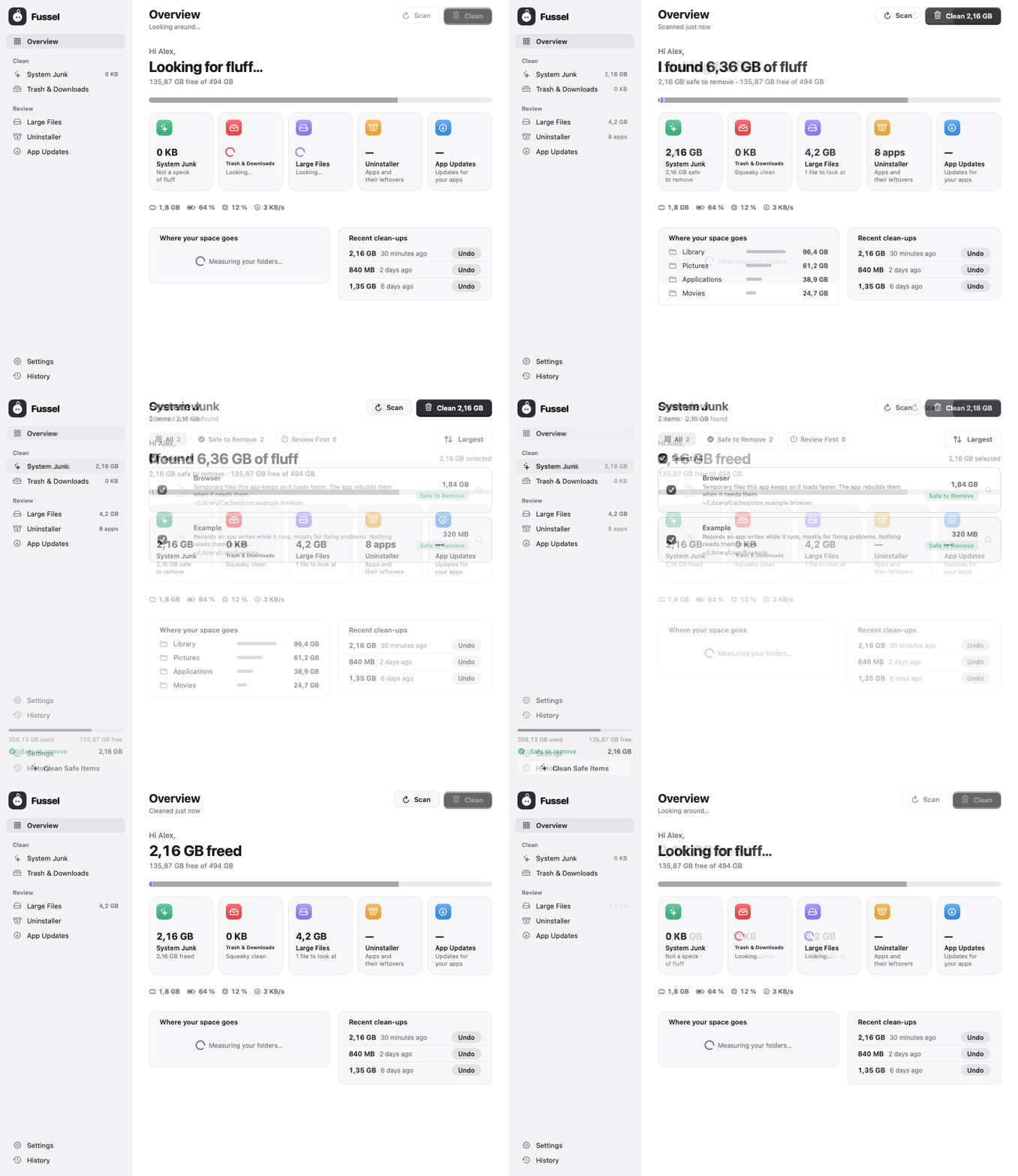
What's new
- Fussel says hi: the overview now opens with a greeting and one clear line: "Ready when you are", "Looking for fluff…", "I found 6.36 GB of fluff" or "2.16 GB freed", with your free space right below
- A tile for each tool: System Junk, Trash & Downloads, Large Files, Uninstaller and App Updates sit side by side as calm grey tiles, each with its colored icon, what it found and a short note. The numbers line up, and the Uninstaller and App Updates now say "8 apps" or "2 updates" instead of a bare number
- Point to see what's what: move the pointer over a colored part of the storage bar and its tile lights up, while the others turn grey. It works the other way round too: point at a tile and its part of the bar stands out
- Buttons you can feel: the main buttons (Clean, Uninstall, Update Now and friends) now stand on a small base and sink onto it when you click, like a real key
- Smoother Clean button: when the size on it changes, it grows and shrinks smoothly instead of jumping
- App Updates shows "—" until Fussel has actually checked, instead of a misleading "0"
Safety first
Everything Fussel cleans goes to the Trash first, and Undo puts it right back. Only items that are already in the Trash are deleted for good, and Fussel asks before doing that. System files, Apple apps and your main folders are never touched, and nothing marked Review First is ever picked for you. 28 automatic tests guard these rules on every build.
Install
Recommended: the installer
- Download Fussel-Installer.zip below. Your Mac unpacks it to Fussel-Installer.pkg; open that.
- Fussel isn't signed with an Apple Developer ID yet, so macOS blocks it at first. Open System Settings › Privacy & Security, scroll down and click Open Anyway next to the Fussel installer.
- Click through the installer. Fussel lands in your Applications folder and appears in the menu bar, next to the clock.
- Recommended: allow Full Disk Access in System Settings › Privacy & Security, so Fussel can reach the Trash and every hidden cache.
Already using Fussel? On 0.9.8 or later, just click Update Now. Older versions: install this one by hand once with the installer.
Or: drag and drop
Open Fussel.dmg and drag Fussel onto the Applications folder. Before the first launch, run this once in Terminal:
xattr -dr com.apple.quarantine /Applications/Fussel.app
Requires macOS 14 Sonoma or later. Runs natively on Apple Silicon and Intel. The Glass cards need macOS 26; earlier versions get frosted glass.
Good to know
- Undo works as long as the items are still in the Trash.
- Found something odd? Send Feedback in Fussel's menu opens a GitHub issue, already filled in with your Fussel and macOS version. Screenshots help a lot.
Made by Dshamil Meziane, built with Claude. Free and open source under the MIT license.