CAM SE Workflows
This page describes the process once a scientist has indicated on their issue that their branch is ready for master. This documents the steps that the assigned SE will perform.
- Enter a card for the request onto the CAMdev project board (barring PTO this should happen within a day of the request) [Include link for project page here once it is created]
- If possible, assign the SE who will be responsible for bringing this onto master.
-
Copy scientist branch to your fork
-
Perform necessary cleanup (if any needed) prior to issuing a pull request [OR-- do we want to have a pull request issued immediately and we have a separate step which indicates that the code is ready for review?]
-
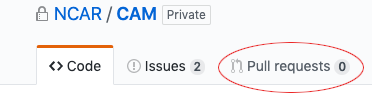
Go to your CAMdev fork's GitHub page, and select the "Pull requests" tab:
-
Create a new pull request using the "new pull request" button:

-
Set the "base repository" to "NCAR/CAM", and the "base" to your branch of interest (likely "master"):

-
Set the "head repository" to your CAM fork repo, and the "compare" to your newly created branch:

-
If the phrase "Able to merge" is present, then select "create pull request":

-
Add a title for your request, along with a description of what your pull request is doing. Fill out all fields in the template while removing any template comments. Be sure to list the issue(s) which are addressed by this pull request, taking care to use the correct syntax.
-
Add a label (ideally one that matches the associated issue), along with the project and milestone, if applicable. Once finished, create the pull request.
-
CAM software engineers will perform code review, add comments, and request any necessary changes.
-
Make requested changes to personal branch (Following the above instructions for modifying your fork).
-
Finally, the PR will be merged with upstream branch (e.g. "master"). Testing will be done, and if all is okay, the changes will be merged into the release branch.
- On Izumi: Run
<root>/test/system/test_driver.shwithCAM_FC=pgiandCAM_FC=nag - On Cheyenne: Run
<root>/test/system/test_driver.shwithCAM_FC=intel - Fix any errors and/or document expected fails
- If a science run is required (e.g., for answer changing updates or for new tests),
- Make sure all CAM tests have been run on the HEAD of the branch (e.g., master or release branch)
- Update ChangeLog to reflect all changes since previous tag on branch (script?)
- Commit to branch and push to proper remote
- Make annotated tag with the ChangeLog summary as the tag commit message
- Push the tag to the proper remote