Repository navigation
Releases
GHMetalRecomp v0.3.1-beta.1 (Beta)

Beta 1 of 0.3.1: guitars. Every controller works in the launcher, PS3 guitars play with the right frets, and a whammy bar and tilt can be assigned
Warning
This is a test version, before 0.3.1. The launcher's Updates page does not offer it: download it from here. When 0.3.1 comes out, Updates will offer it to you.
Important
You need your own copy of the game: the USA / Europe Xbox 360 disc, as an ISO. This release contains none of the game's files.
New
- Assign your whammy bar (Controls, your guitar, Whammy bar): the button is now called Assign and works on any axis of the controller: press it, push the bar all the way, hold it, then let it go. The row shows the axis in use, for example "assigned (RT)". This is for guitars that report themselves as a gamepad, such as a CRKD guitar on its PC setting.
- Assign your tilt (Controls, your guitar, Tilt): if tilting gives you no Star Power, press Assign, tilt the neck up as for Star Power and hold it, then go back to your playing position. Any axis of the controller works, and its accelerometer where it has one. This is for a Wii guitar through a program such as WiitarThing, and for PS3 guitars. The game takes tilt only at the very end of its axis, so a tilt that ends with the neck straight up rarely reached it.
- The last controller that pressed a button drives the launcher. Before, only the first one connected did.
Fixed
- The launcher ignored every controller but the first one: on the others no button could be assigned and the whammy bar read nothing. With a DualSense connected, a guitar was never the first.
- Yellow and blue swapped on PS3 guitars, and their whammy bar read half pressed at rest. This covers PS3 Guitar Hero guitars, and should cover a CRKD guitar on its P3 setting. On that setting use View for Star Power, or try assigning Tilt.
- The launcher stopped responding to a guitar after a button was assigned on it, until it was closed: an Xbox 360 guitar's tilt looked like a button held down.
Known issues
- These guitar fixes have not been tried on a CRKD, Wii or PS3 guitar yet. If yours still misbehaves, tell us its slider and dial position and send the newest
launcher_NNN.logandghmetallica_NNN.logfrom thelogsfolder. - Singing is experimental: if the pitch line jumps around, lower the microphone's Gain in the launcher; if the game does not hear you, raise it.
- Drums and AMD graphics cards have not been tested yet.
- Above 60 FPS and the keyboard are experimental.
- The full list is in the README.
How to install
- Over your install: extract the zip (GHMetalRecomp-v0.3.1-beta.1-win64.zip) into your install folder, replacing the files. Your profile, saves and settings stay.
- New install: download the installer (GHMetalRecomp-v0.3.1-beta.1-setup.exe), or the zip and extract it into a folder of your own. The first start asks for your ISO.
GHMetalRecomp v0.3.0 (Beta)
Upscaling with AMD FSR 1 and NVIDIA NIS, Shift / Ctrl / Alt on the keyboard's controls, a launcher in your language, and fixes for crackling audio, G-Sync and FreeSync, Alt+Tab in fullscreen, and the keyboard being taken as the singer.
Important
You need your own copy of the game: the USA / Europe Xbox 360 disc, as an ISO. This release contains none of the game's files.
New
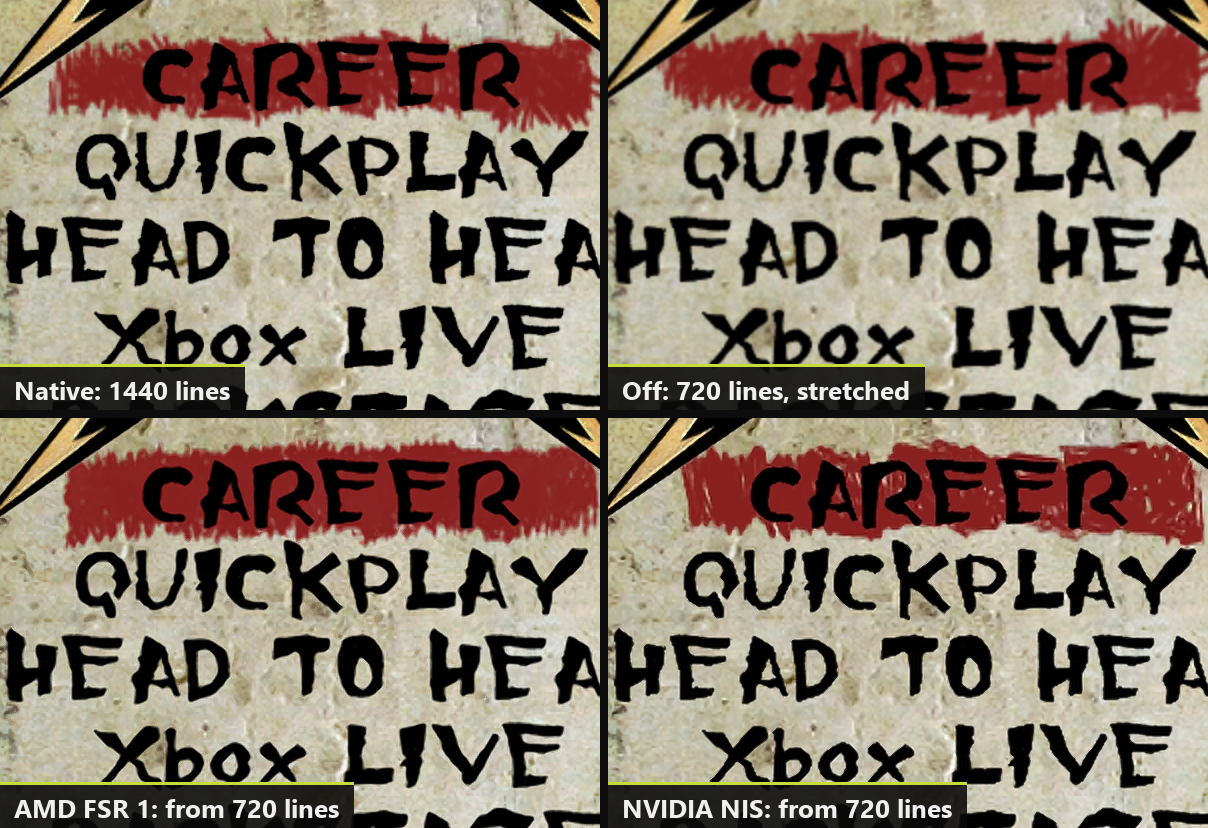
- Upscaling (Settings > Video > Upscaling): AMD FSR 1 or NVIDIA NIS, on any graphics card. The game draws at a lower resolution and is enlarged to your screen, sharper than before, for modest graphics cards and 4K screens. Choose how much smaller with Quality (Ultra Quality to Ultra Performance).
- Sharpness (Settings > Video): Off, Low, Medium or High, for the final image, with or without upscaling.
- Shift, Ctrl and Alt as keys for the keyboard's controls (Controls > Keyboard): for example Left Alt as Star Power. The F keys can go on a control too.
- Debug keys (Settings > Game, off): F3, F4 and ` no longer open the developer's windows during the game, so they can be used to play. F7 still shows the achievements.
- The launcher's language (Settings > Game > Launcher language): Automatic, or any of its five languages, apart from the game's.
- The launcher keeps its own log in the
logsfolder (launcher_NNN.log), and saves a report file there if it stops responding or crashes. Attach both when you report a problem with the launcher.
Fixed
- Crackling audio, and with Low latency audio on, the sound muting itself every few seconds, on slower PCs. The game's sound work had to fit in about 2 ms per block; it now has the whole 5 ms. The update changes that one audio setting in
ghmetallica.tomlby itself (a value you set by hand stays). If a stutter still leaves a gap, the sound now catches up without extra silence. - Your guitar's strings shook wildly above 60 FPS while you played: the game placed them only 60 times a second, so they lagged behind the moving guitar. They now follow it every frame, and vibrate as on the console.
- Alt+Tab in fullscreen closed the game. It now keeps running in the background and comes back when you return.
- The keyboard taken as the singer: playing guitar on the keyboard while a controller was set to sing could leave the keyboard's player as the singer. The game now follows the controller you actually play with.
- An F key on a control no longer also opens a developer window (F4 the settings, F7 the achievements).
- G-Sync and FreeSync: with V-Sync on, the frame time could turn into a saw tooth for a few seconds at a time; with V-Sync off, the image could tear. The game ran right at (or a hair above) the monitor's maximum, with frames a millisecond or two uneven. Frames now come evenly, just under your monitor's exact refresh rate when you choose that frame rate (119.7 FPS at 120 Hz, 159.6 at 160 Hz). V-Sync on is still the one we recommend, also with G-Sync or FreeSync: it never tears and, in this game, does not add V-Sync's usual delay (the launcher's help now says so).
- The launcher could keep a whole CPU core busy while it was on screen (a connected controller kept it drawing), and feel slow to respond after the game. It now rests when nothing changes.
- The launcher could stop responding for a few seconds after the game on some PCs (its picture waiting on the screen, 3 seconds a frame). It now starts its drawing over when you come back.
Known issues
- If the launcher still stops responding after you come back from the game, send us the newest
launcher_NNN.logfrom thelogsfolder (and its.dmpfile if there is one). - Singing is experimental: if the pitch line jumps around, lower the microphone's Gain in the launcher; if the game does not hear you, raise it.
- Drums, AMD graphics cards, and Wii or PS3 instruments have not been tested yet.
- Above 60 FPS and the keyboard are experimental.
- The full list is in the README.
How to update or install
- Already on 0.2.x: open GH Metallica Launcher, go to Updates and install 0.3.0. Your profile, saves and settings stay. The first start after updating can take a little longer while the graphics are prepared again (only once).
- New install: download the installer (GHMetalRecomp-v0.3.0-setup.exe), or the zip (GHMetalRecomp-v0.3.0-win64.zip) and extract it into a folder you can write to (not Program Files). Open GH Metallica Launcher, choose your ISO, create your profile, press PLAY, and calibrate the audio and video once in the game's options.
Windows may warn about an unknown publisher the first time: click More info, then Run anyway.
Something wrong? Tell us on Discord or in issues, with the latest files in the game's logs folder.
GHMetalRecomp v0.2.2 (Beta)
An update to the beta: songs that stay in sync, V-Sync that follows your monitor, lower audio latency, and better support for guitars like CRKD's.
Important
You need your own copy of the game: the USA / Europe Xbox 360 disc, as an ISO. This release contains none of the game's files.
New
- V-Sync in the launcher (Settings > Graphics, on by default): no tearing, and the game now runs in step with your monitor, so each frame reaches the screen sooner (on a 160 Hz monitor, about 4 ms instead of 18). Turn it off if you have a G-Sync or FreeSync display.
- Low latency audio (Settings > Game, off by default): the game takes your audio device in exclusive mode and skips Windows' audio mixer. On a Focusrite Scarlett 2i2 the sound arrives about 55 ms sooner. Other programs cannot play sound on that device while the game runs. Calibrate the audio again in the game's options after turning it on or off.
- Each controller keeps its own buttons (Controls): a guitar and a gamepad no longer share one layout, so swapping a guitar's frets leaves your other controllers alone.
- Whammy bar calibration (Controls, the Whammy bar row): push the bar all the way, hold it, then let it go. For guitars whose bar rests or moves differently.
Fixed
- The music no longer falls behind the notes after the game stutters during a song.
- A guitar that reports itself as a gamepad (such as CRKD's in Xbox 360 mode) no longer has its whammy bar always pressed.
- Assigning buttons on an Xbox 360 guitar no longer picks up its tilt sensor by mistake.
- The default renderer (NativeXRenderer) uses less CPU each frame, most of all above 60 FPS.
- James's hair and the edge of his beard no longer look see-through with NativeXRenderer.
Known issues
- Singing is experimental: if the pitch line jumps around, lower the microphone's Gain in the launcher; if the game does not hear you, raise it.
- Drums, AMD graphics cards, and Wii or PS3 instruments have not been tested yet. CRKD guitars have not been tested by us yet either: tell us how yours works.
- Above 60 FPS and the keyboard are experimental.
- The full list is in the README.
How to update or install
- Already on 0.2.0 or 0.2.1: open GH Metallica Launcher, go to Updates and install 0.2.2. Your profile, saves and settings stay. The first start after updating can take a little longer while the graphics are prepared again (only once).
- New install: download the installer (GHMetalRecomp-v0.2.2-setup.exe), or the zip (GHMetalRecomp-v0.2.2-win64.zip) and extract it into a folder you can write to (not Program Files). Open GH Metallica Launcher, choose your ISO, create your profile, press PLAY, and calibrate the audio and video once in the game's options.
Windows may warn about an unknown publisher the first time: click More info, then Run anyway.
Something wrong? Tell us on Discord or in issues, with the latest file in the game's logs folder.
GHMetalRecomp v0.2.1 (Beta)
A small update to the beta: fewer crashes, and a controller that plays more like a guitar.
Important
You need your own copy of the game: the USA / Europe Xbox 360 disc, as an ISO. This release contains none of the game's files.
New
- Auto-strum on controllers too, GH2 / GH3 style: each fret button strums as you press it, as the keyboard already could, and a chord is one strum. Turn on "Strum when a fret is pressed" in the launcher's Controls tab, on your controller. It works only during a song, so the menus are not affected.
Fixed
- The game no longer closes now and then with a crash: the controllers were read from several threads at once.
- The whammy bar no longer acts half pressed on every sustain when you play with a controller or the keyboard. Push the right stick to either side to use it (the Right arrow on the keyboard).
- James's guitar and Rob's bass are no longer white during songs.
Known issues
- Singing is experimental: if the pitch line jumps around, lower the microphone's Gain in the launcher; if the game does not hear you, raise it.
- Drums, AMD graphics cards, and Wii or PS3 instruments have not been tested yet.
- Above 60 FPS and the keyboard are experimental.
- The full list is in the README.
How to update or install
- Already on 0.2.0: open GH Metallica Launcher, go to Updates and install 0.2.1. Your profile, saves and settings stay.
- New install: download the installer (GHMetalRecomp-v0.2.1-setup.exe), or the zip (GHMetalRecomp-v0.2.1-win64.zip) and extract it into a folder you can write to (not Program Files). Open GH Metallica Launcher, choose your ISO, create your profile, press PLAY, and calibrate the audio and video once in the game's options.
Windows may warn about an unknown publisher the first time: click More info, then Run anyway.
Something wrong? Tell us on Discord or in issues, with the latest file in the game's logs folder.
GHMetalRecomp v0.2.0 (Beta)
The first public beta of GHMetalRecomp: Guitar Hero: Metallica (Xbox 360), recompiled to run natively on Windows.
Important
You need your own copy of the game: the USA / Europe Xbox 360 disc, as an ISO. This release contains none of the game's files.
New
- The game runs natively on Windows, drawn by NativeXRenderer (Vulkan) at your screen's resolution, with antialiasing.
- Play with an Xbox 360 guitar, with any controller as a guitar, or with the keyboard (experimental).
- Sing with any microphone on your PC (experimental): choose it in the launcher's Controls tab, under Microphone, and set the singer's controller to Vocals.
- 60 FPS as on the console, or 120, 144, 160, 165 or 240 FPS where your monitor reaches them (experimental). Songs keep their speed and stay in sync.
- Wide and ultrawide screens: the stage fills 21:9 and wider, while the note highway, the HUD and the menus keep their shape.
- GH Metallica Launcher: installs the game from your ISO, profiles shared with the other ElGus Recomps launchers, the 50 achievements, your DLC (the Death Magnetic album), and automatic updates.
- English, French, German, Italian and Spanish.
Better than the original
- Songs no longer drift out of sync with the notes, as they do on the later Xbox 360 models.
- The crowd's claps on Star Power follow your audio calibration.
- Each screen effect (bloom, depth of field, film grain, color correction, vignette, ink blotches) can be turned off in Settings > Graphics.
Known issues
- Singing is experimental: if the pitch line jumps around, lower the microphone's Gain in the launcher; if the game does not hear you, raise it.
- Drums, AMD graphics cards, and Wii or PS3 instruments have not been tested yet.
- Above 60 FPS and the keyboard are experimental.
- Some USB audio interfaces add delay: calibrate the audio in the game's options.
- The full list is in the README.
How to install
- Download the installer (GHMetalRecomp-v0.2.0-setup.exe), or the zip (GHMetalRecomp-win64.zip) and extract it into a folder you can write to (not Program Files).
- Open GH Metallica Launcher, choose your ISO, and create your profile.
- Press PLAY, then calibrate the audio and video once in the game's options.
Windows may warn about an unknown publisher the first time: click More info, then Run anyway.
Something wrong? Tell us on Discord or in issues, with the latest file in the game's logs folder.