Repository navigation
GHMetalRecomp v0.3.0 (Beta)

Upscaling with AMD FSR 1 and NVIDIA NIS, Shift / Ctrl / Alt on the keyboard's controls, a launcher in your language, and fixes for crackling audio, G-Sync and FreeSync, Alt+Tab in fullscreen, and the keyboard being taken as the singer.
Important
You need your own copy of the game: the USA / Europe Xbox 360 disc, as an ISO. This release contains none of the game's files.
New
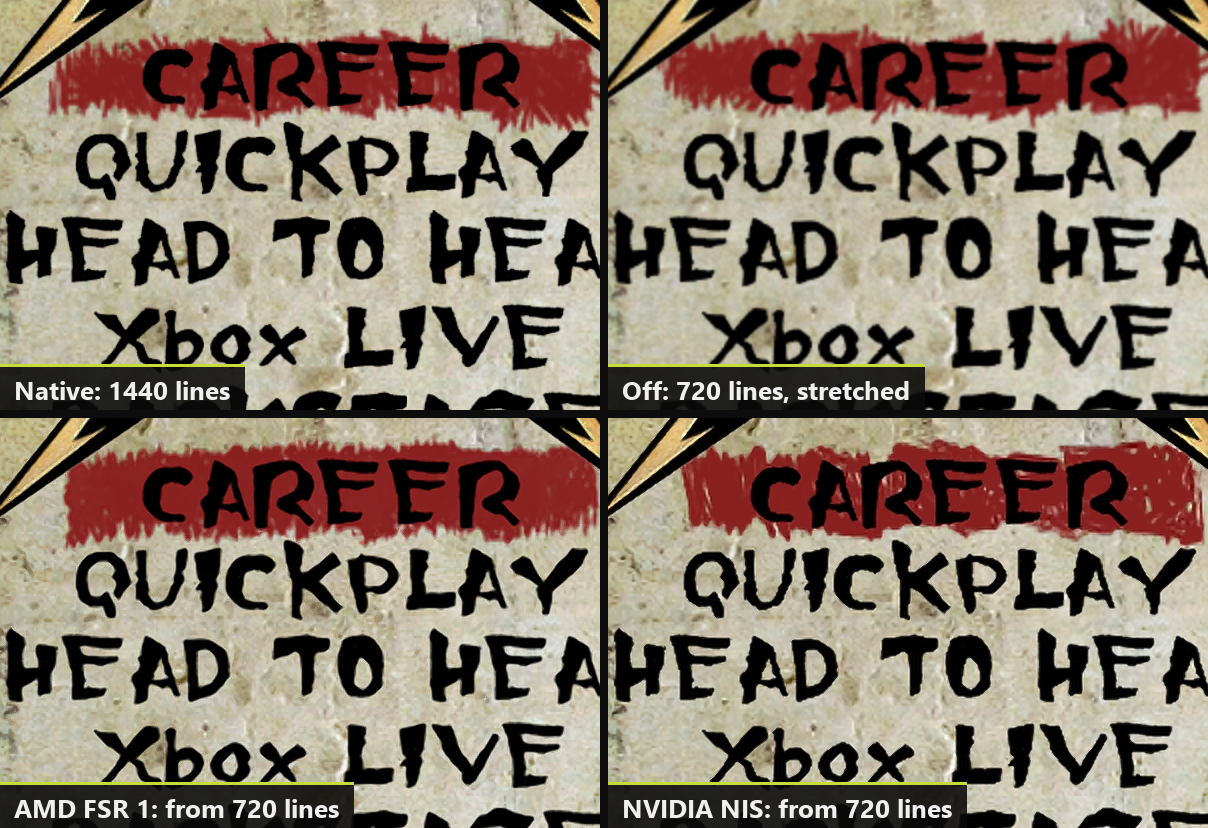
- Upscaling (Settings > Video > Upscaling): AMD FSR 1 or NVIDIA NIS, on any graphics card. The game draws at a lower resolution and is enlarged to your screen, sharper than before, for modest graphics cards and 4K screens. Choose how much smaller with Quality (Ultra Quality to Ultra Performance).
- Sharpness (Settings > Video): Off, Low, Medium or High, for the final image, with or without upscaling.
- Shift, Ctrl and Alt as keys for the keyboard's controls (Controls > Keyboard): for example Left Alt as Star Power. The F keys can go on a control too.
- Debug keys (Settings > Game, off): F3, F4 and ` no longer open the developer's windows during the game, so they can be used to play. F7 still shows the achievements.
- The launcher's language (Settings > Game > Launcher language): Automatic, or any of its five languages, apart from the game's.
- The launcher keeps its own log in the
logsfolder (launcher_NNN.log), and saves a report file there if it stops responding or crashes. Attach both when you report a problem with the launcher.
Fixed
- Crackling audio, and with Low latency audio on, the sound muting itself every few seconds, on slower PCs. The game's sound work had to fit in about 2 ms per block; it now has the whole 5 ms. The update changes that one audio setting in
ghmetallica.tomlby itself (a value you set by hand stays). If a stutter still leaves a gap, the sound now catches up without extra silence. - Your guitar's strings shook wildly above 60 FPS while you played: the game placed them only 60 times a second, so they lagged behind the moving guitar. They now follow it every frame, and vibrate as on the console.
- Alt+Tab in fullscreen closed the game. It now keeps running in the background and comes back when you return.
- The keyboard taken as the singer: playing guitar on the keyboard while a controller was set to sing could leave the keyboard's player as the singer. The game now follows the controller you actually play with.
- An F key on a control no longer also opens a developer window (F4 the settings, F7 the achievements).
- G-Sync and FreeSync: with V-Sync on, the frame time could turn into a saw tooth for a few seconds at a time; with V-Sync off, the image could tear. The game ran right at (or a hair above) the monitor's maximum, with frames a millisecond or two uneven. Frames now come evenly, just under your monitor's exact refresh rate when you choose that frame rate (119.7 FPS at 120 Hz, 159.6 at 160 Hz). V-Sync on is still the one we recommend, also with G-Sync or FreeSync: it never tears and, in this game, does not add V-Sync's usual delay (the launcher's help now says so).
- The launcher could keep a whole CPU core busy while it was on screen (a connected controller kept it drawing), and feel slow to respond after the game. It now rests when nothing changes.
- The launcher could stop responding for a few seconds after the game on some PCs (its picture waiting on the screen, 3 seconds a frame). It now starts its drawing over when you come back.
Known issues
- If the launcher still stops responding after you come back from the game, send us the newest
launcher_NNN.logfrom thelogsfolder (and its.dmpfile if there is one). - Singing is experimental: if the pitch line jumps around, lower the microphone's Gain in the launcher; if the game does not hear you, raise it.
- Drums, AMD graphics cards, and Wii or PS3 instruments have not been tested yet.
- Above 60 FPS and the keyboard are experimental.
- The full list is in the README.
How to update or install
- Already on 0.2.x: open GH Metallica Launcher, go to Updates and install 0.3.0. Your profile, saves and settings stay. The first start after updating can take a little longer while the graphics are prepared again (only once).
- New install: download the installer (GHMetalRecomp-v0.3.0-setup.exe), or the zip (GHMetalRecomp-v0.3.0-win64.zip) and extract it into a folder you can write to (not Program Files). Open GH Metallica Launcher, choose your ISO, create your profile, press PLAY, and calibrate the audio and video once in the game's options.
Windows may warn about an unknown publisher the first time: click More info, then Run anyway.
Something wrong? Tell us on Discord or in issues, with the latest files in the game's logs folder.