Repository navigation
Releases
GHVanHRecomp v0.2.0

"Compiling shaders" for no first-time stutters, more guitars (PS3 and CRKD guitars, assign your whammy bar and tilt), less CPU in songs, a clean bloom at high resolutions, and AMD graphics cards prepared. Everything GHMetalRecomp brought in its 0.4.0, on the same engine.
Important
You need your own copy of the game: the Xbox 360 disc, as an ISO (tested with the USA disc). This release contains none of the game's files.
New
- "Compiling shaders" before you play: the first time you press PLAY, and after an update of the game or of your graphics driver, the launcher shows this screen for a moment while it prepares every graphics combination the game uses for your graphics card. The first song, venue or effect then shows up smoothly, instead of stuttering or appearing a moment late. It uses a list of what the game draws that comes with this release; the game's graphics themselves come from your own game files. Skip starts the game at once (it then prepares them as you play, as before). On NVIDIA graphics cards, something the list does not cover is also prepared in a fraction of a millisecond the first time.
- Assign your whammy bar (Controls, your guitar, Whammy bar): press Assign, push the bar all the way, hold it, then let it go. Any axis of the controller works; the row shows the one in use, for example "assigned (RT)". For guitars that report themselves as a gamepad, such as a CRKD guitar on its PC setting.
- Assign your tilt (Controls, your guitar, Tilt): if tilting gives you no Star Power, press Assign, tilt the neck up as for Star Power and hold it, then go back to your playing position. Any axis works, and the controller's accelerometer where it has one: for a Wii guitar through a program such as WiitarThing, and for PS3 guitars.
- The last controller that pressed a button drives the launcher. Before, only the first one connected did.
Fixed
- Yellow and blue swapped on PS3 guitars, and their whammy bar read half pressed at rest. This covers PS3 Guitar Hero guitars and CRKD guitars on their P3 setting.
- The launcher ignored every controller but the first one: on the others no button could be assigned and the whammy bar read nothing (with a DualSense connected, a guitar was never the first).
- The launcher stopped responding to a guitar after a button was assigned on it, until it was closed: an Xbox 360 guitar's tilt looked like a button held down.
- A grid pattern in the glow around lights and bright surfaces (the bloom), and in the blur of the depth of field, at resolutions above 1080p.
- Above 60 FPS, the frets on the highway sprang back slowly after each hit. They now take the same time as at 60.
- Less CPU in songs. The game's main thread and its three worker threads were waking each other up tens of thousands of times a second, taking turns on one lock and waking all three workers for each piece of work. In GH Metallica, with the same engine, songs took about a tenth less processor time.
- AMD graphics cards at 2560 wide and above: some of the game's full-screen passes were drawn with a size larger than AMD cards accept (fine on NVIDIA). Found by simulating an AMD card's capabilities in GH Metallica; not tested on a real AMD card yet.
- A little less work behind the scenes: the part of the game that follows the Xbox 360's GPU commands no longer prepares graphics that are never drawn, and waits for the renderer asleep instead of spinning.
Known issues
- AMD graphics cards have only been checked in a simulation: if you have one, tell us how it goes (or what goes wrong), with the newest
ghvanhalen_NNN.log. - Drums and singing have not been tested in this game yet.
- Above 60 FPS and the keyboard are experimental.
- Downloadable content is not supported yet.
- The full list is in the README.
How to update or install
- Already on 0.1.0: open GH Van Halen Launcher, go to Updates and install 0.2.0. Your profile, saves and settings stay. The first PLAY after updating shows "Compiling shaders" for a moment (only once).
- New install: download the installer (GHVanHRecomp-v0.2.0-setup.exe), or the zip (GHVanHRecomp-v0.2.0-win64.zip) and extract it into a folder you can write to (not Program Files). Open GH Van Halen Launcher, choose your ISO, create your profile (or keep the one you already have from another ElGus Recomps game), press PLAY, and calibrate the audio and video once in the game's options.
Windows may warn about an unknown publisher the first time: click More info, then Run anyway.
Something wrong? Tell us on Discord or in issues, with the latest files in the game's logs folder.
GHVanHRecomp v0.1.0 (Beta)
The first beta of Guitar Hero: Van Halen, running natively on Windows: no emulator to set up, sharp graphics, wide screens, high frame rates, and your Xbox 360 guitar.
Important
You need your own copy of the game: the Xbox 360 disc, as an ISO (tested with the USA disc). This release contains none of the game's files.
Guitar Hero: Van Halen runs on Guitar Hero: Metallica's engine, so from day one it comes with everything GHMetalRecomp has up to its version 0.3.0, except downloadable content. Songs have been played from start to finish with an Xbox 360 guitar, on guitar and bass parts.
What you get
- Your guitar: an Xbox 360 guitar plays as on the console, whammy bar and Star Power included. Any other controller is a guitar too, and the keyboard can be one (experimental). Each controller's buttons can be reassigned in the launcher, and a whammy bar that reads pressed at rest (some third-party guitars) can be calibrated there.
- Auto-strum, GH2 / GH3 style: on a controller or the keyboard, each fret strums as you press it. Turn it on in the launcher's Controls tab; it only acts during a song.
- Sharp, native graphics with NativeXRenderer (Vulkan), at your screen's resolution, with antialiasing.
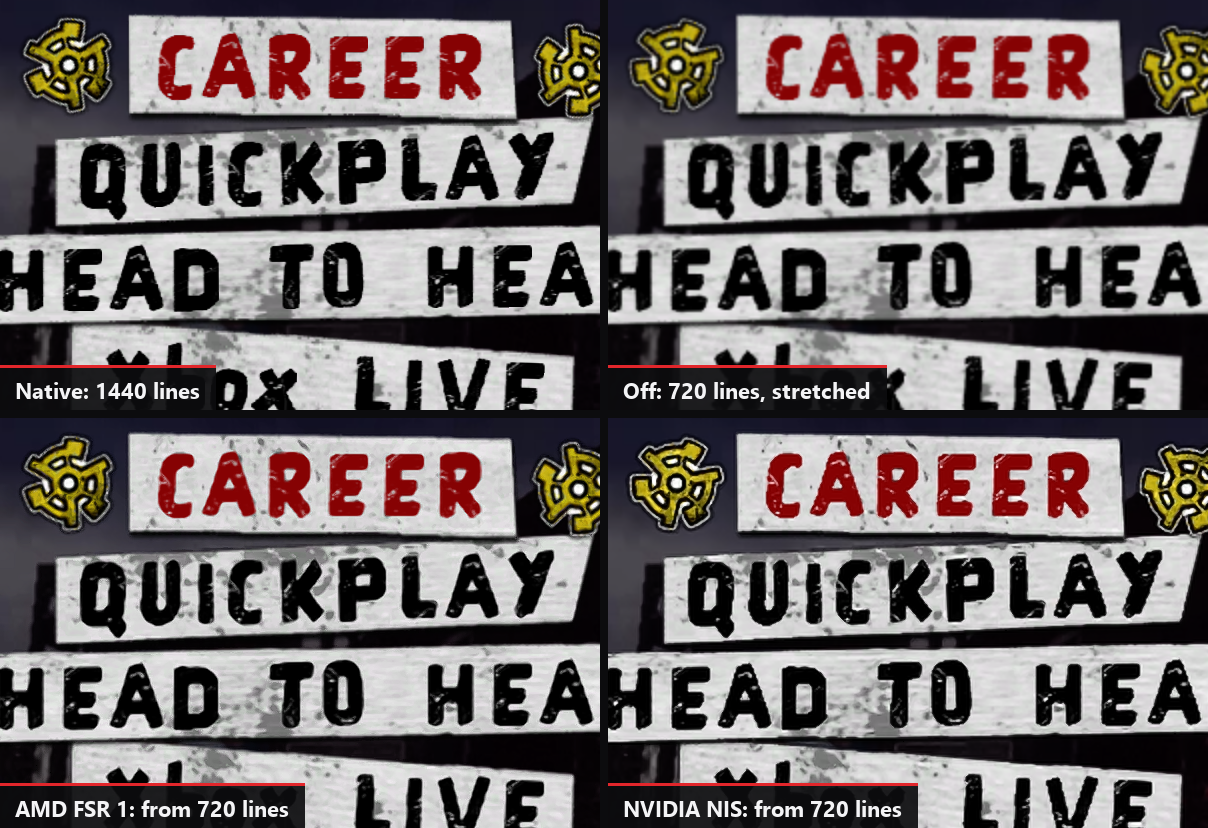
- Upscaling: AMD FSR 1 or NVIDIA NIS, on any graphics card, for 4K screens and slower graphics cards (Settings > Video), with their Quality and Sharpness.
- High frame rates: 60 FPS, or 120, 144, 160, 165 or 240 FPS (experimental). The songs keep their speed and stay in sync.
- V-Sync, on by default: no tearing, without V-Sync's usual delay. Leave it on with a G-Sync or FreeSync monitor too.
- Low latency audio (optional, Settings > Game): the game takes your audio device in exclusive mode and the sound comes sooner. Calibrate the audio again after changing it.
- Wide and ultrawide screens: the stage fills the screen, the note highway, the HUD and the menus stay 16:9 in the center.
- Better than the original: songs no longer drift out of sync, the crowd's claps follow your audio calibration, and each screen effect can be turned off.
- Sing (experimental) with any microphone on your PC. Not tested in this game yet.
- Profiles and achievements shared by all the ElGus Recomps launchers: all 46 achievements in the launcher or with F7 in the game.
- Languages: English, French, German, Italian and Spanish, in the game and in the launcher.
- Automatic updates from the launcher.
Known issues
- Drums and singing have not been tested in this game yet.
- AMD graphics cards, and Wii or PS3 instruments, have not been tested yet.
- Above 60 FPS and the keyboard are experimental.
- Downloadable content is not supported yet.
- The full list is in the README.
How to install
Download the installer (GHVanHRecomp-v0.1.0-setup.exe), or the zip (GHVanHRecomp-v0.1.0-win64.zip) and extract it into a folder you can write to (not Program Files). Open GH Van Halen Launcher, choose your ISO, create your profile (or keep the one you already have from another ElGus Recomps game), press PLAY, and calibrate the audio and video once in the game's options.
Windows may warn about an unknown publisher the first time: click More info, then Run anyway.
Something wrong? Tell us on Discord or in issues, with the latest files in the game's logs folder.