Repository navigation
BigText v0.1.0

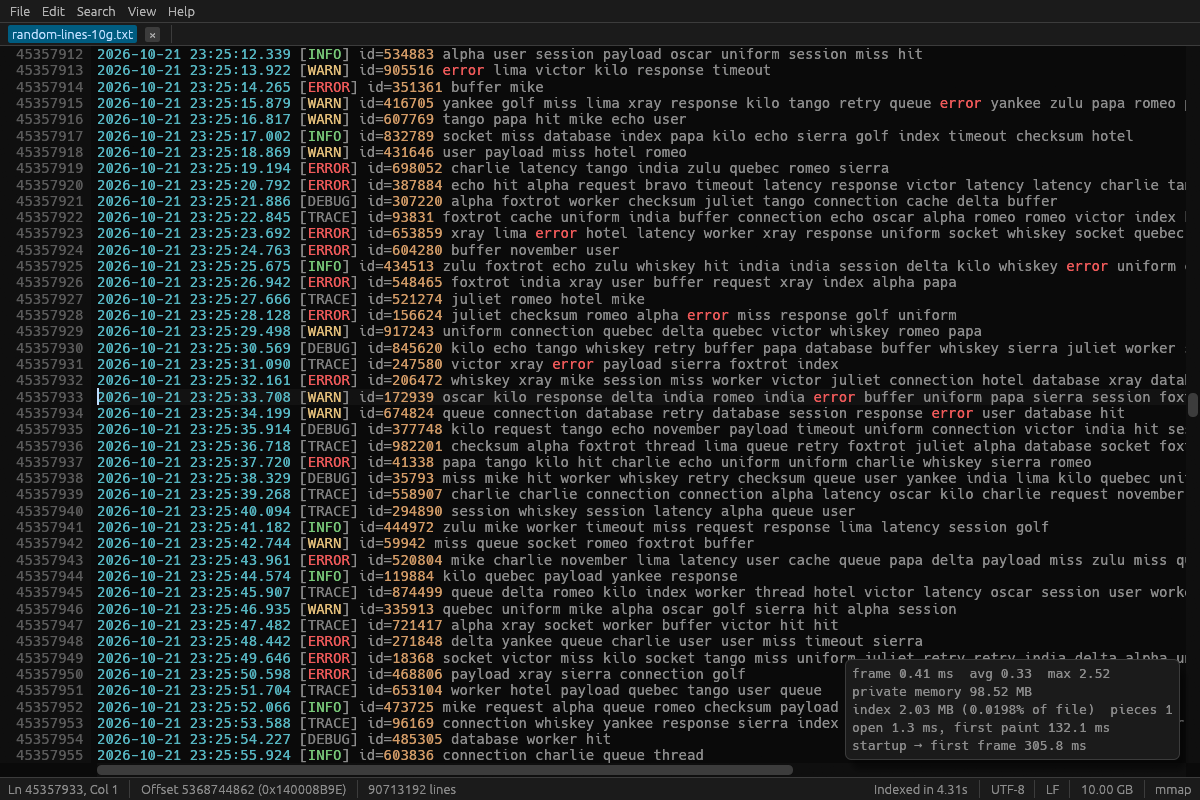
BigText is a free, open-source desktop text editor for huge files (1–50+ GB): logs, CSV exports, SQL dumps, JSON. It never loads a whole file into memory, so files of any size open in milliseconds and the window never freezes.
Website: erkinbek.github.io/bigtext · Русский · O'zbekcha
Which file do I need?
| Platform | File | Notes |
|---|---|---|
| Windows 10 / 11 (recommended) | bigtext-setup-windows-x64.exe |
Installer. Install for yourself (no admin rights) or for all users; adds “Open with BigText”, an Explorer context-menu entry, a Start menu shortcut and an uninstaller. |
| Windows, portable | bigtext-windows-x64.zip |
Unzip anywhere and run bigtext.exe. Nothing is installed. |
| Linux x64 | bigtext-linux-x64.tar.gz |
Extract and run ./bigtext (X11 or Wayland). |
| macOS, Apple Silicon (M1 and later) | bigtext-macos-arm64.tar.gz |
The binary is not signed: run xattr -d com.apple.quarantine bigtext once, or allow it in System Settings → Privacy & Security. |
| macOS, Intel | bigtext-macos-x64.tar.gz |
Same as above. |
The archives also contain bigtext-bench (benchmarks) and gen-testfiles (test-file generator). Windows is the main, fully tested platform (unit tests plus a 56-check GUI self-test); the Linux and Apple Silicon builds pass the unit tests in CI, and the Intel macOS build is cross-compiled.
Highlights
- Opens anything: 1 GB, 10 GB and 50 GB files show their first screen in about 40 ms; scrolling and go to line work while the line index is built in the background.
- Search: plain text and linear-time regular expressions (case, whole word, multiline, in selection); Find All lists up to 1,000,000 results; F3 / Shift+F3 work immediately.
- Replace:
$1/${name}groups. Up to 50,000 changes are applied as one undoable edit; larger jobs stream to a new file with bounded memory. - Editing: piece table with undo/redo, cut/copy/paste, duplicate and delete line, auto-indent.
- Crash-safe save: temporary file, fsync, then an atomic replace; the original is never half-written. Optional
.bakbackup. - Encodings: UTF-8, UTF-16 LE/BE, Windows-1251, Windows-1252, ISO-8859-1; LF / CRLF / CR line endings kept or converted; hex view for binary files.
- Huge single lines: tested with one 2 GB line (minified JSON, base64).
- For logs: follow (tail -f) mode, syntax highlighting for logs, JSON, XML, CSV, SQL and INI, bookmarks, split view.
- Compare files: streaming line diff of two huge files.
- Recent files and session restore, light and dark themes, zoom, word wrap, read-only mode, external change detection.
Measured performance
Built-in benchmarks on Windows 11 with 1 GB, 10 GB and 50 GB test files:
| Task | Result |
|---|---|
| Open → first screen of text (1–50 GB) | 41–46 ms |
| Jump to a line in a 50 GB file | under 1 ms |
| Line index build | 2.2–2.7 GB/s (50 GB in about 20 s, 8 MB of index) |
| Plain-text search | 2.4–2.5 GB/s |
| Regex search | 2.3–2.8 GB/s with a literal part, 672 MB/s without |
| Replace All in a 10 GB file (22.2 M replacements) | 11.3 s, 46 MB peak memory |
| Memory with a 50 GB file open | 107 MB |
| UI frame time while indexing 50 GB | max 1.9 ms |
| Compare 1 GB with 1 GB | 0.6 s, about 2 MB of memory |
| Start → first frame | 159–185 ms |
Method and raw results: README → Measured performance. Known limitations are listed in the README.
Author
Erkin Pardayev · GitHub · Telegram · E-mail · MIT license
Full Changelog: https://github.com/Erkinbek/bigtext/commits/v0.1.0