Repository navigation
Settings List
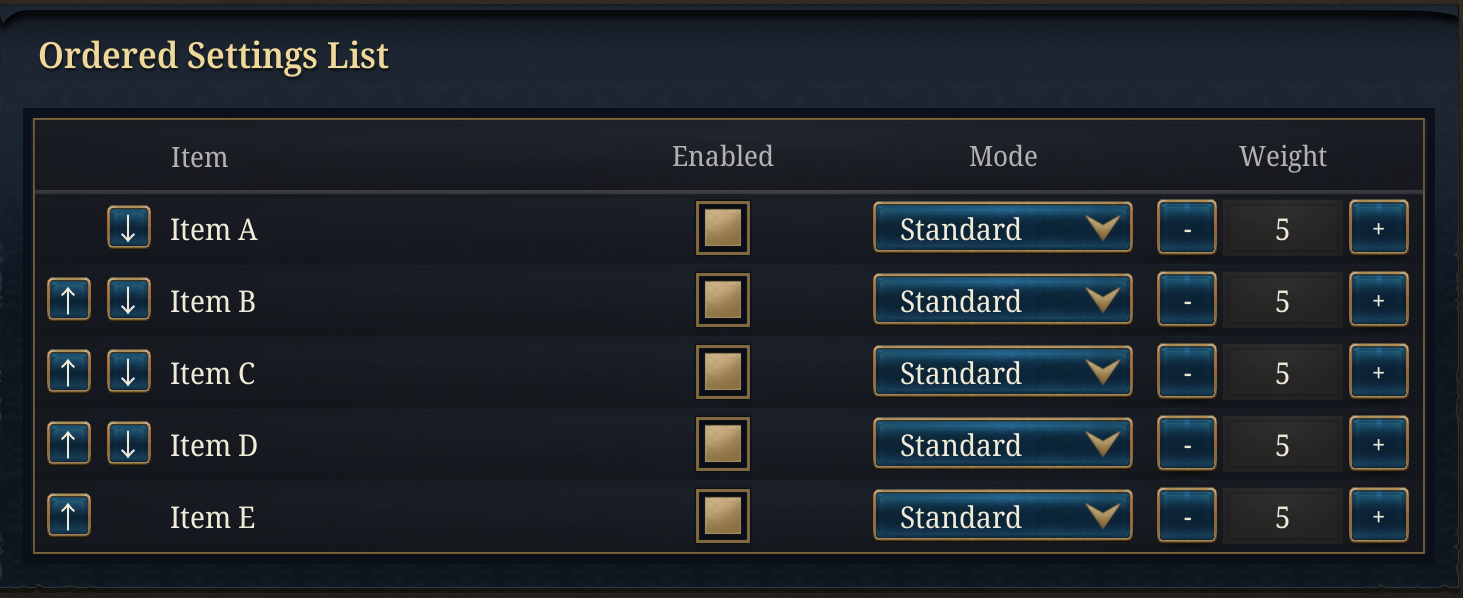
A settings list allows you to make a table of items where each row has one or more settings (toggles, dropdowns, numeric steppers, sliders, buttons, read-only data, or read-only text). Lists can optionally be ordered, allowing players to rearrange rows.
First, register the list itself using cmm_register_settings_list:
cmm_example_register_mod = {
	cmm_register_settings_list = {
		mod_id = cmm_example
		setting_id = example_list
		tab_id = general
		item_count = 5    # Number of rows
		is_ordered = 1    # 1 = players can reorder rows, 0 = fixed order
	}
}
-
item_count- the number of rows in the list, between 1 and 50. -
is_ordered- when set to 1, players can reorder rows by clicking the arrow buttons. Click moves one position; right-click moves to the top or bottom.
Each item has a stable identity number (1 through item_count) that never changes. Field values are stored against this number: the value for item 1's first field is always keyed as flag:mod__list_i1_f1 regardless of where it appears on screen.
Reordering only changes a separate display order list.
This matters for iteration. cmm_for_each_list_item visits items in display order, but $i$ resolves to the stable item number. So if the player reorders to [3, 1, 2], your effect runs with $i$=3 first, then $i$=1, then $i$=2. The order of iteration reflects the player's chosen priority.
For example, an auto-builder mod could register buildings as an ordered list. The player drags their preferred build order, and cmm_for_each_list_item iterates in that order, so the first enabled building encountered is the one to construct.
After registering the list, register one or more fields. Each field becomes a column in the list:
Bool field (toggle column):
	cmm_register_list_bool_field = {
		mod_id = cmm_example
		setting_id = example_list
		field_id = enabled
		default_value = 1
	}
Dropdown field (dropdown column):
	cmm_register_list_dropdown_field = {
		mod_id = cmm_example
		setting_id = example_list
		field_id = mode
		default_index = 1
		option_count = 3
	}
Numeric field (numeric stepper column):
	cmm_register_list_numeric_field = {
		mod_id = cmm_example
		setting_id = example_list
		field_id = weight
		default_value = 5
		min_value = 0
		max_value = 10
		step_value = 1
	}
Slider field (compact slider column):
	cmm_register_list_slider_field = {
		mod_id = cmm_example
		setting_id = example_list
		field_id = intensity
		default_value = 50
		min_value = 0
		max_value = 100
		step_value = 5
	}
Same parameters as numeric. Renders as a draggable slider track instead of +/- buttons. Click anywhere on the track to set the value; use the +/- buttons on the sides for fine tuning (Ctrl = 5x, Shift = min/max). Right-click the track to apply the current row's value to all rows.
Data field (read-only display column):
	cmm_register_list_data_field = {
		mod_id = cmm_example
		setting_id = example_list
		field_id = score
		default_value = 0
	}
Data fields are display-only: the player cannot edit the value. Use them to show per-item information alongside the editable fields (e.g. a computed score, a timestamp, a status indicator). Update the displayed value with cmm_set_list_data_value:
	cmm_set_list_data_value = {
		mod_id = cmm_example
		setting_id = example_list
		field_id = score
		item = 1       # 1-based item ordinal
		value = 42
	}
Data field values are stored in the same cmm variable map as other fields (keyed by flag:[mod_id]__[setting_id]_i[N]_f[slot]) and can be read the same way. Data fields also support prefix/postfix display formatting (see List Field Display Formatting below).
Button field (button column):
	cmm_register_list_button_field = {
		mod_id = cmm_example
		setting_id = example_list
		field_id = action
	}
Button fields store no value. A press records the item and slot it came from, which the list's
_on_changed reads after cmm_apply_list_change:
cmm_example__example_list_on_changed = {
	scope = country

	effect = {
		cmm_apply_list_change = {
			setting = cmm_example__example_list
		}
		if = {
			limit = { has_variable = cmm_list_button_item }
			# React to the press here; var:cmm_list_button_item is the item ordinal
			remove_variable = cmm_list_button_item
			remove_variable = cmm_list_button_slot
		}
	}
}
The button's caption comes from a _text localization key, and its tooltip from _desc:
l_english:
 cmm_example__example_list__action_name: "Action"
 cmm_example__example_list__action_text: "Run"
 cmm_example__example_list__action_desc: "What this button does."
Text field (display-only text column):
	cmm_register_list_text_field = {
		mod_id = cmm_example
		setting_id = example_list
		field_id = status
	}
Each cell localizes the per-item key set with cmm_set_list_text_value; items with no key set
render empty.
	cmm_set_list_text_value = {
		mod_id = cmm_example
		setting_id = example_list
		field_id = status
		item = 1
		value = flag:cmm_example_status_ready
	}
A button field can open one of your tabs instead of reporting its press. Call
cmm_set_list_button_open_tab after registering the field, once per item:
	cmm_register_list_button_field = {
		mod_id = cmm_example
		setting_id = example_list
		field_id = settings
	}

	cmm_set_list_button_open_tab = { mod_id = cmm_example setting_id = example_list field_id = settings item = 1 tab_id = alpha }
	cmm_set_list_button_open_tab = { mod_id = cmm_example setting_id = example_list field_id = settings item = 2 tab_id = beta }
Naming a tab that has sub-tabs opens the sub-tab it opens on, the same tab the parent's own tab
button lands on. An item with a target does not set cmm_list_button_item, so a list whose every
button opens a tab needs nothing in its _on_changed beyond cmm_apply_list_change.
Targets are re-asserted each registration pass like the rest of your registration block. To give
one item back an ordinary press, call cmm_clear_list_button_open_tab with the same
mod_id, setting_id, field_id and item.
Right-click a cell to apply that row's value to every row; right-click the column header to apply the first row's value to every row. Bool columns toggle instead of copy. Button, data, and text columns hold no editable value, so they have no apply control.
Numeric, slider, and data fields can display prefix and/or postfix text around the value, including formatting codes like color tags.
After registering the field, call cmm_set_list_field_format to enable formatted display:
	cmm_register_list_numeric_field = {
		mod_id = your_mod
		setting_id = your_list
		field_id = weight
		default_value = 0
		min_value = -5
		max_value = 5
		step_value = 1
	}
	cmm_set_list_field_format = {
		mod_id = your_mod
		setting_id = your_list
		field_id = weight
	}
Then define _prefix and/or _postfix localization keys for the field:
l_english:
 cmm_example__example_list__weight_prefix: "#G "
 cmm_example__example_list__weight_postfix: "%#!"
This would display the value as e.g. 50% (with green color formatting). See Localization for the key format.
For conditional formatting based on the value's sign (e.g., green for positive, red for negative), use cmm_set_list_field_conditional_format instead of cmm_set_list_field_format, and add _high and/or _low prefix/postfix variants. See Localization - Conditional Formatting.
A field's localization keys can be repointed at runtime, so a column can change its header, description, and value formatting while the menu is open, for example when another setting changes what the column means.
Call cmm_set_list_field_localization after registering the field:
	cmm_set_list_field_localization = {
		mod_id = your_mod
		setting_id = your_list
		field_id = weight
		name = your_mod__your_list__weight_alt_name
		root = your_mod__your_list__weight_alt
	}
-
nameis the localization key for the column header, used as-is. -
rootis the localization key root for the rest of the field's text: the description and prefix/postfix resolve from[root]_desc,[root]_prefix, and[root]_postfix, including the_high/_lowconditional variants.
Define the alternate key family alongside the field's default keys:
l_english:
 your_mod__your_list__weight_alt_name: "Wait Years"
 your_mod__your_list__weight_alt_desc: "Years to wait before acting."
 your_mod__your_list__weight_alt_postfix: "y"
Registering a field always resets its localization to the field_id defaults ([Mod_ID]__[Setting_ID]__[Field_ID]_name and the matching root) and clears its format flag. So when re-registering a field at runtime (for example to change its bounds), re-apply cmm_set_list_field_format and cmm_set_list_field_localization afterwards.
Repointing driven from a dropdown change shows immediately.
By default, every item in a list has all registered field columns. You can disable specific fields for specific items so that certain rows have empty cells where that field would normally appear.
Call cmm_disable_list_field_for_item after registering the field:
	cmm_register_list_bool_field = {
		mod_id = cmm_example
		setting_id = example_list
		field_id = enabled
		default_value = 1
	}

	cmm_register_list_numeric_field = {
		mod_id = cmm_example
		setting_id = example_list
		field_id = weight
		default_value = 5
		min_value = 0
		max_value = 10
		step_value = 1
	}

	# Item 2 has no toggle, item 3 has no numeric stepper
	cmm_disable_list_field_for_item = {
		mod_id = cmm_example
		setting_id = example_list
		field_id = enabled
		item = 2
	}
	cmm_disable_list_field_for_item = {
		mod_id = cmm_example
		setting_id = example_list
		field_id = weight
		item = 3
	}
Disabled fields are skipped by right-click "apply to all".
To re-enable a previously disabled field, use cmm_enable_list_field_for_item with the same parameters.
Every field has one shared default_value that applies to all rows. To give one row a different default, call cmm_set_list_field_default_for_item with the item ordinal. Call it before you register the field, and the per-item value becomes both the row's starting value and the value Reset to Defaults restores for that row:
	# Item 1 starts enabled and resets to enabled; every other row starts and resets to disabled
	cmm_set_list_field_default_for_item = {
		mod_id = cmm_example
		setting_id = example_list
		field_id = enabled
		item = 1
		value = 1
	}

	cmm_register_list_bool_field = {
		mod_id = cmm_example
		setting_id = example_list
		field_id = enabled
		default_value = 0
	}
Works on bool, dropdown, numeric, and slider fields. Call it before registering the field to drive both the starting value and the reset value, as above. Called after the field is registered, it sets only the reset value and the row still starts at default_value.
You can hide entire item rows so they don't render in the menu. Hidden items still exist in the datamodel and are still iterated by cmm_for_each_list_item.
Call cmm_hide_list_item after registering the list:
	cmm_register_settings_list = {
		mod_id = cmm_example
		setting_id = example_list
		tab_id = general
		item_count = 5
		is_ordered = 1
	}

	# Hide item 3 from the menu
	cmm_hide_list_item = {
		mod_id = cmm_example
		setting_id = example_list
		item = 3
	}
To show a previously hidden item, use cmm_show_list_item with the same parameters.
Settings lists require a Scripted GUI callback (unlike other setting types which use auto-apply):
cmm_example__example_list_on_changed = {
	scope = country

	effect = {
		cmm_apply_list_change = {
			setting = cmm_example__example_list
		}
		# optional custom logic
	}
}
-
cmm_apply_list_change- a CMM-provided helper that handles all list interactions (reordering, toggling, dropdown cycling, and numeric changes).
You can attach a game object scope to each item in a settings list. This lets you associate a building type, trade good, or any other game object with a row so you can access it during iteration.
Call cmm_set_list_item_value inside your registration effect, after cmm_register_settings_list:
cmm_example_register_mod = {
	cmm_register_settings_list = {
		mod_id = cmm_example
		setting_id = example_list
		tab_id = general
		item_count = 3
		is_ordered = 0
	}

	cmm_set_list_item_value = { mod_id = cmm_example setting_id = example_list item = 1 value = building_type:fine_cloth_guild }
	cmm_set_list_item_value = { mod_id = cmm_example setting_id = example_list item = 2 value = building_type:grain_depot }
	cmm_set_list_item_value = { mod_id = cmm_example setting_id = example_list item = 3 value = building_type:silk_workshop }

	cmm_register_list_bool_field = {
		mod_id = cmm_example
		setting_id = example_list
		field_id = enabled
		default_value = 1
	}
}
The display name in the CMM menu comes from the localization key ([Your_Mod_ID]__[Your_Setting_ID]_i[index]_name) and is independent of the attached value. See Reading Setting Values for how to access item values during iteration.
When your list items correspond directly to game objects (such as building types, trade goods, etc.) you can build the list dynamically instead of specifying a fixed item_count.
Use cmm_begin_settings_list / cmm_add_settings_list_item / cmm_finish_settings_list to add items one by one. Each call takes a value (the game object scope to attach) and a name (the localization key for the row label).
cmm_example_register_mod = {
	cmm_begin_settings_list = {
		mod_id = cmm_example
		setting_id = building_list
		tab_id = buildings
		is_ordered = 0
	}

	# name = localization key for the row label, value = attached game object scope
	cmm_add_settings_list_item = { mod_id = cmm_example setting_id = building_list value = building_type:fine_cloth_guild name = fine_cloth_guild }
	cmm_add_settings_list_item = { mod_id = cmm_example setting_id = building_list value = building_type:grain_depot name = grain_depot }
	cmm_add_settings_list_item = { mod_id = cmm_example setting_id = building_list value = building_type:silk_workshop name = silk_workshop }

	# Must call this before registering fields
	cmm_finish_settings_list = { mod_id = cmm_example setting_id = building_list }

	cmm_register_list_bool_field = {
		mod_id = cmm_example
		setting_id = building_list
		field_id = enabled
		default_value = 1
	}
}
Alternatively, use cmm_register_settings_list_from_list to build a settings list directly from an existing country variable list. Each entry in the source list becomes one row, and its scope is automatically stored as the item value:
cmm_example_register_mod = {
	# Assumes my_buildings_list is a country variable list of building_type scopes
	cmm_register_settings_list_from_list = {
		mod_id = cmm_example
		setting_id = building_list
		tab_id = buildings
		is_ordered = 0
		list = my_buildings_list
	}

	cmm_register_list_bool_field = {
		mod_id = cmm_example
		setting_id = building_list
		field_id = enabled
		default_value = 1
	}
}
Row labels use the [Mod_ID]__[Setting_ID]_i[N]_name localization key pattern.
- Items are auto-numbered starting from 1 in the order they are added.
- Maximum 50 items (same limit as the static API). Items beyond 50 are silently ignored.
-
cmm_finish_settings_listmust be called before any field registration (cmm_register_list_bool_field, etc.). Not needed when usingcmm_register_settings_list_from_list. - The entire block runs on every registration cycle, but is idempotent - items are only added on the first run.
- The Scripted GUI callback and localization for the list name, column header (
_item_column_name), and field headers follow the same patterns as a static list. - When using
cmm_add_settings_list_item, thenameparameter sets the localization key for each row label. When usingcmm_register_settings_list_from_list, row labels require_item_N_namelocalization keys.