The answer, to the question of how I can log in to my website with LinkedIn via Java Codes.
First of all you have to create an app in Linkedin Developer page. You should save your client secret and client id. In this example we will redirect response to a servlet class.
Create a Dynamic Web Project. Your project directory should be like this.
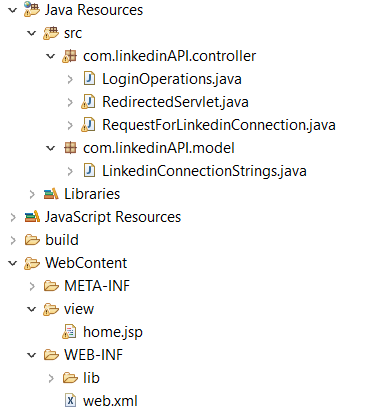
Create classes and write codes. Don't forget json library. You have to add to WebContent-> WEB_INF -> lib
After all steps, you can run your server. It will show the user's information in the terminal. To see in the browser you need to create a User Model. You should store data in the user then return the object. You should create a session in servlet and call the session object in JSP.
HttpSession session = request.getSession(); session.setAttribute("userInfo", user.getName()); .... response.sendRedirect("views/yourjsp.jsp");
To call session value:
<%=session.getAttribute("userInfo")%>
To call and use session object
<c:set value="${sessionScope.userInfo}" var="userInformation" />
${userInformation.name}