Repository navigation
Releases
HyprW 1.4.0

Install: download hyprw-1.4.0.zip, then in Blender Edit → Preferences → Get Extensions → Install from Disk (replaces 1.3.0). Requirements: Blender 5.2 or newer (tested on 5.3.0), Linux x86-64. Restart Blender after updating. Aerated Falling Water needs a new bake (the bake now stores the surface velocities).
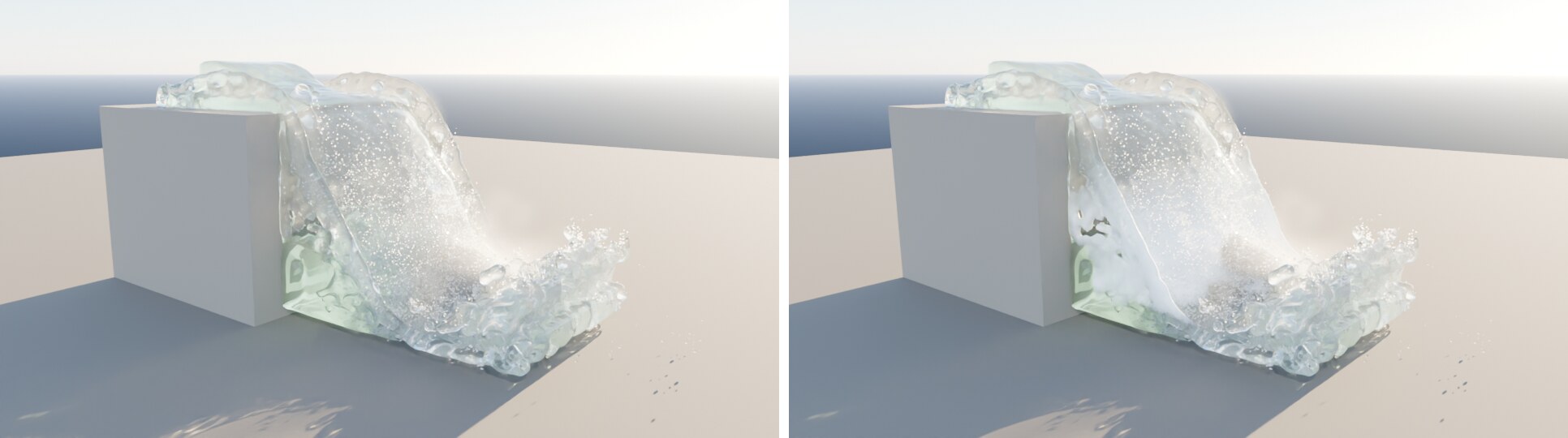
New — materials from measurements
- Aerated Falling Water (Water › Fine-tune, on): falling water takes up air and turns white the further it falls, fully white at its breakup length. The breakup length comes from the largest inflow (Ervine et al. 1997, with the turbulence at the edge measured by Carrillo et al. 2020); Breakup overrides it. A short fall with much water stays nearly clear, as in nature: the learning scene turns white from 1.6 m and fully at 11.4 m. The bake stores the surface velocities for it, which also give Cycles motion blur on the water.
- Ripples From Wind (on): wind from the scene's force fields roughens the water as Cox & Munk (1954) measured it: 0.32 at 2 m/s, 0.40 at 5 m/s, 0.48 at 10 m/s. Without wind nothing changes.
- Wet Obstacles (off): rocks and banks turn darker and get a water film from the frame the water reaches them (Lekner & Dorf 1988: an albedo of 0.3 becomes 0.18). Works on coarse obstacles too: a modifier subdivides them for display and render; the mesh itself stays as it is. Switched off, the materials are as before.
- Foam Decay (3 s): foam thins out as it ages instead of vanishing at once (Callaghan et al. 2012, 552 breaking waves: 1.4–4.8 s).
- Traced Caustics (off): Cycles' Shadow Caustics trace the light the simulated waves throw onto the ground. Sharper network than the pattern, but measured 31 % darker on average and slower — the method is approximate.
Checked
- Foam brightness: a foam particle reflects 31 %, within the measured 22–55 % (Whitlock 1982, Koepke 1984).
Not added, and why
- Rainbows in the spray: built (each colour refracted with its own index) but not switched on. A rainbow is a caustic Cycles finds only by chance; 300,000 drops at 256 samples gave coloured noise instead of a bow.
Fixed
- Blender 5.3 changed how geometry nodes modifier inputs are set; HyprW uses the new way and the old one on 5.2.
Tests: 300 checks, 0 failures.
HyprW 1.3.0
Install: download hyprw-1.3.0.zip, then in Blender Edit → Preferences → Get Extensions → Install from Disk (replaces 1.2.0). Requirements: Blender 5.2 or newer (tested on 5.3.0), Linux x86-64. Restart Blender after updating: the engine library is only loaded at start.

New
- Inflow turbulence (Inflow › Turbulence, default 10 %, and Eddies): the water leaving an inflow swirls like a real river instead of leaving as one smooth, rigid slab. Strength after measurements in open channels (Nezu 1977: 7–15 % of the mean speed for typical rivers); a divergence-free eddy field with a Kolmogorov spectrum (Kraichnan 1970), carried with the flow (Taylor 1938). Eddies sets the size of the largest swirls; 0 takes the inflow's thinnest side. Checked: 9.5–10.4 % fluctuation per direction at 10 %.
- The inflow still delivers the water it should: inside it the water keeps the mean velocity, and each particle gets its swirl as it leaves through the outlet. Measured without an outflow over 24 frames: +0.4 % water at 10 %, +7 % at 25 % (smaller time steps alone add about 1.7 %).
Changed
- Inflows are turbulent by default (10 %). New bakes of older scenes look rougher; set Turbulence to 0 % for the smooth inflow of 1.2.
- Turbulence needs Constrain Velocity (on by default); without it the setting is greyed out.
Tests: 292 checks, 0 failures.
HyprW 1.2.0
Install: download hyprw-1.2.0.zip, then in Blender Edit → Preferences → Get Extensions → Install from Disk (replaces 1.1.0). Requirements: Blender 5.2 or newer (tested on 5.3.0), Linux x86-64. Restart Blender after updating: the engine library is only loaded at start.
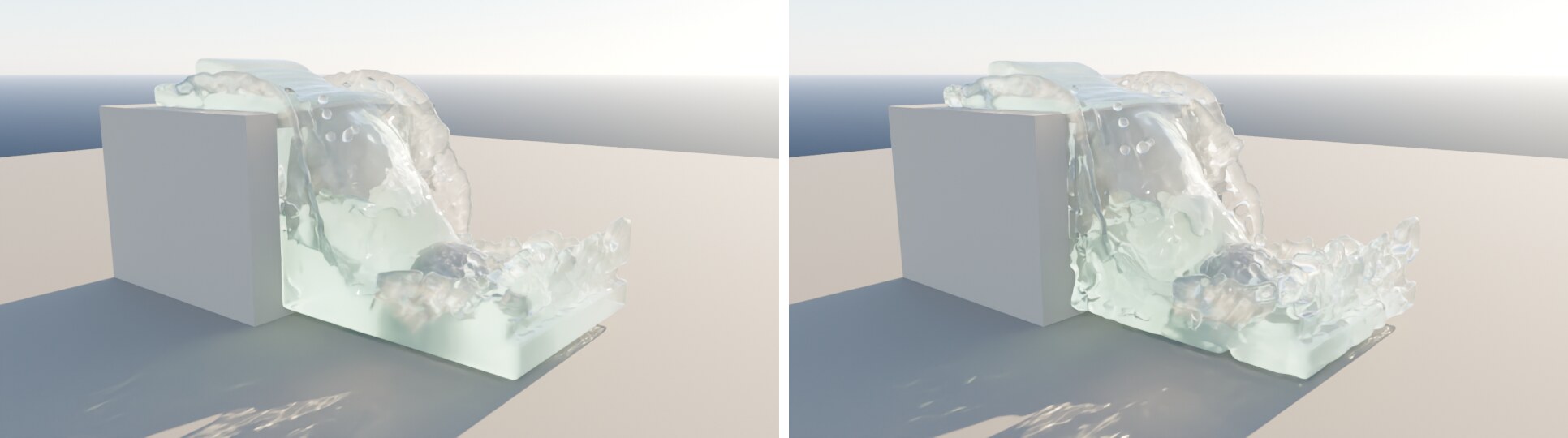
New
- Anisotropic Surface (Water Mesh › Anisotropic, off by default): the water mesh is built from kernels stretched along the surface (Yu & Turk 2010) and cut where it holds exactly the particles' volume, new every frame. Learning scene, 160,000 particles: the old spheres' mesh holds +19 % water and looks like gel; the new one +0.9 to +1.0 % at Mesh Detail 2 and +0.4 % at 3, with at most 0.2 % change from frame to frame (no flicker). 1.7 s per frame including the simulation. Smoothness sets how calm the surface looks.
- Resume a bake: a bake keeps saved states every few frames; a stopped or crashed bake continues from the last one.
- Blender stays usable while baking: the bake computes in a worker thread. Cancel takes effect when the frame being computed is done. Same results byte for byte, same bake time.
- Liquids (Domain › Liquid): water, olive oil, glycerol, honey or lava with viscosity, density and surface tension measured at about 20 °C (honey's and lava's surface tension are approximations). A drop without gravity oscillates with 1.11 s against Rayleigh's 1.03 s.
- Hybrid Water (formerly Adaptive Particles) sits below Resolution and gets one Strength lever from 1 to 6; the panel shows how far below the surface and from obstacles the water stays fine, in metres.
- Resolution up to 8192 (the slider ends at 2000, type higher values). The panel warns when the grid alone exceeds this computer's memory.
- Light Playback (on by default): smooth timeline playback with a simplified mesh and at most 150,000 whitewater points while playing; paused frames and renders stay full quality. A light mist while playing (25 ms instead of 316–693 ms per frame) and Pause Other Animation for heavy scenes.
- An (i) next to every setting: hover for the short version, click for how to use it and the technical background with sources.
Fixed
- Open terrain sheets reaching past the domain are closed downwards instead of thickened: water no longer leaks into a cliff; displaced terrain no longer throws vertices kilometres away (which made the engine run out of memory).
- A floor duplicated in place no longer lets the water through.
- A scene renamed while playing gets its full frame back on stop and save.
- A render from a script while playing keeps Pause Other Animation working.
- Bake, lens drops and Clear Cache refuse while one of the others runs (Bake Again during the lens drops emptied their cache).
- An engine error ends the bake with a readable report; no saved state is written after a failed frame.
- Compute Lens Drops says why the lens stays dry when the camera never comes near the spray.
Tests: 289 checks, 0 failures.
HyprW 1.1.0
Install: download hyprw-1.1.0.zip, then in Blender Edit → Preferences → Get Extensions → Install from Disk (replaces 1.0.0). Requirements unchanged: Blender 5.2, Linux x86-64.
New
- Adaptive particles (domain setting, off by default): deep water merges into larger particles, near the air, obstacles and in fast flow they split back (Adams et al. 2007). Test scene on the GPU: 2.76 million particles carried by 1.39 million, 75 s → 64 s for 30 frames, same volume. Split time adjustable, default 0.25 s.
- Studio water: light reaches the ground through the surface, caustics, capillary ripples at 1.71 cm, optional dispersion with water's measured refractive index per colour.
- Surface mesh on the GPU, bit-identical to the CPU.
- Lighter Viewport: a lighter mesh in the viewport, renders keep the full one.
- Clearer panel: Object Role, Bake, Look, Domain, Lens Drops; progress bar and time left while baking.
- Files from older versions get the current look when opened (black GPU foam and dark water fixed automatically).
Removed
- The tools for FLIP Fluids domains (they needed the FLIP Fluids add-on). HyprW's own simulation covers them.
Fixed
- Undo or switching scenes no longer cancels a running bake; Esc only cancels on the press.
- Clear Cache empties water, whitewater and lens drops; frames without whitewater show none.
- After opening a file the viewport follows the timeline again.
HyprW 1.0.0
First public release of HyprW — Hyper Realistic Water, a water simulation add-on for Blender 5.2 on its own copy of the FLIP Fluids engine (the FLIP Fluids add-on is not needed).
Install: download hyprw-1.0.0.zip, then in Blender Edit → Preferences → Get Extensions → Install from Disk. The tab HyprW appears in the 3D viewport sidebar.
Requirements: Linux x86-64 (libstdc++ from GCC 13 or newer, e.g. Ubuntu 24.04, Fedora 39+). GPU steps need an NVIDIA GPU (RTX 20xx or newer); without one everything runs on the CPU. Windows and macOS need the engine built from source, see engine_patch/README.md.
Highlights
- Own simulation with object roles, bake and cache
- GPU per step (mesh, whitewater, water particles, advection, pressure) and a button that measures the fastest device per step
- Foam rendered as aerated water, identical on CPU and GPU
- Water from measured optics: visibility and dissolved matter instead of tuned colours
- Mist from spray after literature values, wind on whitewater and the water surface
- Drops on the camera lens driven by the simulation
Licenses: add-on GPL-3.0-or-later, engine MIT; third-party notes in THIRD_PARTY.md.