Repository navigation
Releases
Self Coverflow 1.0 Beta 5

更新内容
- Windows 和 macOS 的循环按钮现在依次切换「不循环 → 专辑循环 → 单曲循环 → 不循环」。图标中央有 1 时,再点一次即可关闭循环。
- Windows 上,Apple Music 最小化时也能从当前曲目建立专辑循环。唱片架未固定时,点击主体会把已打开的浮动歌词窗一起带回前台。
Changes
- On Windows and macOS, the repeat button cycles through off, album repeat, repeat one, and back to off.
- On Windows, album repeat can now establish the album queue with Apple Music minimized. Clicking the unpinned shelf brings its open floating lyrics window forward with it.
Choose the English or Simplified Chinese installer for your platform. The macOS universal packages support Apple silicon and Intel on macOS 13 or newer. SHA256SUMS.txt contains checksums for all four downloads.
Self Coverflow 1.0 Beta 4
Windows
Fixed the shelf’s Previous and Next buttons when Apple Music is minimized. Track changes are confirmed against the current album, including moving between its first and last tracks.
修复 Apple Music 最小化时唱片架的「上一首/下一首」失效或提示无法确认切歌的问题,支持同一专辑内首尾切换。
macOS
Includes English and Simplified Chinese universal installers for Apple silicon and Intel on macOS 13 or later. Both editions use the existing native Music integration.
包含 macOS 13 及以上系统的英文和简体中文通用安装包,支持 Apple 芯片和 Intel。Mac 版沿用原生 Music 切歌逻辑。
Downloads
Choose one language for your platform. SHA256SUMS.txt lists checksums for all four installers. The Windows installers are unsigned. The macOS apps are ad-hoc signed and the packages are unsigned and unnotarized.
Self Coverflow 1.0 Beta 3
Windows
Self Coverflow can read lyrics from both the Apple Music MiniPlayer and the full player. Drag an album cover upward or choose Lyrics from the menu to bring the lyrics window back into view. The window keeps your pin setting.
唱片架现在可以读取 Apple Music 迷你播放器和完整窗口中的歌词。向上拖动封面,或从右上角菜单选择「歌词」,即可把被其他窗口遮住的歌词窗带回前面。图钉设置会保留。
Downloads · 下载
Choose the Windows x64 installer ending in en-Setup.exe for English or zh-Setup.exe for 简体中文. Run it over your existing installation to update the same language edition.
macOS users can keep Beta 2. The two universal macOS packages included here are the original Beta 2 builds. 此次修复针对 Windows,Mac 用户可继续使用 Beta 2。
Self Coverflow 1.0 Beta 2
Previous and Next now move between tracks on the playing album. The button beside Next switches between album repeat and single-track repeat. On macOS, album repeat uses a reusable album playlist in Music.
上一首、下一首现在只在正在播放的专辑内切歌。下一首右侧的循环键可切换专辑循环与单曲循环。Mac 版会在「音乐」里创建可复用的专辑播放列表。
Choose one installer for your language and platform. Windows x64 and macOS 13+ (Intel and Apple silicon) each have separate English and Simplified Chinese editions. Installers are unsigned beta builds.
Self Coverflow 1.0 Beta 1
Browse your Apple Music library as a white desktop Cover Flow shelf. Search for an album, press Return to bring its cover to the center, then double-click to play it through Music.
用白色桌面唱片架浏览本机 Apple Music 资料库。搜索专辑后按回车即可滚到封面,双击开始播放。
| System · 系统 | English | 简体中文 |
|---|---|---|
| Windows 10 22H2 / 11 · x64 | Download Setup.exe | 下载中文安装程序 |
| macOS 13+ · Intel / Apple silicon | Download .pkg | 下载中文安装包 |
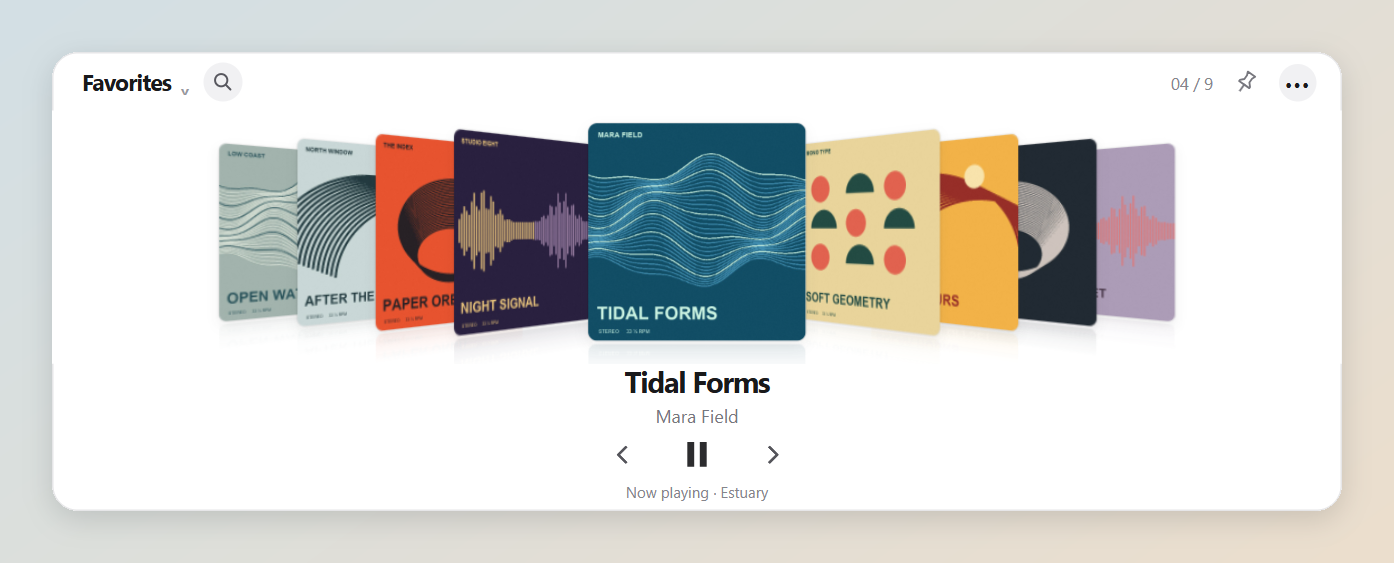
Open the installer in your preferred language and follow the steps. First confirm that Music can play an album with your account. On Mac, grant Self Coverflow permission to control Music when prompted. The Windows and Mac installers are unsigned. The Mac app is ad-hoc signed and has not been notarized by Apple.
双击对应语言的安装程序即可进入向导。首次使用前,请先在 Apple Music 登录并播放一首歌。Mac 用户首次启动时请允许唱片架控制「音乐」。此测试版的 Windows 与 Mac 安装程序均未签名,Mac 应用使用临时签名,未经 Apple 公证。