Repository navigation
Releases
Hero Meter v2.3.0

Hero Meter 2.3 is a free, Details!-style damage meter for City of Heroes Homecoming.
New in 2.3
- Procs under the power that fired them (Options → Breakdown, off by default). Each damage proc is credited
to the attack that just hit that target, so a breakdown shows, say, Fire Blast + 1 proc with the proc counted
in its total. Click it to see the attack and each proc. Procs nothing set off stay in the Procs row, and
Interface stays its own line. Thanks to the player on the forums who suggested it! - Cleaner Options. Every page now holds only what its name says: a new Breakdown page, Death Recap on
its own, window behavior on Windows, Profiles under the new Setup & Data group, and Alerts split into
clear sections. No setting changed its value. - Fixed: in the City of Heroes skin, window contents no longer poke over the frame's rounded corners.
Recently (2.2)
- Share as a picture (Report → Copy as a picture), Earlier days (Segments → Earlier days…), an
Influence mode with per-hour rates, and alert sounds: built-in tones or your own .wav, .ogg or .mp3.
Get started in three steps
- Download
HeroMeter.exebelow and double-click it. There's no installer. - In the game, turn on Log Chat for each character:
Menu → Options → Windows → Chat → Log Chat(or type/logchatonce). - Using pets, or powers like Rain of Fire or Caltrops? Right-click a chat tab → Edit Tab → add Pet Combat, Pet Damage Inflicted, Pet Damage Received, Pet Hit Rolls, Pet Healing Delivered and Pet Healing Received.
If Windows says "Windows protected your PC", click More info → Run anyway. New programs without a paid signing certificate always get that warning. This file was built by GitHub from the code in this repo, and its SHA-256 checksum is in SHA256.txt below.
What it does
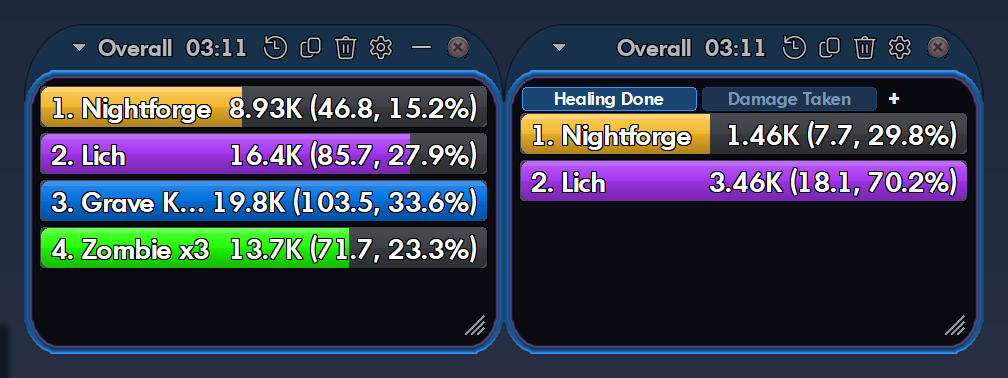
- Sixteen modes: damage, DPS, healing, damage taken, kills, deaths, accuracy, absorbs, bodyguard, experience, influence and more, for every fight and overall.
- Masterminds welcome: every pet on its own bar, grouped by tier, or rolled into yours. Pseudo pets like Rain of Fire count as your damage.
- Breakdowns: click a bar for powers, Shift+click for hits, averages, crits and a DPS-over-time graph. Procs can sit under the attack that fired them.
- Death recap: the last few seconds before you died, hit by hit.
- Alerts: a pop-up and a sound of your choice when you're held, stunned, slept or taunted, or a pet goes down.
- Personal records for each character.
- Your build vs. what you actually do, from Mids Reborn or CoH Sidekick builds.
- Looks like the game: the City of Heroes skin matches each character's own window color, with themes, layouts and profiles if you want something else.
- Tidy chat logs: old logs are zipped after a week, and nothing is lost.
New to it? The user guide has pictures of every page, and you can open it any time with ⚙ → User Guide. Hover any setting in Options for a short note on what it does.
Updating?
Just replace your old HeroMeter.exe with this one. Your settings carry over. The full list of changes is in the changelog.
Found a bug? Click ⚙ → About Hero Meter → Copy diagnostics and paste it into a new issue.
Hero Meter v2.2.1
Hero Meter 2.2 is a free, Details!-style damage meter for City of Heroes Homecoming.
New in 2.2.1
- Your own alert sound can be a .wav, .ogg or .mp3 file (Options → Alerts → Choose your own sound…).
It's made ready once when you pick it: silence at the start is trimmed and anything past 2 seconds fades out,
so one alert never runs into the next. Your file isn't changed.
New in 2.2
- Share as a picture: Report → Copy as a picture puts a clean image of the meter on your clipboard, with
your character, the fight and the key totals. Paste it straight into Discord, or Save as a picture… for a PNG. - Earlier days: Segments → Earlier days… opens any earlier day's fights, deaths and breakdowns, zipped
logs included. ← Back to today returns to live play. - Influence per hour: a new Influence mode (Infamy for villains, Information for Praetorians), and Experience
now shows per hour too. - Alert sounds: the Windows alert, five built-in tones, or your own sound file (Options → Alerts).
- Faster Options: the Window Themes and Skin pages open quickly the first time.
- Fixed: the status bar's damage, DPS and kills match what the meter lists, even after switching characters,
and its right-hand text no longer hides under the resize corner.
Recent fixes (2.1.1)
- One swing with Rage (or any two-damage-type power) counts as one hit.
- Mez alerts only when the mez actually lands, plus a new taunt alert.
- Minimize while City of Heroes isn't focused (2.1, thanks to @cmihran).
Get started in three steps
- Download
HeroMeter.exebelow and double-click it. There's no installer. - In the game, turn on Log Chat for each character:
Menu → Options → Windows → Chat → Log Chat(or type/logchatonce). - Using pets, or powers like Rain of Fire or Caltrops? Right-click a chat tab → Edit Tab → add Pet Combat, Pet Damage Inflicted, Pet Damage Received, Pet Hit Rolls, Pet Healing Delivered and Pet Healing Received.
If Windows says "Windows protected your PC", click More info → Run anyway. New programs without a paid signing certificate always get that warning. This file was built by GitHub from the code in this repo, and its SHA-256 checksum is in SHA256.txt below.
What it does
- Sixteen modes: damage, DPS, healing, damage taken, kills, deaths, accuracy, absorbs, bodyguard, experience, influence and more, for every fight and overall.
- Masterminds welcome: every pet on its own bar, grouped by tier, or rolled into yours. Pseudo pets like Rain of Fire count as your damage.
- Breakdowns: click a bar for powers, Shift+click for hits, averages, crits and a DPS-over-time graph.
- Death recap: the last few seconds before you died, hit by hit.
- Alerts: a pop-up and a sound of your choice when you're held, stunned, slept or taunted, or a pet goes down.
- Personal records for each character.
- Your build vs. what you actually do, from Mids Reborn or CoH Sidekick builds.
- Looks like the game: the City of Heroes skin matches each character's own window color, with themes, layouts and profiles if you want something else.
- Tidy chat logs: old logs are zipped after a week, and nothing is lost.
New to it? The user guide has pictures of every page, and you can open it any time with ⚙ → User Guide. Hover any setting in Options for a short note on what it does.
Updating?
Just replace your old HeroMeter.exe with this one. Your settings carry over. The full list of changes is in the changelog.
Found a bug? Click ⚙ → About Hero Meter → Copy diagnostics and paste it into a new issue.
Contributors

Assets 4
Hero Meter v2.2.0
Hero Meter 2.2 is a free, Details!-style damage meter for City of Heroes Homecoming.
New in 2.2
- Share as a picture: Report → Copy as a picture puts a clean image of the meter on your clipboard, with
your character, the fight and the key totals. Paste it straight into Discord, or Save as a picture… for a PNG. - Earlier days: Segments → Earlier days… opens any earlier day's fights, deaths and breakdowns, zipped
logs included. ← Back to today returns to live play. - Influence per hour: a new Influence mode (Infamy for villains, Information for Praetorians), and Experience
now shows per hour too. - Alert sounds: the Windows alert, five built-in tones, or your own .wav file (Options → Alerts).
- Faster Options: the Window Themes and Skin pages open quickly the first time.
- Fixed: the status bar's damage, DPS and kills match what the meter lists, even after switching characters,
and its right-hand text no longer hides under the resize corner.
Recent fixes (2.1.1)
- One swing with Rage (or any two-damage-type power) counts as one hit.
- Mez alerts only when the mez actually lands, plus a new taunt alert.
- Minimize while City of Heroes isn't focused (2.1, thanks to @cmihran).
Get started in three steps
- Download
HeroMeter.exebelow and double-click it. There's no installer. - In the game, turn on Log Chat for each character:
Menu → Options → Windows → Chat → Log Chat(or type/logchatonce). - Using pets, or powers like Rain of Fire or Caltrops? Right-click a chat tab → Edit Tab → add Pet Combat, Pet Damage Inflicted, Pet Damage Received, Pet Hit Rolls, Pet Healing Delivered and Pet Healing Received.
If Windows says "Windows protected your PC", click More info → Run anyway. New programs without a paid signing certificate always get that warning. This file was built by GitHub from the code in this repo, and its SHA-256 checksum is in SHA256.txt below.
What it does
- Sixteen modes: damage, DPS, healing, damage taken, kills, deaths, accuracy, absorbs, bodyguard, experience, influence and more, for every fight and overall.
- Masterminds welcome: every pet on its own bar, grouped by tier, or rolled into yours. Pseudo pets like Rain of Fire count as your damage.
- Breakdowns: click a bar for powers, Shift+click for hits, averages, crits and a DPS-over-time graph.
- Death recap: the last few seconds before you died, hit by hit.
- Alerts: a pop-up and a sound of your choice when you're held, stunned, slept or taunted, or a pet goes down.
- Personal records for each character.
- Your build vs. what you actually do, from Mids Reborn or CoH Sidekick builds.
- Looks like the game: the City of Heroes skin matches each character's own window color, with themes, layouts and profiles if you want something else.
- Tidy chat logs: old logs are zipped after a week, and nothing is lost.
New to it? The user guide has pictures of every page, and you can open it any time with ⚙ → User Guide. Hover any setting in Options for a short note on what it does.
Updating?
Just replace your old HeroMeter.exe with this one. Your settings carry over. The full list of changes is in the changelog.
Found a bug? Click ⚙ → About Hero Meter → Copy diagnostics and paste it into a new issue.
Contributors
Assets 4
Hero Meter v2.1.1
Hero Meter 2.1 is a free, Details!-style damage meter for City of Heroes Homecoming.
Fixed in 2.1.1
- Hit counts with Rage (or any power that deals two damage types): one swing now counts as one hit, so
averages and the biggest hit are right. - Mez alerts only when it lands. Attempts your mez protection stops no longer set off alerts, so Brutes
and Tanks stop getting false alarms. A mez your protection breaks instantly doesn't alert either. - New taunt alert when an enemy taunts you (Options → Alerts).
- Check boxes in Options toggle on every click.
New in 2.1
- Minimize while City of Heroes isn't focused (Options → Opacity & Fading, off by default). The meter goes
to the taskbar when you switch to another program and comes back the moment you click into the game.
Hero Meter's own windows, like Options, never trigger it. - This is Hero Meter's first community contribution. Thank you, @cmihran!
Get started in three steps
- Download
HeroMeter.exebelow and double-click it. There's no installer. - In the game, turn on Log Chat for each character:
Menu → Options → Windows → Chat → Log Chat(or type/logchatonce). - Using pets, or powers like Rain of Fire or Caltrops? Right-click a chat tab → Edit Tab → add Pet Combat, Pet Damage Inflicted, Pet Damage Received, Pet Hit Rolls, Pet Healing Delivered and Pet Healing Received.
If Windows says "Windows protected your PC", click More info → Run anyway. New programs without a paid signing certificate always get that warning. This file was built by GitHub from the code in this repo, and its SHA-256 checksum is in SHA256.txt below.
What it does
- Fifteen modes: damage, DPS, healing, damage taken, kills, deaths, accuracy, absorbs, bodyguard and more, for every fight and overall.
- Masterminds welcome: every pet on its own bar, grouped by tier, or rolled into yours. Pseudo pets like Rain of Fire count as your damage.
- Breakdowns: click a bar for powers, Shift+click for hits, averages, crits and a DPS-over-time graph.
- Death recap: the last few seconds before you died, hit by hit.
- Alerts: a pop-up when you're held, stunned or slept, or a pet goes down.
- Personal records for each character.
- Your build vs. what you actually do, from Mids Reborn or CoH Sidekick builds.
- Looks like the game: the City of Heroes skin matches each character's own window color, with themes, layouts and profiles if you want something else.
- Tidy chat logs: old logs are zipped after a week, and nothing is lost.
New to it? The user guide has pictures of every page, and you can open it any time with ⚙ → User Guide. Hover any setting in Options for a short note on what it does.
Updating?
Just replace your old HeroMeter.exe with this one. Your settings carry over. The full list of changes is in the changelog.
Found a bug? Click ⚙ → About Hero Meter → Copy diagnostics and paste it into a new issue.
Contributors
Assets 4
Hero Meter v2.1.0
Hero Meter 2.1 is a free, Details!-style damage meter for City of Heroes Homecoming.
New in 2.1
- Minimize while City of Heroes isn't focused (Options → Opacity & Fading, off by default). The meter goes
to the taskbar when you switch to another program and comes back the moment you click into the game.
Hero Meter's own windows, like Options, never trigger it. - This is Hero Meter's first community contribution. Thank you, @cmihran!
Get started in three steps
- Download
HeroMeter.exebelow and double-click it. There's no installer. - In the game, turn on Log Chat for each character:
Menu → Options → Windows → Chat → Log Chat(or type/logchatonce). - Using pets, or powers like Rain of Fire or Caltrops? Right-click a chat tab → Edit Tab → add Pet Combat, Pet Damage Inflicted, Pet Damage Received, Pet Hit Rolls, Pet Healing Delivered and Pet Healing Received.
If Windows says "Windows protected your PC", click More info → Run anyway. New programs without a paid signing certificate always get that warning. This file was built by GitHub from the code in this repo, and its SHA-256 checksum is in SHA256.txt below.
What it does
- Fifteen modes: damage, DPS, healing, damage taken, kills, deaths, accuracy, absorbs, bodyguard and more, for every fight and overall.
- Masterminds welcome: every pet on its own bar, grouped by tier, or rolled into yours. Pseudo pets like Rain of Fire count as your damage.
- Breakdowns: click a bar for powers, Shift+click for hits, averages, crits and a DPS-over-time graph.
- Death recap: the last few seconds before you died, hit by hit.
- Alerts: a pop-up when you're held, stunned or slept, or a pet goes down.
- Personal records for each character.
- Your build vs. what you actually do, from Mids Reborn or CoH Sidekick builds.
- Looks like the game: the City of Heroes skin matches each character's own window color, with themes, layouts and profiles if you want something else.
- Tidy chat logs: old logs are zipped after a week, and nothing is lost.
New to it? The user guide has pictures of every page, and you can open it any time with ⚙ → User Guide. Hover any setting in Options for a short note on what it does.
Updating?
Just replace your old HeroMeter.exe with this one. Your settings carry over. The full list of changes is in the changelog.
Found a bug? Click ⚙ → About Hero Meter → Copy diagnostics and paste it into a new issue.
Contributors
Assets 4
Hero Meter v2.0.0
Hero Meter 2.0 is the first full release: a free, Details!-style damage meter for City of Heroes Homecoming.
Get started in three steps
- Download
HeroMeter.exebelow and double-click it. There's no installer. - In the game, turn on Log Chat for each character:
Menu → Options → Windows → Chat → Log Chat(or type/logchatonce). - Using pets, or powers like Rain of Fire or Caltrops? Right-click a chat tab → Edit Tab → add Pet Combat, Pet Damage Inflicted, Pet Damage Received, Pet Hit Rolls, Pet Healing Delivered and Pet Healing Received.
If Windows says "Windows protected your PC", click More info → Run anyway. New programs without a paid signing certificate always get that warning. This file was built by GitHub from the code in this repo, and its SHA-256 checksum is in SHA256.txt below.
What it does
- Fifteen modes: damage, DPS, healing, damage taken, kills, deaths, accuracy, absorbs, bodyguard and more, for every fight and overall.
- Masterminds welcome: every pet on its own bar, grouped by tier, or rolled into yours. Pseudo pets like Rain of Fire count as your damage.
- Breakdowns: click a bar for powers, Shift+click for hits, averages, crits and a DPS-over-time graph.
- Death recap: the last few seconds before you died, hit by hit.
- Alerts: a pop-up when you're held, stunned or slept, or a pet goes down.
- Personal records for each character.
- Your build vs. what you actually do, from Mids Reborn or CoH Sidekick builds.
- Looks like the game: the City of Heroes skin matches each character's own window color, with themes, layouts and profiles if you want something else.
- Tidy chat logs: old logs are zipped after a week, and nothing is lost.
New to it? The user guide has pictures of every page, and you can open it any time with ⚙ → User Guide. Hover any setting in Options for a short note on what it does.
Coming from a beta?
Everything from beta.1 to beta.8 is in here. Your settings carry over. The full list of changes is in the changelog.
Found a bug? Click ⚙ → About Hero Meter → Copy diagnostics and paste it into a new issue.
Hero Meter v2.0.0-beta.8 (beta)
This is a beta. Thanks for helping test Hero Meter before the full release!
How to try it
- Download
HeroMeter.exebelow. - Put it anywhere and double-click it. There's no installer.
- In the game, turn on Log Chat for each character you test with:
Menu → Options → Windows → Chat → Log Chat(or type/logchatonce). - Using pets or powers like Rain of Fire or Caltrops? Add the Pet channels to a chat tab: right-click
a chat tab → Edit Tab → add Pet Combat, Pet Damage Inflicted, Pet Damage Received, Pet Hit Rolls,
Pet Healing Delivered and Pet Healing Received. Otherwise the game never logs that damage.
If Windows says "Windows protected your PC", click More info → Run anyway. New programs without a paid
signing certificate always get that warning. This file was built by GitHub from the code in this repo, and its
SHA-256 checksum is in SHA256.txt below.
New in beta.8
- Window color matching copes with screen filters. f.lux, Windows Night light, eye-care modes,
black-and-white filters and in-game tint effects no longer make it save a wrong color (white read as
orange or brown). It keeps your saved color and looks again later. - Pick it from a game window tells you when the screen is tinted instead of picking the wrong color.
- Read it automatically waits for you to click back into the game.
New in beta.7
- Hover help in Options: rest the mouse on any setting's name for a short note on what it does and its
default. Options search reads these notes too. - Click-through works with the City of Heroes skin. Hold Ctrl to click the meter while it's on.
- Stays on top after long sessions, even if the game was restarted.
- Options no longer loses its page list and top bar when the meter moves to a screen with different scaling.
- If Hero Meter ever stops responding, it writes a short
freeze-log.txtnext to its settings. Please
attach it to a bug report.
New in beta.6
- An easier, illustrated user guide: a screenshot of every Options page, short animations, and the
full settings tables tucked away until you open them. Open it with ⚙ → User Guide. - Welcome tip for new users, and an "Updated" notice with a link to what changed.
- Clearer names: Total DPS (all bars) in the statusbar, and Builds (planned vs actual) in the ⚙ menu.
- The "Log Chat is off" and "pet damage isn't being logged" warnings link to the setup steps.
New in beta.5
- User guide: every setting with its default, the bigger features and a troubleshooting FAQ. Open it
with ⚙ → User Guide, or click User Guide ↗ at the top right of Options to jump to the
section for the page you're on. - Options reorganized into four groups (Meter, Look, Windows, Data), with a search box that finds any
setting by name. Show example bars now sits at the top of Options, so it works from any page. - Pet logging check: if you use pet or pseudo-pet powers and the log shows no pet lines, Hero Meter tells
you the Pet chat channels aren't being logged and how to add them. It never changes your game settings.
New in beta.4
- Alerts: a pop-up above the meter when you're held, stunned, slept, terrified or confused, or a pet is
defeated. Immobilize, pet mez and sound are optional (Options → Alerts). - Personal records for each character, with a pop-up when you beat one (Options → Records).
- DPS over time graph in the Breakdown window.
- Proc fire rates in Mids' Build → Procs.
- CoH Sidekick builds (
.skif) work just like Mids builds. - Chat log clean-up: old logs are zipped after a week and the zips deleted after six months (both
changeable, or set to Never). Nothing is deleted in the first two weeks. - Build powers show their in-game names, so more of them match your log.
New in beta.3
- Pseudo pets count as your damage. Rain of Fire, Caltrops, Burn, Chain Induction, Lightning Rod, the
Judgement powers and other powers that drop an invisible stand-in are now credited to you under the
power's name, instead of showing up as a separate pet. - Streakbreaker hits now count toward accuracy, for you and your pets.
- "Unresistable" damage is listed under its real damage type.
- The version number now shows which beta you're on (⚙ → About Hero Meter).
New in beta.2
- City of Heroes skin, now the default. Every Hero Meter window looks like a window from the game:
the same sloped title tab, beveled border and see-through body, measured from the game's own windows. - Matches your in-game window color. When you log in, the meter reads the color of your game's windows
(power tray first) and uses it for its border. You can turn this off under ⚙ → Window Themes.
For an exact pick, use Pick it from a game window there and click the border of any game window. - Skins, Window Themes and Bar Themes: pick the window style (City of Heroes or Details!), the window
colors and the bar colors separately. Every theme works with every skin, and each has an editor. - The game's fonts, read from your own install (nothing is bundled). Until the meter can find your game,
it uses a close Windows look-alike and switches over by itself. - Game-style menus: see-through, with radio dots, light-cyan items and fading dividers.
- Mouse-over glow: the border brightens and the title tab firms up while your mouse is over a window.
- Procs collapse into one "Procs" row, like pets do. Left-click it to see each proc, right-click to go
back. A pet's procs go into that pet's own Procs row. - Multiple monitors: the meter resizes itself when you move it to a screen with different scaling.
Things worth testing
- Does it find your game by itself? (Try it with the game closed and with it running.)
- Log into a few characters with different window colors. Does the meter's frame follow?
- Switch characters, or log out to character select and back in. Does the name follow you?
- Mastermind? Check that your pets show the right type and tier.
- Open a second window, snap them together, add tabs.
- If you use Mids Reborn, link a build: ⚙ → Mids' Build.
- Close it. It should close quietly with no error box.
The full list of changes is in CHANGELOG.md.
Found a problem?
Go to ⚙ → About Hero Meter → Copy diagnostics, then paste it into a
new issue along with what happened.
Account names are blanked out automatically.
Hero Meter v2.0.0-beta.7 (beta)
This is a beta. Thanks for helping test Hero Meter before the full release!
How to try it
- Download
HeroMeter.exebelow. - Put it anywhere and double-click it. There's no installer.
- In the game, turn on Log Chat for each character you test with:
Menu → Options → Windows → Chat → Log Chat(or type/logchatonce). - Using pets or powers like Rain of Fire or Caltrops? Add the Pet channels to a chat tab: right-click
a chat tab → Edit Tab → add Pet Combat, Pet Damage Inflicted, Pet Damage Received, Pet Hit Rolls,
Pet Healing Delivered and Pet Healing Received. Otherwise the game never logs that damage.
If Windows says "Windows protected your PC", click More info → Run anyway. New programs without a paid
signing certificate always get that warning. This file was built by GitHub from the code in this repo, and its
SHA-256 checksum is in SHA256.txt below.
New in beta.7
- Hover help in Options: rest the mouse on any setting's name for a short note on what it does and its
default. Options search reads these notes too. - Click-through works with the City of Heroes skin. Hold Ctrl to click the meter while it's on.
- Stays on top after long sessions, even if the game was restarted.
- Options no longer loses its page list and top bar when the meter moves to a screen with different scaling.
- If Hero Meter ever stops responding, it writes a short
freeze-log.txtnext to its settings. Please
attach it to a bug report.
New in beta.6
- An easier, illustrated user guide: a screenshot of every Options page, short animations, and the
full settings tables tucked away until you open them. Open it with ⚙ → User Guide. - Welcome tip for new users, and an "Updated" notice with a link to what changed.
- Clearer names: Total DPS (all bars) in the statusbar, and Builds (planned vs actual) in the ⚙ menu.
- The "Log Chat is off" and "pet damage isn't being logged" warnings link to the setup steps.
New in beta.5
- User guide: every setting with its default, the bigger features and a troubleshooting FAQ. Open it
with ⚙ → User Guide, or click User Guide ↗ at the top right of Options to jump to the
section for the page you're on. - Options reorganized into four groups (Meter, Look, Windows, Data), with a search box that finds any
setting by name. Show example bars now sits at the top of Options, so it works from any page. - Pet logging check: if you use pet or pseudo-pet powers and the log shows no pet lines, Hero Meter tells
you the Pet chat channels aren't being logged and how to add them. It never changes your game settings.
New in beta.4
- Alerts: a pop-up above the meter when you're held, stunned, slept, terrified or confused, or a pet is
defeated. Immobilize, pet mez and sound are optional (Options → Alerts). - Personal records for each character, with a pop-up when you beat one (Options → Records).
- DPS over time graph in the Breakdown window.
- Proc fire rates in Mids' Build → Procs.
- CoH Sidekick builds (
.skif) work just like Mids builds. - Chat log clean-up: old logs are zipped after a week and the zips deleted after six months (both
changeable, or set to Never). Nothing is deleted in the first two weeks. - Build powers show their in-game names, so more of them match your log.
New in beta.3
- Pseudo pets count as your damage. Rain of Fire, Caltrops, Burn, Chain Induction, Lightning Rod, the
Judgement powers and other powers that drop an invisible stand-in are now credited to you under the
power's name, instead of showing up as a separate pet. - Streakbreaker hits now count toward accuracy, for you and your pets.
- "Unresistable" damage is listed under its real damage type.
- The version number now shows which beta you're on (⚙ → About Hero Meter).
New in beta.2
- City of Heroes skin, now the default. Every Hero Meter window looks like a window from the game:
the same sloped title tab, beveled border and see-through body, measured from the game's own windows. - Matches your in-game window color. When you log in, the meter reads the color of your game's windows
(power tray first) and uses it for its border. You can turn this off under ⚙ → Window Themes.
For an exact pick, use Pick it from a game window there and click the border of any game window. - Skins, Window Themes and Bar Themes: pick the window style (City of Heroes or Details!), the window
colors and the bar colors separately. Every theme works with every skin, and each has an editor. - The game's fonts, read from your own install (nothing is bundled). Until the meter can find your game,
it uses a close Windows look-alike and switches over by itself. - Game-style menus: see-through, with radio dots, light-cyan items and fading dividers.
- Mouse-over glow: the border brightens and the title tab firms up while your mouse is over a window.
- Procs collapse into one "Procs" row, like pets do. Left-click it to see each proc, right-click to go
back. A pet's procs go into that pet's own Procs row. - Multiple monitors: the meter resizes itself when you move it to a screen with different scaling.
Things worth testing
- Does it find your game by itself? (Try it with the game closed and with it running.)
- Log into a few characters with different window colors. Does the meter's frame follow?
- Switch characters, or log out to character select and back in. Does the name follow you?
- Mastermind? Check that your pets show the right type and tier.
- Open a second window, snap them together, add tabs.
- If you use Mids Reborn, link a build: ⚙ → Mids' Build.
- Close it. It should close quietly with no error box.
The full list of changes is in CHANGELOG.md.
Found a problem?
Go to ⚙ → About Hero Meter → Copy diagnostics, then paste it into a
new issue along with what happened.
Account names are blanked out automatically.
Hero Meter v2.0.0-beta.6 (beta)
This is a beta. Thanks for helping test Hero Meter before the full release!
How to try it
- Download
HeroMeter.exebelow. - Put it anywhere and double-click it. There's no installer.
- In the game, turn on Log Chat for each character you test with:
Menu → Options → Windows → Chat → Log Chat(or type/logchatonce). - Using pets or powers like Rain of Fire or Caltrops? Add the Pet channels to a chat tab: right-click
a chat tab → Edit Tab → add Pet Combat, Pet Damage Inflicted, Pet Damage Received, Pet Hit Rolls,
Pet Healing Delivered and Pet Healing Received. Otherwise the game never logs that damage.
If Windows says "Windows protected your PC", click More info → Run anyway. New programs without a paid
signing certificate always get that warning. This file was built by GitHub from the code in this repo, and its
SHA-256 checksum is in SHA256.txt below.
New in beta.6
- An easier, illustrated user guide: a screenshot of every Options page, short animations, and the
full settings tables tucked away until you open them. Open it with ⚙ → User Guide. - Welcome tip for new users, and an "Updated" notice with a link to what changed.
- Clearer names: Total DPS (all bars) in the statusbar, and Builds (planned vs actual) in the ⚙ menu.
- The "Log Chat is off" and "pet damage isn't being logged" warnings link to the setup steps.
New in beta.5
- User guide: every setting with its default, the bigger features and a troubleshooting FAQ. Open it
with ⚙ → User Guide, or click User Guide ↗ at the top right of Options to jump to the
section for the page you're on. - Options reorganized into four groups (Meter, Look, Windows, Data), with a search box that finds any
setting by name. Show example bars now sits at the top of Options, so it works from any page. - Pet logging check: if you use pet or pseudo-pet powers and the log shows no pet lines, Hero Meter tells
you the Pet chat channels aren't being logged and how to add them. It never changes your game settings.
New in beta.4
- Alerts: a pop-up above the meter when you're held, stunned, slept, terrified or confused, or a pet is
defeated. Immobilize, pet mez and sound are optional (Options → Alerts). - Personal records for each character, with a pop-up when you beat one (Options → Records).
- DPS over time graph in the Breakdown window.
- Proc fire rates in Mids' Build → Procs.
- CoH Sidekick builds (
.skif) work just like Mids builds. - Chat log clean-up: old logs are zipped after a week and the zips deleted after six months (both
changeable, or set to Never). Nothing is deleted in the first two weeks. - Build powers show their in-game names, so more of them match your log.
New in beta.3
- Pseudo pets count as your damage. Rain of Fire, Caltrops, Burn, Chain Induction, Lightning Rod, the
Judgement powers and other powers that drop an invisible stand-in are now credited to you under the
power's name, instead of showing up as a separate pet. - Streakbreaker hits now count toward accuracy, for you and your pets.
- "Unresistable" damage is listed under its real damage type.
- The version number now shows which beta you're on (⚙ → About Hero Meter).
New in beta.2
- City of Heroes skin, now the default. Every Hero Meter window looks like a window from the game:
the same sloped title tab, beveled border and see-through body, measured from the game's own windows. - Matches your in-game window color. When you log in, the meter reads the color of your game's windows
(power tray first) and uses it for its border. You can turn this off under ⚙ → Window Themes.
For an exact pick, use Pick it from a game window there and click the border of any game window. - Skins, Window Themes and Bar Themes: pick the window style (City of Heroes or Details!), the window
colors and the bar colors separately. Every theme works with every skin, and each has an editor. - The game's fonts, read from your own install (nothing is bundled). Until the meter can find your game,
it uses a close Windows look-alike and switches over by itself. - Game-style menus: see-through, with radio dots, light-cyan items and fading dividers.
- Mouse-over glow: the border brightens and the title tab firms up while your mouse is over a window.
- Procs collapse into one "Procs" row, like pets do. Left-click it to see each proc, right-click to go
back. A pet's procs go into that pet's own Procs row. - Multiple monitors: the meter resizes itself when you move it to a screen with different scaling.
Things worth testing
- Does it find your game by itself? (Try it with the game closed and with it running.)
- Log into a few characters with different window colors. Does the meter's frame follow?
- Switch characters, or log out to character select and back in. Does the name follow you?
- Mastermind? Check that your pets show the right type and tier.
- Open a second window, snap them together, add tabs.
- If you use Mids Reborn, link a build: ⚙ → Mids' Build.
- Close it. It should close quietly with no error box.
The full list of changes is in CHANGELOG.md.
Found a problem?
Go to ⚙ → About Hero Meter → Copy diagnostics, then paste it into a
new issue along with what happened.
Account names are blanked out automatically.
Hero Meter v2.0.0-beta.5 (beta)
This is a beta. Thanks for helping test Hero Meter before the full release!
How to try it
- Download
HeroMeter.exebelow. - Put it anywhere and double-click it. There's no installer.
- In the game, turn on Log Chat for each character you test with:
Menu → Options → Windows → Chat → Log Chat(or type/logchatonce). - Using pets or powers like Rain of Fire or Caltrops? Add the Pet channels to a chat tab: right-click
a chat tab → Edit Tab → add Pet Combat, Pet Damage Inflicted, Pet Damage Received, Pet Hit Rolls,
Pet Healing Delivered and Pet Healing Received. Otherwise the game never logs that damage.
If Windows says "Windows protected your PC", click More info → Run anyway. New programs without a paid
signing certificate always get that warning. This file was built by GitHub from the code in this repo, and its
SHA-256 checksum is in SHA256.txt below.
New in beta.5
- User guide: every setting with its default, the bigger features and a troubleshooting FAQ. Open it
with ⚙ → User Guide, or click User Guide ↗ at the top right of Options to jump to the
section for the page you're on. - Options reorganized into four groups (Meter, Look, Windows, Data), with a search box that finds any
setting by name. Show example bars now sits at the top of Options, so it works from any page. - Pet logging check: if you use pet or pseudo-pet powers and the log shows no pet lines, Hero Meter tells
you the Pet chat channels aren't being logged and how to add them. It never changes your game settings.
New in beta.4
- Alerts: a pop-up above the meter when you're held, stunned, slept, terrified or confused, or a pet is
defeated. Immobilize, pet mez and sound are optional (Options → Alerts). - Personal records for each character, with a pop-up when you beat one (Options → Records).
- DPS over time graph in the Breakdown window.
- Proc fire rates in Mids' Build → Procs.
- CoH Sidekick builds (
.skif) work just like Mids builds. - Chat log clean-up: old logs are zipped after a week and the zips deleted after six months (both
changeable, or set to Never). Nothing is deleted in the first two weeks. - Build powers show their in-game names, so more of them match your log.
New in beta.3
- Pseudo pets count as your damage. Rain of Fire, Caltrops, Burn, Chain Induction, Lightning Rod, the
Judgement powers and other powers that drop an invisible stand-in are now credited to you under the
power's name, instead of showing up as a separate pet. - Streakbreaker hits now count toward accuracy, for you and your pets.
- "Unresistable" damage is listed under its real damage type.
- The version number now shows which beta you're on (⚙ → About Hero Meter).
New in beta.2
- City of Heroes skin, now the default. Every Hero Meter window looks like a window from the game:
the same sloped title tab, beveled border and see-through body, measured from the game's own windows. - Matches your in-game window color. When you log in, the meter reads the color of your game's windows
(power tray first) and uses it for its border. You can turn this off under ⚙ → Window Themes.
For an exact pick, use Pick it from a game window there and click the border of any game window. - Skins, Window Themes and Bar Themes: pick the window style (City of Heroes or Details!), the window
colors and the bar colors separately. Every theme works with every skin, and each has an editor. - The game's fonts, read from your own install (nothing is bundled). Until the meter can find your game,
it uses a close Windows look-alike and switches over by itself. - Game-style menus: see-through, with radio dots, light-cyan items and fading dividers.
- Mouse-over glow: the border brightens and the title tab firms up while your mouse is over a window.
- Procs collapse into one "Procs" row, like pets do. Left-click it to see each proc, right-click to go
back. A pet's procs go into that pet's own Procs row. - Multiple monitors: the meter resizes itself when you move it to a screen with different scaling.
Things worth testing
- Does it find your game by itself? (Try it with the game closed and with it running.)
- Log into a few characters with different window colors. Does the meter's frame follow?
- Switch characters, or log out to character select and back in. Does the name follow you?
- Mastermind? Check that your pets show the right type and tier.
- Open a second window, snap them together, add tabs.
- If you use Mids Reborn, link a build: ⚙ → Mids' Build.
- Close it. It should close quietly with no error box.
The full list of changes is in CHANGELOG.md.
Found a problem?
Go to ⚙ → About Hero Meter → Copy diagnostics, then paste it into a
new issue along with what happened.
Account names are blanked out automatically.